TCL RC802V User manual

EN 1
Exclusive remote control RC802V
Quick start guide
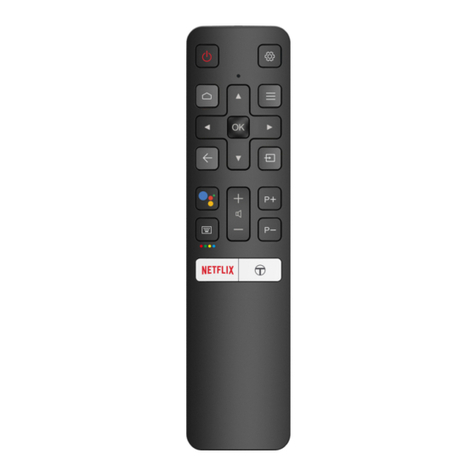
Remote control functions
:Standby/quit standby.
: To display the Settings menu.
: To access the Android TV homepage.
: To display the Option menu.
OK: To conrm an entry or selection. This button is also used
to display the channel list in TV mode.
▲/▼/◄/►: Navigation direction buttons.
: To return to the previous menu or quit an App.
: To select input source.
: To turn on the Google Assistant function. (Available only
when the network connection is normal.)
: To pop up the virtual remote control keyboard when
available.
/: To control the volume.
P /: To change channels.
NETFLIX: To access the NETFLIX application if available.
: To access T recommended Apps.
Note: Follow the on-screen guide to pair the remote control
with the TV when pressing the button for the rst time.
Installing batteries
1. Push to open the back cover as illustrated.
2. Insert two AAA batteries according to the polarities
marked on the battery case.
3. Replace the back cover as illustrated.
English

EN 2
Notice:
The sign Pb below the
symbol for batteries
indicates that this
battery contains lead.
Products
Warning
Batteries (battery pack or batteries installed) shall not be exposed to
excessive heat such as sunshine, re or the like.
Information for users on disposal of old equipment
and batteries
[European union]
These symbols indicate that the electrical and electronic equipment
and the battery with this symbol should not be disposed of as general
household waste at its end-of-life. Instead, the products should be
handed over to the applicable collection points for the recycling of
electrical and electronic equipment as well as batteries for proper
treatment, recovery and recycling in accordance with your national
legislation and the Directive 2012/19/EU, 2006/66/EC and 2008/12/EC.
By disposing of these products correctly, you will help to conserve natural resources
and will help to prevent potential negative effects on the environment and human health
which could otherwise be caused by inappropriate waste handling of these products.
For more information about collection points and recycling of these products, please
contact your local municipal ofce, your household waste disposal service or the shop
where you purchased the product.
Penalties may be applicable for incorrect disposal of this waste, in accordance with
national legislation.
[Business users]
If you wish to dispose of this product, please contact your supplier and check the terms
and conditions of the purchase contract.
[Other countries outside the european union]
These symbols are only valid in the European Union. If you wish to dispose of these
items, please do so in accordance with applicable national legislation or other rules in
your country for the treatment of old electrical equipment and batteries.
Pb Battery
English

EN 3
Hereby, TCL declares that this device is in compliance with Directive 2014/53/EU. The
full text of the EU declaration of conformity is available at the following internet address:
www.tcl.eu
• RF transmitter frequency range: 2402 - 2480MHz
• RF transmitter power: -6dBm - 0dBm
• Operating environment temperature: -25°C - 40°C
Manufacturer
TCL King Electrical Appliances (Huizhou) Co., Ltd.
78#, 4th Huifeng Road, ZhongKai New & High-tech Industries Development Zone,
Huizhou, Guangdong, China 516006
Importer
TCL Operations Polska Sp. z o.o.
ul. A. Mickiewicza 31/41
96-300 Żyrardów, Poland
What’s in the box
1. Remote control 2. Two AAA batteries 3. User’s manual
Notes:
-For the purpose of performance improvement, design and specications are subject
to change without notice.
-For more information about this remote control and features like voice search, as well
as warranty information, please access our ofcial website: www.tcl.eu
English

FR 1
Télécommande exclusive RC802V
Guide de Démarrage Rapide
Fonctions de la télécommande
:Mode veille/quitter le mode veille.
: Pour afcher le menu Réglages.
: Pour accéder à la page d’accueil Android TV.
: Pour afcher le menu Option.
OK : Pour conrmer une entrée ou une sélection. Cette touche
sert également à afcher la liste des chaînes en mode TV.
▲/▼/◄/► : Touches de navigation directionnelles.
: Pour revenir au menu précédent ou quitter une application.
: Pour sélectionner la source d’entrée.
: Pour activer la fonction Google Assistant. (Uniquement
disponible lorsque la connexion au réseau est normale.)
: Pour afcher le clavier de télécommande virtuel si
disponible.
/: Pour régler le volume.
P /: Pour changer de chaîne.
NETFLIX : Pour accéder à l'application NETFLIX si elle est
disponible.
: Pour accéder aux applications recommandées.
Remarque : Suivez le guide à l’écran pour appairer la
télécommande avec le téléviseur lorsque vous appuyez sur
la touche pour la première fois.
Installation des piles
1. Poussez pour ouvrir le couvercle arrière comme illustré.
2. Insérez deux piles AAA conformément à la polarité
indiquée sur le boîtier des piles.
3. Réinstallez le couvercle arrière comme illustré.
Français
Français

FR 2
Remarque :
Le symbole Pb
situé en dessous du
symbole de la batterie
indique que celle-ci
contient du plomb.
Produits
Avertissement
Les piles, même installées, ne doivent pas être exposées à une
chaleur excessive telle que soleil, feu etc.
Informations destinées aux utilisateurs sur la mise au
rebut des équipements et des piles usagés
[Union européenne]
Les symboles suivants indiquent que les équipements électriques et
électroniques et les batteries marqués avec ce symbole ne doivent
pas être éliminés comme des déchets ménagers à leur n de vie.
Les produits doivent être plutôt remis aux points de collecte pour le
recyclage des équipements électriques et électroniques ainsi que
des batteries pour un traitement, une revalorisation et un recyclage
correct et en conformité avec la législation nationale et la directive
2012/19/UE, 2006/66/CE et 2008/12/CE.
En éliminant ces produits de façon appropriée, vous contribuez à préserver les
ressources naturelles et à prévenir les effets négatifs potentiels sur l’environnement et
la santé humaine qui pourraient autrement être causés par le traitement inapproprié des
déchets de ces produits.
Pour obtenir des informations plus détaillées sur le recyclage de ce produit, veuillez
contacter votre bureau municipal local, votre service des ordures ménagères ou le
magasin où vous l’avez acheté.
Selon la législation nationale, des sanctions peuvent être appliquées en cas d’élimination
incorrecte de ces déchets.
[Usagers professionnels]
Si vous souhaitez éliminer ce produit, contactez votre revendeur et consultez les termes
et conditions du contrat d’achat.
[Autres pays hors de l'Union européenne]
Ces symboles ne sont valables qu’à l’intérieur de l’Union européenne. Pour éliminer
ces produits, il convient de respecter la législation nationale applicable ou d’autres
règlements de votre pays pour le traitement des équipements électriques et
électroniques et les batteries usés.
Batterie
au plomb
Français
Français

FR 3
TCL déclare par la présente que ce produit est conforme aux exigences de la directive
2014/53/UE. Le texte intégral de la déclaration de conformité UE est disponible à
l’adresse Internet suivante : www.tcl.eu
• Plage de fréquence de l'émetteur FR : 2402 - 2480MHz
• Puissance de l'émetteur RF : -6dBm - 0dBm
• Température de l’environnement d’utilisation : -25°C - 40°C
Fabricant
TCL King Electrical Appliances (Huizhou) Co., Ltd.
78#, 4th Huifeng Road, ZhongKai New & High-tech Industries Development Zone,
Huizhou, Guangdong, Chine 516006
Importateur
TCL Operations Polska Sp. z o.o.
ul. A. Mickiewicza 31/41
96-300 Żyrardów, Pologne
Contenu de l’emballage
1. Télécommande 2. Deux piles AAA 3. Guide d’utilisation
Remarques :
-An d'améliorer les performances du produit, la conception et les spécications sont
sujettes à modication sans préavis.
-Pour plus d'informations sur cette télécommande et ses fonctions telles que la
recherche vocale, ainsi que sur la garantie, rendez-vous sur notre site ofciel :
www.tcl.eu
Français
Français

DE 1
Exklusive Fernbedienung RC802V
Kurzanleitung
Funktionen der Fernbedienung
:Standby/Standby verlassen.
: Einstellungsmenü aufrufen.
: Zugriff auf die Android-TV-Homepage.
: Optionsmenü aufrufen.
OK: Bestätigen einer Eingabe oder Auswahl. Diese Taste wird
ebenfalls verwendet, um im TV-Modus die Kanalliste anzuzeigen.
▲/▼/◄/►: Navigationstasten.
: Rückkehr in das vorherige Menü oder App verlassen.
: Auswahl der Eingangsquelle.
: Für die Aktivierung der Google Assistant-Funktion (nur
bei normaler Netzwerkverbindung verfügbar).
: Anzeigen der virtuellen Fernbedienung, sofern verfügbar.
/: Regeln der Lautstärke.
P /: Umschalten der Sender.
NETFLIX: Für den Zugriff auf die NETFLIX-App, sofern
verfügbar.
: Für den Zugriff auf T-empfohlene Apps.
Hinweis: Wenn Sie die Taste das erste Mal drücken,
dann folgen Sie den Bildschirmanweisungen, um die
Fernbedienung mit dem Fernseher zu koppeln.
Batterien einsetzen
1. Öffnen Sie die Rückseite wie dargestellt.
2. Legen Sie zwei Batterien vom Typ AAA gemäß den im
Batteriefach angezeigten Polaritäten ein.
3. Setzen Sie die Rückseite zurück wie dargestellt.
Deutsch

DE 2
Produkte
Warnung
Batterien (installierte Batteriepackung oder Batterien) müssen vor
extremer Wärme wie Sonneneinstrahlung, Feuer oder ähnlichem
geschützt werden.
Informationen zur Entsorgung von alten Geräten und
Batterien
[Europäische Union]
Diese Symbole weisen darauf hin, dass elektrische und elektronische
Geräte und Batterien mit diesem Symbol am Ende ihrer Nutzungsdauer
nicht über den normalen Haushaltsmüll entsorgt werden dürfen.
Stattdessen sind die Produkte an einer entsprechenden Sammelstelle für
das Recycling elektrischer und elektronischer Geräte sowie von Batterien
abzugeben, um eine ordnungsgemäße Behandlung, Wiederverwendung
und Verwertung gemäß nationalen Gesetzen und der Richtlinien
2012/19/EU, 2006/66/EC und 2008/12/EC zu gewährleisten.
Durch die ordnungsgemäße Entsorgung dieser Produkte tragen Sie dazu bei, natürliche
Rohstoffe zu schonen und negative Auswirkungen auf die Umwelt und Gesundheit
abzuwenden, die anderenfalls durch die unsachgemäße Müllabfertigung dieser Geräte
entstehen würden.
Weitere Informationen über Sammelstellen und das Recycling erhalten Sie von Ihrer
Behörde vor Ort, Ihrem Abfallbeseitigungsunternehmen oder Ihrem Einzelhändler.
Je nach nationaler Gesetzgebung ist die unsachgemäße Entsorgung möglicherweise
strafbar.
[Firmen]
Wenn Sie dieses Gerät entsorgen möchten, wenden Sie sich bitte an Ihren Lieferanten,
und prüfen Sie die Verkaufs- und Lieferbedingungen im Kaufvertrag.
[Länder außerhalb der Europäischen Union]
Diese Symbole gelten nur innerhalb der Europäischen Union. Beachten Sie bei der
Entsorgung dieses Geräts die nationale Gesetzgebung oder andere Richtlinien in Ihrem
Land für die Beseitigung von elektrischen Altgeräten und Batterien.
Pb-Batterie
Anmerkung:
Das Zeichen Pb
unter dem Symbol für
Batterien weist darauf
hin, dass diese
Batterie Blei enthält.
Deutsch

DE 3
TCL erklärt hiermit, dass das Gerät den Anforderungen der Richtlinie 2014/53/EU
entspricht. Die vollständige EU-Konformitätserklärung ist erhältlich unter: www.tcl.eu
• Frequenzbereich HF-Transmitter: 2402 – 2480 MHz
• Leistung HF-Transmitter: -6 dBm – 0 dBm
• Betriebsumgebungstemperatur: -25 °C – 40 °C
Hersteller
TCL King Electrical Appliances (Huizhou) Co., Ltd.
78#, 4th Huifeng Road, ZhongKai New & High-tech Industries Development Zone,
Huizhou, Guangdong, China 516006
Importeur
TCL Operations Polska Sp. z o.o.
ul. A. Mickiewicza 31/41
96-300Żyrardów,Polen
Was sich in der Verpackung bendet
1. Fernbedienung 2. 2 x Batterien vom Typ AAA 3. Bedienungsanleitung
Hinweise:
-Zu Zwecken der Produktoptimierung können Design und Produktdaten jederzeit ohne
Vorankündigung geändert werden.
-Besuchen Sie für weitere Informationen zu dieser Fernbedienung, zu Funktionen wie
beispielsweise die Stimmensuche und zu den Gewährleistungsbedingungen unsere
Webseite unter: www.tcl.eu
Deutsch

RU 1
Эксклюзивный пульт ДУ RC802V
Руководство по быстрому запуску
Функции пульта ДУ
: Режим ожидания/выход из режима ожидания.
: Отображение меню настройки.
: Переход на домашнюю страницу Android TV.
: Отображение меню параметров.
OK: Подтверждение ввода или выделения. Эта кнопка
также используется для отображения списка каналов в
режиме телевизора.
▲/▼/◄/►: Кнопки направлений навигации.
: Возврат в предыдущее меню или выход из приложения.
: Выбор источника входного сигнала.
: Включение Google Ассистент. (Доступно только при
стабильном сетевом подключении).
: Открытие виртуальной клавиатуры пульта ДУ при ее
наличии.
/ : Регулировка громкости.
P / : Переключение каналов.
NETFLIX: Для доступа к приложению NETFLIX (если
доступно).
: Доступ к рекомендуемым приложениям.
Примечание: При нажатии кнопки в первый раз
следуйте инструкциям на экране для сопряжения
пульта ДУ с телевизором.
Установка батареек
1. Снимите заднюю крышку, как показано на рисунке.
2. Вставьте две батарейки ААА, соблюдая полярность,
указанную в батарейном отсеке.
3. Установите на место заднюю крышку, как показано
на рисунке.
Русский
Русский
Other manuals for RC802V
2
Table of contents
Languages:
Other TCL Remote Control manuals