manuals.online logo
Brands
  1. Home
  2. •
  3. Brands
  4. •
  5. Teltonika
  6. •
  7. GPS
  8. •
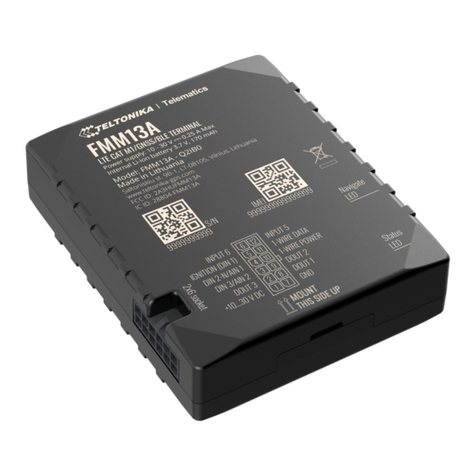
  9. Teltonika TMT250 User manual

Teltonika TMT250 User manual

Other manuals for TMT250

9

Other Teltonika GPS manuals

Teltonika FMP100 User manual

Teltonika

Teltonika FMP100 User manual

Teltonika FMC130 Installation guide

Teltonika

Teltonika FMC130 Installation guide

Teltonika FMB920 Installation guide

Teltonika

Teltonika FMB920 Installation guide

Teltonika FMB125 User manual

Teltonika

Teltonika FMB125 User manual

Teltonika FM1100 User manual

Teltonika

Teltonika FM1100 User manual
Teltonika Telematics FMM650 Installation guide

Teltonika

Teltonika Telematics FMM650 Installation guide

Teltonika FMB110 User manual

Teltonika

Teltonika FMB110 User manual

Teltonika GH5200 User manual

Teltonika

Teltonika GH5200 User manual

Teltonika FMC225 User manual

Teltonika

Teltonika FMC225 User manual

Teltonika FMB920 User manual

Teltonika

Teltonika FMB920 User manual

Teltonika FMB64 User manual

Teltonika

Teltonika FMB64 User manual

Teltonika FMB130 Installation guide

Teltonika

Teltonika FMB130 Installation guide

Teltonika FMC800 Installation guide

Teltonika

Teltonika FMC800 Installation guide

Teltonika FMC920 Installation guide

Teltonika

Teltonika FMC920 Installation guide

Teltonika GH1201 User manual

Teltonika

Teltonika GH1201 User manual

Teltonika FMB230 User manual

Teltonika

Teltonika FMB230 User manual

Teltonika Telematics FMC880 User manual

Teltonika

Teltonika Telematics FMC880 User manual

Teltonika FMB930 Installation guide

Teltonika

Teltonika FMB930 Installation guide

Teltonika Telematics FTC881 User manual

Teltonika

Teltonika Telematics FTC881 User manual

Teltonika FMB965 Installation guide

Teltonika

Teltonika FMB965 Installation guide

Teltonika FMB125 User manual

Teltonika

Teltonika FMB125 User manual

Teltonika FMT1 User manual

Teltonika

Teltonika FMT1 User manual

Teltonika FMP100 User manual

Teltonika

Teltonika FMP100 User manual

Teltonika FMB900 Installation and user guide

Teltonika

Teltonika FMB900 Installation and user guide

Popular GPS manuals by other brands

Polar Electro RCX3 Getting started guide

Polar Electro

Polar Electro RCX3 Getting started guide

Tobii Pro Spectrum user manual

Tobii Pro

Tobii Pro Spectrum user manual

Gosafe G91I user manual

Gosafe

Gosafe G91I user manual

Fisher TW-8800 operating manual

Fisher

Fisher TW-8800 operating manual

LG LN740 Series Specifications

LG

LG LN740 Series Specifications

Prestigio GeoVision 430 user manual

Prestigio

Prestigio GeoVision 430 user manual

JVC KW-NT3HDT instructions

JVC

JVC KW-NT3HDT instructions

Yoctopuce Yocto-GPS user guide

Yoctopuce

Yoctopuce Yocto-GPS user guide

RightWay GPS Navigator RW 200 user manual

RightWay

RightWay GPS Navigator RW 200 user manual

TomTom VIA user guide

TomTom

TomTom VIA user guide

Garmin ECHOMAP PLUS owner's manual

Garmin

Garmin ECHOMAP PLUS owner's manual

Telit Wireless Solutions GM862GPS Series Hardware user's guide

Telit Wireless Solutions

Telit Wireless Solutions GM862GPS Series Hardware user's guide

Hama 53118 Operating	 instruction

Hama

Hama 53118 Operating instruction

Garmin DEZL 580 owner's manual

Garmin

Garmin DEZL 580 owner's manual

Jigabot EX quick start guide

Jigabot

Jigabot EX quick start guide

Pointer Cellocator CelloTrack XT LTE overview

Pointer

Pointer Cellocator CelloTrack XT LTE overview

Queclink GV55LITE user manual

Queclink

Queclink GV55LITE user manual

Starcom Systems Kylos Compact user guide

Starcom Systems

Starcom Systems Kylos Compact user guide

manuals.online logo
manuals.online logoBrands
  • About & Mission
  • Contact us
  • Privacy Policy
  • Terms and Conditions

Copyright 2025 Manuals.Online. All Rights Reserved.

HOW TO ASSEMBLE
THE WRISTBAND OF
TMT250
HOW TO ASSEMBLE THE WRISTBAND OF TMT250 V1.00
Allen key, size 2
(Not included in the
package)
TMT250 device
TMT250 tamper
detection device
STEP 1
Unscrew the bolts of
the lid with allen key:
STEP 3 Before inserting TMT250 into the tamper
detection device, ensure that the wristband
is securely placed in the back of the device.
STEP 2 Remove the lid of the device
by lowering rubber tie and
pulling the wristband.
PULL
PULL
STEP 4
Make sure that the wristband securely stays
in place. Then, insert TMT250 device all the
way in, so that contacts of TMT250 would
face outside of tamper detection device.
PULL
STEP 5
After inserting the device check if
the wristband has not slipped out
by pulling the wristband. Keep the
cover unclosed while pulling the
wristband softly. If it slips out,
repeat Step 3 and 4.
PREPARATION:
HOW TO ASSEMBLE THE WRISTBAND OF TMT250 V1.00
STEP 6
Make sure the wristband is
securely in place on the lid.
If not, place the wristband
into the lid and then push
contacts firmly in place.
STEP 8
Tighten the wristband so that the holes
in the wristband match with
protrusions in tamper detection device.
Bend the wristband, make a loop to
insert the lid and close it.
STEP 9 Screw in the bolts of the lid
with allen key:
Do not overtighten bolts on the
lid. It may cause breakage of
the lid. It is sucient to tighten
bolts until there is no play on
the lid near bolts.
CAUTION!
STEP 10 PUT ON THE
RUBBER TIE:
ASSEMBLED
PRODUCT:
STEP 7
Pull the wristband to reach
the comfortable size for
wearing. Then, put tamper
detection device on a
preferable limb.