10
ENG
Channel
Network
Smart TV
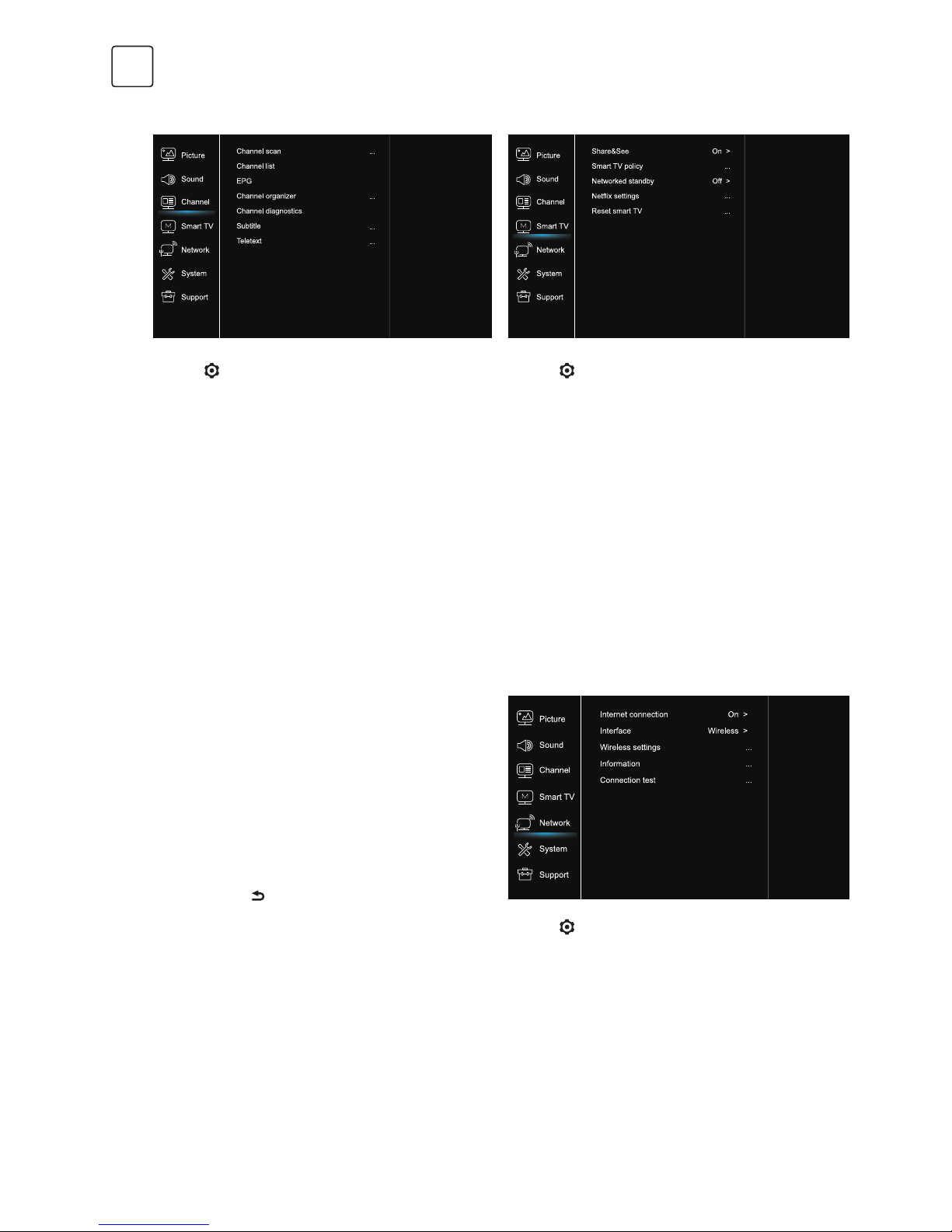
1. Press to display the main menu.
2. Press /to select Channel, then press OK or uto
enter the submenu.
Note: This function is only available in TV mode.
Channel scan
Allows you to scan for all available analog and digital
channels.
Channel List
Shows all the searched channel in a list.
EPG
Press OK/uto enter the Program Guide menu.
Channel organiser
This option allows you to organise channels.
Channel diagnostics (on digital TV channels)
Press OK/uto display some signal information on
current digital channel, such as signal strength,
Frequency, etc.
Subtitle
press OK/uto enter, press /to turn On or Off the
subtitles. When Subtitle is set to On, you can enable
subtitle languages on digital TV channels.
-Digital subtitle language:
Press /to select Digital subtitle language. Press
OK/uto enter, press /to select a subtitle language
as your preferred language.
-Digital subtitle language 2nd:
Press /to select Digital subtitle language 2nd.Press
OK/uto enter,press /to select a secondary subtitle
language.Press to return to previous menu.
-Subtitle type:
Press OK/uto to enter,press /to select a subtitle
type. You can select Hearing impaired to display the
hearing impaired subtitle with your selected language.
Teletext
Press OK/uto display its submenu.
Decoding page language:select a proper type of
language in which Teletext will display.
Digital teletext language:for digital TV channels, your TV
could zap to a service with multiple initial Teletext pages
in different languages. This function allows you to select
an available language as primary language which relates
to different initial Teletext page.
1. Press to display the main menu.
2. Press /to select Network, then press OK or uto
enter the submenu.
Internet connection
Press OK or uto select On, then you can adjust the
options below.
Interface
Press OK or uto select Ethernet or Wireless.
Ethernet
Connects your ethernet cable to the router and to the
Ethernet port on the back of the TV.
1. Press to display the main menu.
2. Press /to select SmartTV, then press OK or uto
enter the submenu.
Share&See
With Share&See, you can enjoy recorded video, picture,
music saved on your PC.
Smart TV policy
Press OK or uto read the Smart TV policy.
Networked standby
Press OK or uto select off or on.
Netflix settings
In Netflix Setting menu, Netflix Deactivation can
deactivate your device form Netflix.
Reset smart TV
Reset the settings of smart TV.