EnglishDeutsch
 logo
Brands
  1. Home
  2. •
  3. Brands
  4. •
  5. Texas Instruments
  6. •
  7. Motherboard
  8. •
  9. Texas Instruments TPS53515EVM-PWR587 User manual

Texas Instruments TPS53515EVM-PWR587 User manual

Other Texas Instruments Motherboard manuals
Texas Instruments BUF22821EVM-USB User manual

Texas Instruments

Texas Instruments BUF22821EVM-USB User manual

Texas Instruments bqTESLA bq500414Q User manual
Texas Instruments

Texas Instruments bqTESLA bq500414Q User manual

Texas Instruments bq4050EVM-561 User manual
Texas Instruments

Texas Instruments bq4050EVM-561 User manual

Texas Instruments TPA6136A2 EVM User manual
Texas Instruments

Texas Instruments TPA6136A2 EVM User manual

Texas Instruments TPS22924EVM-532 User manual
Texas Instruments

Texas Instruments TPS22924EVM-532 User manual

Texas Instruments DAC53204EVM User manual
Texas Instruments

Texas Instruments DAC53204EVM User manual

Texas Instruments DLP LightCrafter Display 4710 User manual
Texas Instruments

Texas Instruments DLP LightCrafter Display 4710 User manual

Texas Instruments TAS6424-Q1 User manual
Texas Instruments

Texas Instruments TAS6424-Q1 User manual

Texas Instruments bq34110EVM-796 User manual
Texas Instruments

Texas Instruments bq34110EVM-796 User manual

Texas Instruments TPS65053EVM-389 User manual
Texas Instruments

Texas Instruments TPS65053EVM-389 User manual

Texas Instruments TUSB8044RGC User manual
Texas Instruments

Texas Instruments TUSB8044RGC User manual

Texas Instruments LMX2820EVM User manual
Texas Instruments

Texas Instruments LMX2820EVM User manual

Texas Instruments INA293EVM User manual
Texas Instruments

Texas Instruments INA293EVM User manual

Texas Instruments THS4131 User manual

Texas Instruments

Texas Instruments THS4131 User manual

Texas Instruments bq27425EVM User manual
Texas Instruments

Texas Instruments bq27425EVM User manual

Texas Instruments DRV8328A User manual

Texas Instruments

Texas Instruments DRV8328A User manual

Texas Instruments LMX2572LPEVM User manual
Texas Instruments

Texas Instruments LMX2572LPEVM User manual

Texas Instruments TPS65011EVM-049 User manual
Texas Instruments

Texas Instruments TPS65011EVM-049 User manual

Texas Instruments tps61040EVM-002 User manual
Texas Instruments

Texas Instruments tps61040EVM-002 User manual

Texas Instruments LMQ61460EVM-400K User manual
Texas Instruments

Texas Instruments LMQ61460EVM-400K User manual
Texas Instruments SD034EVK User manual

Texas Instruments

Texas Instruments SD034EVK User manual

Texas Instruments TPS51385EVM User manual

Texas Instruments

Texas Instruments TPS51385EVM User manual

Texas Instruments AMC1100EVM User manual

Texas Instruments

Texas Instruments AMC1100EVM User manual
Texas Instruments ADS54J40EVM User manual

Texas Instruments

Texas Instruments ADS54J40EVM User manual

Popular Motherboard manuals by other brands

DFI SD170 user manual

DFI

DFI SD170 user manual

ASROCK ROMED8-2T user manual

ASROCK

ASROCK ROMED8-2T user manual

Asus P2L97A user manual

Asus

Asus P2L97A user manual

Winmate IC70 user manual

Winmate

Winmate IC70 user manual

Asus MES-B user manual

Asus

Asus MES-B user manual

Grantech SYS8F377VGGA-3OMN user manual

Grantech

Grantech SYS8F377VGGA-3OMN user manual

Telit Wireless Solutions SL869-3DR user guide

Telit Wireless Solutions

Telit Wireless Solutions SL869-3DR user guide

Commell MS-C73 user manual

Commell

Commell MS-C73 user manual

Gigabyte GA-9IVDT user manual

Gigabyte

Gigabyte GA-9IVDT user manual

IBT Technologies MB860 user manual

IBT Technologies

IBT Technologies MB860 user manual

Nvidia TEGRA DG-04927-001_V01 user guide

Nvidia

Nvidia TEGRA DG-04927-001_V01 user guide

Intel D33217CK specification

Intel

Intel D33217CK specification

Asus F1A55-M LX PLUS R2.0 user manual

Asus

Asus F1A55-M LX PLUS R2.0 user manual

EPC EPC9147C quick start guide

EPC

EPC EPC9147C quick start guide

Asus EX-B760M-V5 D4 quick start guide

Asus

Asus EX-B760M-V5 D4 quick start guide

EPOX MU-8KHA0010 user manual

EPOX

EPOX MU-8KHA0010 user manual

Ski-Doo Bombardier MPEM 219 700 090 user guide

Ski-Doo

Ski-Doo Bombardier MPEM 219 700 090 user guide

Epson S5U13700P00C000 user manual

Epson

Epson S5U13700P00C000 user manual

https://manuals.online logo
https://manuals.online logoBrands
  • About & Mission
  • Contact us
  • Privacy Policy
  • Terms and Conditions

Copyright 2026 Manuals.Online. All Rights Reserved.

High Performance 12-A, Single-Synchronous,
Step-Down Converter Using the TPS53515EVM-
PWR587
User's Guide
Literature Number: SLUUAS1
October 2013
User's Guide
SLUUAS1–October 2013
High Performance 12-A, Single-Synchronous, Step-Down
Converter Using the TPS53515EVM-PWR587
1 Introduction
The TPS53515EVM-PWR587 evaluation module (EVM) uses the TPS53515 device. The TPS53515
device is a D-CAP3™ mode, 12-A synchronous buck-converter with integrated MOSFETs. The device
provides a fixed 1.2-V output at up to 12 A from a 12-V input bus.
2 Description
The TPS53515EVM-PWR587 is designed for a regulated 12-V bus to produce a regulated 1.2-V output at
up to 12 A of load current. The TPS53515EVM-PWR587 is designed to demonstrate the TPS53515
device in a typical low-voltage application while providing a number of test points to evaluate the
performance of the TPS53515 device.
2.1 Typical Applications
• Servers and storage
• Workstations and desktops
• Telecommunication infrastructure
2.2 Features
The TPS53515EVM-PWR587 features include the following:
• 12-A DC steady-state output current
• Support for a prebias-output voltage at startup
• Jumper, J2, for enable function
• Jumper, J5, for auto-skip and forced-continuous-conduction-mode (FCCM) selection
• Jumper, J7, for extra 5-V input for further power saving purpose
• Convenient test points for probing critical waveforms
2High Performance 12-A, Single-Synchronous, Step-Down Converter Using SLUUAS1–October 2013
the TPS53515EVM-PWR587 Submit Documentation Feedback
Copyright © 2013, Texas Instruments Incorporated
www.ti.com
Electrical Performance Specifications
3 Electrical Performance Specifications
Table 1. TPS53515EVM-PWR587 Electrical Performance Specifications(1)
PARAMETER TEST CONDITIONS MIN TYP MAX UNITS
Input Characteristics
Voltage range VIN 5 12 18 V
Maximum input current VIN = 5 V, Io = 8 A 2.5 A
No load input current VIN = 12 V, Io = 0 A with auto-skip mode 1 mA
Output Characteristics
Output voltage VOUT 1.2 V
Line regulation (VIN = 5 V – 14 V) with FCCM 0.2
Output voltage regulation %
Load regulation (VIN = 12 V, Io = 0 A – 8 A) with FCCM 0.5
Output voltage ripple VIN = 12 V, Io = 8 A with FCCM 10 mVpp
Output load current 0 12 A
Output over current 15 A
Soft-start 1 ms
Systems Characteristics
Switching frequency VIN = 12 V, 1.2 V / 4 A 1000 kHz
Peak efficiency VIN = 12 V, 1.2 V / 8 A 88.5 %
Full load efficiency 86.9 %
Operating temperature 25 °C
(1) Jumpers set to default locations, See Section 6.
3
SLUUAS1–October 2013 High Performance 12-A, Single-Synchronous, Step-Down Converter Using
the TPS53515EVM-PWR587
Submit Documentation Feedback Copyright © 2013, Texas Instruments Incorporated
CLK
DATA
VREG
ALERT#
OPEN= ENABLE
VIN
PGND
VOUT
PGND
SW
PGOOD
ADDR/RF
TRIP
AGND
EN
VDD
MODE
CHB CHA
PM
Bus C
onnector
Input: 8-
14V
Output: 1.2V/0-6A
Ext. VDD
LabView
C
onnector
300k
R4
1.00k
R3
0
R5
1
1
2
2
PEC02SAAN
J2
1
2
3
4
5
6
7
8
9
10
PEC05DAAN
J4
DNP
0
R14
100k
R1
3.01
R9
22uF
C1
22uF
C4
22uF
C3
0.1uF
C7
100k
R2
57.6k
R10
22uF
C2
0.1uF
C5
TP1
TP4
0
R8
TP7
TP9
TP3
TP6
TP2
0
R15
C15
DNP
C16
DNP
R7
DNP
C17
DNP
C9
DNP
0
R19
1uF
C18
1uF
C20
10.0k
R20
10.0k
R21
10
R22
1
2
3
4
5
6
7
8
9
10
PEC05DAAN
J5
20.0kR11
150kR12
150kR13
TP5 TP8
TP10
TP11
TP12
22uF
C6
22uF
C10
22uF
C11
22uF
C12
22uF
C13
22uF
C14
22uF
C19
22uF
C21
22uF
C22
22uF
C23
1
1
2
2
ED120/2
DS
J1
1
1
2
2
ED120/2
DS
J3
TP13
200k
R6
1
122
1
.0 uH
L1
11
22
DNP
L1A
DNP
TP14
TP15
470pF
C8
ADDR/RF
1
PGOOD
2
EN
3
VBST
4
NC
5
SW
6
SW
7
SW
8
SW
9
PGND 10
PGND 11
PGND 12
PGND 13
PGND 14
VIN 15
VIN 16
VIN 17
NC 18
VDD 19
VREG 20
MODE 21
AGND 22
FB 23
VO
24
TRIP
25
26
27
28
PW
PD
29
TPS53515RVE
U1
1uF
C25
1uF
C26
1
2
3
4
5
6
7
8
9
10
PEC05DAAN
J6
1
R16
1
1
2
2
ED555/2
DS
J7
C24
DNP
C27
DNP
VDD_19
VREG
VREG
VREG
VREG
VIN
VIN
VOUT
VOUT
VOUT
VOUT
VDD
VDD
VDD
SW
FB
FB
MODE
PGOOD
PGOOD
AGND
AGND
AGND
AGND
VIN
VOUT
PGND
AGND
PGND
PGND
FB
VR
EG
PGND
VR
EG PGND
VOUT
PGND
MODE
AGND
AGND
AGND
VR
EG
PGOOD
FB
VOUT
VR
EG
VDD
VDD
PGOOD
VOUT
VIN
VDD
PGND
SW
SW
PGND
SW
1
1
TPS53513
NOTES:
PIN 26
PIN 27
PIN 28
TPS53515TPS53915
ALERT#
SDA
SCL
NC
GND1
GND2
NC
GND1
GND2
IC
VARIANT PINOUT FOR U1
TABLE 1
Schematic
www.ti.com
4 Schematic
Figure 1. TPS53515EVM-PWR587 Schematic
4High Performance 12-A, Single-Synchronous, Step-Down Converter Using the SLUUAS1–October 2013
TPS53515EVM-PWR587 Submit Documentation Feedback
Copyright © 2013, Texas Instruments Incorporated
TP7
TP5
Metal Ground Barrel
Probe Tip
www.ti.com
Test Setup
5 Test Setup
5.1 Test Equipment
Oscilloscope— A digital or analog oscilloscope measures the output ripple. The oscilloscope must be set
for the following: 1-MΩimpedance, 20-MHz bandwidth, AC coupling, 1-µs / division horizontal
resolution, 20-mV / division vertical resolution. Test points TP7 and TP9 measure the output ripple
voltage by placing the oscilloscope probe tip through TP7 and holding the ground barrel on TP9 as
shown in Figure 2. Using a leaded ground connection can induce additional noise due to the large
ground loop.
Voltage Source—The input voltage source VIN must be a 0 to 14-V variable-DC source capable of
supplying 10 ADC. Connect VIN to J1 as shown in Figure 3.
Multimeters— V1: VIN at TP1 (VIN) and TP4 (GND).
V2: VOUT at TP7 (VOUT) and TP9 (GND).
Output Load—The output load must an electronic constant-resistance-mode load capable of 0 to 15 ADC
at 1.2 V.
Figure 2. Tip and Barrel Measurement for VOUT Ripple
Recommended Wire Gauge:
1. VIN to J1 (12-V input)
• The recommended wire size is 1× AWG number 14 per input connection, with the total length of
wire less than 4 feet (2 feet input, 2 feet return).
2. J3 to LOAD
• The minimum recommended wire size is 2× AWG number 14, with the total length of wire less than
4 feet (2 feet output, 2 feet return).
5
SLUUAS1–October 2013 High Performance 12-A, Single-Synchronous, Step-Down Converter Using
the TPS53515EVM-PWR587
Submit Documentation Feedback Copyright © 2013, Texas Instruments Incorporated
Test Setup
www.ti.com
5.2 Recommended Test Setup
Figure 3. TPS53515EVM-587 Top Layer for Test Setup
Input Connections:
1. Prior to connecting the DC input-source, VIN, TI recommends to limit the source current from VIN to 10
A maximum. Ensure that VIN is initially set to 0 V and connected as shown in Figure 3.
2. Connect the voltmeter V1 at TP1 (VIN) and TP4 (GND) to measure the input voltage.
Output Connections:
1. Connect the load to J3 and set the load to constant-resistance-mode to sink 0 ADC before VIN is
applied.
2. Connect the voltmeter V2 at TP7 (VOUT) and TP9 (GND) to measure the output voltage.
6High Performance 12-A, Single-Synchronous, Step-Down Converter Using SLUUAS1–October 2013
the TPS53515EVM-PWR587 Submit Documentation Feedback
Copyright © 2013, Texas Instruments Incorporated
www.ti.com
Configurations
6 Configurations
All Jumper selections must be made prior to applying power to the EVM. Configure this EVM using the
following configuration selections.
6.1 Switching Frequency Selection
Switching frequency can be changed as shown in Table 2.
Table 2. Switching Frequency Selection
EXAMPLE RF FREQUENCY
SWITCHING RESISTOR DIVIDER RATIO COMBINATIONS
FREQUENCY(1) (RDR)
(ƒSW) (kHz) RRF_H (kΩ) RRF_L (kΩ)
1000 > 0.557 1 300
850 0.461 180 154
750 0.375 200 120
600 0.297 249 105
500 0.229 240 71.5
400 0.16 249 47.5
300 0.096 255 27
200 < 0.041 270 11.5
(1) Default Setting: 1 MHz.
For different switching frequency setting, please change R3 and R4 as shown in Table 2.
6.2 Mode Selection
The MODE can be set by J5.
Table 3. Mode Selection
JUMPER SET TO: MODE SELECTION
1 to 2 pin shorted FCCM with 2x RC time constant
3 to 4 pin shorted(1) FCCM(2) with 1x RC time constant(1)
5 to 6 pin shorted FCCM(2) with 2x RC time constant
7 to 8 pin shorted Auto-skip mode with 2× RC time constant
9 to 10 pin shorted Auto-skip mode with 1× RC time constant
(1) Default setting.
(2) The device enters FCCM after PGOOD goes high.
7
SLUUAS1–October 2013 High Performance 12-A, Single-Synchronous, Step-Down Converter Using
the TPS53515EVM-PWR587
Submit Documentation Feedback Copyright © 2013, Texas Instruments Incorporated
Test Procedure
www.ti.com
6.3 VDD Pin Supply Selection
The controller can be enabled and disabled by J7.
Table 4. Enable Selection
SET ON CONNECTION ENABLE SELECTION
R19 = 0 Ω(1) VDD pin connected to VIN pins(1)
R19 = Open VDD pin disconnected to VIN pins
(1) Default setting: the VDD pin connected to the VIN pins through R19.
For power-up, input J7 with proper voltage. The VDD pin input voltage range is from 4.5 V to 25 V.
7 Test Procedure
7.1 Line and Load Regulation and Efficiency Measurement Procedure
1. Set up the EVM as described in Section 5 and Figure 3.
2. Ensure the load is set to constant-resistance mode and to sink at 0 ADC.
3. Ensure all jumper setting are configured as shown in Section 6.
4. Ensure the jumper provided in the EVM shorts on J2 before VIN is applied.
5. Increase VIN from 0 to 12 V. Use V1 to measure input voltage.
6. Remove the jumper on J2 to enable the controller.
7. Use V2 to measure the VOUT voltage.
8. Vary the load from 0 to 10 ADC, VOUT must remain in load regulation.
9. Vary VIN from 8 to 14 V, VOUT must remain in line regulation.
10. To disable the converter, place the jumper on J2.
11. Decrease the load to 0 A
12. Decrease VIN to 0 V.
7.2 Control-Loop Gain and Phase-Measurement Procedure
The TPS53515EVM-PWR587 contains a 10-Ωseries resistor in the feedback loop for loop response
analysis.
1. Set up the EVM as described in Section 5 and Figure 3.
2. Connect the isolation transformer to the test points marked TP5 and TP8.
3. Connect the input-signal amplitude-measurement probe (channel A) to TP10. Connect the output-
signal amplitude-measurement probe (channel B) to TP11.
4. Connect the ground lead of channel A and channel B to TP15.
5. Inject around 20 mV or less signal through the isolation transformer.
6. To measure control-loop gain and phase margin, change the frequency from 100 Hz to 1 MHz using a
10-Hz or less post filter.
7. Disconnect the isolation transformer from the bode-plot test points before making other measurements.
• Signal injection into feedback can interfere with the accuracy of other measurements.
8High Performance 12-A, Single-Synchronous, Step-Down Converter Using SLUUAS1–October 2013
the TPS53515EVM-PWR587 Submit Documentation Feedback
Copyright © 2013, Texas Instruments Incorporated
www.ti.com
Test Procedure
7.3 List of Test Points
Table 5. Test Point Functions
TEST POINTS NAME DESCRIPTION
TP1 VIN Converter input supply voltage
TP2 VREG LDO voltage
TP3 PGOOD Power good output
TP4 PGND Power ground
TP5 CHB Input B for loop injection
TP6 SW Switch Node
TP7 VOUT VOUT terminal +
TP8 CHA Input A for loop injection
TP9 PGND Power ground
TP10 RF RF pin
TP11 TRIP TRIP pin
TP12 EN Enable pin
TP13 VDD VDD pin
TP14 MODE MODE pin
TP15 AGND Analog ground
7.4 Equipment Shutdown
Follow these steps when shutting down the equipment.
1. Shut down load
2. Shut down VIN
9
SLUUAS1–October 2013 High Performance 12-A, Single-Synchronous, Step-Down Converter Using
the TPS53515EVM-PWR587
Submit Documentation Feedback Copyright © 2013, Texas Instruments Incorporated
EVM Assembly Drawing and PCB Layout
www.ti.com
8 EVM Assembly Drawing and PCB Layout
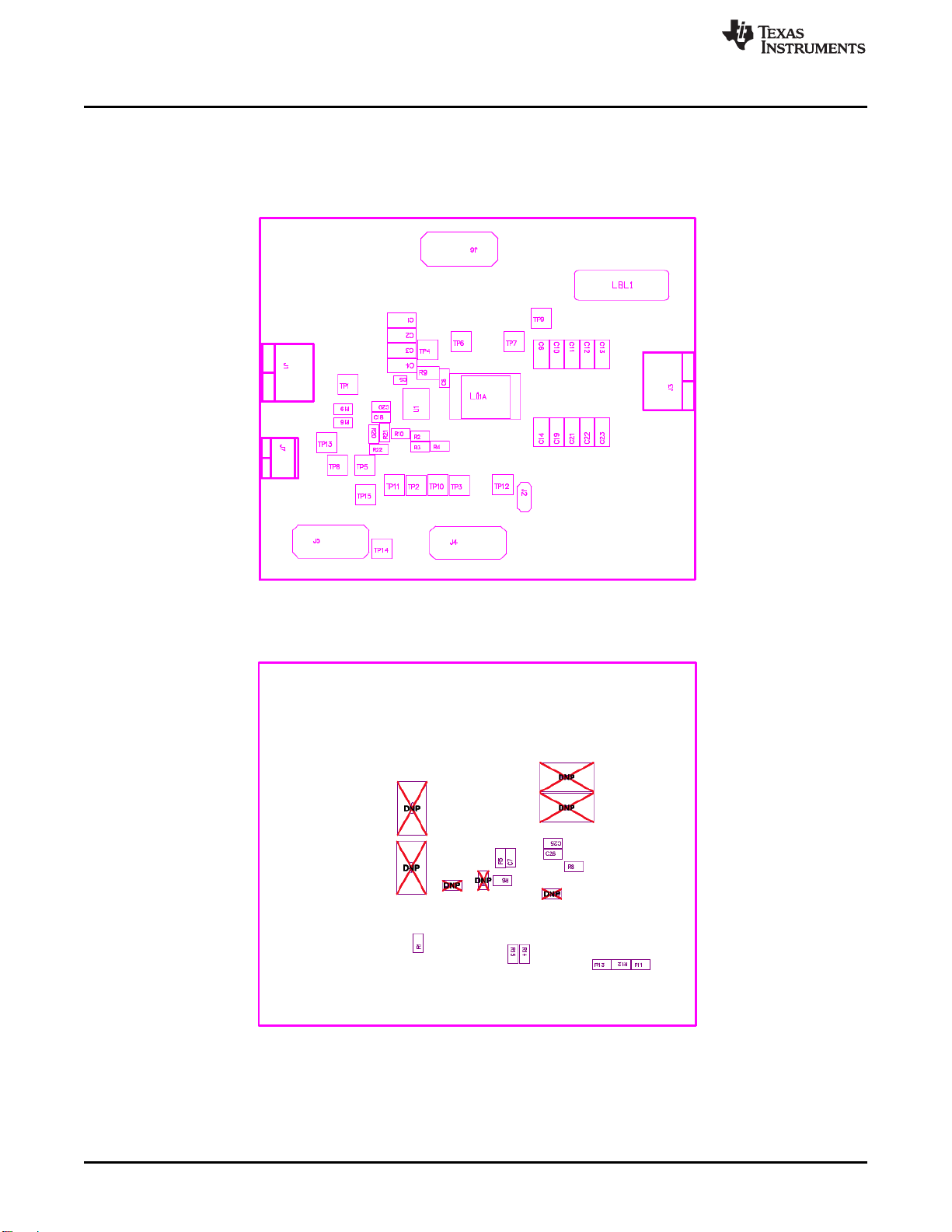
The following figures show the design of the TPS53515EVM-PWR587 printed circuit board (see Figure 4,
Figure 5,Figure 6,Figure 7,Figure 8,Figure 9,Figure 10, and Figure 11). The EVM has been designed
using a six-layer, 2-oz copper-circuit board.
Figure 4. TPS53515EVM-587 Top-Layer Assembly Drawing
Figure 5. TPS53515EVM-587 Bottom-Layer Assembly Drawing
10 High Performance 12-A, Single-Synchronous, Step-Down Converter Using SLUUAS1–October 2013
the TPS53515EVM-PWR587 Submit Documentation Feedback
Copyright © 2013, Texas Instruments Incorporated