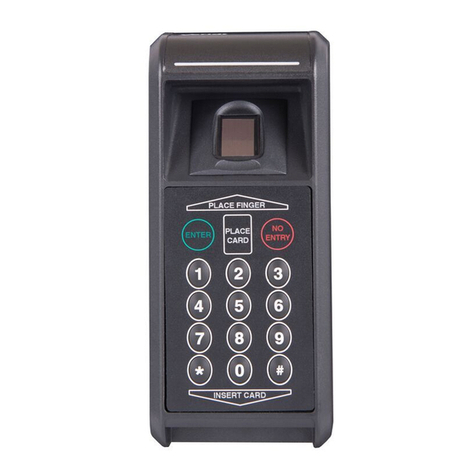
Veridt 900W2037 Specification sheet

VERIDT INC · Middleton, WI 53562
1
www.veridt.com
•TECHNICAL NOTE•
Verify Identify
Reader Part Number 900W2037
Mode: Card Only
Contactless + Contact (Inserted)
Visual Indicators:
Stand-by phase: In stand-by phase, the LED bar on the top side of the reader will blink a red LED every two
seconds. This is a repeated pattern.
Presenting a card: When a card is presented in front of the reader, the reader will make no indication that the
card is actively being read.
Dependent on the card type, it can take up to about four seconds before a card will be verified.
Valid Card: When a card is verified and given access granted, a green LED will be illuminated and there will be
audio buzzer feedback. The buzzer will beep exactly two times. Simultaneously, the reader will blink the green
LED a total of exactly five times.
The reader will then return to stand-by phase.
Invalid Card: When a card is presented in front of the reader, the reader will make no indication that the card
is actively being read.
An invalid card denied for any reason is almost instantaneous.
When a card is deemed invalid, a solid red LED bar will be shown and there will be audio buzzer feedback. The
buzzer will beep exactly three times. Simultaneously, the reader will hold the solid red LED bar for a total of
exactly five seconds.
The reader will then return to stand-by phase.
Reader Part Number 900W2036
Mode: Card Only
Contactless + Contact (Inserted)
Visual Indicators:
Stand-by phase: In stand-by phase, the LED bar on the top side of the reader will blink a red LED every two
seconds. This is a repeated pattern.
Presenting a card: When a card is presented in front of the reader, the reader will turn off the illumination of
the “Place Card” and “Insert Card” LED on the keypad to indicate that a card is being actively read.
Dependent on the card type, it can take up to about four seconds before a card will be verified.
Valid Card: When a card is verified and given access granted, a green LED will be illuminated and there will be
audio buzzer feedback. The buzzer will beep exactly two times. Simultaneously, the reader will blink the green
LED a total of exactly five times.
The reader will then return to stand-by phase
.Invalid Card: When a card is presented in front of the reader, the reader will turn off the illumination of the
“Place Card” and “Insert Card” LED on the keypad to indicate that a card is being actively read.
An invalid card denied for any reason is almost instantaneous.
When a card is deemed invalid, a solid red LED bar will be shown and there will be audio buzzer feedback. The
buzzer will beep exactly three times. Simultaneously, the reader will hold the solid red LED bar for a total of
exactly five seconds.
The reader will then return to stand-by phase.
#126
Veridt Reader Operation & LED Sequencing when configured with
Lenel On-Guard embedded authentication with LNL 4420 (OSDP)
LED Sequencing
Reader Operation using Lenel OSDP Protocols

VERIDT INC · Middleton, WI 53562
2
www.veridt.com
•TECHNICAL NOTE•
Verify Identify
#126
Reader Part Number 900W2036
Mode: Card + PIN Entry
Contact (Inserted)
Visual Indicators:
Stand-by phase: In stand-by phase, the LED bar on the top side of the reader will blink a red LED every two
seconds. This is a repeated pattern.
In stand-by phase, on the keypad, the “Insert Card” LED will be illuminated and blink once every five seconds. This
is a repeated pattern.
Presenting a card: When a card is INSERTED, the reader will turn off the illumination (temporarily) of the
“Insert Card” LED on the keypad to indicate that a card is being actively read.
When the card is determined to be valid, that digits on the keypad will illuminate. This is the visual indication
that the reader is waiting for pin entry (Second Authentication).
Enter valid pin and hit the “#” to communicate with reader that pin entry is complete
.
Dependent on the card type, it can take up to about four seconds before a card will be verified.
Valid Card: When a card is verified and given access granted, a green LED will be illuminated and there will be
audio buzzer feedback. The buzzer will beep exactly two times. Simultaneously, the reader will blink the green
LED a total of exactly five times..
The reader will then return to stand-by phase
.Invalid Card: When a card is INSERTED, the reader will turn off the illumination (temporarily) of the “Insert
Card” LED on the keypad to indicate that a card is being read.
An invalid card denied for any reason is almost instantaneous.
When a card is deemed invalid, a solid red LED bar will be shown and there will be audio buzzer feedback. The
buzzer will beep exactly three times. Simultaneously, the reader will hold the solid red LED bar for a total of
exactly five seconds.
NOTE: When in Card + Pin mode, if a pin is not entered within ten seconds of entry, the reader will timeout and
give invalid card visual responses.
NOTE: If an invalid card is inserted, it will deny the card before requiring pin.
The reader will then return to stand-by phase.
©Copyright 2022 Veridt, Inc. All rights reserved. Specifications subject to change without notice. Veridt, Stealth, and MultiMode are
trademarks of Veridt. All other brands or product names are the trademarks or registered trademarks of their respective holders.
LED Sequencing
Reader Operation using Lenel OSDP Protocols
Table of contents
Other Veridt Card Reader manuals