Z
2
0
13
8
2
-
0
Y
Page 4 of 5 ©2015 Veris Industries USA 800.354.8556 or +1.503.598.4564 / suppor[email protected] 0315 Alta Labs, Enercept, Enspector, Hawkeye, Trustat, Aerospond, Veris, and the Veris ‘V’ logo are trademarks or registered trademarks of Veris Industries, L.L.C. in the USA and/or other countries.
Other companies’ trademarks are hereby acknowledged to belong to their respective owners.
Installation Guide
Humidity
HOSeries TM
Test Points and
Setup Verification
Calibration-Free
Sensor
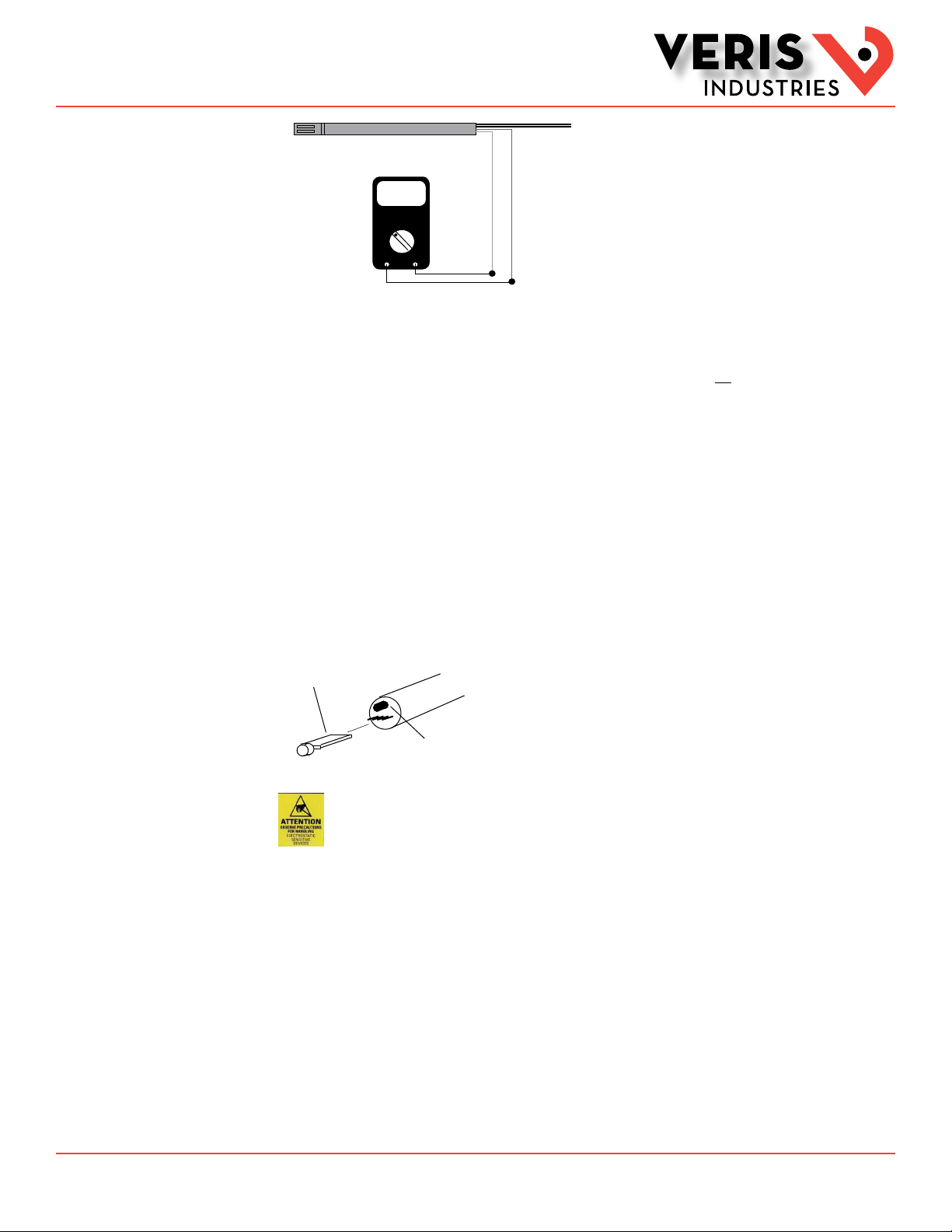
For 4-20 mA versions: Test leads output 0-1VDC corresponding to 0 to 100% RH sensor reading. For example, a 0.42 VDC output
on test points equals 42% RH sensor reading. These test points also provide an output that verifies mother board accuracy when
the HS element is removed. CONNECT TEST POINT LEADS TO VOLTMETER ONLY. This output is not suitable for connection to a DDC
panel.
To check motherboard functionality using the test leads, remove sensor element. 1.0 VDC reading verifies motherboard
functionality.
To verify sensor accuracy, de-power unit and insert a replacement HS element. Repower unit and compare readings to original
sensor. For example, if test points read 0.40VDC (40% RH) with original sensor, and 0.45VDC (45% RH) with new replacement
sensor, the original sensor is 5% off specification. This method of ensuring accuracy offers more precision than using slings or
other devices, and it eliminates the need to manually adjust sensors to an unstable standard.
Note: Temperature, body sweat, and breath effect humidity. Ensure that conditions are stable to evaluate performance.
Filter may be washed using warm water and soft brush. Do not attempt to scrub HS element.
For 0-5V/0-10V versions, use output as test point and scale accordingly.
Test leads and voltmeter
verify accuracy
and simplify DDC
programming
1VDC
0.42
WHITE (+)
GREY(--)
Voltmeter shows reading of 42% RH
Replaceable HS Element
Optional
Temp sensor
The microprocessor-profiled
capacitive HS element can be
replaced in the field without
calibration.
Observe precautions for handling static sensitive
devices to avoid damage to the circuitry that
is not covered under the factory warranty.
To replace HS Element
1. Disconnect power to the unit.
2. Remove probe from junction box by loosening black swage nut and sliding out.
3. Removed HS element by unscrewing probe filter tip and gently pulling sensor board from jack. Do not attempt to remove black
temperature sensor next to board.
4. Install new HS element, observing orientation such that filter tip can be reinstalled.
Replacement HS Element Ordering Information
HS2xx Replacement 2% HS Element, Duct
HS3xx Replacement 3% HS Element, Duct