blowing in 5 seconds.
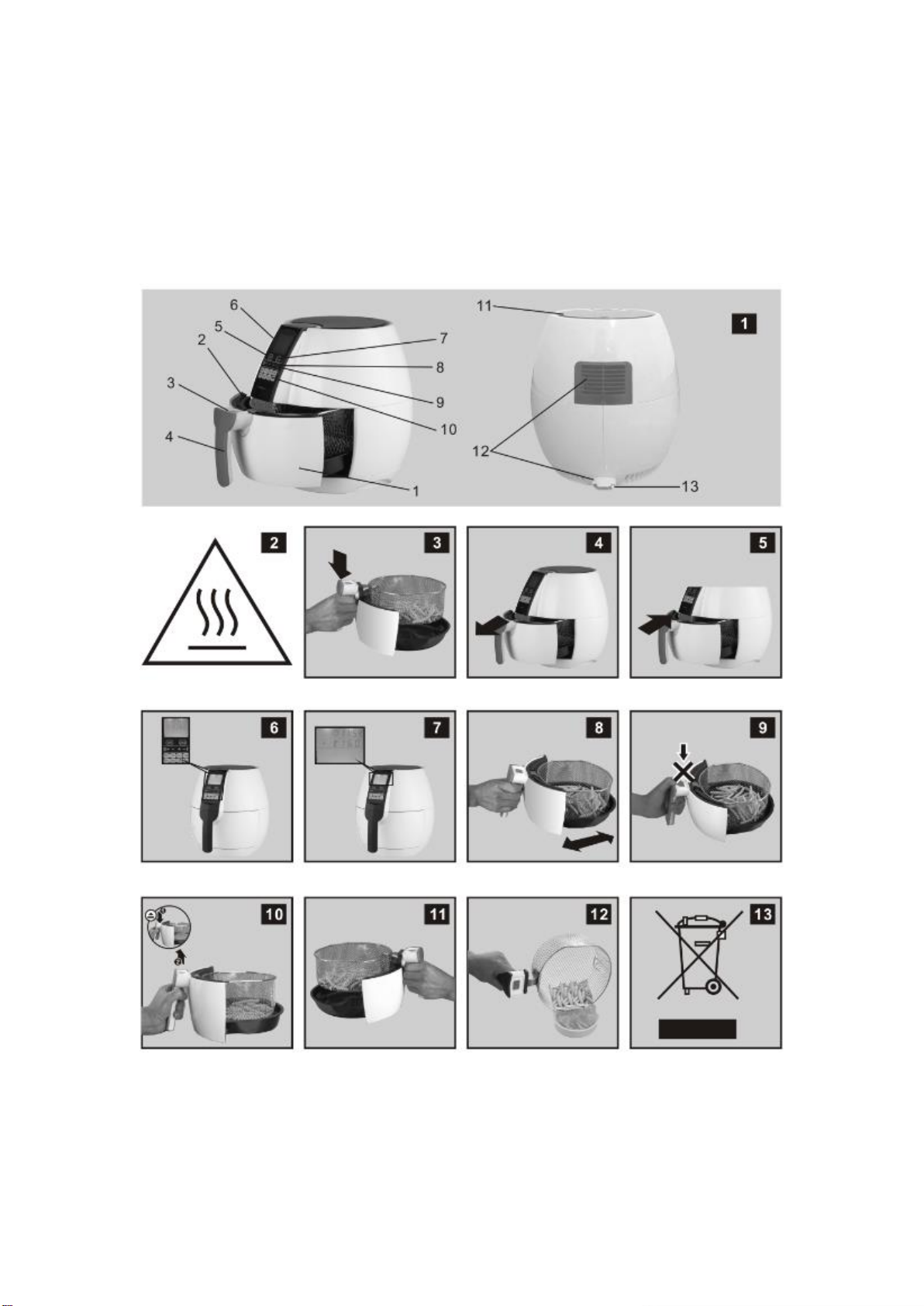
4. Place the ingredients in the basket, and then put the basket into the appliance.(fig. 5)
5. Select proper function and temperature for the ingredients. See section 'settings' in this
chapter to determine the right temperature.(fig. 6)
Notes:8 Shortcut functions are provided: WARM-UP, CHIPS, CHICKEN, STEAK,
SHRIMP, MEAT, CAKE, and FISH. Press the function button to select the proper function
according to the ingredients. If more flexible time setting and temperature are needed,
adjustment can be made directly by pressing corresponding buttons. There are two
buttons (TIME '+' & '-') in the control panel which can adjust time setting -
Increase/Decrease 1 minute per a press or increase/decrease rapidly in the unit of 1
minute by long pressing. There are two buttons (TEMP '+' & '-') in the control panel which
can adjust temperature setting - Increase/Decrease 5 degrees per a press or
increase/decrease rapidly in the unit of 5 degrees by long pressing.
6. Select the proper function and temperature for the ingredients you are using. There are
8 shortcut functions provided: WARM-UP, CHIPS, CHICKEN, STEAK, SHRIMP, MEAT,
CAKE, and FISH. Press the shortcut button to select the proper function according to your
ingredients and then press START button, the appliance will run and heat the ingredients.
If the wrong function is chosen, you can press the CANCEL button and reselect the
function.
1. WARM-UP: 176°F for 5 minutes
2. CHIPS: 392°F for 20 minutes
3. DRUMSTICK: 356°Ffor 25 minutes
4. BEEFSTEAK:356°Ffor 15 minutes
5. SHRIMP: 320°F for 20 minutes
6. RIBS: 356°Ffor 20 minutes
7. CAKE: 320°F for 30 minutes
8. FISH: 392°F for 20 minutes
Notes: If more flexible time setting and temperature are needed, adjustment can be
made directly by pressing corresponding buttons. There are two buttons (TIME '+' & '-') in
the control panel which can adjust time setting - Increase/Decrease 1 minute per a press
or increase/decrease rapidly in the unit of 1 minute by long pressing. There are two button
(TEMP '+' &'-') in the control panel which can adjust temperature setting -
Increase/Decrease 5 degrees per a press or increase/decrease rapidly in the unit of 5
degrees by long pressing.
7. The heating-up and blower icon will blink while the current setting is running. (Fig. 7)