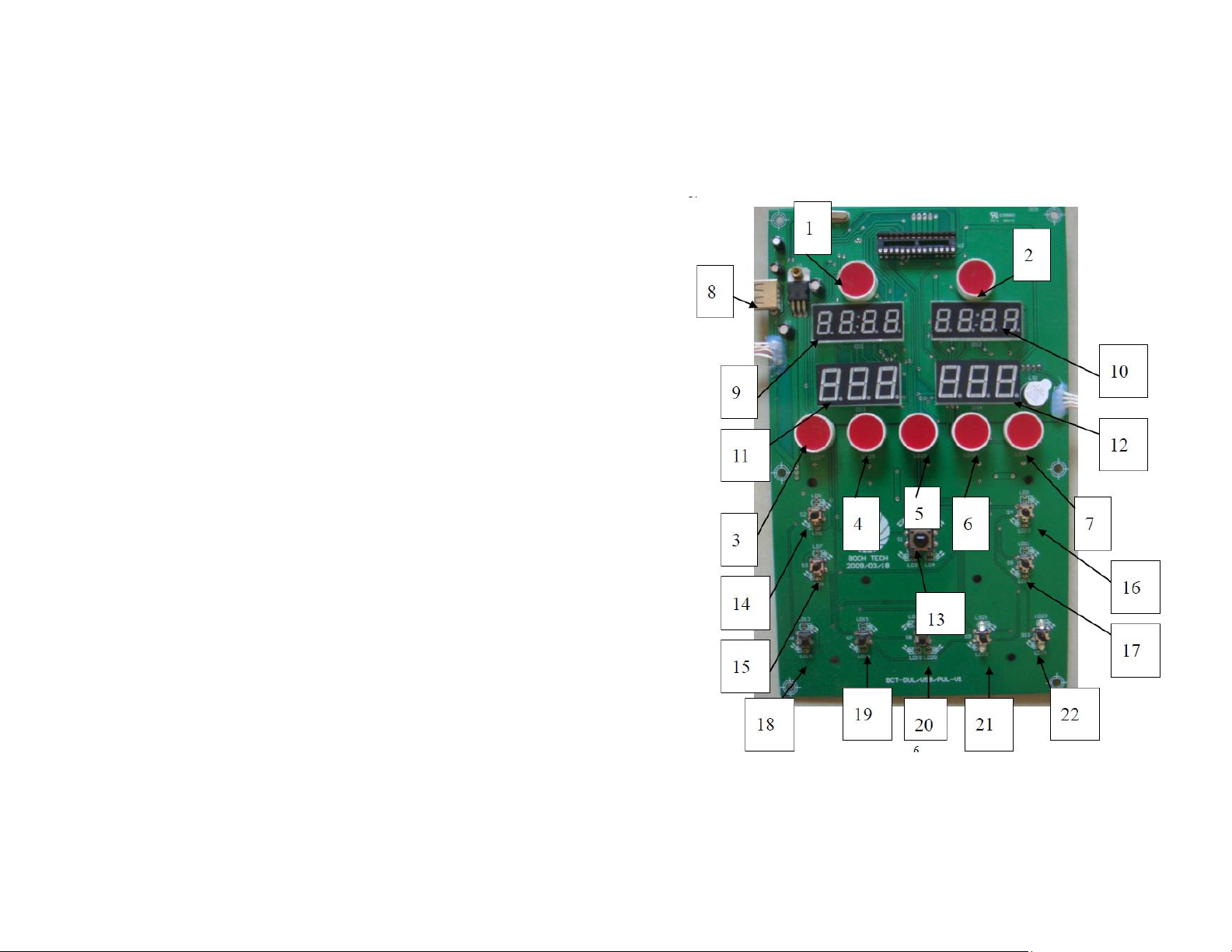
1. Time indicator.
2. Pulse light: The light will flicker when the machine detects your pulse.
3. Manual Mode Light: The light will shine when manual mode is working.
4. USB Program Light: The light will shine when USB Program Mode is working.
5. Auto Program P1 Light: The light will shine when Program P1 is working.
6. Auto Program P2 Light: The light will shine when Program P2 is working.
7. Auto Program P3 Light: The light will shine when Program P3 is working.
8. USB Interface: User can insert USB flash disk which will allow users to preset
programs.
9. Mode/Spiral Vibration Time Display Window: Display’s Spiral Vibration Time, or
display’s mode with “10” together. Preset time is from 0 to 20 minutes.
10. Mode/Seesaw Vibration Time Display Window: Display’s Seesaw Vibration Time,
or display’s mode with “9” together. Present time is from 0 to 20 minutes.
11. Spiral Vibration Speed Display Window: Display’s from H00 to H60. When it
display’s H00, the Spiral Vibration mode will not work. H60 is the highest speed.
12. Seesaw Vibration Speed Display Window: Display’s from L00 to L60. When it
display’s L00 the Seesaw Vibration Mode will not work. L60 is the highest speed.
13. On/Off Button: Press button, the displaying mode will be working. Press again and
the working mode will be stopped.
14. Spiral Vibration Mode Time/Speed “+” button: increase Spiral Vibration time when
displaying time mode. Increase spiral vibration speed when on manual program.
15. Spiral Vibration Mode Time/Speed “-“button: Decrease Spiral Vibration time when
displaying time mode. Decrease spiral vibration speed when on manual program.
16. Seesaw Vibration Mode Time/Speed “+” button: Increase Seesaw Vibration time
when displaying time mode. Increase seesaw vibration speed when on manual
program.
17. Seesaw Vibration Mode Time/Speed “-“ button: Decrease Seesaw Vibration time
when displaying time mode. Decrease seesaw vibration speed when on manual
program.
18. Time/Speed “+” button: Increase two Vibration time when display time mode.
Increase two vibration speed when display speed mode.
19. Time/Speed “-” button: Decrease two Vibration time when display time mode.
Decrease two vibration speed when display speed mode.
20. Mode/Time Change button: Press this button, windows “9” and “10” will display
mode. Press again, windows “9” and “10” will display time.
21. Program Button: Press this button to change programs –Auto Program (P1, P2,
P3) and manual program without USB flask disk insert. Press this button to
change user’s program (U1, U2, U3, U4, U5, U6) With USB flash disk insert.
22. Time button: Adjust vibration time when the machine is not working on manual
mode.
Manual Mode
There are 3 preset manual programs. Each program goes for 10 minutes.
P1: Spiral Vibration: 30, 34…54, 58, 54…6, 2, 6…22, 26
Seesaw Vibration: 30, 26…6, 2, 6…54, 58, 54…38, 34
Two vibration modes work together, the speed changed one time every five
second.
P2: Spiral Vibration: 2, 40…40, 2, 40
Seesaw Vibration: 40, 2…2, 40, 2
Two vibration modes work together, the speed changed one time every five
second.
P3: Spiral Vibration: (Seesaw Vibration does not work): 5, 10, 15…50, 55,
60…10, 5
Seesaw Vibration: (Spiral Vibration does not work): 5, 10, 15…50, 55, 60…10, 5
The speed changes one time every two seconds.
USER PROGRAMS
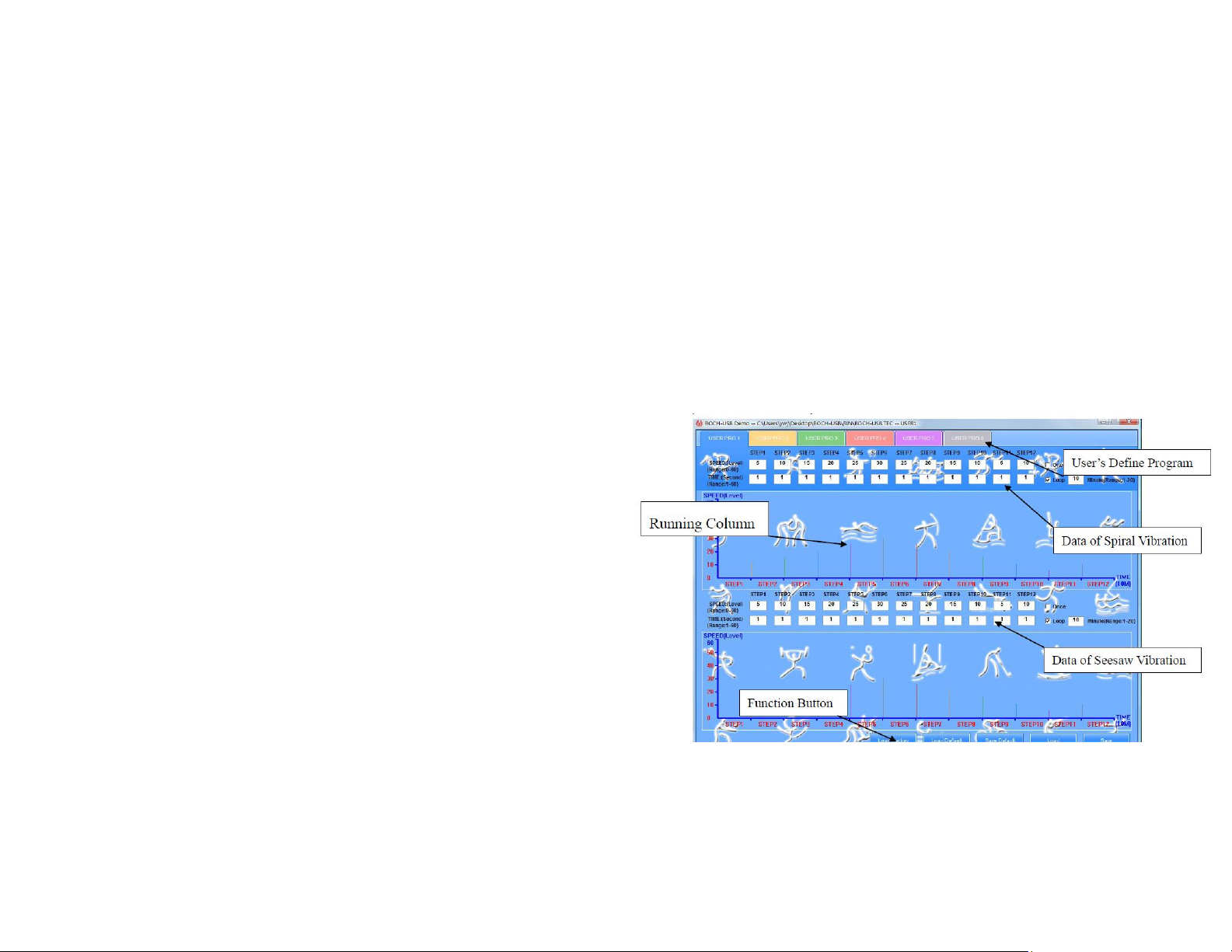
Users can define the program in a USB flash disk which works with the machine.
1. Open the reset interface by double clicking BOCH-USB-DUL under BOCH-USB in
USB Flask Disk.
2. You can choose U1-U6 by clicking User’s Define Program.
3. Fill in the data. Speed Range: 0-60 seconds.
4. When you choose “ONCE” button after you reset the 12 sets of data, the vibration
mode will only be running once. (The whole vibration time is the amount of the
12 sets of data). When you choose “LOOP” button and fill in running time (1-12
minutes). It will run for several times of the 12 sets of data. The running time is
running time which you filled by the amount of 12 sets of data.