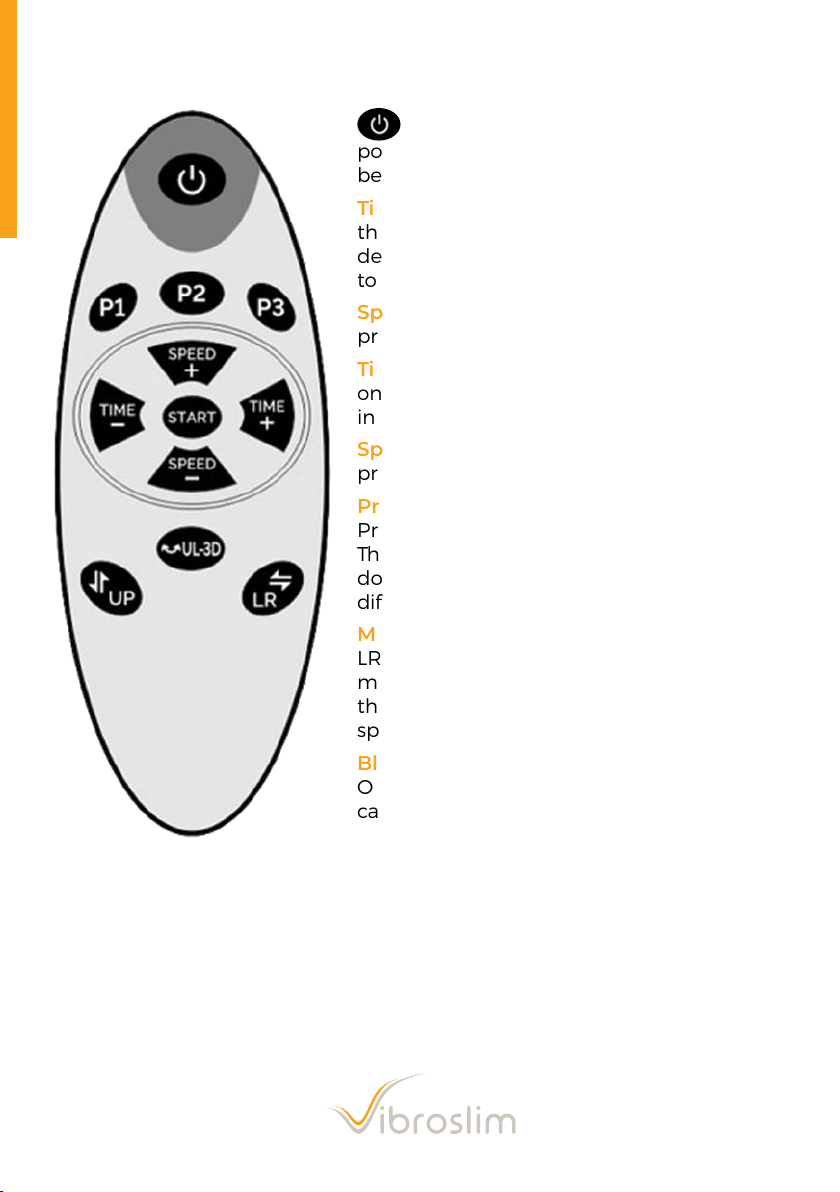
Remote Control Functions
Insert the power plug, switch to on
position and press the power button to
begin.
Time - : The default duration of a session on
the VibroSlim Radial 3D is 10 minutes. To
decrease this period, press this button once
to decrease by a minute each time.
Speed + : To increase the speed of vibration,
press this button to go from 1 - 180
Time + : The default duration of a session
on the VibroSlim Radial 3D is 10 minutes. To
increase this period, press this button.
Speed - : To decrease the speed manually,
press this button.
Program: There is a total of 4 Pre-set
Programs, P1, P2 and P3, P4 (see next page).
These programs use the UP system (lineal up/
down) in varied speeds and times to offer
different types of workouts.
Manual Settings: UP (lineal up / down);
LR (oscillation left / right); UL-3D (both
movements). Choose the setting and adjust
the time. Press Start and then adjust the
speed.
Bluetooth Music Name: Vibroslim
Open any devices you have with Bluetooth
capability, perform search and after
matching the connection to Vibroslim
you can play music. When power is on, the
Bluetooth function will work automatically.
20