Owners manual and specications
VP
71
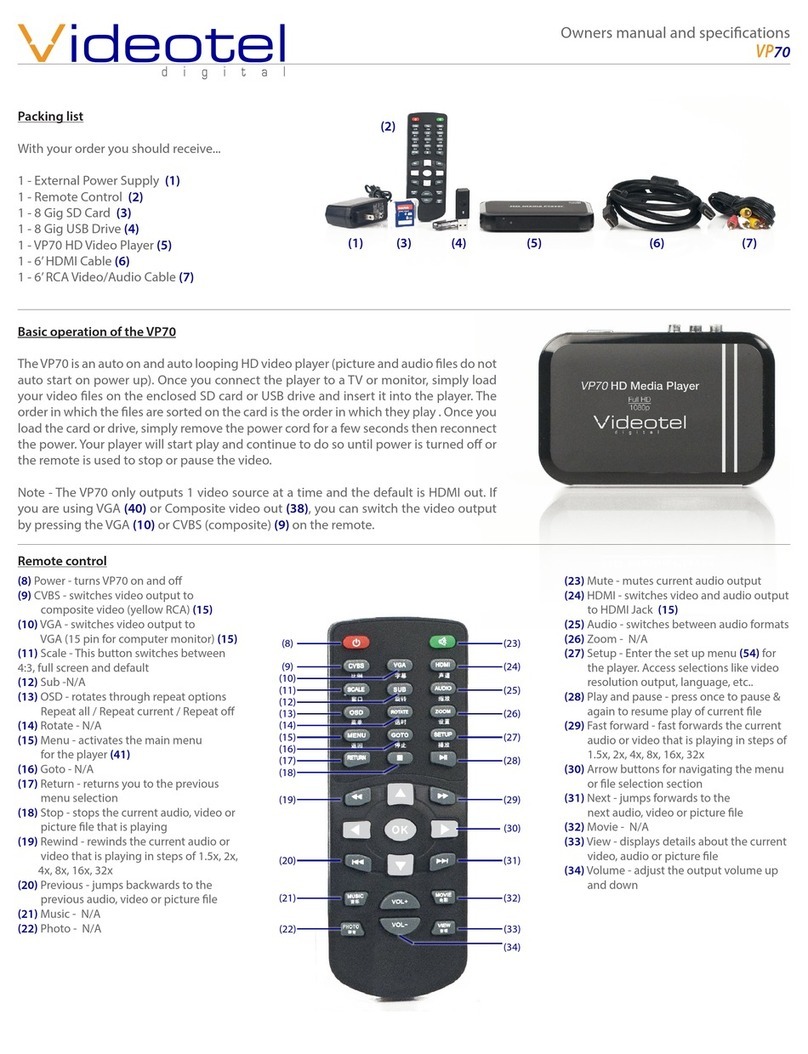
Packing list
With your order you should receive...
1 - 8 Gig SD Card (1)
1 - 8 Gig USB Drive (2)
1 - 6’ HDMI Cable (3)
1 - Remote Control (4)
1 - VP71 HD Video Player (5)
1 - External Power Supply (6)
1 - 6’ RCA Video/Audio Cable (7)
(1)
(3)
(2)
(4)
(8) Power - turns VP70 on and o
(9) CVBS - switches video output to
composite video (yellow RCA) (15)
(10) VGA - switches video output to
VGA (15 pin for computer monitor) (15)
(11) Scale - This button switches between
4:3, full screen and default
(12) Sub -N/A
(13) OSD - rotates through repeat options
Repeat all / Repeat current / Repeat o
(14) Rotate - N/A
(15) Menu - activates the main menu
for the player (41)
(16) Goto - N/A
(17) Return - returns you to the previous
menu selection
(18) Stop - stops the current audio, video or
picture le that is playing
(19) Rewind - rewinds the current audio or
video that is playing in steps of 1.5x, 2x,
4x, 8x, 16x, 32x
(20) Previous - jumps backwards to the
previous audio, video or picture le
(21) Music - N/A
(22) Photo - N/A
Basic operation of the VP71
The VP71 is an auto on and auto looping HD video player (picture and audio les
do not auto start on power up). Once you connect the player to a TV or monitor,
simply load your video les on the enclosed SD card or USB drive and insert it into
the player. The order in which the les are sorted on the card is the order in which
they play . Once you load the card or drive, simply remove the power cord for a
few seconds then reconnect the power. Your player will start play and continue to
do so until power is turned o or the remote is used to stop or pause the video.
Note - The VP71 only outputs 1 video source at a time and the default is HDMI out.
If you are using VGA (40) or Composite video out (38), you can switch the video
output by pressing the VGA (10) or CVBS (composite) (9) on the remote.
(5) (6) (7)
(8)
(9)
(10)
(11)
(12)
(13)
(14)
(15)
(16)
(17)
(18)
(19)
(30)
(20)
(21)
(22)
(34)
(23)
(24)
(25)
(26)
(27)
(28)
(29)
(31)
(32)
(33)
Remote control
(23) Mute - mutes current audio output
(24) HDMI - switches video and audio output
to HDMI Jack (15)
(25) Audio - switches between audio formats
(26) Zoom - N/A
(27) Setup - Enter the set up menu (54) for
the player. Access selections like video
resolution output, language, etc..
(28) Play and pause - press once to pause &
again to resume play of current le
(29) Fast forward - fast forwards the current
audio or video that is playing in steps of
1.5x, 2x, 4x, 8x, 16x, 32x
(30) Arrow buttons for navigating the menu
or le selection section
(31) Next - jumps forwards to the
next audio, video or picture le
(32) Movie - N/A
(33) View - displays details about the current
video, audio or picture le
(34) Volume - adjust the output volume up
and down