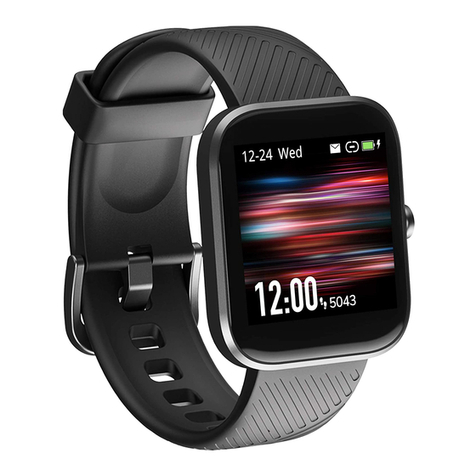
Virmee VT3PLUS Instruction manual
QUICK START MANUAL
VT3PLUS

EN
1. Package Contents
Charging Your Watch
2.1
Properly attach the magnetic charging base to the back of the watch, then
plug the USB end into a USB port on the computer, charging dock or power
bank for charging.
2. How to Operate
VT3PLUS Watch Quick Start ManualCharging Cable
QUICK START MANUAL
VT3PLUS
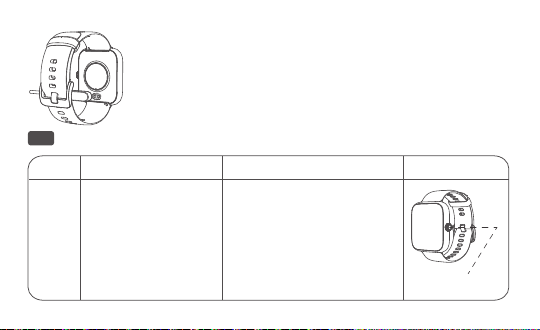
Navigating Your Watch
Power
Key
Long press Short press
2.2
Input current: <0.3A
Input voltage: 5V DC
Charging time: about 2 hours
Note:
It is recommended to use the universal 5V/1A
charger with certification mark on the market.
1. Power on or off
2. To end the exercise
from the activity
pause interface
1. Wake up or lock screen
from the home screen
2. Return to the previous
menu, or pause/continue
the exercise
Long press the power key to turn on your watch. Please make sure to fully
charge the watch first if it Doesn’ t turn on.
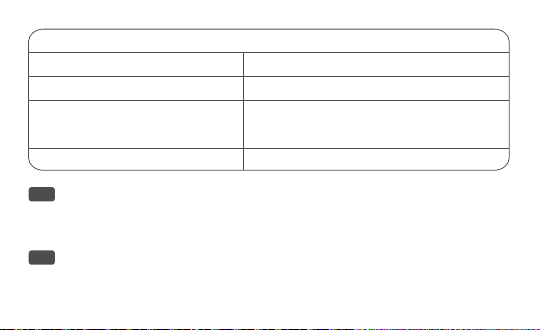
Gestures Instruction
Tap the screen Confirm to use this feature/Enter the sub-interface
Swipe right to return to the previous menu
Switch screen/Swipe up from the home screen to
access Power Saving Mode, Flashlight Mode , DND
Mode and brightness
Change watch face
Swipe left/right
Swipe up/down
Long press on the home screen
Powering on Your Watch
2.3
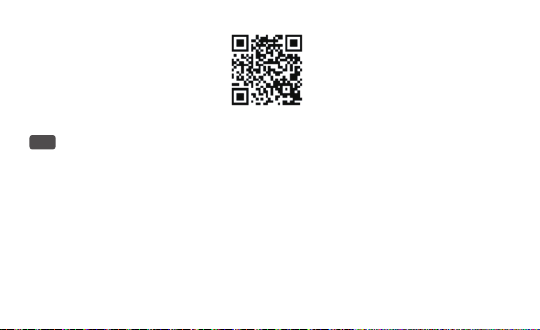
Download the “Zeroner Health Pro” app from the App Store or Google Play
Store, or scan the QR code below to download.
Downloading App
2.4
Please follow the below instructions to complete the pairing.
1.Please make sure that you have enabled Bluetooth on your phone before
starting paring.
2.Launch Zeroner Health Pro on your phone and register an account.
3.Fill in your personal information(height, weight, date or birth), and then follow
the onscreen instructions to create your profile.
4.Tap “device” > “Watch +” > “VIRMEE-VT3plus-xxxx” on the app to connect
your watch to the phone.
Pairing Your Watch with Your Phone
2.5

1. For optimized tracking of the measured values, we recommend wearing the
watch with one finger’ s width below your wrist bone.
2. Please make sure the watch is fairly snug against your skin and does not slide
up or down your wrist during exercise.
Wearing Your Watch
2.6
NOTE:
The app needs permission to access your location if you are using an Android
phone, so you need to ALLOW LOCATION ACCESS in System Settings in order to
connect successfully.

Please choose the strap with a width of 20mm if you want to replace it.
1. Remove the strap from the watch by sliding the snap lock on the strap.
2. Align the new strap with the watch and buckle the strap in.
Replacing the Strap
2.7
B
Heart Rate Monitoring
3.1
Professional Swimming Tracking
3.2
1. The watch can monitor 24-hour real-time heart rate, resting heart rate and
heart rate zones during exercise, you can choose to enable or disable this func-
tion on the app.
2. You can set the upper and lower limit of heart rate on the Zeroner Health Pro
app. If the heart rate is out ofthescopeoflimit value, the watch will remind
you.
3. Multiple heart rate zones display during exercise: all detailed data can be
viewed after connecting and syncing to the app.
1. The watch can record swimming distance, SWOLF, strokes, total energy and
Note:
the light signal transmission might be blocked if your skin is too dark or with
excess hair, or improper wearing also may lead to measurement failure.
3. Main Features

Multiple Sports Modes
3.3
1. The watch supports various sports modes, such as Run, Swimming, Cycle and
so on. You can choose one that suits you, set goals and obtain real-time data.
2. You can enable Illumi Run in the Sports Settings when running, the color
display will change with cadence and heart rate zones. Making running at
night safer and more fun.
other data.
2. End exercise: press the right button once to enter pause interface, then long
press the right button to end swimming.
Note:
1. The watch is only used for swimming. If you wear it for diving, it may cause
damage to the device. Such damage is not within the scope of warranty.
2. The watch cannot obtain heart rate data when swimming.
3. Under the swimming mode, the touch function is automatically disabled.
4. In the pool mode, please set the distance of the swimming pool correctly. If the
swimming distance is less than one lap, then the distance cannot be calculated.

1. The watch supports various sports modes, such as Run, Swimming, Cycle and
so on. You can choose one that suits you, set goals and obtain real-time data.
2. You can enable Illumi Run in the Sports Settings when running, the color
display will change with cadence and heart rate zones. Making running at
night safer and more fun.
Sleep Monitoring
3.4
The watch goes into sleep monitoring from 8:00pm to 9:00am of the next day,
you can check your sleep data on the app after paring and synchronizing the
watch with the app.
Note:
1. The sleep monitoring will be stopped after you get up and move for 5-10
minutes.
2. The watch does not record daytime sleep data.
Water Resistance Instruction
4.1
The water resistance rating: 5ATM
4. More Information
Table of contents
Other Virmee Watch manuals