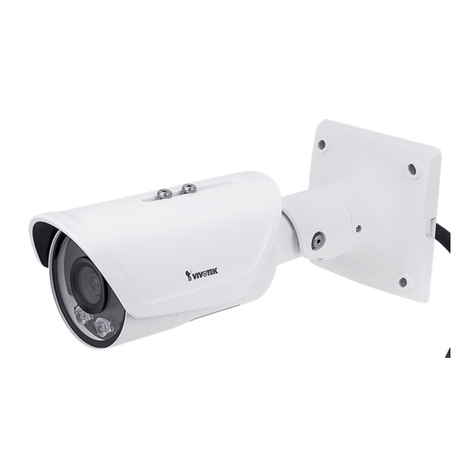
Vivotek IB8373-EH User manual

User’s Manual
IB8373-EH Bullet
Network Camera
3MP • 30m IR • IP67 • Smart IR • Smart Focus System
Day & Night • Weather-proof
Rev. 1.0

VIVOTEK
2 - User's Manual
Table of Contents
Overview ��������������������������������������������������������������������������������������������������������������������������������������������������������������������4
Revision History ����������������������������������������������������������������������������������������������������������������������������������������������������� 4
Read Before Use���������������������������������������������������������������������������������������������������������������������������������������������������� 5
Package Contents �������������������������������������������������������������������������������������������������������������������������������������������������� 5
Symbols and Statements in this Document������������������������������������������������������������������������������������������������������������ 5
Physical Description ����������������������������������������������������������������������������������������������������������������������������������������������� 6
Installation������������������������������������������������������������������������������������������������������������������������������������������������������������������ 9
Hardware Installation���������������������������������������������������������������������������������������������������������������������������������������������� 9
Network Deployment �������������������������������������������������������������������������������������������������������������������������������������������� 13
Software Installation ��������������������������������������������������������������������������������������������������������������������������������������������� 17
Ready to Use�������������������������������������������������������������������������������������������������������������������������������������������������������� 18
Accessing the Network Camera ���������������������������������������������������������������������������������������������������������������������������21
Using Web Browsers�������������������������������������������������������������������������������������������������������������������������������������������� 21
Using RTSP Players��������������������������������������������������������������������������������������������������������������������������������������������� 24
Using 3GPP-compatible Mobile Devices�������������������������������������������������������������������������������������������������������������� 25
Using VIVOTEK Recording Software ������������������������������������������������������������������������������������������������������������������� 26
Main Page����������������������������������������������������������������������������������������������������������������������������������������������������������������27
Client Settings ���������������������������������������������������������������������������������������������������������������������������������������������������������32
Conguration�����������������������������������������������������������������������������������������������������������������������������������������������������������37
System > General settings ����������������������������������������������������������������������������������������������������������������������������������� 38
System > Homepage layout �������������������������������������������������������������������������������������������������������������������������������� 39
System > Logs ����������������������������������������������������������������������������������������������������������������������������������������������������� 42
System > Parameters ������������������������������������������������������������������������������������������������������������������������������������������ 43
System > Maintenance����������������������������������������������������������������������������������������������������������������������������������������� 44
Media > Image ��������������������������������������������������������������������������������������������������������������������������������������������������� 48
Media > Video ������������������������������������������������������������������������������������������������������������������������������������������������������ 58
Media > Video ������������������������������������������������������������������������������������������������������������������������������������������������������ 61
Media > Audio������������������������������������������������������������������������������������������������������������������������������������������������������� 68
Network > General settings���������������������������������������������������������������������������������������������������������������������������������� 69
Network > Streaming protocols �������������������������������������������������������������������������������������������������������������������������� 77
Network > SNMP (Simple Network Management Protocol)��������������������������������������������������������������������������������� 86
Security > User Account��������������������������������������������������������������������������������������������������������������������������������������� 87
Security > HTTPS (Hypertext Transfer Protocol over SSL) ���������������������������������������������������� 88
Security > Access List ���������������������������������������������������������������������������������������������������������������������������������������� 93
PTZ > PTZ settings ���������������������������������������������������������������������������������������������������������������������������������������������� 98
Event > Event settings���������������������������������������������������������������������������������������������������������������������������������������� 102
Applications > Motion detection�������������������������������������������������������������������������������������������������������������������������� 117
Applications > DI and DO����������������������������������������������������������������������������������������������������������������������������������� 120
Applications > Tampering detection ������������������������������������������������������������������������������������������������������������������� 120
Applications > Audio detection ������������������������������������������������������������������������������������������������������������������������� 121
Applications > VADP (VIVOTEK Application Development Platform) ��������������������������������������������������������������� 123
Recording > Recording settings ������������������������������������������������������������������������������������������������������������������������ 126
Local storage > SD card management��������������������������������������������������������������������������������������������������������������� 131
Local storage > Content management ��������������������������������������������������������������������������������������������������������������� 132

VIVOTEK
User's Manual - 3
Appendix ���������������������������������������������������������������������������������������������������������������������������������������������������� 135
URL Commands for the Network Camera������������������������������������������������������������������������������������������������ 135
Technical Specications ���������������������������������������������������������������������������������������������������������������������������214
Technology License Notice����������������������������������������������������������������������������������������������������������������������� 215
Electromagnetic Compatibility (EMC)������������������������������������������������������������������������������������������������������� 216

VIVOTEK
4 - User's Manual
Overview
VIVOTEK’s IB8373-EH network camera features a 3-Megapixel WDR CMOS sensor to cope with
challenging lighting conditions� The WDR Pro feature allows the camera to capture both the dark and
bright areas of an image and combine the differences to generate a highly realistic representation of the
original scene� This feature enables the camera to provide video quality very close to the capabilities of
the human eye� The IB8373-EH can be deployed widely in high contrast outdoor environments such as
parking areas and streets� The P-iris lens controls the iris with extreme precision; with its built-in stepper
motor, it maintains the iris opening at an optimal level at all times, resulting in superior image clarity and
depth of eld.
The IP67-rated housing is designed to help the camera body withstand rain and dust and ensures
smooth operation even under a multitude of harsh weather conditions� Additionally, the wide temperature
range further enhances the IB8373-EH’s performance and reliability in extremely cold environments�
Revision History
■ Rev. 1.0: Initial release.

VIVOTEK
User's Manual - 5
Read Before Use
The use of surveillance devices may be prohibited by law in your country� The Network Camera
is not only a high-performance web-ready camera but can also be part of a exible surveillance
system� It is the user’s responsibility to ensure that the operation of such devices is legal before
installing this unit for its intended use�
It is important to first verify that all contents received are complete according to the Package
Contents listed below� Take note of the warnings in the Quick Installation Guide before the Network
Camera is installed; then carefully read and follow the instructions in the Installation chapter to
avoid damage due to faulty assembly and installation� This also ensures the product is used
properly as intended�
The Network Camera is a network device and its use should be straightforward for those who
have basic networking knowledge� It is designed for various applications including video sharing,
general security/surveillance, etc� The Configuration chapter suggests ways to best utilize the
Network Camera and ensure proper operations� For creative and professional developers, the URL
Commands of the Network Camera section serves as a helpful reference to customizing existing
homepages or integrating with the current web server�
Package Contents
■ IB8373-EH with an RJ45 Cable
■ Sun Shield / Wrench / RJ45 Female-Female Coupler / Double-sided Tape / Screws
■ Wall Mount Bracket
■Waterproof Connector for RJ45 Ethernet Enclosure
■ Waterproof Connector (for DI/DO and power wires)
■ Alignment Sticker / Desiccant Bag
■ Quick Installation Guide
■ Software CD
Symbols and Statements in this Document
i
INFORMATION: provides important messages or advices that might help prevent
inconvenient or problem situations�
NOTE: Notices provide guidance or advices that are related to the functional integrity of
the machine�
Tips: Tips are useful information that helps enhance or facilitae an installation, function,
or process�
WARNING! or IMPORTANT!: These statements indicate situations that can be
dangerous or hazardous to the machine or you�
Electrical Hazard: This statement appears when high voltage electrical hazards might
occur to an operator�

VIVOTEK
6 - User's Manual
Physical Description
NTSC-PAL switch
Reset Button
SD/SDHC/SDXC Card Slot
NTSCPAL
Auto Focus
LED
Status LED
Item LED status Description
1Steady Red Power on and system booting
Red LED off Power off
2 Blinking Green every 1 sec� Network normal (heartbeat)
Steady Red and Green LED is off Network failed
3
Red blinking every 0�15 sec�, and Orange LED blinking
every 1 sec�
(Red on for 0�15 sec and off for 0�15 sec�); (Green on for 1
sec� and off for another� )
Upgrading firmware
4Blinking Orange every 0�15 sec� Both LEDs are on for 0�15
sec� and off for 0�15 sec� Restoring default
General I/O
Terminal Block
AV out
Audio in

VIVOTEK
User's Manual - 7
DI/DO Diagram
Please refer to the following illustration for the connection method�
GND
Camera Power
Input
Output
+12
VDC
Max.
VDC
Switch
BJT transistor
GND
Camera Power
Input
Output
+12
VDC
VDC
Switch
BJT transistor
Relay Relay

VIVOTEK
8 - User's Manual
Hardware Reset
The reset button is used to reset the system or restore the factory default settings� Sometimes
resetting the system can return the camera to normal operation� If the system problems remain
after reset, restore the factory settings and install again�
Reset: Press and release the recessed reset button. Wait for the Network Camera to reboot.
Restore: Press and hold the recessed reset button until the status LED rapidly blinks. Note that
all settings will be restored to factory default� Upon successful restore, the status LED will blink
green and red during normal operation�
SD/SDHC/SDXC Card Capacity
This network camera is compliant with SD/SDHC/SDXC 16GB / 8GB / 32GB /64GB and other
preceding standard SD cards�
Reset Button

VIVOTEK
User's Manual - 9
Installation
Hardware Installation
1�Attach the alignment sticker to the wall� Drill four holes into the wall� Then hammer the
supplied plastic anchors into the holes and secure the plate with supplied screws�
2�Fix the intersection bracket to the side of the Network Camera with two screws�
3. Feed the RJ45 cable through the front opening of the wall mount bracket. (If you want to use
external devices such as sensors and alarms, please refer to the assembling steps on the
next page�)
4�Push the spring mortise and hook the bracket onto the groove of the wall mount bracket�
5�Secure the two screws on the other side of the wall mount bracket�
6� Hang the wall mount bracket to the mounting plate�
7�Fix the wall mount bracket with the supplied screw�
8� Adjust the angle of the wall mount bracket to aim at the shooting area�
1
2
6
3
5
7
8
4

VIVOTEK
10 - User's Manual
Waterproof Connector
Components of the Waterproof Connector
Seals (C)
Housing (D)
Sealing Nut (E)
Seal (B)
Screw Nut (A)
Pin Denitions
NOTE:
In addition to PoE (Power over Ethernet), you can also supply power to the camera using
pins #1~#4 from the terminal block, either using DC 12V or AC24V�
Open the rear cover by rotating to the
alignment mark, and pull the cover off the
canister�
1 DC 12V- IN
2 DC 12V+ IN
3 AC24V_2 IN
4 AC24V_1 IN
5 DI-
6 DI+
7 DO-
8 DO+ (12V)
8
1
Pin number
Pin Denitions
Table of contents
Other Vivotek Security Camera manuals

Vivotek
Vivotek FD8154V User manual

Vivotek
Vivotek IP7153 User manual

Vivotek
Vivotek IP8371E User manual
Vivotek
Vivotek FE9192-H User manual

Vivotek
Vivotek FD8136 User manual
Vivotek
Vivotek IP6117 User manual
Vivotek
Vivotek FD8161 User manual

Vivotek
Vivotek IP8152 User manual

Vivotek
Vivotek FD8168 User manual
Vivotek
Vivotek IB8377-H User manual
Vivotek
Vivotek IB9391-EHT User manual

Vivotek
Vivotek FD8138-H User manual
Vivotek
Vivotek FD8169 User manual
Vivotek
Vivotek IP8335H User manual

Vivotek
Vivotek CaMate CM48 Series User manual
Vivotek
Vivotek IP8371 User manual
Vivotek
Vivotek PT1111M User manual
Vivotek
Vivotek CC9381-HV User manual
Vivotek
Vivotek FD8361L User manual
Vivotek
Vivotek IP9165-LPC User manual