
Wulfsberg C-5000 User manual


C-5000 COMMUNICATION MANAGEMENT CONTROLLER
INSTALLATION MANUAL
Page ii Publication No. 150-041118
Table of Contents Rev A
Sep 2001
Wulfsberg Electronics Division, located in Prescott, Arizona, designs and manufactures the
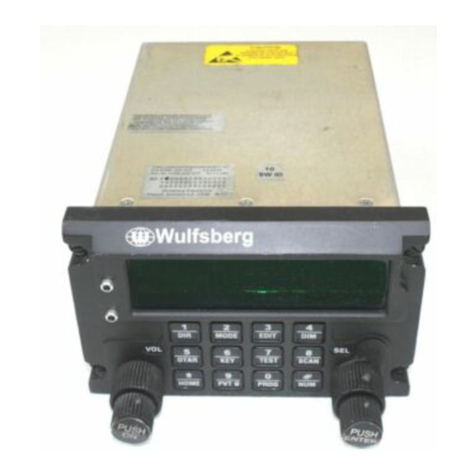
C-5000 Communication Management Controller
Wulfsberg Electronics Division makes no warranty, expressed or implied, with regard to this
manual, including but not limited to any implied warranties of merchantability, fitness for a
particular purpose, and non-infringement. In addition, Wulfsberg Electronics Division makes no
warranty with regard to the documentation or data contained herein. Wulfsberg Electronics
Division is not liable in the event of incidental, special, consequential, or any other damages in
connection with or arising from furnishing, performance, or use of this manual.
Reproduction of this publication or any portion thereof by any means is prohibited. For further
information contact Sales, Wulfsberg Electronics Division, 6400 Wilkinson Drive, Prescott,
Arizona, 86301. Telephone: (928) 708-1500.
Information in this manual is subject to change without notice.
2001 Wulfsberg Electronics Division. All rights reserved
C-5000 is a trademark of Wulfsberg Electronics Division.
PROPRIETARY NOTICE
This document contains proprietary information and such information may not be disclosed to
others for any purpose, nor used for manufacturing purposes without written permission from
Wulfsberg Electronics Division.

C-5000 COMMUNICATION MANAGEMENT CONTROLLER
INSTALLATION MANUAL
Publication No. 150-041118 Page iii
Rev A Table of Contents
Sep 2001
Record of Revisions
Rev
No. Rev
Date Date
Inserted By Rev
No. Rev
Date Date
Inserted By
A9/2001

C-5000 COMMUNICATION MANAGEMENT CONTROLLER
INSTALLATION MANUAL
Page iv Publication No. 150-041118
Table of Contents Rev A
Sep 2001
Record of Revisions
Rev
No. Rev
Date Date
Inserted By Rev
No. Rev
Date Date
Inserted By

C-5000 COMMUNICATION MANAGEMENT CONTROLLER
INSTALLATION MANUAL
Publication No. 150-041118 Page v
Rev A Table of Contents
Sep 2001
TABLE OF CONTENTS
Page
Section 1 - Introduction
1. Using This Manual...................................................................................................... 1-1
2. Components ............................................................................................................... 1-2
A. Communication Management Controller....................................................... 1-2
B. FLEXCOMM II ............................................................................................... 1-2
C. FLEXCOMM I ................................................................................................ 1-3
D. Part Numbering.............................................................................................. 1-4
Section 2 - System Installation
1. General.......................................................................................................................2-1
2. System Specifications................................................................................................. 2-1
A. C-5000 Communication Management Controller.......................................... 2-1
B. FLEXCOMM II ............................................................................................... 2-2
C. FLEXCOMM I ................................................................................................ 2-8
3. System Interface......................................................................................................... 2-9
A. C-5000 Control Unit/FLEXCOMM II RT System Interface .......................... 2-10
B. C-5000 Control Unit/FLEXCOMM I RT System Interface ........................... 2-11
C. C-5000 Control Unit/Hybrid FLEXCOMM II/FLEXCOMM I Interface.......... 2-12
4. System Operational Modes ...................................................................................... 2-13
A. Single Channel Normal Operation............................................................... 2-13
B. Simulcast Operation .................................................................................... 2-13
C. Relay Operation........................................................................................... 2-13
D. Relay with Simulcast Operation................................................................... 2-13
E. Repeater Operation..................................................................................... 2-13
F. Dual C-5000 Operation................................................................................ 2-13

C-5000 COMMUNICATION MANAGEMENT CONTROLLER
INSTALLATION MANUAL
Page vi Publication No. 150-041118
Table of Contents Rev A
Sep 2001
TABLE OF CONTENTS (cont’d)
Page
SECTION 3 – MECHANICAL INSTALLATION
1. General.......................................................................................................................3-1
2. Unpacking and Inspecting Equipment........................................................................ 3-1
3. General Installation Requirements............................................................................. 3-2
A. Component Weights...................................................................................... 3-2
4. Installation of Multipin Crimp Connectors................................................................... 3-3
A. Contacts and Crimp Tool Information............................................................ 3-3
B. Contacts and Insertion/Removal Tool Manufacturer Name and Address..... 3-3
5. Installation of C-5000.................................................................................................. 3-3
6. Installation of RT-5000................................................................................................ 3-3
7. Installation of Antennas .............................................................................................. 3-4
A. AT-560 / AT-5000.......................................................................................... 3-4
B. FC-50............................................................................................................. 3-4
C. AT-550........................................................................................................... 3-4
D. FC-5000......................................................................................................... 3-4
E. AT-50 and AT-51........................................................................................... 3-4
F. FC-50............................................................................................................. 3-5
G. AT-400........................................................................................................... 3-5
H. AT-140........................................................................................................... 3-5
SECTION 4 - ELECTRICAL INSTALLATION
1. General.......................................................................................................................4-1
2. Wiring Considerations................................................................................................. 4-1
A. C-5000 System Interface Connector, P500................................................... 4-2
B. C-5000 Transceiver Interface, RT-5000...................................................... 4-13
C. RT-=5000 Transceiver Installation .............................................................. 4-17
D. C-5000 Communication Management Controller Installation...................... 4-35
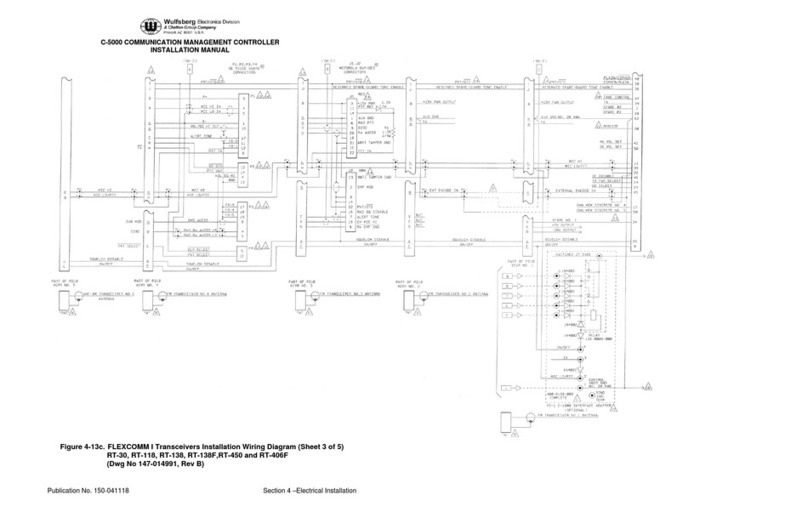
E. C-5000 Transceiver Interface FLEXCOMM................................................. 4-37
F. C-5000 Transceiver Interface...................................................................... 4-47

C-5000 COMMUNICATION MANAGEMENT CONTROLLER
INSTALLATION MANUAL
Publication No. 150-041118 Page vii
Rev A Table of Contents
Sep 2001
TABLE OF CONTENTS (cont’d)
Page
SECTION 5 – CONFIGURATION AND PROGRAMMING
Introduction.............................................................................................................................. 5-1
Features...................................................................................................................... 5-1
Transceiver Overview................................................................................................. 5-1
Steps to Successful Setup and Operation.................................................................. 5-3
Basic Operation....................................................................................................................... 5-4
Front Panel & Controls ............................................................................................... 5-4
The Home Page.......................................................................................................... 5-6
Turning the System On and Off.................................................................................. 5-7
Setting the Display Brightness.................................................................................... 5-7
Setting the Volume Level............................................................................................ 5-7
Selecting a Preset Channel Using the Cursor/Value Knob........................................ 5-8
Selecting a Channel Using the Keypad...................................................................... 5-8
Selecting a Channel by Alphanumeric Identifier......................................................... 5-9
Selecting the Manual Channel.................................................................................... 5-8
Using the Direct/Repeat Feature.............................................................................. 5-10
Receiving/Transmitting............................................................................................. 5-10
Enabling/Disabling Transceivers .............................................................................. 5-11

C-5000 COMMUNICATION MANAGEMENT CONTROLLER
INSTALLATION MANUAL
Page viii Publication No. 150-041118
Table of Contents Rev A
Sep 2001
TABLE OF CONTENTS (cont’d)
Page
SECTION 5 –CONFIGURATION AND PROGRAMMING (cont’d)
Disabling (Turning Off) a Transceiver.......................................................... 5-11
Enabling (Turning On) a Transceiver .......................................................... 5-11
Using the Edit Page............................................................................................................... 5-13
Editing a Preset Channel.......................................................................................... 5-13
Editing a Manual Channel......................................................................................... 5-14
Changing PL and DPL (CTCSS and DCS) Tones ................................................... 5-14
Turning Tones Off........................................................................................ 5-14
Selecting a CTCSS Tone ............................................................................ 5-15
Selecting a DCS Tone................................................................................. 5-15
Changing Transmit Power........................................................................................ 5-16
Changing Modulation Type....................................................................................... 5-16
Changing Receiver Bandwidth ................................................................................. 5-17
Enhanced System Features .................................................................................................. 5-18
Phone Patch Mode................................................................................................... 5-18
Simulcast Operation ................................................................................................. 5-18
Relay Operation........................................................................................................ 5-19
Relay/Simulcast Operation....................................................................................... 5-20
Repeater Operation.................................................................................................. 5-21
Encryption Features............................................................................................................... 5-22
Turning Encryption On and Off................................................................................. 5-22
Selecting an Encryption Key..................................................................................... 5-22
Performing an OTAR................................................................................................ 5-23
Erasing Encryption Keys........................................................................................... 5-24
Manually Loading Encryption Keys .......................................................................... 5-25
Programming Preset Channels.............................................................................................. 5-27
Programming Preset Channels Using the Front Page ............................................. 5-27

C-5000 COMMUNICATION MANAGEMENT CONTROLLER
INSTALLATION MANUAL
Publication No. 150-041118 Page ix
Rev A Table of Contents
Sep 2001
TABLE OF CONTENTS (cont’d)
Page
SECTION 5 –CONFIGURATION AND PROGRAMMING (cont’d)
Configuring the C-5000..........................................................................................................5-32
Configuring the C-5000............................................................................................. 5-32
Configuring the C-5000 to Control an RT-5000........................................................ 5-34
Configuring the C-5000 to Control a Non RT-5000.................................................. 5-35
Setting Passwords.................................................................................................... 5-38
Setting Miscellaneous Configuration Options........................................................... 5-39
Configuring the C-5000 Using a PC ......................................................................... 5-40
Downloading a Configuration from RP into the C-5000 .............................. 5-40
Uploading a Configuration from the C-5000 into RP................................... 5-41
RSS Software Description and Programming ....................................................................... 5-43
Before You Begin...................................................................................................... 5-43
Main Menu Operations ............................................................................................. 5-43
Personality Programming (Conventional Analog FM Personalities) ........................ 5-50
Personality Programming (Conventional P25 Personalities).................................... 5-53
Glossary................................................................................................................................. 5-58
Appendix A – CTCSS (PL) Tone Codes................................................................................ 5-61
Appendix B – Mode 2 Operation............................................................................................ 5-63

C-5000 COMMUNICATION MANAGEMENT CONTROLLER
INSTALLATION MANUAL
Page x Publication No. 150-041118
Table of Contents Rev A
Sep 2001
TABLE OF CONTENTS (cont’d)
Page
SECTION 6 – SYSTEM VERIFICATION PROCEDURE
1. General.......................................................................................................................7-1
2. System Checkout........................................................................................................ 7-1
Other manuals for C-5000
4
Table of contents
Other Wulfsberg Controllers manuals
Popular Controllers manuals by other brands

Digiplex
Digiplex DGP-848 Programming guide

YASKAWA
YASKAWA SGM series user manual

Sinope
Sinope Calypso RM3500ZB installation guide

Isimet
Isimet DLA Series Style 2 Installation, Operations, Start-up and Maintenance Instructions

LSIS
LSIS sv-ip5a user manual

Rockwell Automation
Rockwell Automation 1769-L31 installation instructions










