Yamay SW023 User manual

Operating Instructions
Please read the instructions carefully
and keep it safe.
SW023

On
Bluetooth
1.Download and install App
You can set up the watch through the “VeryFitPro” app for iOS
orAndroid devices. The steps are shown as follows:
Notes: The hardware platform of the equipment system shall
meet requirements.I. Bind Watch
2. Bind process
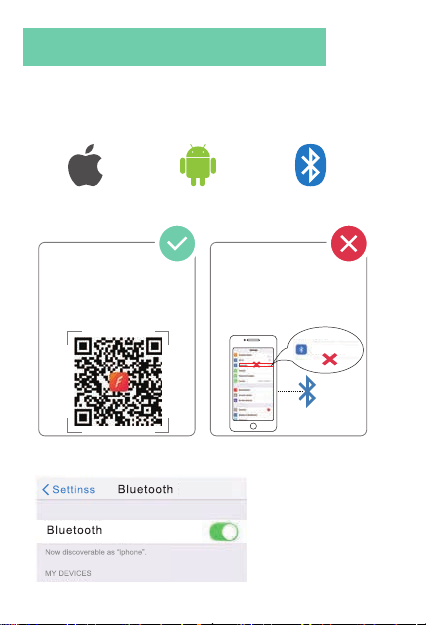
(1) Turn on the Bluetooth and GPS on your mobile phone
Bind Watch
iOS 8.0 version
or above Andriod 4.4 system
or above Support Bluetooth
4.2
Correct operation: Scan the
QRcode below or
download VeryFitPro APP
through the mobile APP
store to pair with the watch.
Wrong operation: Pair the
watch directly with the
bluetooth in your mobile
phone’s settings.
-1-

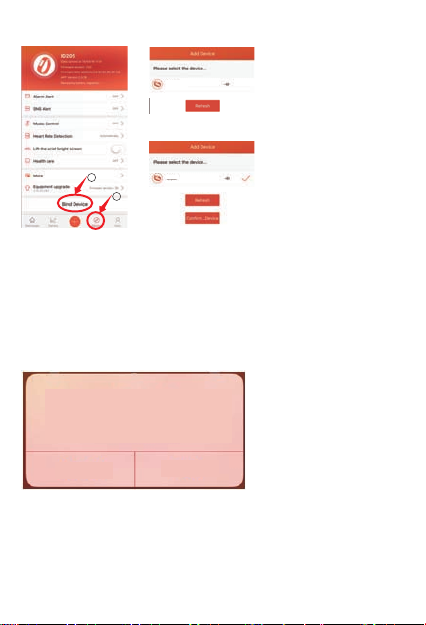
(2).Bind Device
(3).Select product
model: ID205U
(4).Click “Ok” to
complete binding.
Notes:
①.During binding process, VeryFitPro will prompt you to enable
GPS
and Bluetooth, and authorize VeryFitPro to get access to the GPS
on
you mobile phone.
②. Apple phones need to click "pair", the watch has a variety of
message reminders.
3.Synchronous data
In daily wear, the watch can detect all kinds of product data. The
user needs to connect the watch with bluetooth on the APP
before
synchronous operation. The detailed operations are shown as
follows:
1
2
Bluetooth Pairing Request
“ID205U”would like to pair
with your iphone.
Cancel Pair
ID205U
ID205U
-2-

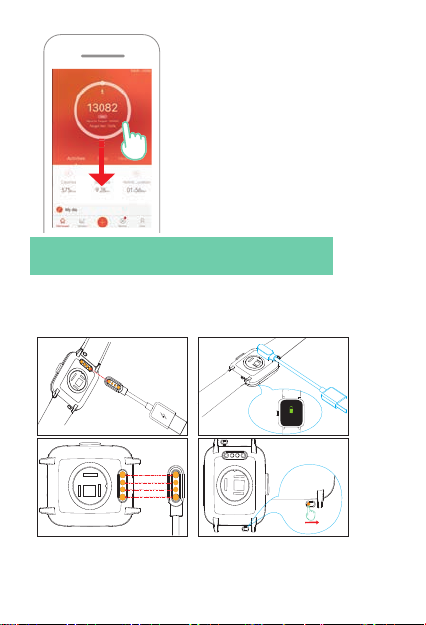
Open the mobile APP> swipe down the
page> sync prompt
appears
Make sure the metal contacts of the watch and of the Charging
dock match well, then the watch can be charged properly.
2.Wear/install
Notes!
Please synchronize the data at least once
within 7 days to avoid data loss at the
watch end.
Instruction for Use
1.Charging schematic
Buckle the watch into the charger seat as shown in the picture.
It needs to be charged to activate the watch when it is started for
the first time.
72%
-3-

Long press the left
key:
Enter the sports
quickly
Short press the
right key: Return to
previous interface
①.Wear
Wear the wristband one finger away from the wrist bone and
adjust the tightness of the wristband to a comfortable position.
②.Replace the strap
Switch
Flip the switch and take out the wristband
Tip: Wearing too loosely may affect the accuracy of heart rate data.
1.Definition of key function
Wear Replace the strap
Switch
Wear the wristbandone finger away
from the wrist bone and adjust the
tightness of the wristband to a
comfortable position.
Flip the switch and take
out the wristband
Operating Instructions
-4-

2.Watch dial switch
3.Main interface operation Swipe the screen to enter different
interfaces (interactive interfacetile diagram)
①. Notice:Display notification message content.
Replacing the dial interfacewill
appear after long press the dial.
Notice bar
Data bar
Function list
interface Status bar
②.Status:
Heart rate
Detection
Wrist sense Do not
disturb mode
Looking
for mobile phone.
-5-

③.Data bar:
④.Function list interface:See below for Function Introduction。
4.Dial data view (default dial)。
1.Icon function introduction
Enter the sports
window, and choose
differentsports
modes. Change the
sports mode on the
APP
Perform a heart
rate test to check
your heart rate
data for the day.
Help you regulate
your breathing and
relax your mood.
View, turnoff or
turn on the alarm
clock. You need to
add an alarm clock
on the mobileAPP.
Function Introduction
Long press the screen to switch different data
-6-

①.Enter the sports window, and choose different sports modes.
Change the sports mode on the APP
(1)Start sports
Click the sports icon > select the sports type > enter the sports
countdown automatically
(2)During sports
Pause sports: short press the right key
Restore sports: short press the right key
(3)End sports
End sports: long press the right key> select the end button on the
screen
②.Perform a heart rate test to check your heart rate data for the
day.
③.Help you regulate your breathing and relax your mood.
④.View, turn off or turn on the alarm clock. You need to add an
z alarm clock on the mobile APP.
Control music play
on your mobile
phone (watch
cannot store music)
Have the timing
and countdown
function.
Record recent
sportss.
-7-

⑤.Control music play on your mobile phone (watch cannot store
music)
⑥.Have the timing and countdown function.
⑦.Record recent sports
⑧. settings
Dial setting
bright adjustment
About.
Shutdown.
Dial setting
bright adjustment
-8-

2. Sleep detection: The watch automatically detects sleep all day,
please wear a good watch when using it;
Notes: For more functions and operation, please check the
VeryFitPro software of the mobile phone.
Model ID205U Screen type 1.3-inch
color screen
Battery
capacity 210mAh Charging voltage 5V±0.2V
Charging time about 2.5 hours Battery life over 7days
Waterproof
level IP68 Weight of product 38g
Operating
temperature -20°C—40°C Bluetooth version BLE 4.2
2402-2480MHz Max. transmission
powerconsumption 0.75dBm
Battery life: Actual battery life and charging time will vary
depending on usage and environment, etc.
Waterproof: Not suitable for diving, swimming in the sea, or sauna.
But suitable for swimming in swimming pool or in shower (cold
water) and shallow beach.
Product
frequency
Product Parameters
Cleaning and Maintenance
It is recommended to wear and maintain according to the
following three points:
(1)Keep the product clean;
(2)Keep the product dry;
(3)Do not wear it too tight.
Do not use household cleaners to clean the watch, butuse the
soap free detergent.
It is recommended to use alcohol to scrub stains that are not
easy to remove.
-9-

Table of contents
Popular Watch manuals by other brands

Casio
Casio QW 5513 Operation guide

Piaget
Piaget 560P Instructions for use

Armitron
Armitron pro sport MD0346 instruction manual

West Marine
West Marine BlackTip 13411293 Instruction Booklet and Care Guide

Jaeger-leCoultre
Jaeger-leCoultre HYBRIS MECHANICA CALIBRE 184 manual

FOREVER
FOREVER iGO PRO JW-200 user manual