
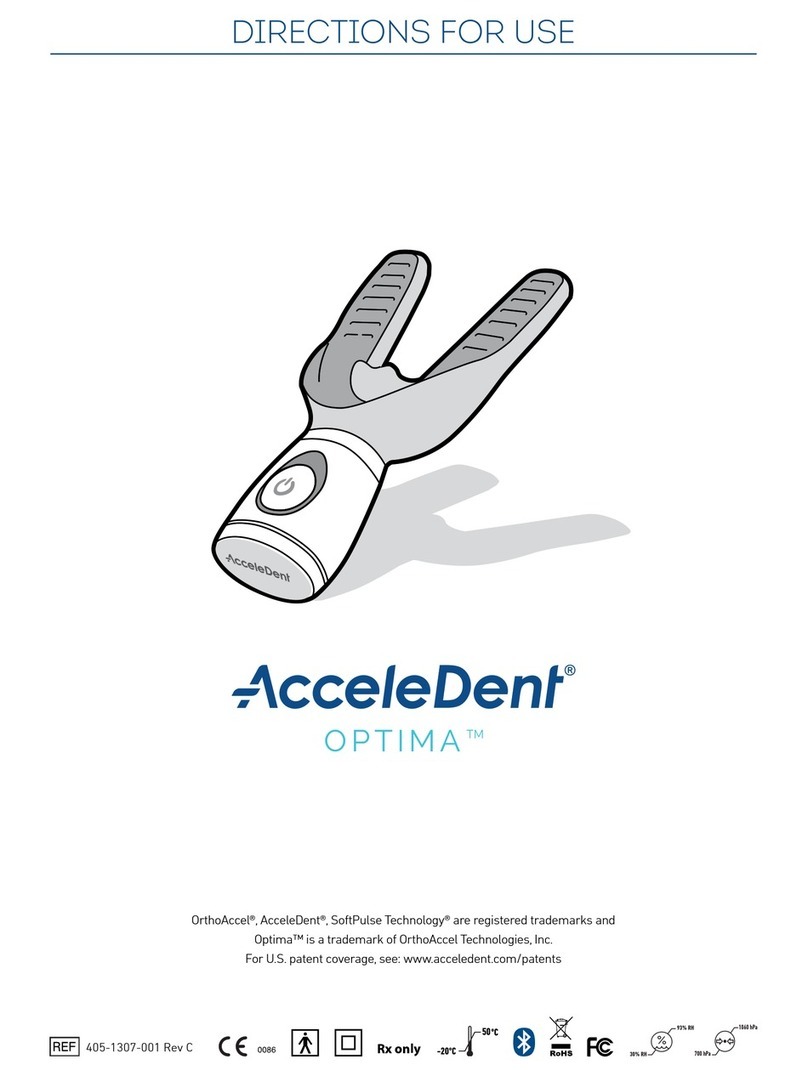
AcceleDent Optima User manual

AcceleDent® Optima - Quick Reference Guide 1
TM
405-1302-001 Rev. A
QUICK REFERENCE GUIDE
INTENDED USE/Indications for Use
AcceleDent®
Optima
is an orthodontic accessory intended for use during
orthodontic treatment. It is used in conjunction with orthodontic appliances
such as braces and helps facilitate minor anterior tooth movement. Its
effect on overall treatment time has not been established. This is due to the
many individual factors that may impact orthodontic treatment. You are
encouraged to speak with your orthodontist to determine the impact this
device may have on your specific treatment plan.
Contraindications for Use
• Use of osteoporosis drugs
• Poor oral hygiene
• Periodontal disease that is not under full control for at least 3-4
months prior to the start of the treatment
TM

AcceleDent® Optima - Quick Reference Guide 2
FEATURES AND COMPONENTS
7
5
6
2
3
4
1
8
9
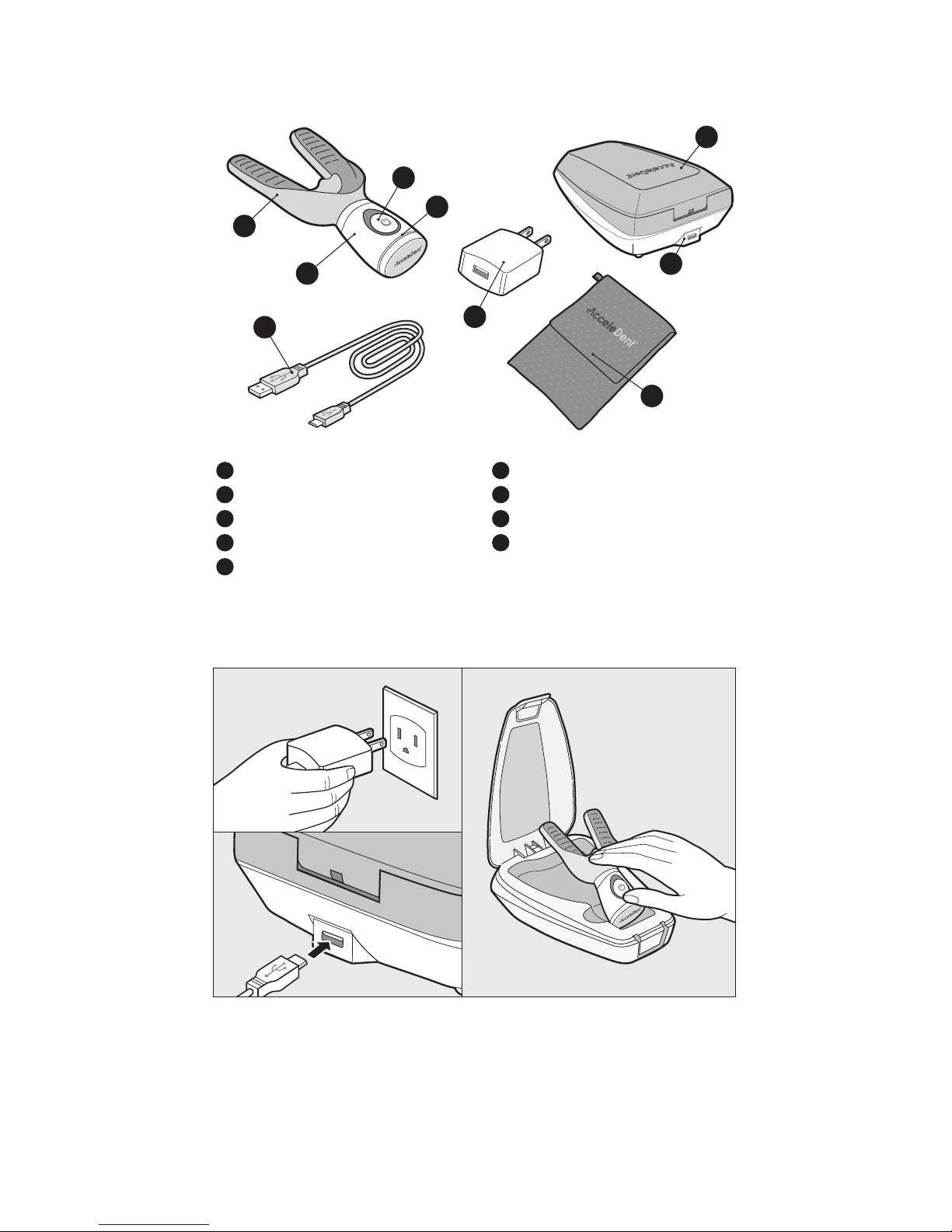
1MOUTHPIECE
2ACTIVATOR
3ON/OFF BUTTON
4STATUS INDICATOR
5CHARGING CASE
6USB CHARGING PORT
7USB CHARGING CABLE
8POWER ADAPTER
9TRAVEL POUCH
ACCELEDENT USE
Power the Charging Case by connecting the USB Charging Cable to an
electrical source. Prior to first use, place the Activator in the Charging Case
to charge for at least 8 hours. The status indicator on the Activator will be
solid orange while charging and turn off when fully-charged.
AcceleDent® Optima - Quick Reference Guide 3
ACCELEDENT USE (Continued)
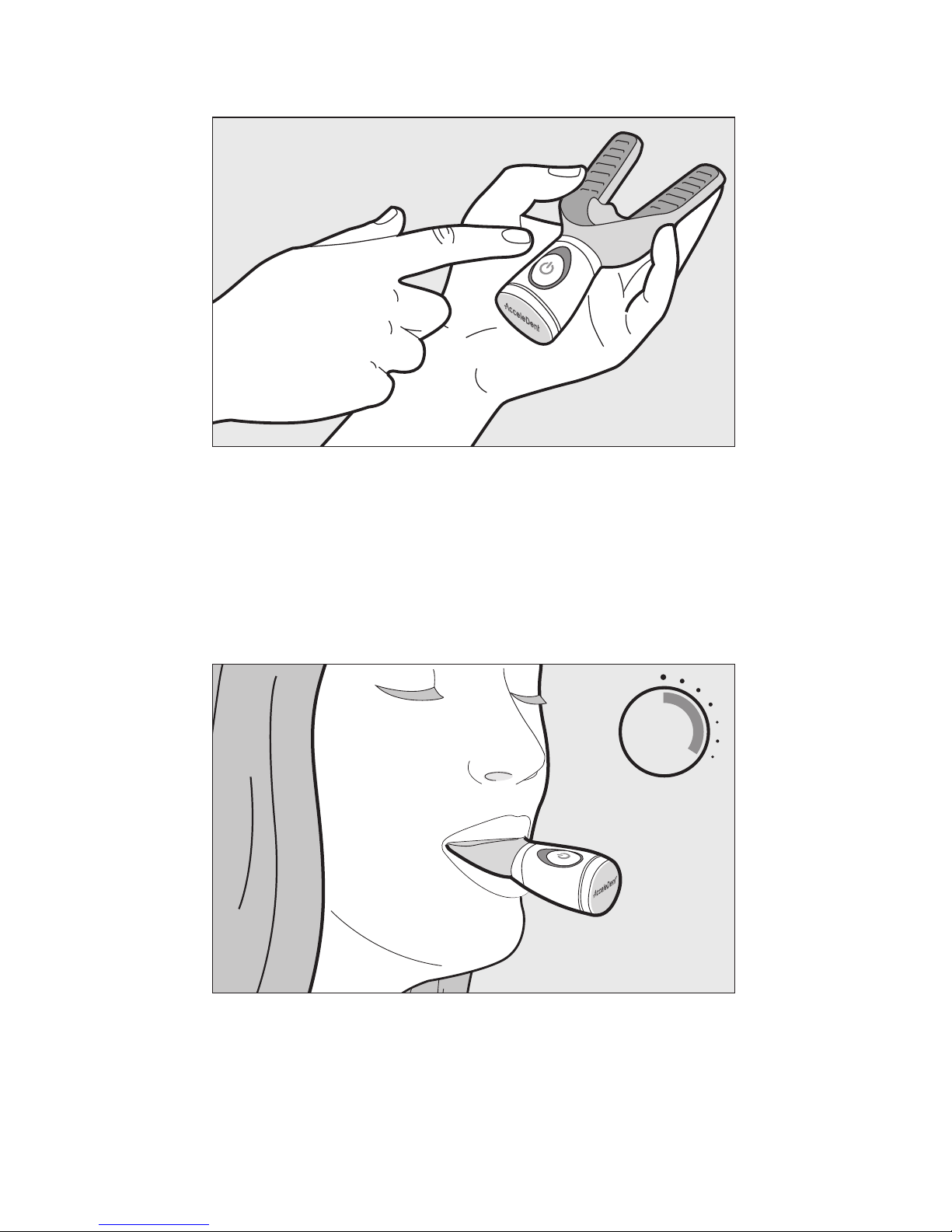
To turn the device on, press the on/off button. The Activator will vibrate
and the status indicator will be solid blue.
2 0
min
Place the mouthpiece in your mouth and bite down gently. After 20
minutes of treatment, the Activator and status indicator light will
automatically turn off. To pause your treatment session up to 5 minutes,
press the on/off button once. During the pause, the status indicator will
pulse blue slowly. The status indicator will blink orange when the battery
is low.

AcceleDent® Optima - Quick Reference Guide 4
ACCELEDENT USE (Continued)
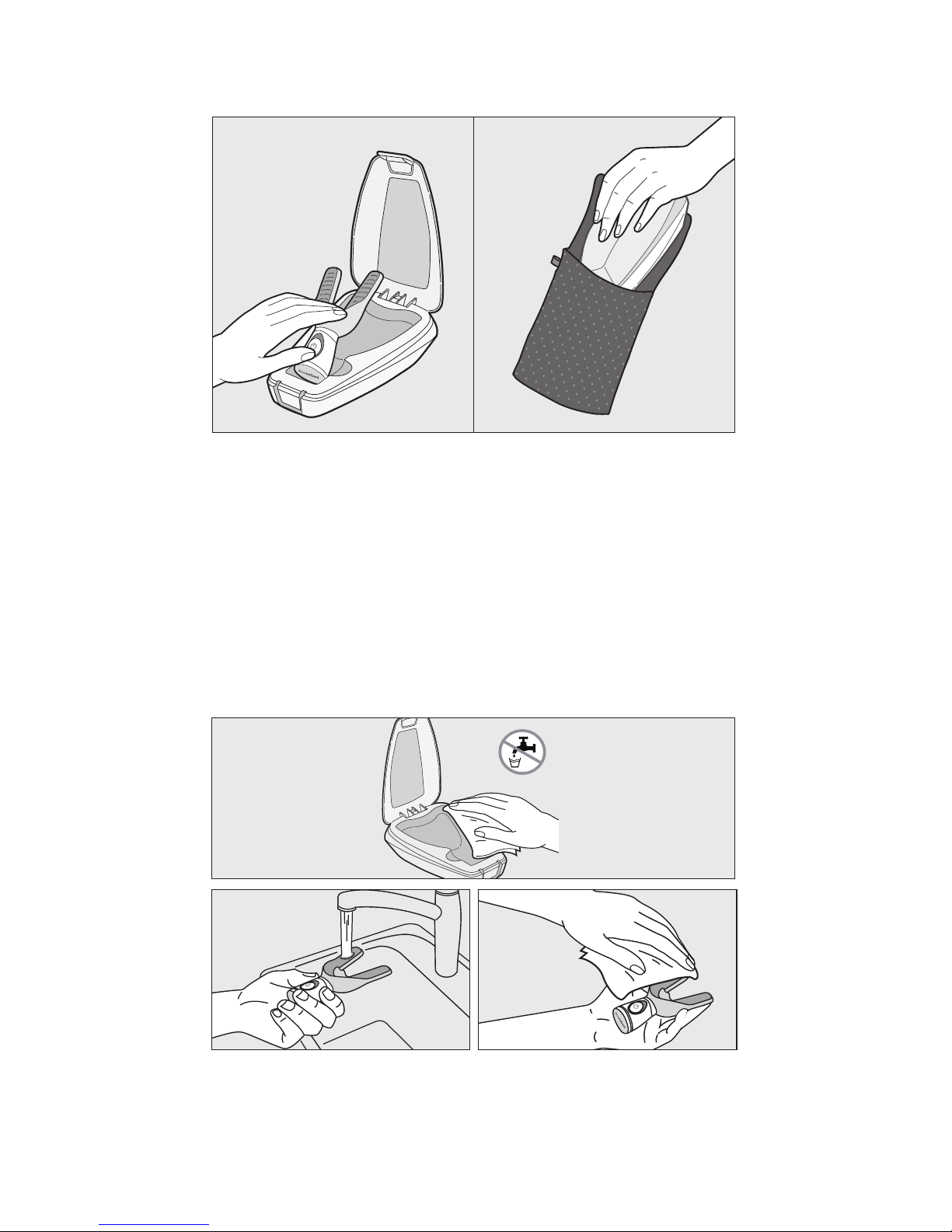
Recharge the Activator after each treatment by returning to the
Charging Case. A Travel Pouch has been provided to store the Charging
Case and accessories when not in use.
CARE
To clean the Charging Case, unplug from power source and wipe inside
and out using a moist cloth and dry with a soft cloth before reconnecting
to power source (DO NOT rinse or submerge Charging Case).
Clean the Mouthpiece with warm running water and wipe with a dry
cloth prior to storage or charging.

AcceleDent® Optima - Quick Reference Guide 5
• Use this product only for its intended use as described in the Quick Reference
Guide and Directions for Use. Please refer to detailed instructions found on
acceledent.com.
• This is a single patient device (one patient to one device).
• This is a prescription device which must be prescribed by an orthodontist or
dentist.
• Contact your orthodontist or dentist if any discomfort, or pain occurs during and
after use of the product.
• Warning: Do not plug the Power Adapter into an outlet with a voltage other than
what is specified on the Power Adapter.
• Warning: Never force the Power Adapter into an outlet.
• Warning: Never use damaged Activator, Charging Case, USB Charging Cable, or
Power Adapter.
• Warning: Do not place or store the device or accessories near any heated
surfaces.
• Warning: Do not place or store the Power Adapter and Charging Case where it
will sit in a pool of water or where it can fall or be pulled into a bathtub, sink, or
toilet. Do not reach for a service if this occurs. Charging Case that has fallen into
water. Unplug immediately and call customer service if this occurs.
• Do not sterilize the product.
• Do not clean components or accessories in the dishwasher.
• Activator is waterproof, but it is recommended that it is not submerged in water
or cleaning solutions for an extended period of time.
• Do not rinse or submerge the entire Charging Case in water.
• Do not attempt to service or perform maintenance on the device. No
modification of the equipment is allowed.
• Note: If the LED is alternating orange and blue, the Activator has reached end of
life. If you are in the middle of a treatment plan, please contact your
orthodontist.
SAFETY, WARNINGS, PRECAUTIONS

AcceleDent® Optima - Quick Reference Guide 6
Solid orange Charging battery
Blinking orange Low battery
Solid blue Active treatment
Solid blue and pulsing vibration Mid-point treatment
Slow pulsing blue Paused treatment
Fading blue to none End of treatment
Alternating orange and blue blinking End of device life
CUSTOMER SERVICE
If you have any questions or comments after reading the enclosed
materials, please contact OrthoAccel Customer Service:
North America: 1-866-866-4919
Email: [email protected]
Online: www.acceledent.com
Please refer to the AcceleDent Directions for Use for IMPORTANT
SAFEGUARDS and detailed instructions found on acceledent.com.
TO INSTALL THE ACCELEDENT FREE COMPANION APP, PLEASE FOLLOW
THE STEPS BELOW:
1. Android™ Device: Search in Android Market or Google Play Store for the
AcceleDent App.
Apple® Device: Search in Apple App Store for the AcceleDent App.
2. Follow specific steps recommended by your device manufacture for
downloading app.
3. Open the app and begin registration by clicking on SIGN UP.
4. Follow prompts within app for set up and linking the Activator.
* OrthoAccel is an independent manufacture and has not been authorized, sponsored, or otherwise approved by Apple
Inc. or Google Inc. Apple is a registered trademark of Apple Inc. in the U.S. and other countries. Google and Android are
trademarks of Google Inc. in the U.S. and other countries.
INDICATORS FOR ACCELEDENT DEVICE

AcceleDent® Optima - Quick Reference Guide 7
TM
FR
GUIDE DE RÉFÉRENCE
UTILISATION PRÉVUE/Indications d’usage
AcceleDent®
Optima
est un accessoire orthodontique conçu pour être
utilisé lors de traitements orthodontiques. Il est utilisé conjointement avec
des appareils orthodontiques tels que des appareillages dentaires et sert
à faciliter les mouvements mineurs des dents antérieures. Son effet sur le
temps de traitement total n’a pas encore été établi. Nous vous conseillons de
parler à votre orthodontiste afin de déterminer l’impact que cet appareil peut
avoir sur votre plan de traitement spécifique.
Contre-indications d’usage
• Utilisation de médicaments pour l’ostéoporose
• Mauvaise hygiène dentaire
• Maladie parodontale qui n’a pas été entièrement circonscrite depuis au
moins 3-4 mois avant le début du traitement
TM
AcceleDent® Optima - Quick Reference Guide 8
CARACTÉRISTIQUES ET COMPOSANTS
7
5
6
2
3
4
1
8
9
1EMBOUT BUCCAL
2ACTIVATEUR
3INTERRUPTEUR ON/OFF
4TÉMOIN LUMINEUX
5BOÎTE DE CHARGEMENT
6PORT DE CHARGE USB
7CÂBLE DE CHARGE USB
8TRANSFORMATEUR
9POCHE DE VOYAGE
UTILISATION DE L’ACCELEDENT
Activer le boîtier de chargement en connectant le câble de chargement
USB à une source de courant électrique. Avant la première utilisation,
placer l’Activateur dans le boîtier de chargement la veille de son utilisation
moins 8 heures. L’indicateur de fonctionnement sur l’Activateur sera de
couleur orange fixe pendant le chargement et il s’éteindra une fois que le
chargement sera complètement terminé.
AcceleDent® Optima - Quick Reference Guide 9
UTILISATION DE L’ACCELEDENT (A Continué)
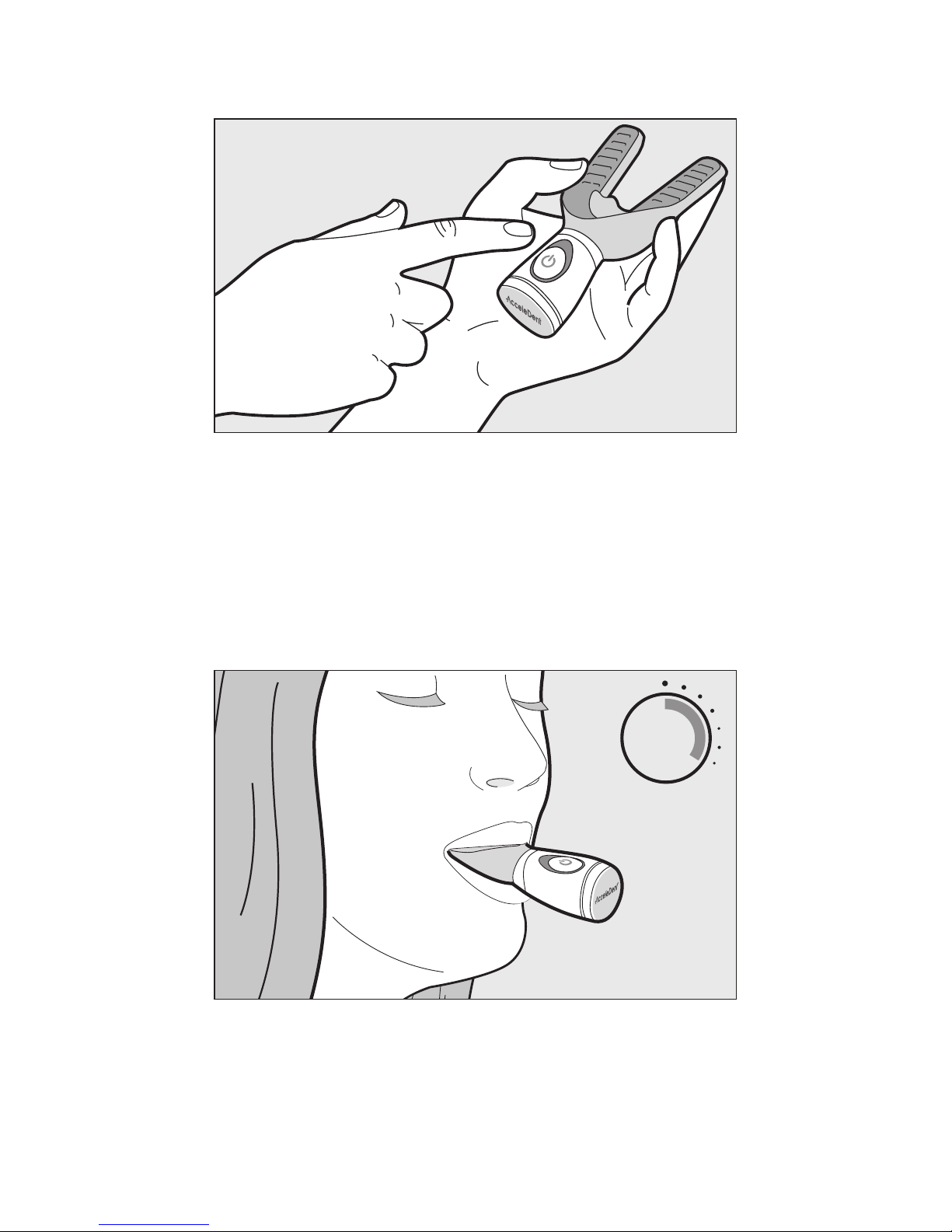
Pour brancher l’appareil, appuyez sur le bouton de l’interrupteur on/off.
L’Activateur va se mettre à vibrer et le témoin lumineux affichera une
lumière bleue fixe.
2 0
min
Placer l’embout buccal dans votre bouche et mordez doucement en abaissant
votre mâchoire supérieure. Après 20 minutes de traitement, l’Activateur et la
lumière du témoin lumineux s’éteindront automatiquement. Pour faire une
pause pendant la session de traitement, jusqu’à 5 minutes, appuyez une fois
sur l’interrupteur on/off. Pendant la pause, le témoin lumineux clignotera en
bleu lentement, Le témoin lumineux clignotera en orange pour indiquer que la
charge de la batterie est faible.
AcceleDent® Optima - Quick Reference Guide 10
UTILISATION DE L’ACCELEDENT (A Continué)
Recharger l’Activateur après chaque traitement en le replaçant dans le
boîtier de chargement. Une poche de voyage est fournie afin de ranger le
boîtier de chargement ainsi que les accessoires quand ils ne sont pas utilisés.
Pour nettoyer le boîtier de chargement, le débrancher de la source de
courant et l’essuyer à l’intérieur et à l’extérieur à l’aide d’un tissu humide et
le sécher avec un tissu doux et sec avant de le reconnecter à une source de
courant (ne pas rincer ou immerger le boîtier de chargement dans l’eau).
PRÉCAUTIONS
Nettoyer l’embout buccal à l’eau courante chaude et l’essuyer avec un
tissu sec avant de le ranger ou de le charger.
Other manuals for Optima
2
Table of contents
Languages:
Other AcceleDent Medical Equipment manuals
Popular Medical Equipment manuals by other brands







Getinge
Getinge Arjohuntleigh Nimbus 3 Professional Instructions for use

Mettler Electronics
Mettler Electronics Sonicator 730 Maintenance manual

Pressalit Care
Pressalit Care R1100 Mounting instruction

Denas MS
Denas MS DENAS-T operating manual

bort medical
bort medical ActiveColor quick guide

AccuVein
AccuVein AV400 user manual





