manuals.online logo
Brands
  1. Home
  2. •
  3. Brands
  4. •
  5. ADTRAN
  6. •
  7. Multiplexer
  8. •
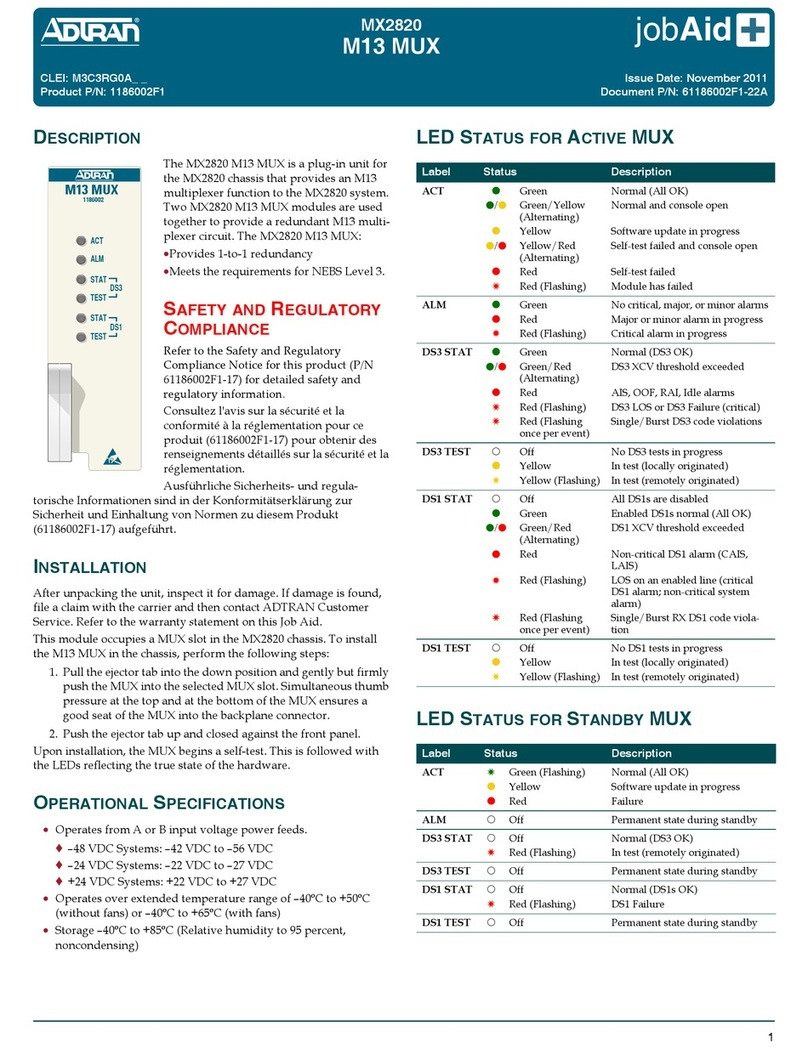
  9. ADTRAN MX2820 User manual

ADTRAN MX2820 User manual

Other manuals for MX2820

6

This manual suits for next models

1

Other ADTRAN Multiplexer manuals

ADTRAN Total Access 1248 Instruction Manual

ADTRAN

ADTRAN Total Access 1248 Instruction Manual

ADTRAN TDU 120e User manual

ADTRAN

ADTRAN TDU 120e User manual

ADTRAN TOTAL ACCESS MX2800 User manual

ADTRAN

ADTRAN TOTAL ACCESS MX2800 User manual

ADTRAN OPTI-6100 LMX User manual

ADTRAN

ADTRAN OPTI-6100 LMX User manual

ADTRAN OPTI-6100 LMX User manual

ADTRAN

ADTRAN OPTI-6100 LMX User manual

ADTRAN OC-3 Installation instructions

ADTRAN

ADTRAN OC-3 Installation instructions

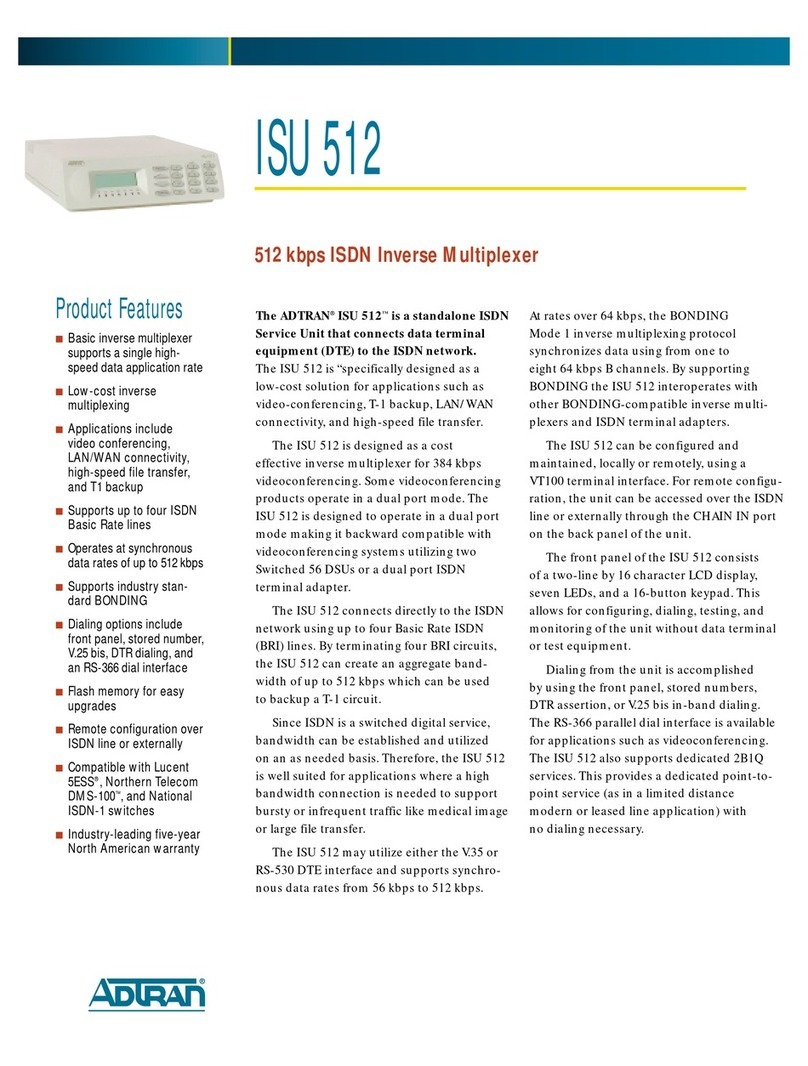
ADTRAN ISU 512 User manual

ADTRAN

ADTRAN ISU 512 User manual

ADTRAN T3SU 300 User manual

ADTRAN

ADTRAN T3SU 300 User manual

ADTRAN MX3216 User manual

ADTRAN

ADTRAN MX3216 User manual

ADTRAN Total Access 3000 Instruction Manual

ADTRAN

ADTRAN Total Access 3000 Instruction Manual

ADTRAN Total Access OC-3 L3 Instruction Manual

ADTRAN

ADTRAN Total Access OC-3 L3 Instruction Manual

ADTRAN 1200 User manual

ADTRAN

ADTRAN 1200 User manual

ADTRAN 1202076L1 User manual

ADTRAN

ADTRAN 1202076L1 User manual

ADTRAN MX2800 STS-1 Installation instructions

ADTRAN

ADTRAN MX2800 STS-1 Installation instructions

ADTRAN TSU 120 User manual

ADTRAN

ADTRAN TSU 120 User manual

ADTRAN Total Access 3000 Instruction Manual

ADTRAN

ADTRAN Total Access 3000 Instruction Manual

ADTRAN MX2820 User manual

ADTRAN

ADTRAN MX2820 User manual

ADTRAN Frameport 768 User manual

ADTRAN

ADTRAN Frameport 768 User manual

ADTRAN MX2820 User guide

ADTRAN

ADTRAN MX2820 User guide

ADTRAN MX2820 M13 MUX Owner's manual

ADTRAN

ADTRAN MX2820 M13 MUX Owner's manual

ADTRAN TSU 600 Installation instructions

ADTRAN

ADTRAN TSU 600 Installation instructions

ADTRAN 1200287L1 User manual

ADTRAN

ADTRAN 1200287L1 User manual

ADTRAN T3SU 300 User manual

ADTRAN

ADTRAN T3SU 300 User manual

ADTRAN ISU 512E User manual

ADTRAN

ADTRAN ISU 512E User manual

Popular Multiplexer manuals by other brands

Steren CCTV-908 user manual

Steren

Steren CCTV-908 user manual

Pickering SIMRC 1050 Getting started

Pickering

Pickering SIMRC 1050 Getting started

Fiber Options S708V instruction manual

Fiber Options

Fiber Options S708V instruction manual

Campbell AM416 instruction manual

Campbell

Campbell AM416 instruction manual

Paradyne SIM2000 installation instructions

Paradyne

Paradyne SIM2000 installation instructions

Panasonic WJFS616 - SWITCHER Operating	 instruction

Panasonic

Panasonic WJFS616 - SWITCHER Operating instruction

Lanex TM-77 operating manual

Lanex

Lanex TM-77 operating manual

Quark-Elec QK-A035 Setup guide

Quark-Elec

Quark-Elec QK-A035 Setup guide

Elo TouchSystems E247 Operation manual

Elo TouchSystems

Elo TouchSystems E247 Operation manual

Paradyne Hotwire 8786 installation instructions

Paradyne

Paradyne Hotwire 8786 installation instructions

Bosch VSS8394/01T operating manual

Bosch

Bosch VSS8394/01T operating manual

RFL Electronics 9508D UCC instruction manual

RFL Electronics

RFL Electronics 9508D UCC instruction manual

ShipModul MiniPlex-AIX NMEA-0183 manual

ShipModul

ShipModul MiniPlex-AIX NMEA-0183 manual

GE StoreSafe SDVR-10 user manual

GE

GE StoreSafe SDVR-10 user manual

Pickering 40-667C user manual

Pickering

Pickering 40-667C user manual

Pickering 40-613 user manual

Pickering

Pickering 40-613 user manual

Ikegami MVF-90 instruction manual

Ikegami

Ikegami MVF-90 instruction manual

RFL Electronics eXmux 3500 quick start guide

RFL Electronics

RFL Electronics eXmux 3500 quick start guide

manuals.online logo
manuals.online logoBrands
  • About & Mission
  • Contact us
  • Privacy Policy
  • Terms and Conditions

Copyright 2025 Manuals.Online. All Rights Reserved.

jobAid
1
DESCRIPTION
The ADTRAN®MX2820 Clock Card is a plug-in
card, which generates a timing signal synchro-
nized to either of two external BITS clock refer-
ences. If both BITS clock references fail, the Clock
Card meets Sonet Minimum Clock (SMC)
holdover requirements to produce the clock
reference. This signal is used by the MX2820 to
synchronize its STS-1 transmit. Two Clock Cards
provide 1-to-1 redundancy in the MX2820 system.
FEATURES
The MX2820 Clock Card has the following features:
•Provides a redundant SMC source with clock holdover to the
MX2820 STS-1 Multiplexer
•Communicates to the redundant Clock Card though an
asynchronous data link directly between the two cards
•Provides another direct link to the redundant card for
protection management
•Maintains full duplex link to the System Controller Unit (SCU)
for management, alarm notification, and card provisioning
•Displays status using a single front panel LED, labeled ACT
•Supports downloading of FLASH program data to the active
and protection card simultaneously or individually
•Meets NEBS Level 3 requirements
•Interfaces to backplane through a 24-pin Future Bus connector
•Supports TL1 and SNMP
INSTALLATION
After unpacking the unit, inspect it for damage. If damage is
found, file a claim with the carrier and then contact Customer
Service. For more information, refer to the warranty.
This module occupies a Clock Card slot in the MX2820 chassis.
Follow these steps to install the Clock Card:
1. Pull the ejector tab into the down position.
2. Gently but firmly push the Clock Card into the selected
Clock Card slot.
3. Apply thumb pressure at the top and at the bottom of the
unit to ensure a good seat of the Clock Card into the
backplane connector.
4. Push the ejector tab up and closed against the front panel.
Upon installation, the Clock Card begins a self-test. When the
self-test is complete, the LEDs indicate the current status of the
hardware.
1186004
CLK
ACT
MX2820
Clock Card
LED Status for Active MX2820 Clock Card
The following table provides the LED indications for the active
card in a redundant pair.
LED Status for Standby MX2820 Clock Card
The following table provides the LED indications for the standby
card in a redundant pair.
OPERATIONAL SPECIFICATIONS
•Operates from –42 VDC to –56 VDC input voltage power feeds
•Operational temperature range of 0°C to +50°C with fans
•Storage –40°C to +85°C; Relative humidity to 95 percent,
noncondensing
SAFETY AND REGULATORY COMPLIANCE
Refer to the Safety and Regulatory Compliance Notice for this
product (P/N 61186004F1-17) for detailed safety and regulatory
information.
Consultez l'avis sur la sécurité et la conformité à la réglemen-
tation pour ce produit (61186004F1‐17) pour obtenir des
renseignements détaillés sur la sécurité et la réglementation.
Ausführliche Sicherheits- und regulatorische Informationen sind
in der Konformitätserklärung zur Sicherheit und Einhaltung von
Normen zu diesem Produkt (61186004F1‐17) aufgeführt.
Label Status Description
ACT z
z
2
z
2
2
Green
Yellow
Yellow Flashing
Red
Red Flashing Slow
Red Flashing Fast
Normal (all OK)
Software update in progress
Console open
Major or Minor alarm in progress
Clock Card has failed
Critical alarm in progress
Label Status Description
ACT z
z
z
Green
Yellow
Red
Normal (all OK)
Software update in progress
Self-test failure
CLEI: M3CUX30B_ _
Product P/N: 1186004F1
Issue Date: November 2011
Document P/N: 61186004F1-22A

CAUTION!
SUBJECT TO ELECTROSTATIC DAMAGE
OR DECREASE IN RELIABILITY
HANDLING PRECAUTIONS REQUIRED
Warranty: ADTRAN will replace or repair this product within the warranty period if it does not
meet its published specifications or fails while in service. Warranty information can be
found online at www.adtran.com/warranty.
©2011 ADTRAN, Inc. All Rights Reserved.
ADTRAN CUSTOMER CARE:
From within the U.S. 1.800.726.8663
From outside the U.S. +1 256.963.8716
PRICING AND AVAILABILITY 1.800.827.0807
*61186004F1-22A*
PROVISIONING
MX2820 Clock Card provisioning is available through the MX2820 System menu by selecting Access Modules. Type C, and press ENTER
to access the active MX2820 Clock Card.
The menu tree below illustrates the options and default settings for the MX2820 Clock Card.
1. Configuration
2. Provisioning
3. Status
Clock Card
Main Menu
3. Protection
Note: An asterisk (*) indicates default setting
2. Service States
4. Save Provisioning
CLEI Code
Serial Number
Part Number
Code Checksum
Code Version
Boot Version
Boot Checksum
Self Test
1. Timing Mode
3. Termination
2. Timing Type
6. Card Reset
1. Clock Interface
5. Restore Factory Defaults
7. Auto Save
8. Card Pair ID
2. Enabled*
1. Disabled
1. Perform Manual Switch
2. Perform Manual Switch From Primary Refrence
3. Automatic Clock Card Switch
4. Automatic Clock Reference Switch
5. Minimum Switching Period
6. Maximum Switching Threshold
1. Card CLK A Equipment Provisioned State
Card CLK A Equipment Functional State
2. Card CLK B Equipment Provisioned State
Card CLK B Equipment Functional State
3. Primary Clock Failure Alarm
4. Secondary Clock Failure Alarm
1. External Timing*
2. Force Hold Over
1. Disabled
2. Enabled
1. SF/ESF*
2. All Ones
Shelf: 1 Slot: CLK A ADTRAN MX2820 System 01/23/04 10:09
Unacknowledged Alarms: NONE TID: ADTRAN MX2820
Status
Clock Status, Active
Master = CLK A
Clock Refrence = Primary
PRI Clock Status= OK
SEC Clock Status= OK
CTL Status = Norm
Card Pair State
Alarm = None
Protection = Circuit
Card Comm. = OK
Slot CLK A
Status = Active
Slot CLK B
Status = Standby
Selection: '?' - System Help Screen
1. Disabled
2. Enabled*
1. Disabled
2. Enabled*