manuals.online logo
Brands
  1. Home
  2. •
  3. Brands
  4. •
  5. Altman
  6. •
  7. Spotlight
  8. •
  9. Altman Phoenix Series User manual

Altman Phoenix Series User manual

Other manuals for Phoenix Series

1

Other Altman Spotlight manuals

Altman SS-SP*-100 Quick guide

Altman

Altman SS-SP*-100 Quick guide

Altman Helios Series User manual

Altman

Altman Helios Series User manual

Altman PHX Series User manual

Altman

Altman PHX Series User manual

Altman AFS-700 Instruction Manual

Altman

Altman AFS-700 Instruction Manual

Altman AFS-500 Instruction Manual

Altman

Altman AFS-500 Instruction Manual

Altman Ellipsoidal Firmware update

Altman

Altman Ellipsoidal Firmware update

Popular Spotlight manuals by other brands

Foscam S41/SPC user manual

Foscam

Foscam S41/SPC user manual

EuroLite LED SLS-144 UV Floor Spot user manual

EuroLite

EuroLite LED SLS-144 UV Floor Spot user manual

Guangzhou Yinhe Lighting&Sound Equipment Factory NE-204 user manual

Guangzhou Yinhe Lighting&Sound Equipment Factory

Guangzhou Yinhe Lighting&Sound Equipment Factory NE-204 user manual

LIVARNO home 375304 2101 Installation, operating and safety information

LIVARNO home

LIVARNO home 375304 2101 Installation, operating and safety information

Leviton Ellipsoid 5/50 user guide

Leviton

Leviton Ellipsoid 5/50 user guide

Vector SL3AKV instruction manual

Vector

Vector SL3AKV instruction manual

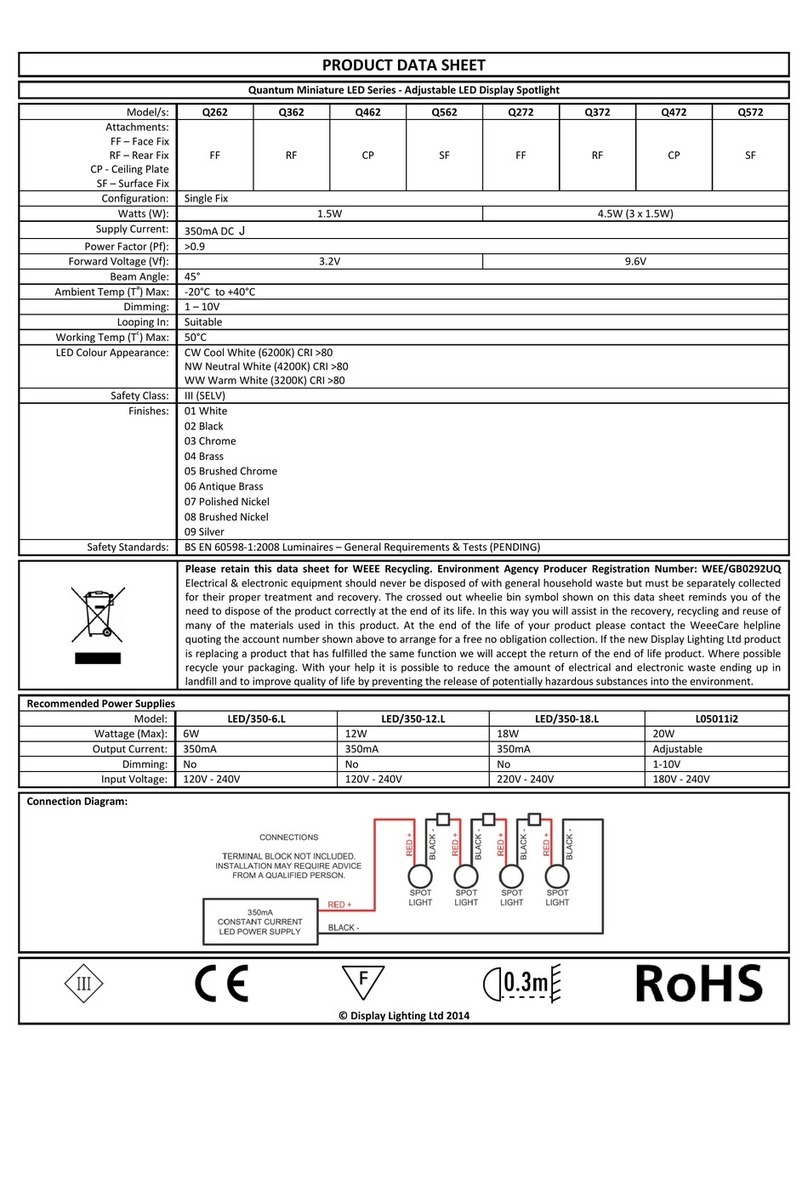
Quantum Q262 Product data sheet

Quantum

Quantum Q262 Product data sheet

EUROSPOT C51 instruction manual

EUROSPOT

EUROSPOT C51 instruction manual

DTS MINI BRICK ARC user manual

DTS

DTS MINI BRICK ARC user manual

Federal Signal Corporation VISIBEAM II Installation, operation and maintenance instructions

Federal Signal Corporation

Federal Signal Corporation VISIBEAM II Installation, operation and maintenance instructions

ACME LED-MS350B user manual

ACME

ACME LED-MS350B user manual

EuroLite Akku flat light 1 user manual

EuroLite

EuroLite Akku flat light 1 user manual

Commercial Electric SPTM-1401 Use and care guide

Commercial Electric

Commercial Electric SPTM-1401 Use and care guide

Vision & Control SLB-500-W5K7-P-SL Instructions for use

Vision & Control

Vision & Control SLB-500-W5K7-P-SL Instructions for use

Craftsman CMXLSB10 instruction manual

Craftsman

Craftsman CMXLSB10 instruction manual

Cameo CLQS40WW user manual

Cameo

Cameo CLQS40WW user manual

EverStart maxx SL5W09E quick start guide

EverStart

EverStart maxx SL5W09E quick start guide

Philips 6919114PH brochure

Philips

Philips 6919114PH brochure

manuals.online logo
manuals.online logoBrands
  • About & Mission
  • Contact us
  • Privacy Policy
  • Terms and Conditions

Copyright 2025 Manuals.Online. All Rights Reserved.

Altman Lighting, Inc. 57 Alexander St., Yonkers NY, 10701 1-800-4-ALTMAN
SPECIFICATIONS SUBJECT TO CHANGE WITHOUT NOTICE. COPYRIGHT 2012© ALTMAN LIGHTING, INC. ALL RIGHTS RESERVED.
Lighting
BRINGING IMAGINATION TO LIGHT
Phoenix
Series
Ellipsoidal
Spotlight
Caution: Read and understand these entire instructions
before proceeding.
Caution: Always wear safety goggle and gloves when
servicing this equipment.
Caution: Disconnect unit from electrical supply before initial
lamp installation, re-lamping or servicing for any reason.
Caution: DO NOT expose unit to rain or use in damp or wet
locations. Always use indoors.
Caution: This luminaire is a source of intense heat and is not
intended for residential use. To reduce risk of re or injury,
avoid contact by persons or materials. If luminaire is hot,
allow to cool before re-lamping.
Caution: DO NOT touch glass portion of lamp with your hands.
Agents such as sodium, grease or oil from your ngers may be
transferred to the glass wall. The contaminants can cause the
lamp to rupture or can greatly reduce the performance and
life of the lamp. If accidentally soiled, immediately clean the
lamp with a soft, clean and lint free cloth soaked in methylated
spirits (denatured alcohol), then polish with a dry, soft, clean
and lint free cloth.
Caution: DO NOT allow materials to come in contact with
hot lamp. Protect lamp from abrasions and scratches. These
lamps reach very high temperatures (as high as 1740° F
[950°C]). Under certain circumstances, internal or external
inuences may cause lamp to rupture.
/$03&$3
$66(0%/<
/80,1$,5(%2'<
6+877(5527$7,21
/2&..12%
'523,1,5,66/27
<2.(/2&.,1*
.12%
6+877(5$66(0%/<
)2&86/2&.,1*
.12%
/(1678%(
<2.(
)/,33(5
&2/25)5$0(
$&&(6625<+2/'(5
6+877(56
3$77(51/2&.,1*
/(9(5
INTRODUCTION
Congratulations on purchasing one of the nest
lighting instruments available today! Before using
your Phoenix Ellipsoidal Spotlight, be sure to read all
of the instructions in this manual. SAVE THESE INSTRUCTIONS FOR FUTURE USE!
SAFETY INSTRUCTIONS
Altman Lighting, Inc. 57 Alexander St., Yonkers NY, 10701 1-800-4-ALTMAN
SPECIFICATIONS SUBJECT TO CHANGE WITHOUT NOTICE. COPYRIGHT 2012© ALTMAN LIGHTING, INC. ALL RIGHTS RESERVED.
CAUTION: Do not use any lamps exceeding 750W,
or permanent damage will result!
CAUTION: DO NOT touch the glass portion of the
lamp with your hands!
CAUTION: Disconnect xture before re-lamping.
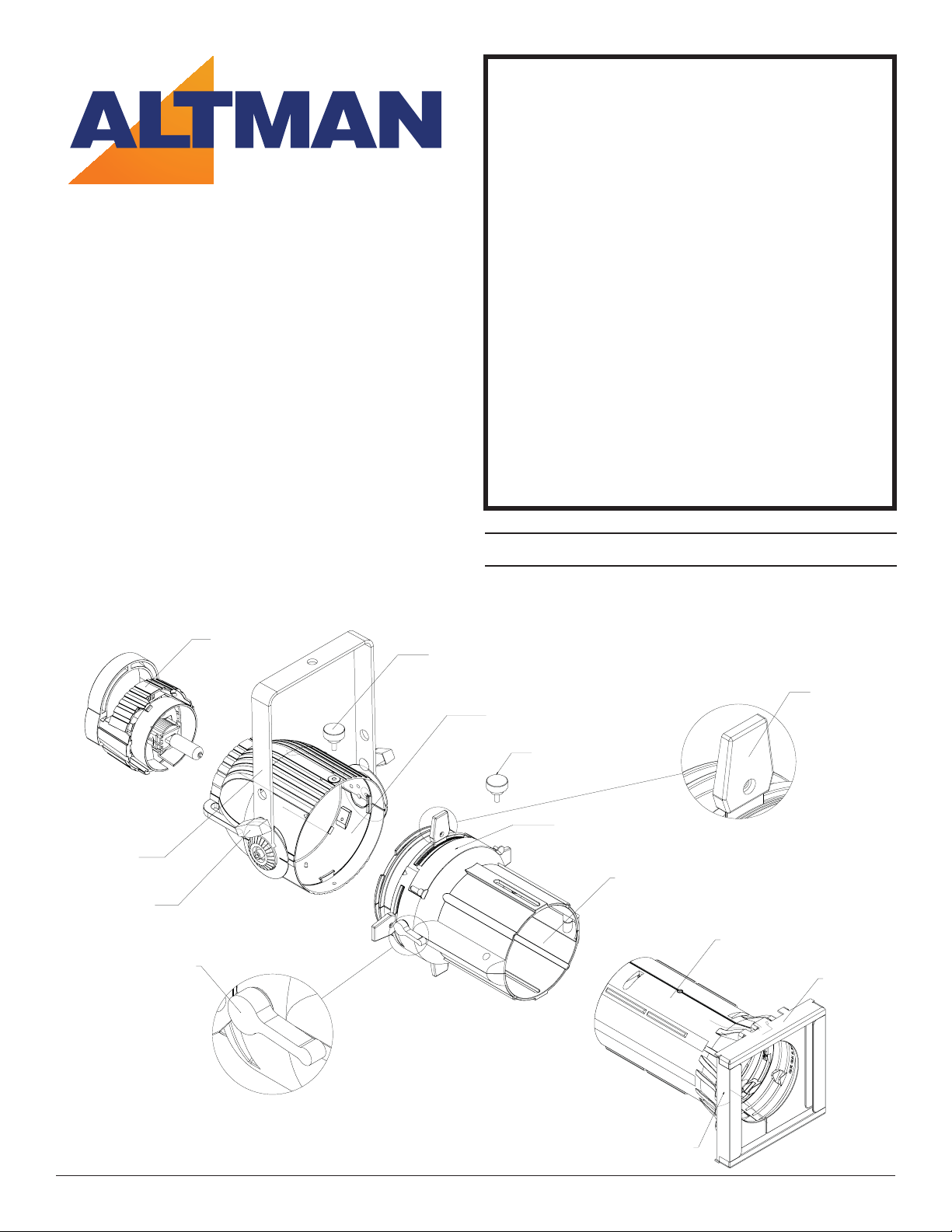
1. Loosen cap screw until it spins freely.
2. Pull lamp cap straight out from the luminaire body.
3. With protective wrap still in place, grasp lamp at base and
gently push into socket until rmly seated.
4. Remove protective wrap from bulb and replace lamp cap
into luminaire body.
5. Tighten cap screw.
INSTALLING THE LAMP
USING SHORT YOKE POSITION
1. Remove T-Handle and its associated hardware.
2. Remove yoke bolts, cup washers and pivot covers. Note:
use a 1/4” hex head wrench to remove yoke bolts.
3. Stretch yoke and snap it into short yoke position.
4. Replace pivot covers, cup washers and yoke bolts.
5. Replace T-Handle into square hole, keeping the washer
between handle and yoke.
ADJUSTING YOKE
1. With one hand on ring handle to hold unit, loosen T-
Handle.
2. Tilt unit to desired angle. Note: Reference angles have
been molded on the pivot cover to make adjustments
easier and more precise.
3. Tighten T-Handle to secure xture in place.
ROTATING SHUTTER ASSEMBLY
1. Loosen shutter rotation lock knob on either side of the
luminaire.
2. Rotate shutter assembly 360° in either direction.
3. Tighten shutter rotation lock knobs to secure shutter as-
sembly.
4. To lock the shutters in place, rotate the Shutter Lock Lever
until proper tension is applied to shutters.
INSTALLING C-CLAMP
The C-clamp is used to mount the luminaire to a pipe hang
position. The C-clamp attaches to the top of the yoke via
the 1/2” bolt provided with the C-clamp. Be sure to keep the
washer between the bolt head and the yoke.
LAMP
CAP
SCREW
T-Handles
Lens
Tube
Shutter
Handle
Shutter
Assembly
Cap Assembly
Shutter Rotation
Lock Knob
Short Yoke
Position
Yoke bolts
Cup Washers
Pivot Covers
Shutter
Lock
Lever
Altman Lighting, Inc. 57 Alexander St., Yonkers NY, 10701 1-800-4-ALTMAN
SPECIFICATIONS SUBJECT TO CHANGE WITHOUT NOTICE. COPYRIGHT 2012© ALTMAN LIGHTING, INC. ALL RIGHTS RESERVED.
ACCESSORY RETAINING LATCH
This unique retaining hatch is designed for positive locking and
manual return.
1. Slide Clip to right side.
2. Swing latch back.
3. Insert accessory.
4. Close latch. Make sure latch locks in place.
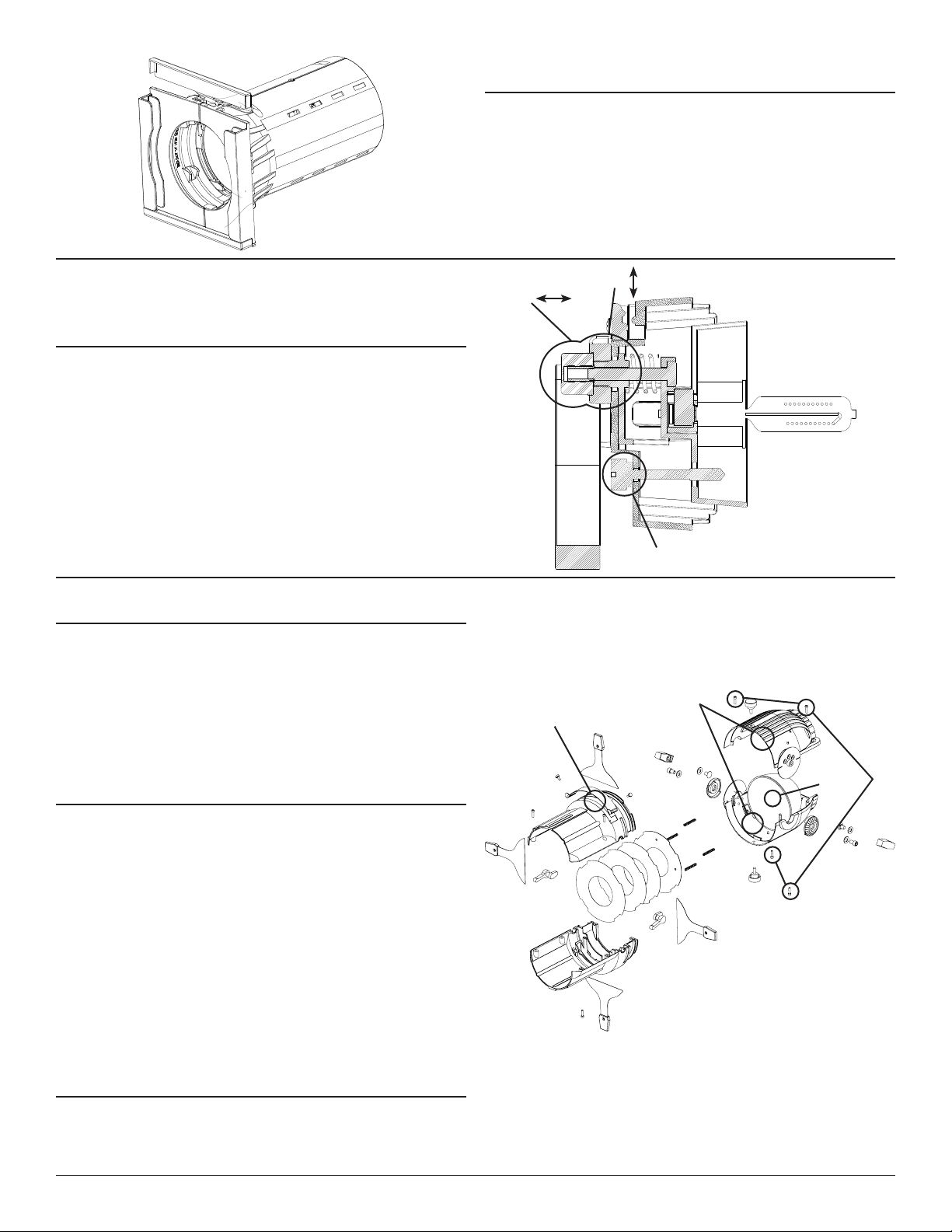
ADJUSTING LAMP
1. With power on and all four shutters open, shine light onto a
surface perpendicular to xture and adjust for sharp focus.
2. Rotate distance knob all the way to the left to put unit into
peak focus.
3. Loosen centering knob slightly and adjust so the hot-spot is
in the center of the beam of light. Tighten centering knob
to lock lamp in place.
4. Turn distance knob to the right until desired eld is achieved.
The more you turn to the right, the atter the eld will get.
CLEANING THE REFLECTOR
1. Remove lamp cap from luminaire.
2. Remove yoke from luminaire.
3. Remove shutter assembly rotation lock knobs.
4. Remove the four screws from the reector housing.
5. Lift othe top half of the reector housing.
6. Dampen a clean, lint-free cloth with denatured alcohol and
gently wipe reector clean. Align reector with locating
springs, replace luminaire body top.
7. Re-install four screws in luminaire body. WARNING: never
use glass or window cleaner or any abrasive material to
clean the reector. Use of these items will damage the
reector.
PATTERN PROJECTION
The pattern holder slot accepts standard ETC Source 4 size
pattern holders. The image of the pattern can be rotated 360°
in either direction. The use of a donut will sharpen the image.
DROP IN IRIS SLOT
This larger slot can accept either a drop-in iris or a motorized
pattern device (gobo rotator, yo-yo etc). The slot has a retractable
cover to prevent light leak when not in use. When a device
is used, the cover should be closed to the edge of the device
placed in the slot. When a drop-in iris is used, always place it so
the at side is facing the shutters.
Cap
Screw
Distance
Knob
Centering
Knob
Reector
Reector
Housing
Screws
Reector
Housing
Pattern
Slot
Altman Lighting, Inc. 57 Alexander St., Yonkers NY, 10701 1-800-4-ALTMAN
SPECIFICATIONS SUBJECT TO CHANGE WITHOUT NOTICE. COPYRIGHT 2012© ALTMAN LIGHTING, INC. ALL RIGHTS RESERVED.
INSTALLING SHUTTER PLATES
1. Pressure Plate (completely at): Install such that the tabs are
on the top and bottom and sides.
2. Iris and spring plate. Install so that the (4) studs face the
back of the unit.
SHUTTERS
1. 5IFTIVUUFSTBSFOPUSFNPWBCMFXJUIPVUEJTTFNCMJOHUIFVOJU
2. $BSFNVTUCFHJWFOUPNBLFTVSFFBDIPGUIFGPVSTIVUUFSTTUBZ
JOUIFJSQSPQFSQPTJUJPOTJOCFUXFFOUIFTIVUUFSQMBUFT

CLEANING/REPLACING LENSES
1. Remove focus lock knob, push in safety pin and slide lens
barrel out.
2. Place barrel on a surface so that the two halves are oriented
as the top and bottom.
3. Remove lower accessory cover with (2) screws.
4. Remove top latch cover with (2) screws.
5. Remove (4 ) barrel screws, one on each side.
6. Carefully remove top half of the barrel.
7. Replace or clean lenses with mild soap and water, and a
clean, lint-free cloth.
8. Replace top half of barrel, top latch cover, bottom cover and
re-install screws.
9. Slide lens barrel back into unit and replace focus lock knobs.
WARNING: Never use glass or window cleaner or any abrasive material to clean
a lens. These types of cleaners will stain the lens surface. Abrasive materials will
damage the surface of the lens.
50° (4.5 X 6) 36° (6 X 9) 26° (6 X 12) 19° (6 X 16)
Top latch cover
Barrel screws
Lens retainer
rings
Lower accessory
cover
Lens
Shutter
Plates
Plate
Studs
Plate
Stud
Springs