manuals.online logo
Brands
  1. Home
  2. •
  3. Brands
  4. •
  5. Altronix
  6. •
  7. Power Supply
  8. •
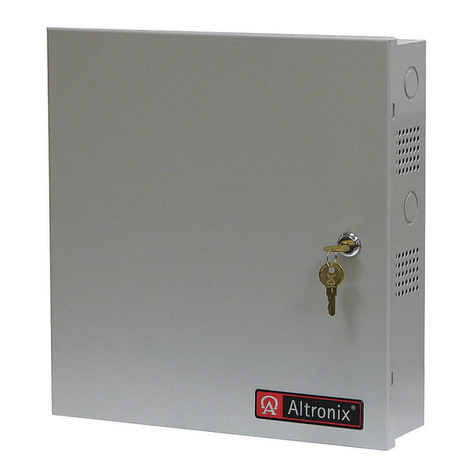
  9. Altronix AL175ULX User manual

Altronix AL175ULX User manual

Other Altronix Power Supply manuals

Altronix ALTV615DC44ULM User manual

Altronix

Altronix ALTV615DC44ULM User manual

Altronix eFlow3NV Series User manual

Altronix

Altronix eFlow3NV Series User manual

Altronix SMPWP Series User manual

Altronix

Altronix SMPWP Series User manual

Altronix SMP7 User manual

Altronix

Altronix SMP7 User manual

Altronix ALTV248ULHi User manual

Altronix

Altronix ALTV248ULHi User manual

Altronix ALTV2432300UL3 User manual

Altronix

Altronix ALTV2432300UL3 User manual

Altronix Maximal FV Series User manual

Altronix

Altronix Maximal FV Series User manual

Altronix TROVE DMP 734 User manual

Altronix

Altronix TROVE DMP 734 User manual

Altronix ALTV248 Series User manual

Altronix

Altronix ALTV248 Series User manual

Altronix AL600X220 Series User manual

Altronix

Altronix AL600X220 Series User manual

Altronix ALTV244UL3 Series User manual

Altronix

Altronix ALTV244UL3 Series User manual

Altronix OLS20 User manual

Altronix

Altronix OLS20 User manual

Altronix AL1012X220 Series User manual

Altronix

Altronix AL1012X220 Series User manual

Altronix OLS75 User manual

Altronix

Altronix OLS75 User manual

Altronix TROVE T1RAL13F8P8 User manual

Altronix

Altronix TROVE T1RAL13F8P8 User manual

Altronix R615DC1016CB User manual

Altronix

Altronix R615DC1016CB User manual

Altronix AL1012X220 Series User manual

Altronix

Altronix AL1012X220 Series User manual

Altronix R1224DC68220 Series User manual

Altronix

Altronix R1224DC68220 Series User manual

Altronix OLS180220 User manual

Altronix

Altronix OLS180220 User manual

Altronix Maximal FD Series User manual

Altronix

Altronix Maximal FD Series User manual

Altronix LPS3WP12220 User manual

Altronix

Altronix LPS3WP12220 User manual

Altronix VertiLine563V User manual

Altronix

Altronix VertiLine563V User manual

Altronix SMP7PM User manual

Altronix

Altronix SMP7PM User manual

Altronix MAXIMAL FIT MaxFit E Series User manual

Altronix

Altronix MAXIMAL FIT MaxFit E Series User manual

Popular Power Supply manuals by other brands

Videx 520MR Installation instruction

Videx

Videx 520MR Installation instruction

Poppstar 1008821 Instructions for use

Poppstar

Poppstar 1008821 Instructions for use

TDK-Lambda LZS-A1000-3 Installation, operation and maintenance manual

TDK-Lambda

TDK-Lambda LZS-A1000-3 Installation, operation and maintenance manual

TDK-Lambda 500A instruction manual

TDK-Lambda

TDK-Lambda 500A instruction manual

Calira EVS 17/07-DS/IU operating instructions

Calira

Calira EVS 17/07-DS/IU operating instructions

Monacor PS-12CCD instruction manual

Monacor

Monacor PS-12CCD instruction manual

VOLTIMA MagicBox 15 Installation and operating instructions

VOLTIMA

VOLTIMA MagicBox 15 Installation and operating instructions

Miller Auto Deltaweld 452 owner's manual

Miller

Miller Auto Deltaweld 452 owner's manual

BCP PUOUBK How to install

BCP

BCP PUOUBK How to install

HC 2210 manual

HC

HC 2210 manual

Agilent Technologies 6032A Service manual

Agilent Technologies

Agilent Technologies 6032A Service manual

Radial Engineering SB-48UB user guide

Radial Engineering

Radial Engineering SB-48UB user guide

Puls CT5.241 installation manual

Puls

Puls CT5.241 installation manual

OCZ ZX1250W Technical specifications

OCZ

OCZ ZX1250W Technical specifications

iseg ECH 238 manual

iseg

iseg ECH 238 manual

Agilent Technologies 6631B Service manual

Agilent Technologies

Agilent Technologies 6631B Service manual

Power XXL A Series instruction manual

Power

Power XXL A Series instruction manual

HP 6200B Operating and service manual

HP

HP 6200B Operating and service manual

manuals.online logo
manuals.online logoBrands
  • About & Mission
  • Contact us
  • Privacy Policy
  • Terms and Conditions

Copyright 2025 Manuals.Online. All Rights Reserved.

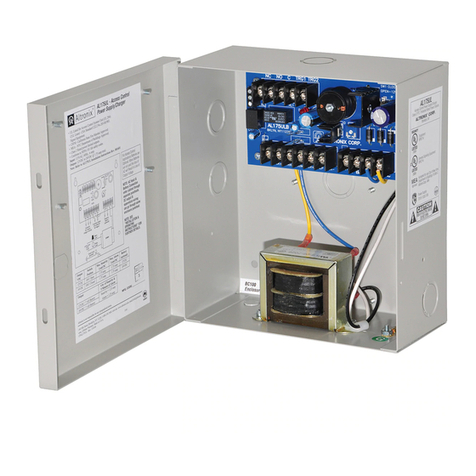
Overview:
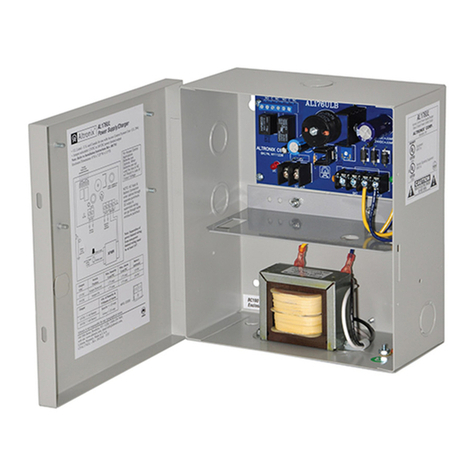
The AL175ULX is a power limited power supply/charger that will convert 115VAC / 60Hz input, into two individually
PTC protected 12VDC or 24VDC outputs, (see specifications). It is intended for use in applications requiring UL Listing
for Access Control System Units (UL 294) and applications requiring an interface with Fire Alarm Control Panels.
Specifications:
Power Supply Output Specifications:
Output VDC Switch Position Max. Stand-by Load DC Max. Alarm Load DC Battery (optional)
12VDC SW1 Open 1.75 amp 1.75 amp 12VDC
24VDC SW1 Closed 1.75 amp 1.75 amp 24VDC
Stand-by Specifications:
Output 4 hr. of Stand-by &
5 Minutes of Alarm
12VDC / 7 AH Battery Stand-by = 1.25 amp
24VDC / 7 AH Battery Alarm = 1.25 amp
Installation Instructions:
The AL175ULX should be installed in accordance with article 760 of The National Electrical Code or NFPA 72 as well
as all applicable Local Codes.
See Terminal Identification Chart on page 3 for a description of each terminal function.
1. Mount the AL175ULX in desired location.
2. Connect AC power to the black and white flying leads of the transformer. Secure green wire lead to earth ground.
Use 18 AWG or larger for all power connections (Battery, DC output). Use 22 AWG to 18 AWG for power
limited circuits (trigger inputs, dry outputs).
Keep power limited wiring separate from non-power limited wiring (115VAC / 60Hz Input, Battery Wires).
Minimum .25” spacing must be provided.
3. Set the AL175ULX to the desired DC output voltage by setting switch SW1 to the appropriate position
(refer to Power Supply Output Specification Table).
Agency Listings:
• UL Listed for Access Control Systems (UL294).
CUL Listed - CSA Standard C22.2
No.205-M1983, Signal Equipment.
• MEA - NYC Dept. of Buildings Approved.
• CSFM - California State Fire Marshal Approved.
• Conforms to NFPA 101 life safety codes.
Input:
• Input 115VAC / 60 Hz, .6 amp.
Output:
• Selectable 12VDC or 24VDC power limited outputs.
•Class 2 Rated power limited outputs.
• 1.75 amp continuous supply current
@ 12VDC or 24VDC.
• Filtered and electronically regulated output.
• Short circuit and thermal overload protection.
Battery Backup:
•Maximum charge current: 400mA.
• Automatic switch over to stand-by battery when
AC fails.
Supervision:
• AC fail supervision (form "C" contacts).
• Dry trigger output (form "C" contacts).
Fire Alarm Interface:
• Dry trigger input.
Visual Indicators:
• AC input and DC output LED indicators.
Added Features:
• Includes power supply, transformer
and enclosure.
Enclosure Dimensions:
13”H x 13.5”W x 3.25”D
Product Weight:
8.9 lbs.
AL175ULX
Access Control Power Supply/Charger Rev. L13Y7

4. Measure output voltage before connecting
devices. This helps avoid potential damage.
5. Connect one (1) 12VDC battery to
terminals marked [+ BAT --]
(Fig. 1, pg. 2) for 12VDC operation.
Use two (2) 12VDC batteries connected in
series for 24VDC operation,
(Battery leads included).
Note: For Access Control applications,
batteries are optional. When batteries are
not used a loss of AC will result in the
loss of output voltage. When the use of
stand-by batteries are desired, they must
be lead acid or gel type.
6. Connect appropriate signaling
notification devices to AC Fail
supervisory relay outputs.
Note: To meet UL requirements, AC
Supervisory outputs must be connected
to the zone of Alarm Control Panel or
to visual AC trouble indicator.
7. For Access Control applications
batteries are optional. When batteries are not
used a loss of AC will result in the loss of output voltage.
When the use of batteries is desired they must be lead acid or gel type. Connect battery to the terminals
marked [+ BAT --] (Fig. 1) (battery leads included). Use two (2) 12VDC batteries connected in series
for 24VDC operation.
8. For Access Control Device & Fire Alarm Interface connections refer to desired Application Diagrams (pg. 4)
and Terminal Identification Chart (pg. 3).
Maintenance:
Unit should be tested at least once a year for the proper operation as follows:
Output Voltage Test: Under normal load conditions, the DC output voltage should be checked for proper voltage level
(refer to Power Supply Output Specifications Chart).
Battery Test: Under normal load conditions check that the battery is fully charged, check specified voltage both at
battery terminal and at the board terminals marked [- BAT +] to insure there is no break in the battery connection wires.
Note: Maximum charging current under discharges is 0.40 amp.
Note: Expected battery life is 5 years, however it is recommended changing batteries in 4 years or less if needed.
LED Diagnostics:
Red (DC) Green (AC) Power Supply Status
ON ON Normal function.
ON OFF Battery backup is powering output.
OFF ON No DC output.
OFF OFF Loss of AC. Discharged or missing stand-by battery. No DC output.
Door
Battery 1 Battery 2
Green
Lead
Battery connection (non-power limited)
Wire
Strap
(from
Enclosure
to Door)
SW1
VR1
+ BAT -- AC AC
LOCK + STRIKE + COM - AUX + FACP AUX -
NC NO C TRG1 TRG2
SW1 CLOSED -24V
OPEN - 12V
NC C
NO
AC FAIL
Constant output
(not affected
by trigger)
Switched
DC output
(trigger control)
Black
Lead
White
Lead
AC
DC
XFMR
Green
Lead
(ground)
115VAC input
60 Hz,
.6 amp
Power Limited
Fig. 1
- 2 -
Terminal Identification:
Terminal Function/Description
Legend
TRG1 & TRG2 These input terminals are designed to connect to the normally closed
outputs of an access control or fire alarm relay. These terminals control [LOCK+],
and [STRIKE+], as well as AL175ULX output relay contacts [N.C., N.O., C]
LOCK+ This terminal provides DC output voltage when [TRG1] and [TRG2] are shorted
together and are typically used to power Mag Locks.
STRIKE+ This terminal provides DC output voltage when [TRG1] and [TRG2] are unshorted
and are typically used to power Electric Strikes.
N.C., N.O., C Isolated dry Form “C” contacts. Shorting [TRG1] and [TRG2] together causes these contacts to
switch. They are typically used for controlling multiple AL175ULXs with fire alarm tie-in
(Fig. 5 and Fig. 6, pg. 4).
AUX + Continuous positive (+) DC power output voltage. It is not affected by TRG1, TRG2 operation.
COM - Common negative (-) output (ground).
FACP Spare wiring terminal used for fire alarm tie-in application (Fig. 4, pg. 4).
+ BAT -- Stand-by battery connections.
AC FAIL Used to notify loss of AC e.g connect audible device or alarm panel relay normally energized
N.C., C, N.O. When AC power is present. Contact rating 1 amp @ 28VDC.
Enclosure Dimensions:
13”H x 13.5”W x 3.25”D
00
0
.81"
0
1.1875"
1.1875"
3.25"
3.25"
0 1.1875" 3.25".75" 1.5" 6.25" 11"
1.4"
6.5"
5.5"
1.4"
11.66"
12.1"
13"
12.5"
11.75"
TOP ONLY
- 3 -
Fig. 5 - Latching fire alarm tie-in with manual reset:
Fig. 3 - Typical dual mag lock installation with fire alarm
tie-in using trigger controlled outputs:
Fig. 6 - Multiple AL175ULX power supply
connections:
Fig. 2 - Typical single mag lock or door strike
installation with fire alarm tie-in using trigger controlled
output:
Typical Application Diagrams:
Fig. 4 - Typical mag lock with fire alarm tie-in using aux
output installation:
Altronix Corp.
140 58th Street, Brooklyn, New York 11220 USA, 718-567-8181, fax: 718-567-9056
web site: www.altronix.com, e-mail: [email protected], Lifetime Warranty, Made in U.S.A.
IIAL175ULX_300cab K24D MEMBER
Altronix is not responsible for any typographical errors.
- 4 -