AMP 8400 USB User manual

AMP 6300 USB
USER MANUAL /MANUAL DE USO
AMP 8400 USB
Rev. 14.03.01

A. INPUT CHANNEL SECTION
B. MASTER SECTION
C. MIXER OUTPUT SECTION
D. POWER SECTION
E. INSTALLATION
F. APPENDIX
G. BLOCK DIAGRAM
2
3~4
5
6
6
7
8
EN
6, 8 Mono Input Channels with gold plated XLRs and balanced Line Inputs
Ultra-low noise discrete Mic Preamps with +48 V Phantom Power
Power amplifier 2x 150W @ 4
Extremely high headroom - offering more dynamic range
Balanced Inputs for highest signal integrity
Ultra-musical 2-band EQ on all channels
Peak LEDs all Mono Channels
1 Aux Send per channel for external effects and monitoring
Build in digital multi (16 DSP)
Master Mix Output and rec output
Highly accurate 5 segment Bargraph Meters
Separate Master Mix Outputs
SAFETY INSTRUCTIONS
CAUTION: To reduce the risk of electrical shock, do not remove
the cover (or back). No user serviceable parts inside;
refer servicing to qualified personnel.
WARNING: To reduce the risk of fire or electrical shock, do not
expose this appliance to rain or moisture.
CAUTION
RISK OF ELECTRIC SHOCK
DO NOT OPEN
This symbol, wherever it appears, alerts
you to the presence of uninsulated
dangerous voltage inside the enclosure
- voltage that may be sufficient to con-
stitute a risk of shock.
This symbol, wherever it appears, alerts
you to important operating and mainte-
nance instructions in the accompanying
literature. Read the manual.
AMP Series - 1 - User Manual / Manual de uso
EN
6, 8 channels Mic/Line self-powered mixers
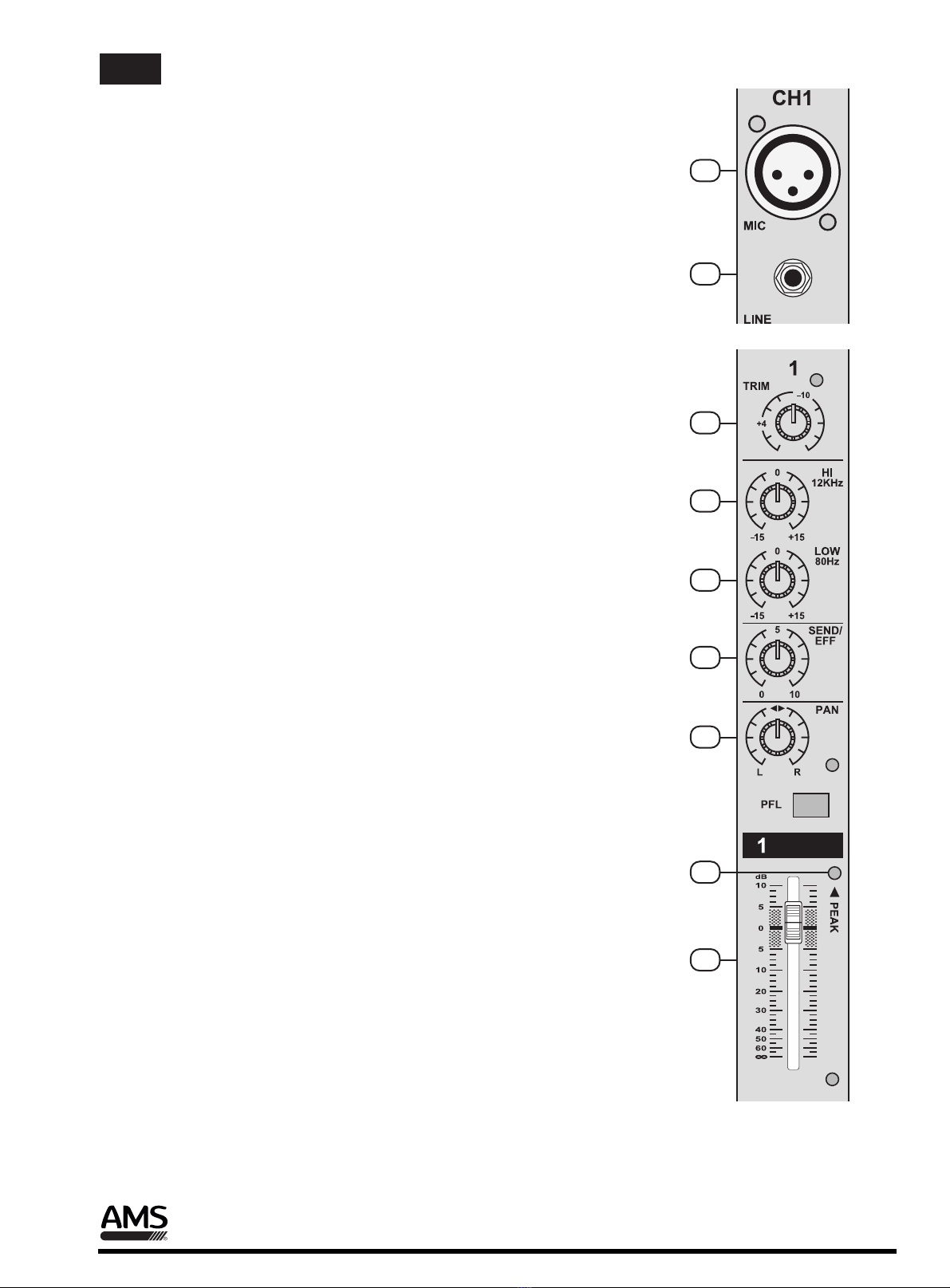
A. INPUT CHANNEL SECTION
1
2. LINE INPUT
The unbalanced Mic input is provided for the use of an unbalance mic and is
designed to accept an unbalanced high impedance input signal.
(This use for connection Deck, Turntable, Keyboard etc..)
1. BALANCE INPUT (MIC)
Electronially Balanced inputs acceptable a standard XLR male connector.
+ 48V Phantom Power available on each input Mic socket.
and this switch is on Rear Phantom Power.
3. TRIM
This has a function which adjusts the input sensitivity of each channel in order
to input the constant level of the signal.
4. HI EQ
This control gives you up to 15 dB of boost or cut at 12KHz and above, and it is
also flat at the detent.
2
3
4
5
6
7
8
9
7. PAN
The pan control sends continuously variable amounts of the post fader signal to
either the left and right main busses. In the center position equal amounts of
signal are sent to the left and right.
9. PEAK
A red LED indicates a signal level at the insert return point, premaster fader, It
illuminates at approximately 5dB below clipping.
8. CHANNEL FADER
This is function to adjust the volume of signal connection into each channel and
adjust the volume of output, together with master fader. Normal operating
position is at the “O” mark, providing 4dB of gain adove that point, if required.
5. LOW EQ
This control gives you up to 15 dB boost or cut at 80Hz and below. This circuit
is flat (no boost or cut) at the center detent position.
6. SEND /EFF
This is normally derived after the EQ and channel fader (POST FADE, POST
EQ), and is therefore follow any changers in fader level. They are normally
used to drive effects processing units which are fed back into the mixer and
which must fade out with the input channel.
AMP Series - 2 - User Manual / Manual de uso
EN
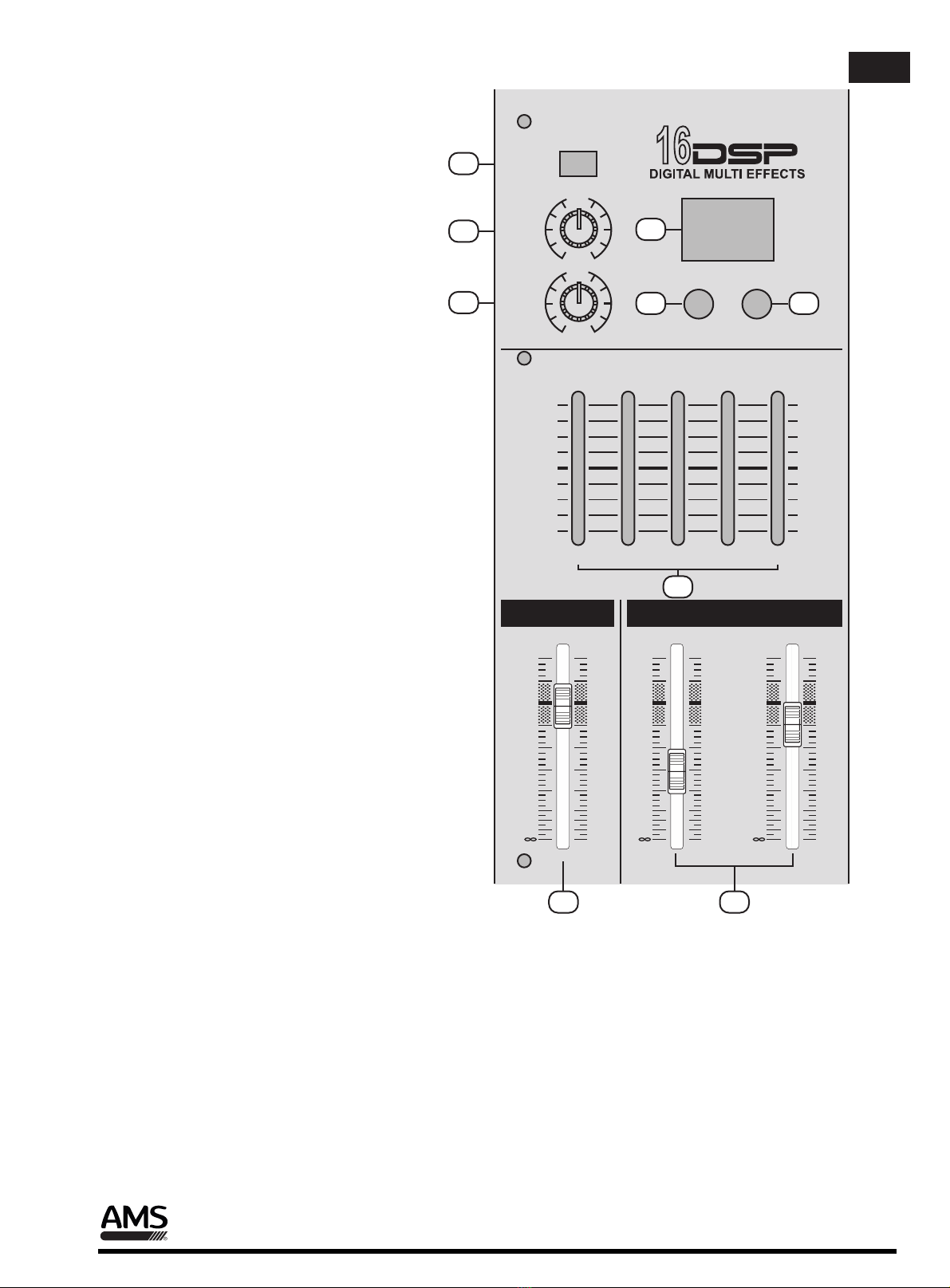
B. MASTER SECTION
SEND/EFF
EFF
RETURN
AUX
RETURN
5
10
5
80Hz 350Hz 1KHz 4KHz 12KHz
GRAPHIC EQUALIZER
+12
0dB
-12
+12
0dB
-12
10 UP DOWN
EFFECT MAIN
LEFT RIGHT
dB
10
5
5
0
10
20
30
40
50
60
dB
10
5
5
0
10
20
30
40
50
60
dB
10
5
5
0
10
20
30
40
50
60
0
0
10
11
12
13
14 15
17
16 18
11. EFFECT RETURN
This is used for adjusting frequency of
echo repeat, since too echo repeat may
cause a nowl, please adjust frequency
properly.
10. SEND / EFFECT
When this button is up, Post signal work
as send signal.
When this button is down, post signal
work as EFFECT singal.
12. AUX RETURN
This is used for adjusting level of
auxiliary device.
13. EFFECT PROGRAMS
When adjust switch 14 and 15, the
effects are displayed.
14. UP SWITCH
One push, one program up.
15. DOWN SWITCH
One push, one program down.
16. EFFECT LEVEL
Using by this control, you can adjust
signal level of echo repeat & exteral effect.
17. STEREO GRAPHIC EQUALIZER
2X5-band equalizer is provided for tone
control over each frequency, and for
precise high quality sound by final tone
control.
18. OUTPUT MAIN FADER
(LEFT/RIGHT)
This is a master fader for adjustment for
volume of left/right output. Unity gain is
the top their travel.
AMP Series - 3 - User Manual / Manual de uso
EN
+7
+4
0
-4
-10
+L R
+48V ON
PHANTOM
PHONE LEVEL
5
10
L-R/PFL
PHONES
0
19
20
21
22
23
24
25
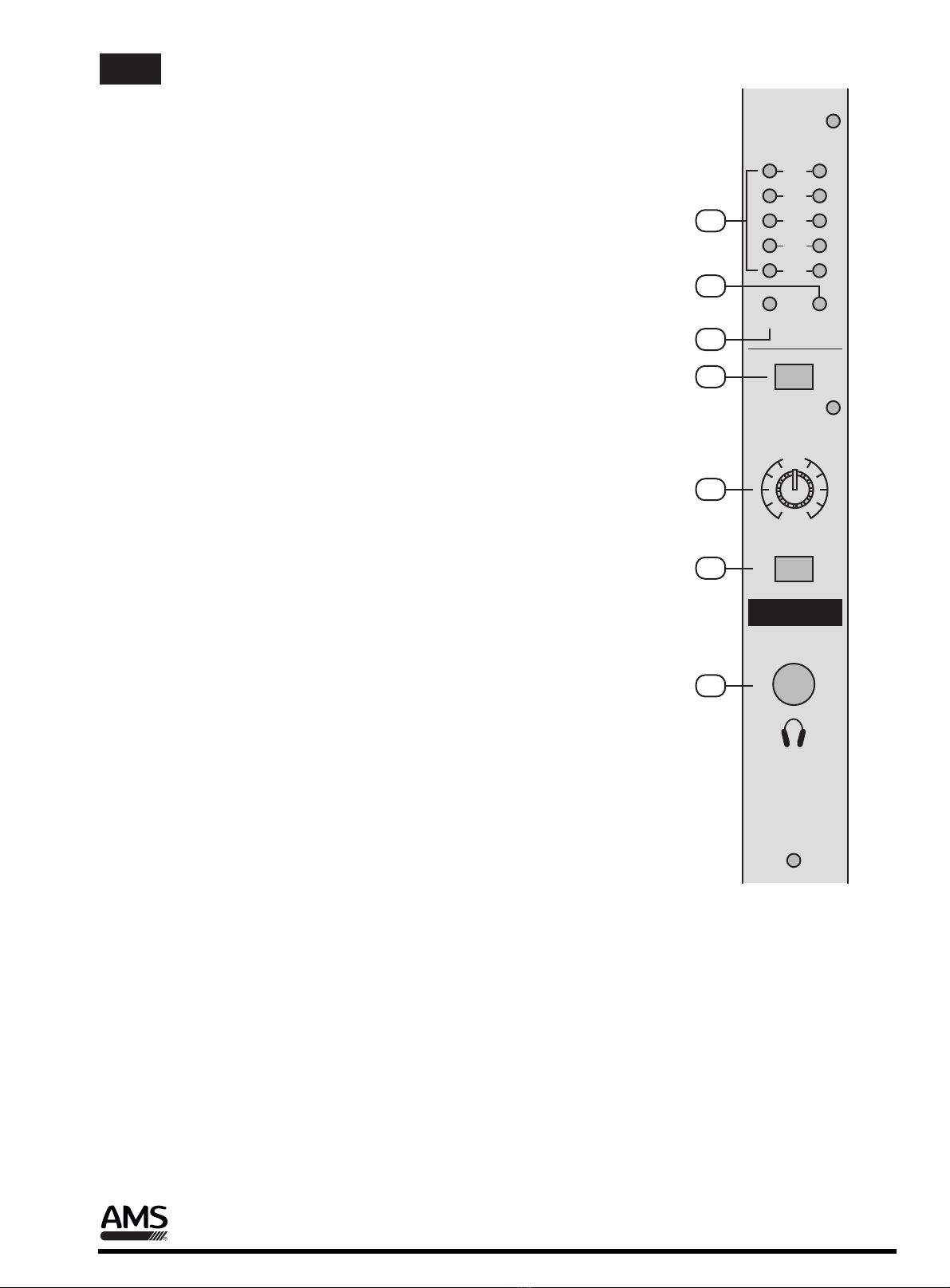
20. POWER LED
The POWER LED will be turned on when the console is working.
19. OUTPUTS LEVEL INDICATOR
This is level meter which shows output levels of left & right channel
condition on the way of operation, therefore, you can see output
condition thru this master level indication.
23. HEADPHONE LEVEL
This is a single volume control sends the level to be the headphones
and main monitors.
24. HEADPHONE SWITCH
When L-R/PFL switch up, could monitor stereo (L-R) output signal when
L-R/PFL switch down, could monitor group (PFL) output signal.
21. PHANTOM LED
The LED will be turned on when phantom power (48V) working.
22. PHANTOM POWER SWITCH
Depressing this switch applies 48V DC across all microphone input
channels connectors for remote powering of condenser microphones.
25. HEADPHONE JACK
You can monitor working condition by sound thru the headphone.
AMP Series - 4 - User Manual / Manual de uso
EN
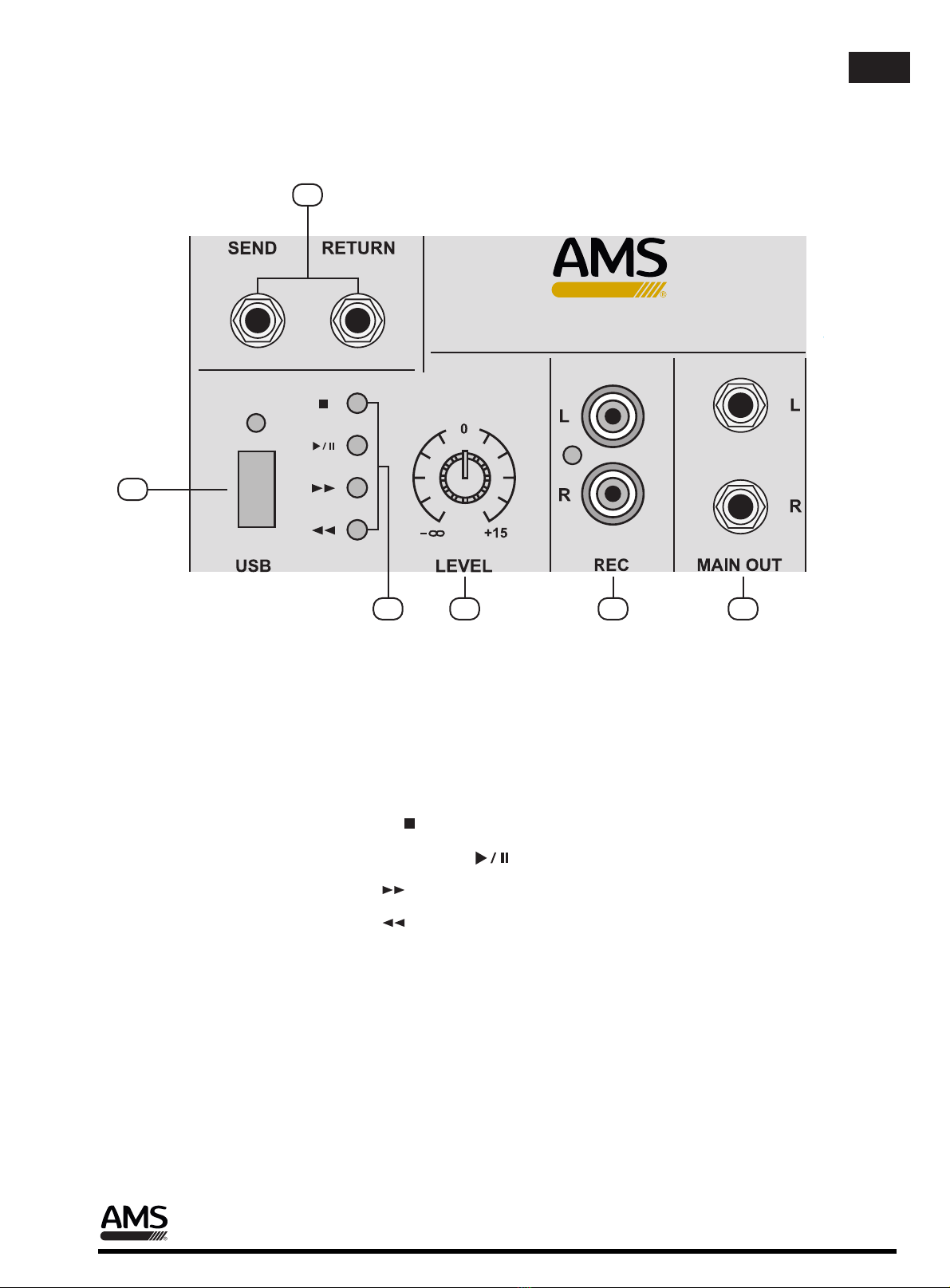
C. MIXER OUTPUT SECTION
27
26. AUX SEND/RETURN JACK
This can be used to connect all kinds of effect form outside.
31. MAIN OUTPUT JACK (LEFT / RIGHT)
30. RECORD PIN JACK
This jack is to be connected with cassette deck when recording the mixed output.
26
29 30 31
27. USB JACK
This is USB Jack.
29. USB LEVEL
With the MP3 In-control, You Can adjust the input level of the USB in jack.
28. MP3 PLAYER SYSTEM
28
STOP
PLAY/PAUSE
F.F
F.B
Main output connection (before power amplifer)
AMP 6300 USB
AMP Series - 5 - User Manual / Manual de uso
EN
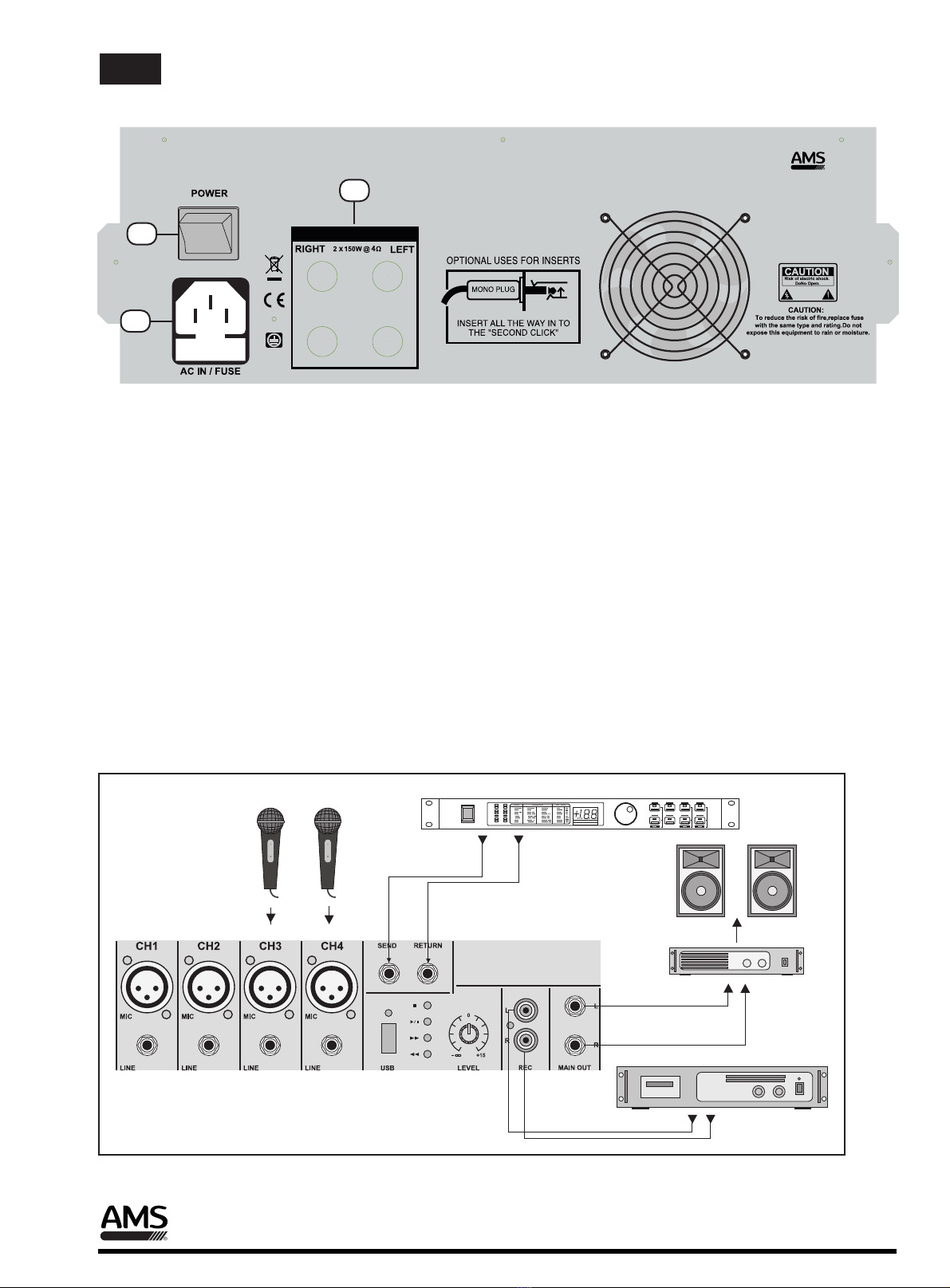
D. POWER SECTION
33. POWER JACK
This is out of connect the power supply (2 X AC 120V or 230V) jack.
32. POWER SWITCH
Push marked (1), when you want to operate. The LED will be turned on when working
34. SPEAKER JACK
MODEL-DVP-3000
AMPLIFIER
DIGITAL
L RdB
-6
-3
-1
0
+1
+3
+6 SURROUND
01
02
03
04
05
06
07
08
09
10
11
12
13
14
15
16
17
18
19
20
21
22
23
24
25
26
27
28
29
30
31
32
POWER
TAPE
OUTPUT
L & R
E. INSTALLATION
Connection example using the different inputs and outputs
Connect the loudspekers according to the power and impedance requirements.
AMP 6300 USB
32
33
34
AMP Series - 6 - User Manual / Manual de uso
EN

Mono Inputs
Specifications
Mic Input
Bandwidth
Distortion (THD & N)
Mic E.I.N (22 Hz - 22 kHz)
TRIM range
electronically balanced, discrete input configuration
10 Hz to 60 kHz ± 3 dB
0.01% at +4 dBu, 1 kHz, Bandwidth 80 kHz
-129.5 dBu, 150 Ohm
-117.3 dBqp, 150 Ohm
-132.0 dBu
-122.0 dBqp
+10dB to +60dB
Line Input
Bandwidth
Distortion (THD&N)
Line level range
electronically balanced
10 Hz to 60 kHz ± 3 dB
0.01% at +4 dBu, 1 kHz, Bandwidth 80 kHz
+10 dBu to -40 dBu
Equalization
Hi Shelving
Lo Shelving
12 kHz +/-15 dB
80 Hz +/-15 dB
Master Mix section
Max Output
Aux Send Max Out
Control Room Out
Signal-To-Noise Ratio
+22 dBu balanced
+22 dBu unbalanced
+22 dBu unbalanced
112 dB, all channels at Unity Gain
Power supply
~ 240 V AC, 50 Hz,
Power
F. APPENDIX
AMP Series - 7 - User Manual / Manual de uso
EN
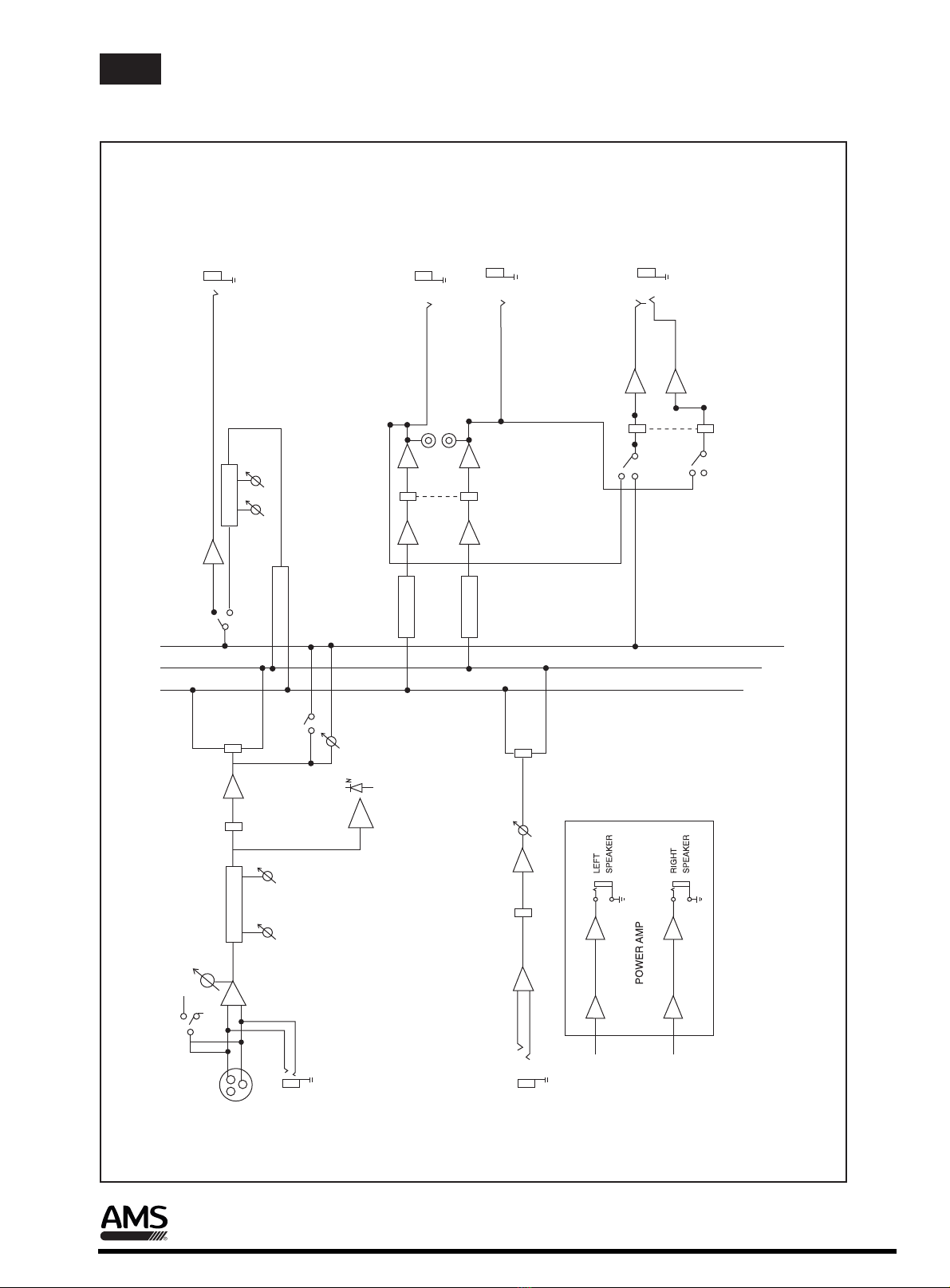
G. BLOCK DIAGRAM
+48V
LINE
MIC
PH
TRIM
HI
2-EQ
PAN
FADER
PEAK
AUX
STEREO AUX RETURN
L
L
R
LEFT
RIGHT
PHONES
PFL
R
PFL
L PHONE
REC
FADER
MIAN
MONO INPUT CHANNELS
LO
PFL
AUX RETURN
RETURN
5 EQ
5 EQ
SEND RETURN
DSP
SEND
PFL
AMP Series - 8 - User Manual / Manual de uso
EN
This manual suits for next models
1
Table of contents
Languages: