manuals.online logo
Brands
  1. Home
  2. •
  3. Brands
  4. •
  5. Apator
  6. •
  7. Switch
  8. •
  9. Apator ARS 3f User manual

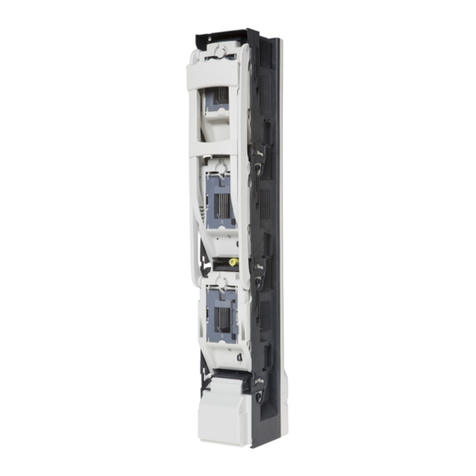
Apator ARS 3f User manual

This manual suits for next models

5

Other Apator Switch manuals

Apator ARS 2 evo User manual

Apator

Apator ARS 2 evo User manual

Apator ARS 00 evo User manual

Apator

Apator ARS 00 evo User manual

Popular Switch manuals by other brands

SMC Networks SMC6224M Technical specifications

SMC Networks

SMC Networks SMC6224M Technical specifications

Aeotec ZWA003-S operating manual

Aeotec

Aeotec ZWA003-S operating manual

TRENDnet TK-209i Quick installation guide

TRENDnet

TRENDnet TK-209i Quick installation guide

Planet FGSW-2022VHP user manual

Planet

Planet FGSW-2022VHP user manual

Avocent AutoView 2000  AV2000BC AV2000BC Installer/user guide

Avocent

Avocent AutoView 2000 AV2000BC AV2000BC Installer/user guide

Moxa Technologies PT-7728 Series user manual

Moxa Technologies

Moxa Technologies PT-7728 Series user manual

Intos Electronic inLine 35392I operating instructions

Intos Electronic

Intos Electronic inLine 35392I operating instructions

Cisco Catalyst 3560-X-24T Technical specifications

Cisco

Cisco Catalyst 3560-X-24T Technical specifications

Asante IntraCore IC3648 Specifications

Asante

Asante IntraCore IC3648 Specifications

Siemens SIRIUS 3SE7310-1AE Series Original operating instructions

Siemens

Siemens SIRIUS 3SE7310-1AE Series Original operating instructions

Edge-Core DCS520 quick start guide

Edge-Core

Edge-Core DCS520 quick start guide

RGBLE S00203 user manual

RGBLE

RGBLE S00203 user manual

Thrustmaster FLIGHT SIMULATOR X quick guide

Thrustmaster

Thrustmaster FLIGHT SIMULATOR X quick guide

Southwire SURGE GUARD 41390 RVC troubleshooting guide

Southwire

Southwire SURGE GUARD 41390 RVC troubleshooting guide

Buhler Nivotemp NT 61 Brief instructions

Buhler

Buhler Nivotemp NT 61 Brief instructions

Kramer VS-41HDCP user manual

Kramer

Kramer VS-41HDCP user manual

Techly IDATA AU-270 user manual

Techly

Techly IDATA AU-270 user manual

Belkin F1U109 user manual

Belkin

Belkin F1U109 user manual

manuals.online logo
manuals.online logoBrands
  • About & Mission
  • Contact us
  • Privacy Policy
  • Terms and Conditions

Copyright 2025 Manuals.Online. All Rights Reserved.

Apator S.A., 87-100 Toruń, ul. Gdańska 4a lok. C4
tel.: +48 56 61 91 244, fax: +48 56 61 91 295
www.apator.com
Zakład produkcyjny Manufacturing area
Ostaszewo 57C, 87-148 Łysomice
ARS 3f;
ARS 400, ARS 2 pro, ARS 3 pro, ARS 630kVA pro, RWS 1250 pro
Listwowe rozłączniki izolacyjne
Vertical fuse switch disconnectors
Instrukcja obsługi i montażu
Mounting and operation manual
ISO 9001 PN-N-18001 ISO 14001
- 3 -
1.WYJĘCIEPOKRYWROZŁĄCZNIKA
TAKINGOFFTHECOVEROFTHEDISCONNECTOR
a) chwycić za rączkę (Fot. 1) i przemieścić ją do pozycji aż rączka zablokuje się o zwalniacz (Fot. 2)
take the handle (Fig. 1) and move it to the position of release until the handle is blocked (Fig. 2)
b) chwycić za „uszy” pokrywki (Fot. 3) i lekko wysunąć ją zgodnie z kierunkiem strzałki oznaczonej
„I”(Fot. 3). Wysuniętą pokrywkę obrócić zgodnie z kierunkiem strzałki oznaczonej „II” (Fot. 3) aż
poczuje się opór. Następnie wyciągnąć pokrywkę z napędu (Fot. 4)
take the „ears” of the cover (Fig. 3) and gently pull out it in accordance with the direction indicated
by the arrow marked „I” (Fig. 3). Rotate pulled out cover in direction indicated by the arrow
marked„II” (Fig. 3) until resistance. Next take out the cover from the operating mechanism (Fig. 4)
c) przemieścić rączkę do pozycji „pracy/załączenia” rozłącznika (Fot. 5)
move the handle to „operation/switched on” position of the disconnector (Fig. 5)
Fot. 1
Fot. 3
Fot. 2
Fot. 4
Fot. 5
I
II
zwalniacz
release
- 4 -
2.OTWORZENIEPŁYTEKMASKUJĄCYCHŚRUBYMOCUJĄCEZAMOCOWANIE
ROZŁĄCZNIKA ARS DO SZYN ZBIORCZYCH. ZAMKNIĘCIE PŁYTEK
MASKUJĄCYCHŚRUBYMOCUJĄCE
 OPENING THE MASKING PLATES FOR FIXING BOLTS. FIXING ARS TYPE
DISCONNECTOR TO BUS BARS. CLOSING THE MASKING PLATES FOR
FIXINGBOLTS
a) otworzyć płytki maskujące śruby mocujące (Fot. 6)
open masking plates for fixing bolts (Fig. 6)
b) przyłożyć podstawę rozłącznika do szyn zbiorczych o rozstawie 185mm (Fot.7 ), wkręcić śrubę
w środkowym biegunie (Fot. 8) a następnie wkręcić śruby w pozostałych biegunach.
Po zamocowaniu rozłącznika do szyn zbiorczych zamknąć płytki maskujące (Fot. 9)
Put the base of disconnector against bus bars with spacing of 185 mm (Fig.7), screw the bolt in the
middle pole (Fig. 8) and next screw the bolts in other poles. After the disconnector is fixed to bus
bars close masking plates (Fig. 9)
3.ZDJĘCIEOSŁONYZACISKÓWIPRZYMOCOWANIEPRZEWODÓW
ODPŁYWOWYCH
TAKINGOFFTHESHIELDFORTERMINALSANDFIXINGOUTPUTCABLES
a) zdjąć osłonę zacisków (Fot. 10) i dokręcić przewody odpływowe (Fot. 11– przykład dla dokręcenia
przewodu sektorowego)
Take off the shield for terminals (Fig. 10) and tighten output cables (Fig. 11– example of tightening
of sector shape cable)
Fot. 6
Fot. 7 Fot. 8 Fot. 9
- 5 -
b) założyć osłonę zacisków (Fot. 12)
mount the shield for terminals (Fig. 12)
4.ZAKŁADANIEDODATKOWEGOELEMENTUOPISOWEGOWOSŁONIE
ZACISKÓW
MOUNTINGOFEXTRALABELINTHESHIELDFORTERMINALS
a) wsunąć dodatkowy element opisowy od spodu osłony zacisków (Fot. 13)
insert extra label from the bottom of the shield for terminals (Fig. 13)
Fot. 12
Fot. 13
Fot. 10 Fot. 11
- 6 -
5.MONTOWANIEIDEMONTOWANIEWKŁADEKTOPIKOWYCHLUB
ZWIERACZYNOŻOWYCHWPOKRYWIE
MOUNTINGANDDISMANTLINGOFTHEFUSELINKSORSOLIDLINKSIN
THECOVER
a) umieścić wkładkę topikową lub zwieracz nożowy w zaczepach pokrywy (Fot. 14 - ARS 2 pro, ARS
3 pro, ARS 630KVA. Fot. 14a - ARS 400A).
place the fuse link or solid link in catches of the cover (Fig. 14 - ARS 2 pro, ARS 3 pro, ARS 630KVA.
Fig. 14a - ARS 400A).
b) trzymając pokrywę wcisnąć palcem wskazującym wystający element suwaka, następnie wysunąć
wkładkę topikową lub zwieracz nożowy z zaczepów pokrywy (Fot. 15 - ARS 2 pro, ARS 3 pro, ARS
630KVA) Chwycić i wysunąć zimną wkładkę topikową lub zwieracz nożowy z zaczepów pokrywy
(Fot 15a - ARS 400A) .
holding the cover in hand push in outstanding element of the slide by an index finger and then pull
out the fuse link from catches of the cover (Fot. 15 - ARS 2 pro, ARS 3 pro, ARS 630KVA). Grab and
pull out cold fuse link or solid link from catches of the cover (Fig. 15a - ARS 400A).
6.UMIESZCZANIEPOKRYWYZZAMONTOWANYMIWKŁADKAMI
TOPIKOWYMILUBZWIERACZAMINOŻOWYMIWROZŁĄCZNIKU
MOUNTINGTHECOVERWITHFUSELINKSORSOLIDLINKSINTHE
DISCONNECTOR
a) wykonać operację zgodnie z punktem 1a) dla rozłącznika zawieszonego na moście szynowym
make the operation according to point 1a) for the disconnector mounted on bus bar bridge
Fot. 14 Fot. 14a
Fot. 15 Fot. 15a
- 7 -
Fot. 16
I
II
b) chwycić za „uszy” pokrywki i osadzić ją w prowadniku (aż do oporu) zgodnie z kierunkiem strzałki oznaczonej
jako „I” (Fot. 16). Wsuniętą pokrywkę obrócić zgodnie z kierunkiem strzałki oznaczonej jako „II” (Fot. 16)
take „ears” of the cover and set it in a guide (up to resistance) in direction indicated by the arrow
marked „I” (Fig. 16). Inserted cover rotate in accordance with the arrow marked as „II” (Fig. 16)
c) zatrzasnąć pokrywkę w prowadniku (Fot. 17)
snap the cover in the guide (Fig. 17)
d) powyższe operacje wykonać dla kolejnych pokryw
above operations one should make for the following covers
7.ZAŁĄCZANIEAPARATU
SWITCHINGONTHEDISCONNECTOR
a) chwycić rączkę i energicznym ruchem przesunąć ją w kierunku jak wskazuje strzałka (Fot. 18)
aż do całkowitego zamknięcia rozłącznika (Fot. 19)
take the handle and firmly move it in direction indicated by the arrow (Fig. 18) until the disconnector
is completely closed. (Fig. 19)
Fot. 18 Fot. 19
Fot. 17
- 8 -
Fot. 22
8.ROZŁĄCZANIENIEAPARATU
SWITCHINGOFFTHEDISCONNECTOR
a) chwycić za rączkę rozłącznika i energicznym ruchem wykonać ruch rączką w kierunku jak to
wskazuje strzałka (Fot. 20) aż do momentu zablokowania się rączki o zwalniacz (Fot. 21)
take the handle of the disconnector and move it firmly in direction indicated by the arrow (Fig. 20)
to the position of the release until the handle is blocked (Fig. 21)
9.PARKOWANIEAPARATU
PARKINGOFTHEDISCONNECTOR
a) rozłączyć rozłącznik zgodnie z punktem 8
switch off the disconnector according to the point 8
b) nacisnąć zwalniacze aż do momentu zwolnienia (Fot. 22)
press the releases until the handle is released (Fig. 22)
c) przy naciśniętych zwalniaczach pociągnąć za rączkę aż do oporu (Fot. 23)
while the releases are pressed pull the handle until resistance (Fig. 23)
Fot. 23
Fot. 21 Fot. 20
- 9 -
Fot. 26
Fot. 24 Fot. 25
Fot. 27
d) chwycić za napęd rozłącznika, pociągnąć do siebie (Fot. 24), następnie trzymając za rączkę prze-
mieścić ją tak jak na rysunku (Fot.25).
take an operating mechanism of the disconnector and pull it (Fig. 24), and then holding the handle
move it as it has been shown in (Fig.25).
e) wsunąć napęd w obudowie aż poczuje się opór (Fot. 26). W ten sposób otrzymujemy stan parko-
wania rozłącznika
insert the operating mechanism in the cabinet until resistance (Fig. 26). In this manner we get
parking of the disconnector
10.ZWOLNIENIESTANUPARKOWANIAAPARATU
RELEASINGTHEPARKINGOFTHEDISCONNECTOR
a) chwycić za rączkę i przemieścić ją zgodnie z kierunkiem strzałki aż do oporu (Fot. 27).
take the handle and move it in direction indicated by the arrow until resistance (Fig. 27).
- 10 -
Fot. 29 Fot. 30
b) nacisnąć zwalniacze aż do momentu zwolnienia rączki i pociągnąc za rączkę aż do oporu (Fot. 28)
press the releases until the handle is released and pull the handle until resistance (Fig. 28)
c) w takiej pozycji wepchnąć napęd w obudowie aż poczuje się opór (Fot. 29) i zamknąć rozłącznik (Fot. 30)
in this position insert operating mechanism in the cabinet until resistance (Fig. 29) and then close
the disconnector (Fig. 30)
11.WYJMOWANIENAPĘDUWCELUMONTAŻUUZIEMIACZAIUZIEMIANIE
ROZŁĄCZNIKA(dlaARS400,ARS2pro,ARS3pro)
  TAKINGOUTTHEOPERATINGMECHANISMINORDERTOMOUNTTHE
GROUNDINGSWITCHANDPROVISIONWITHGROUNDINGOFTHE
DISCONNECTOR(forARS400,ARS2pro,ARS3pro)
a) postępować zgodnie z punktem 9 a, b, c, d, następnie wyjąć napęd (Fot. 31)
proceed in accordance with the point 9a,b,c,d, and next take out the operating mechanism (Fig 31)
b) zamontować zacisk uziemiacza do szyny PN (Fot. 32), używając drążka izolacyjnego, uziemić roz-
łącznik od strony odbioru za pomocą wkładek zwierających postępując (dla każdej fazy) wg Fot.
33, 34, 35
Fot. 31
Fot. 28