manuals.online logo
Brands
  1. Home
  2. •
  3. Brands
  4. •
  5. ARCHITETTURA SONORA
  6. •
  7. Speakers
  8. •
  9. ARCHITETTURA SONORA ICARUS SUB User manual

ARCHITETTURA SONORA ICARUS SUB User manual

Other ARCHITETTURA SONORA Speakers manuals

ARCHITETTURA SONORA ICARUS User manual

ARCHITETTURA SONORA

ARCHITETTURA SONORA ICARUS User manual

ARCHITETTURA SONORA CUBE400 User manual

ARCHITETTURA SONORA

ARCHITETTURA SONORA CUBE400 User manual

ARCHITETTURA SONORA CUBE 2LV SUB User manual

ARCHITETTURA SONORA

ARCHITETTURA SONORA CUBE 2LV SUB User manual

ARCHITETTURA SONORA ICARUS WALL User manual

ARCHITETTURA SONORA

ARCHITETTURA SONORA ICARUS WALL User manual

ARCHITETTURA SONORA SPHERE User manual

ARCHITETTURA SONORA

ARCHITETTURA SONORA SPHERE User manual

Popular Speakers manuals by other brands

Electro-Voice LR4S engineering data

Electro-Voice

Electro-Voice LR4S engineering data

Definitive Technology Sound Cylinder user guide

Definitive Technology

Definitive Technology Sound Cylinder user guide

AudioSource LS545 user manual

AudioSource

AudioSource LS545 user manual

Paso C402-T Instructions for use

Paso

Paso C402-T Instructions for use

Altec Lansing 416-8C LF SPEAKER manual

Altec Lansing

Altec Lansing 416-8C LF SPEAKER manual

Kenwood KFC-1072 Servise manual

Kenwood

Kenwood KFC-1072 Servise manual

Peavey ProSys 112 user guide

Peavey

Peavey ProSys 112 user guide

JBL Control Contractor 60 Series installation instructions

JBL

JBL Control Contractor 60 Series installation instructions

Aura STORM-8 owner's manual

Aura

Aura STORM-8 owner's manual

Oontz ANGLE 3 PLUS quick start guide

Oontz

Oontz ANGLE 3 PLUS quick start guide

Electro-Voice LR4A engineering data

Electro-Voice

Electro-Voice LR4A engineering data

Rave RK-650-ICA-B owner's manual

Rave

Rave RK-650-ICA-B owner's manual

Flux Reference Series installation manual

Flux

Flux Reference Series installation manual

Lanzar AQAWBS64BK installation manual

Lanzar

Lanzar AQAWBS64BK installation manual

DAPAudio DCS-6230 manual

DAPAudio

DAPAudio DCS-6230 manual

Aluratek ABS03F quick start guide

Aluratek

Aluratek ABS03F quick start guide

Kenwood KES-5A instruction manual

Kenwood

Kenwood KES-5A instruction manual

Sonance ORIGINAL SERIES instruction manual

Sonance

Sonance ORIGINAL SERIES instruction manual

manuals.online logo
manuals.online logoBrands
  • About & Mission
  • Contact us
  • Privacy Policy
  • Terms and Conditions

Copyright 2025 Manuals.Online. All Rights Reserved.

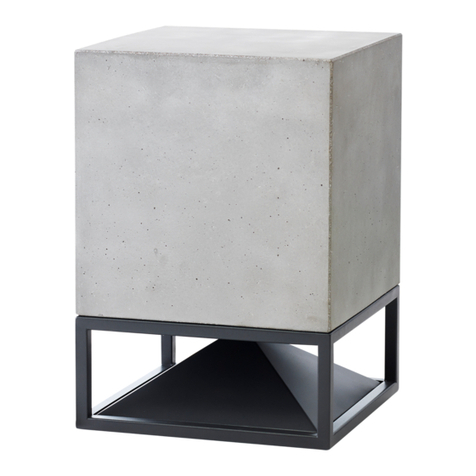
ICARUS_SUB
Unpacking: to remove Icarus_sub from the shipping box carefully follow these steps
Speaker type
8” Woofer
Nominal impedence
4 Ω
Crossover
DSP needed
Frequency range
40 - 150Hz (-6dB)
Sensitivity (1W-1m)
87 dB/W/m
250W (Class D)
Material
concrete, marbles, travertine,
alternative stones.
Metal material
stainless steel, oxidized brass,
and painted steel
Dimensions
Weight
16,5 kg (36,4 pounds)
SPECIFICATIONS
SOUND OUTPUT
Acoustic connectivity & settings:
the Icarus_sub necessarily requires an amplier equipped with DSP on
board. For everything concerning the regulation of the DSP, please refer to the website www.architetturasonora.com or to your speciali-
zed dealer.
2.
Open the box and without
removing the foam on top of
the speaker gently tilt the box
so that it rests directly on the
protecting foam.
3.
Remove the box and the
upper part of the foam to
release the sound module.
4.
Holding gently the module on
its body, pull it out of the box
ready for set-up and installa-
tion.
1.
Icarus_sub is shipped in a box
secured with packing foam
upside down for safety reasons.
IMPORTANT.
NEVER lift the speaker by its
base, but only by its body, once
you turned the box into position
as shown above!
34,6h x 27 cm
(13.62h x 10.62 inches)
34,6cm
13.62”
27cm
10.62”
Last update: February 2020
Specication could be changed without notice
Cabling:
Quick push-pull connection and disconnection:
Icarus_sub is shipped from the factory with a high performance plug/socket connector (IP68, IP69K) already attached.
The plug (male ended) is connected to the cable of the sound module and the socket (female ended) will have to be connected to the cable
going to the amplier during nal installation.
- connect the positive wire (+) into the hole labelled 1 (take the little pin next to the hole as a reference).
- connect the negative wire (-) into the hole labelled 2.
Please keep to the following instruction to connect the socket (female ended) to your cable:
- disassemble the socket as in the image below:
to keep your speakers beautiful as long as possible, we warmly recommend doing maintenance at
least once a year. When not in use, sound modules should be appropriately covered or stored
away; heavy duty protective covers are available from AS.
Please refer to the General Manual for appropriate instructions and note that any departure from
our recommendations on care and cleaning, or any evidence of misuse or damages from ordinary
wear and tear, will void all warranty claims.
Maintenance and care:
To connect To disconnect
click
Disassembled socket (female ended)
plug (male ended)
already connected
socket (female ended)
to be connected
amplier
with DSP
plug (male ended)
already connected socket (female ended)
to be connected
White >
or Blue
White >
or Blue
-
-
-
Brown > Brown >
+
+
+
1. Push the plug connector into the socket connector untill fully seated
2. A noise is the proof of correct matching
3. Apply gentle traction between plug and socket to ensure they are well hooked
4. To disconnect simply press the release button and pull.