manuals.online logo
Brands
  1. Home
  2. •
  3. Brands
  4. •
  5. Argos
  6. •
  7. Transmitter
  8. •
  9. Argos E0207TR-2 User manual

Argos E0207TR-2 User manual

Popular Transmitter manuals by other brands

NIVELCO EasyTREK SCA-300 Series Programming manual

NIVELCO

NIVELCO EasyTREK SCA-300 Series Programming manual

Honeywell 5816WMBR installation instructions

Honeywell

Honeywell 5816WMBR installation instructions

Kamstrup READy MTU Installation and operation guide

Kamstrup

Kamstrup READy MTU Installation and operation guide

Omega ZW Series user guide

Omega

Omega ZW Series user guide

ABB Field 264H Instructions for installation

ABB

ABB Field 264H Instructions for installation

Alinco DJ-V17T Service manual

Alinco

Alinco DJ-V17T Service manual

Dejero EnGo 3x manual

Dejero

Dejero EnGo 3x manual

Rosemount 4600 Reference manual

Rosemount

Rosemount 4600 Reference manual

Speaka Professional 2342740 operating instructions

Speaka Professional

Speaka Professional 2342740 operating instructions

trubomat GAB 1000 instruction manual

trubomat

trubomat GAB 1000 instruction manual

Teledyne Analytical Instruments LXT-380 instructions

Teledyne Analytical Instruments

Teledyne Analytical Instruments LXT-380 instructions

Rondish UT-11 quick start guide

Rondish

Rondish UT-11 quick start guide

MG 10JRE instruction manual

MG

MG 10JRE instruction manual

Burkert 8177 operating instructions

Burkert

Burkert 8177 operating instructions

Firetide HotPort 3203 Hardware installation guide

Firetide

Firetide HotPort 3203 Hardware installation guide

Tele Radio T9-02 User instructions

Tele Radio

Tele Radio T9-02 User instructions

Rotronic HygroFlex HF3 Series user guide

Rotronic

Rotronic HygroFlex HF3 Series user guide

Jamara FCX6 Pro Tel Instruction

Jamara

Jamara FCX6 Pro Tel Instruction

manuals.online logo
manuals.online logoBrands
  • About & Mission
  • Contact us
  • Privacy Policy
  • Terms and Conditions

Copyright 2025 Manuals.Online. All Rights Reserved.

1
User Manual
Model: E0207TR-2
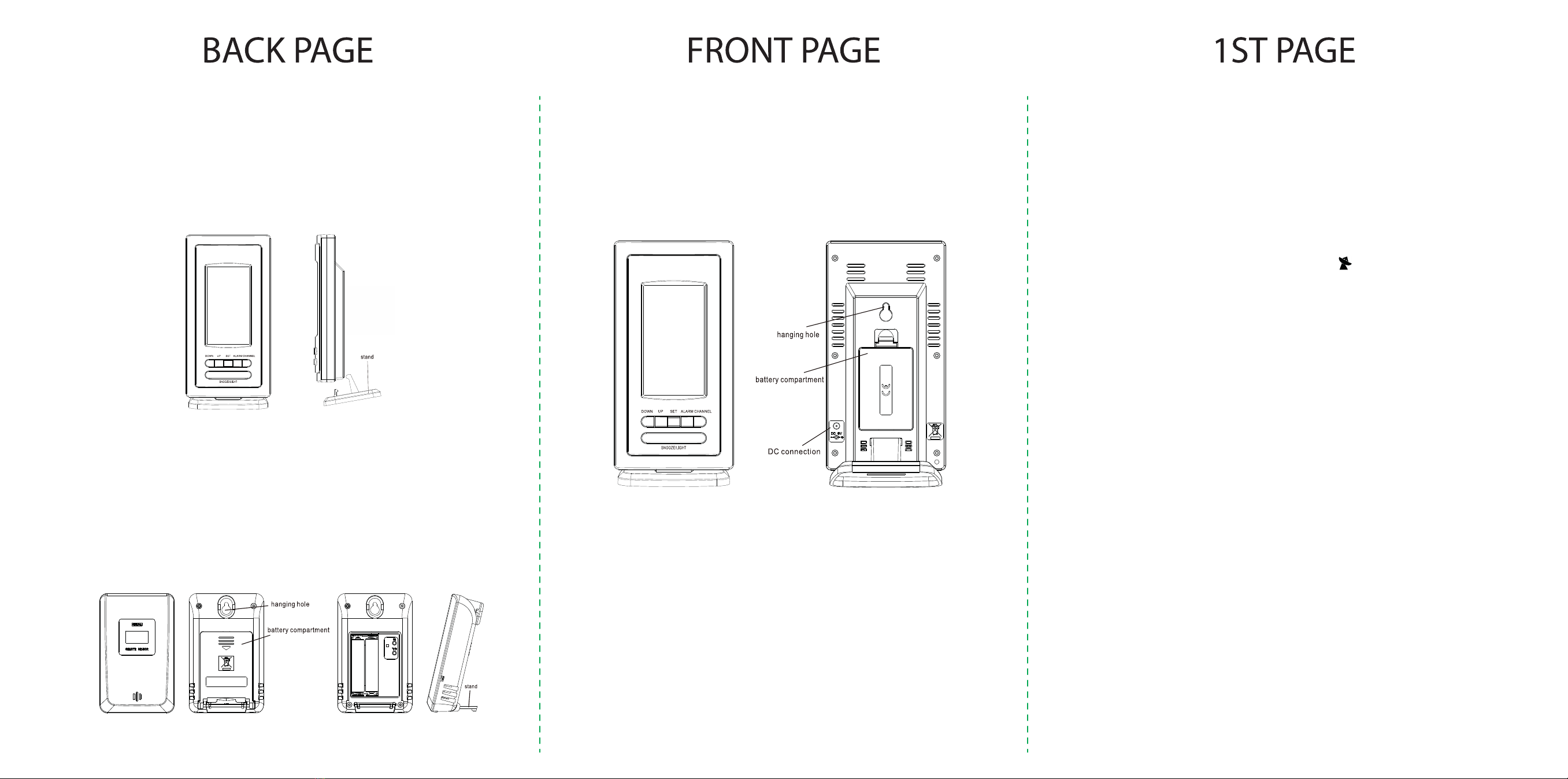
ASSEMBLING THE MAIN UNIT
Place the base of the stand onto a flat surface.
Carefully align the opening at the bottom of the clock and gently push down to lock into place.
POWERING ON AND SETTING THE PORTABLE TEMPERATURE TRANSMITTERS
For each unit, open the battery compartment cover and insert 2xAAA batteries (not supplied) to each
outdoor transmitter, following the polarity symbol as indicated within the compartment.
With the battery compartment exposed, press the “C/F” button to select the temperature read out on the
transmitter unit for Celsius/Fahrenheit – each unit can be set to either Celsius/Fahrenheit without
affecting the display on the clock.
Press the “CH” button to assign the transmitter unit with a number but ensuring a different number is
assigned to each unit.
The assigned number can be seen on the screen of the transmitter and will synchronize tothe display
on the main unit. Replace the battery compartment cover and continue with set up.
2
POWERING ON THE MAIN CLOCK
For ultimate performance, it is recommended to connect and use the supplied 4.5V DC adaptor.
Alternatively, open the battery compartment cover and insert 3xAAA batteries (not supplied) following the
correct polarity as shown within the compartment.
Replace the battery compartment cover and continue with set up.
SETTING YOUR CLOCK
When the clock is powered up, you will hear a “beep” to indicate it is ready and in receiving mode with
the portable temperature transmitters. When connected to the transmitters, the temperature will be
displayed on the main screen of the clock in accordance tothe channel you have set.
Note: The unit of measurement “Celsius/Fahrenheit” displayed on the transmitters are independent to
the main clock but the temperature readings are comparable with each other.
You are now ready to place these portable transmitters in various location of your choice to monitor the
temperature within its environment.
The transmission range is about 260 feet (80 meters) from the transmitter to the main clock.
If the temperature data is not received within 3 minutes after setting up, please check below:
1. The distance of clock or transmitter should be at least 5~6.5 feet (1.5~2 meters) away from any
3
interfering sources such as computer monitors or TV sets.
2. Avoid positioning the clock onto or in the immediate proximity of metal window frames.
3. Press and hold “CHANNEL” button for 2 seconds until you hear a “beep” to reset connection on all
transmitting units.
AUTOMATIC TIME SETTING
After initial set up with the temperature or when the clock is powered up after reset, press and hold the
“Down” button for 2 seconds to start RC connection with the RC icon flashing.
This process can take between 3-7 minutes. If the time does not set through this process, please see
information below on possible cause or ways to improve reception.
MANUAL TIME SETTING
In normal time display mode, press and hold ‘SET’ button for 3 seconds, “0” flashing.
•Press “UP” or “DOWN” button to set hour difference to GMT.
•Press “SET” button once with day flashing.
•Press “UP/DOWN” button to change display language of day (preset toGerman), see below for
sequence.
•Press “SET” button to access “12/24hr” indicator.
•Press “UP/DOWN” button to select.
•Press “SET” button to access “hour” setting.
•Press “UP/DOWN” button to select.
•Press “SET” button to access “minute” setting.
•Press “UP/DOWN” button to select.
•Press “SET” button to access “year” setting.
•Press “UP/DOWN” button to select.
•Press “SET” button to access “month” setting.
•Press “UP/DOWN” button to select.
•Press “SET” button to access “date” setting.
•Press “UP/DOWN” button to select.
•Press “SET” button to access “c/f” setting.
•Press “UP/DOWN” button to select.
•Press “SET” button to exit setting mode.
If there is no operation for 20 seconds, it will save the existing setting and return to normal display.

4
7 LANGUAGE WEEK DISPLAY
The setting order is German French Italian Netherlands Spanish Denmark English
COUNTRY GERMANY ENGLISH ITALIAN FRENCH NETHERLANDS SPANISH DANISH
ABBREVIATION GE EN IT FR NE ES DA
SUNDAY SO SU DO DI ZO DO SO
MONDAY MO MO LU LU MA LU MA
TUESDAY DI TU MA MA DI MA TI
WEDNESDAY MI WE ME ME WO MI ON
THURSDAY DO TH GI JE DO JU TO
FRIDAY FR FR VE VE VR VI FR
SATURDAY SA SA SA SA ZA SA LO
ALARM AND SNOOZE SETTING
In normal time display mode, press ‘SET’ button once to enter Alarm mode.
•Press “UP” to activate showing or “DOWN” deactivate the alarm.
•Press “SET” button to return to normal time display.
SETTING ALARM TIME
In normal time display mode, press ‘SET’ button once to enter Alarm mode and then press and hold
“SET” button for 3 seconds, hour flashing.
•Press “UP/DOWN” button to select.
•Press “SET” button to access “minute” setting,
•Press “UP/DOWN” button to select.
•Press “SET” button to exit setting mode and return to normal time display with the alarm now
activated.
At the set time, the alarm will sound and last for 2minutes.
During the alarm sound, press “SNOOZE/LIGHT” button for snooze function with flashing on screen.
Alarm will snooze for 10 minutes.
Press “SNOOZE/LIGHT” button during snooze again will deactivate snooze function.
During alarm sound, press any other buttons to stop the alarm.
The alarm will still be activated and will sound on the next cycle of time.
BACK LIGHT
When powered by DC adaptor, the “Back Light” will be consistently on.
When using batteries, press “SNOOZE/LIGHT” button, the “Back Light” will appear and last for 20
seconds.
56
TEMPERATURE ALERT
You can set your clock to alert you when temperature set on individual transmitter unit exceeds or falls
below your set temperature.
CHECK PRESET TEMPERATURE
In normal time display:
•Press “UP” button once to show “MAX” set temperature on the clock display
•Press “UP” button again to show “MIN” set temperature on the clock display
•Press “UP” button again to show current temperature
Default limited range of alerted of outdoortemperature: +60℃(+140°F) ~ - 40℃(-40°F)
Default limited range of alerted of indoor temperature: +50℃(+122°F) ~ 0℃(+32°F)
SET TEMPERATURE LIMITS
In normal time display:-
•Press ‘ALARM’ button to show set temperature for each transmitting unit in the following sequence; CH1 HI 
CH1 LO CH2 HI CH2 LO CH3 HI CH3 LO indoor HI indoor LO.
•At the selected channel, Press button “UP” to activate the temperature alarm with showing above the
temperature. Press button “DOWN” to deactivate.
•Press and hold ‘ALARM’ button to enter setting mode with temperature flashing for channel 1.
•Press “UP/DOWN” button to set max temperature.
•Press “Alarm” button to show min temperature.
•Press “UP/Down” button to set min temperature.
•Press “ALARM” button to show channel 2 temperature. Follow the above sequence to set each channels’ Max
and Min temperature.
Whenthe alarm is activated for each channel, the alarm will sound when the temperature falls or exceed the limit on that
channel. The alarm will continue sound until you deactivate the alarm or reset the limits.











