manuals.online logo
Brands
  1. Home
  2. •
  3. Brands
  4. •
  5. Arkal
  6. •
  7. Water Filtration System
  8. •
  9. Arkal Spin Klin Twin Apollo 4" User manual

Arkal Spin Klin Twin Apollo 4" User manual

Other Arkal Water Filtration System manuals
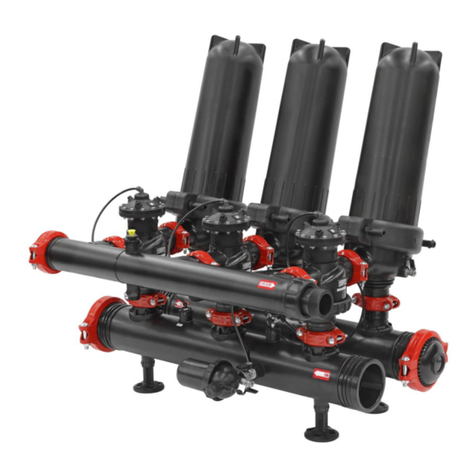
Arkal Spin Klin Angle Apollo 3" User manual

Arkal

Arkal Spin Klin Angle Apollo 3" User manual

Arkal B Series User manual

Arkal

Arkal B Series User manual

Arkal Spin Klin Galaxy 4" User manual

Arkal

Arkal Spin Klin Galaxy 4" User manual

Arkal 2" Sand Separator Installation and user guide

Arkal

Arkal 2" Sand Separator Installation and user guide

Arkal 1400 1 Series User manual

Arkal

Arkal 1400 1 Series User manual

Popular Water Filtration System manuals by other brands
Atlantic Ultraviolet Mighty Pure MP16A owner's manual
Atlantic Ultraviolet

Atlantic Ultraviolet Mighty Pure MP16A owner's manual

SunSun CBG-500 Operation manual

SunSun

SunSun CBG-500 Operation manual
Hayward XStream Filtration Series owner's manual
Hayward

Hayward XStream Filtration Series owner's manual

Contech DownSpout StormFilter Operation and maintenance

Contech

Contech DownSpout StormFilter Operation and maintenance

Teka Airfilter MINI operating instructions
Teka

Teka Airfilter MINI operating instructions

Wisy LineAir 100 Installation and operating instructions
Wisy

Wisy LineAir 100 Installation and operating instructions

Schaffner Ecosine FN3446 Series User and installation manual
Schaffner

Schaffner Ecosine FN3446 Series User and installation manual

Pentair FLECK 4600 SXT Installer manual

Pentair

Pentair FLECK 4600 SXT Installer manual

H2O International H20-500 product manual

H2O International

H2O International H20-500 product manual

Renkforce 2306241 operating instructions
Renkforce

Renkforce 2306241 operating instructions

Neo-Pure TL3-A502 manual

Neo-Pure

Neo-Pure TL3-A502 manual

STA-RITE VERTICAL GRID DE FILTERS S7D75 owner's manual

STA-RITE

STA-RITE VERTICAL GRID DE FILTERS S7D75 owner's manual

Applied Membranes W-G844EM Operation and maintenance manual

Applied Membranes

Applied Membranes W-G844EM Operation and maintenance manual

BEGA 116 Instructions for use

BEGA

BEGA 116 Instructions for use

WATA Standard operating instructions

WATA

WATA Standard operating instructions

Price FFU series Installation and service manual

Price

Price FFU series Installation and service manual

Gaggenau BRITA INTENZA 467873 manual

Gaggenau

Gaggenau BRITA INTENZA 467873 manual

Brita SAFF-100 user guide

Brita

Brita SAFF-100 user guide

manuals.online logo
manuals.online logoBrands
  • About & Mission
  • Contact us
  • Privacy Policy
  • Terms and Conditions

Copyright 2025 Manuals.Online. All Rights Reserved.

4” Twin Apollo 08.2013 Page 1 of 14
Arkal 4” Spin Klin Twin Apollo Filtration
Battery
User Guide
Installation and Operation Instructions
4” Twin Apollo 08.2013 Page 2 of 14
2. Safety Instructions
Prior to installation or handling of the filter, read carefully the Installation and Operation Instructions
carefully.
1. Confirm filter draining prior to service.
2. Take precautions while lifting, transporting or installing the filter.
3. Installation of the filter should be performed so as to avoid direct water splashing on any of the
filter parts and especially on the electronic control unit.
4. Confirm that filter weight, when full, meets the support construction requirements.
5. Prior to installation confirm that line pressure matches filter’s operational pressure.
6. During installation, use standard flanges and connections only.
7. Check that all filter flange bolts are properly secured.
8. Please note, the filter enters a flushing mode automatically, without prior warning.
9. Use original parts only when servicing the filter.
10. Arkalcannot accept responsibilityfor anychanges or modifications to the equipment.
Special Note
Before opening the filter lock, check that there is no pressure in the filter.
4” Twin Apollo 08.2013 Page 3 of 14
3. Description and Operation
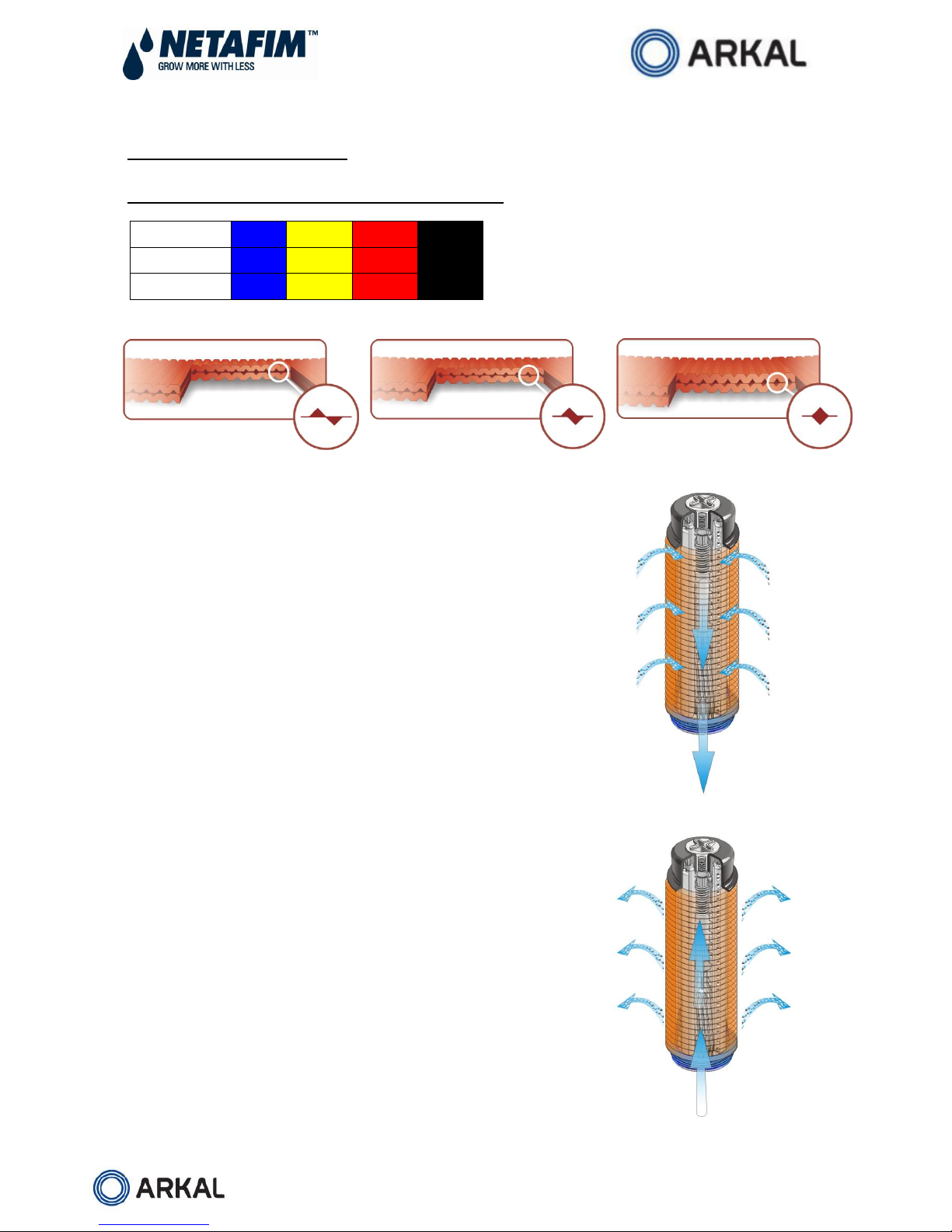
Table of Filtration Degree of the Discs and Color Code
Color Code
Blue
Yellow
Red
Black
Mesh
40
80
120
140
Micron
400
200
130
100
Spin Klin Spine - The Core of the Spin Klin Filtration System
The Spin Klin®discs are stacked on the Spin Klin®spine. The discs
are color-coded according to micron size, and are assembled to suit
your water filtration requirements. The spine assembly has a spring
compression unit and an internal piston, which operate during
alternate filtration or backwash modes. The spine assembly is
specially designed to compress the micron housing. Inside the
housing a spring and the pressure difference compress the discs
tightly during the filtration process, forcing the water to flow between
the grooves and trap the solids.
Spin Klin Automatic Backwash Operation
Activated by a predefined command (differential pressure or time)
alternate units of the Spin Klin®system go into backwash mode.
The inlet valve is shut as the drain is automatically opened. During
the backwash process, the compression spring is released and the
pressure difference is eliminated. The spine piston rises up,
releasing the pressure on the discs. Tangential jets of clean water
are pumped at high pressure in the opposite direction through
nozzles at the center of the spine. The discs spin free and clear,
loosening the trapped solids. Solids are quickly and efficiently
flushed out through the drain.
4” Twin Apollo 08.2013 Page 4 of 14
Modes of the filter’s Control valve
Filtration Position:
Water flows from port [A] (main supply) to port [B] (filter connection). Port [C] (drain water outlet) is closed
by the seal.
Backwash Position:
Command pressure is applied to the diaphragm’s control chamber through port [D]. The diaphragm
moves the sealed shaft, port [A] closes, preventing flow to the filter. Port [C] opens, allowing flushing
water to flow from port [B] (filter connection) to the drain.
D
A
B
C
Filtration Mode
D
A
B
C
Backwash Mode
4” Twin Apollo 08/2013 Page 5 of 14
Mode of Operation
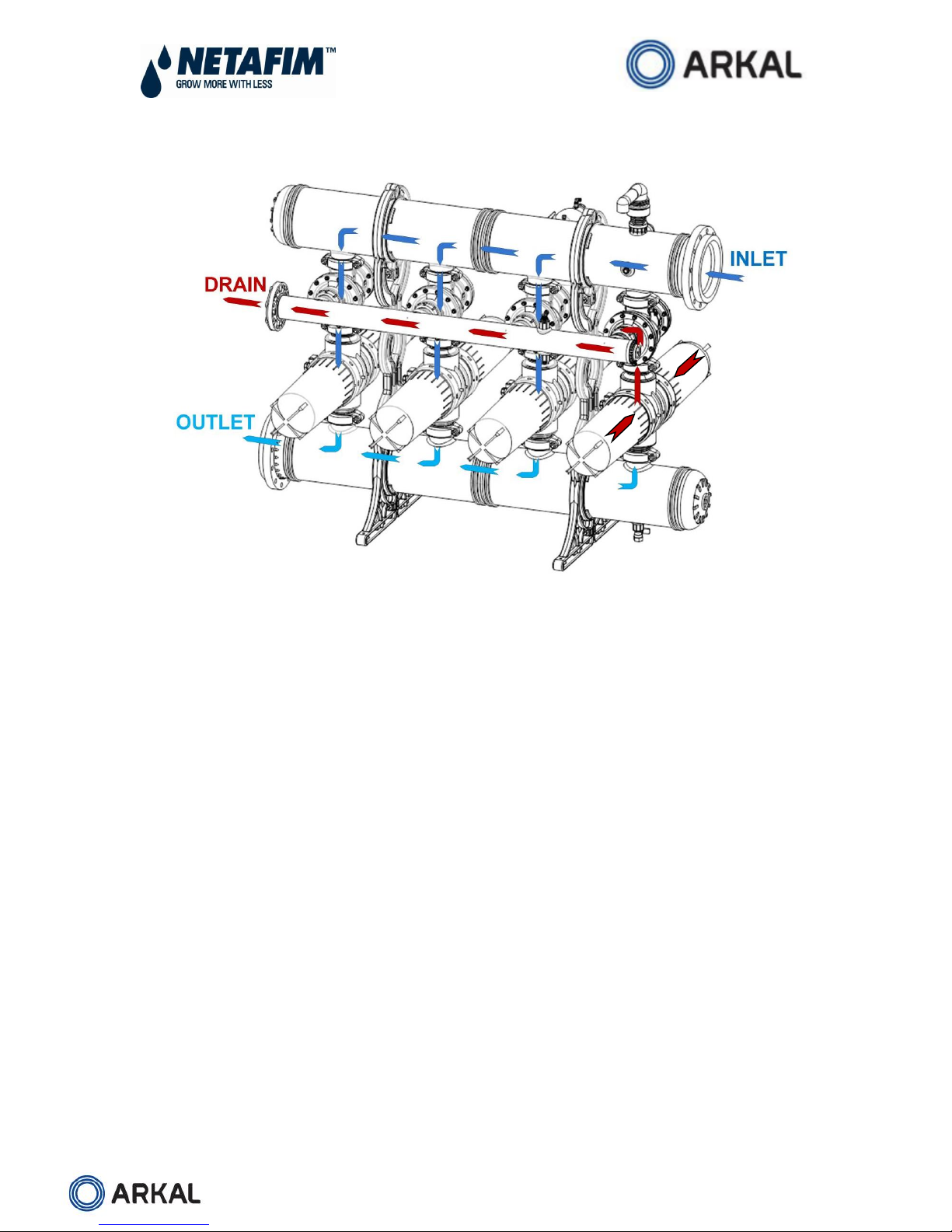
Filtration Process
During the filtration process the water flows through the inlet manifold, reaching the filters through the
backwash valves. The filtered water flow through the outlet manifold into the system.
Backwash Process
The backwash process begins with a signal from the control unit activated by the pressure difference
between the inlet and outlet or by time.
This signal is transported to the booster valve (assembled on 4”x 3”inlet valve No.1).
The booster valve opens, causing the No.1 valve to close the 4” inlet to the filter and open the 3”
drain port.
Filter No.1 is now in a backwash mode.
The Spin Klin spine in filter No.1 operate simultaneously, releasing the compressed discs. Tangential
jets of water are pumped against the discs, causing them to spin fast and free, flushing trapped solids
out to the drain.
The filtered backwash water is supplied from the other filters through the outlet manifold.
The contaminated water from the backwashed filter drains through the drainage manifold.
Backwash time per filter is between 20 -25 seconds. When the time elapses the control unit stops the
backwash signal to the solenoid.
The solenoid releases the water pressure signal allowing the inlet valve and the discs of the spine to
return to filtration mode.
Once filter No.1 is in the filtration position again the control unit sends a signal to begin the backwash
process in filter No.2.
4” Twin Apollo 08/2013 Page 6 of 14
4. Technical Data - 4" Spin Klin Twin Apollo
3 Units
4 Units
5 Units
6 Units
7 Units
8 Units
Max. pressure 
bar/psi
10/145
10/145
10/145
10/145
10/145
10/145
Min. backwash pressure 
bar/psi
2/29
2/29
2/29
2/29
2/29
2.0/29
Max.
recommended
flow rate
400-130µ
m3/h/gpm
225/990
300/1,320
375/1,650
450/1,980
525/2,300
600/2,640
100µ
m3/h/gpm
215/947
290/1,277
360/1,585
430/1,894
505/2,224
580/2,554
Filtration surface area
cm2/in2
15,720/2,435
20,960/3,245
26,200/4,055
31,440/4,865
36,680/5,675
41,920/6,485
Filtration volume
cm3/in3
18,852/1,150
25,136/1,534
31,420/1,917
37,704/2,301
43,988/2,684
50,272/3,068
Backwash flow per filter
m3/h/gpm
48/210
48/210
48/210
48/210
48/210
48/210
Backwash volume
m3/gallon
0.8/210
1/265
1.3/340
1.6/420
1.9/500
2.1/550
System length - L
mm/inch
1,450/57
2,240/88
2,740/108
3,240/128
3,740/147
4,240/167
System width - W
mm/inch
1,533/60
1,533/60
1,533/60
1,533/60
1,533/60
1,533/60
System height - H
mm/inch
1,699/67
1,833/72
1,833/72
1,833/72
1,930/76
1,930/76
Standard diameter
mm/inch
200/8
280/10
280/10
280/10
315/12
315/12
Max. pressure 10 bar - 25t
 depended on the water quality
5. Batteries Headloss Chart - 130 micron, 4" Spin Klin Twin Apollo
4” Twin Apollo 08/2013 Page 7 of 14
6. P & ID
Control
Refer to the manufacturer’s handbook before installing the controller.
Make sure that the voltage of both the solenoid unit and controller are correct.
Set the manual operation button to automatic.
Check that the ∆P hydraulic switch HIGH and LOW pressure lines are correctly connected
to the appropriate ports.
Set the starting backwash switch to ∆P 5-7 meters (6 - 8 psi).
Set the controller to a flush time of 20-25 seconds and a dwell time of 10 seconds. These
settings may require adjustment to conform to local water conditions. Typically, a 1 to 3
hour interval between backwashes is recommended.
4” Twin Apollo 08/2013 Page 8 of 14
7. Apollo Spin Klin - System Maintenance
Monthly Maintenance
Check inlet /outlet pressures:
In case the pressure differential is above 5 m / 7 PSI.
Activate automatic backwash of the Spin Klin filter battery.
In the event that the pressure differential remains high check for possible failures.
Check for leakages from the drain manifold:
In case there is a leakage of water during the filtration stage, check for possible failure at the
backwash valve seals.
Backwash controller performance:
Check that the controller timing parameters are correctly adjusted and activate automatic backwash
cycle. In the event of possible failure at the backwash controller, check for possible failures.
Cleaning of the Command Filter:
Close the command filter inlet valve. Release the static pressure by opening the drain valve. Remove
the cover. Thoroughly clean the filter element and then reassembly the command filter element and
cover, then open the inlet valve.
Winterization:
In order to prevent the filter battery becoming damaged during water freezing –drain all the water
from the filter battery, the command filter and the backwash valves.
4” Twin Apollo 08/2013 Page 9 of 14
Seasonal Maintenance - Discs
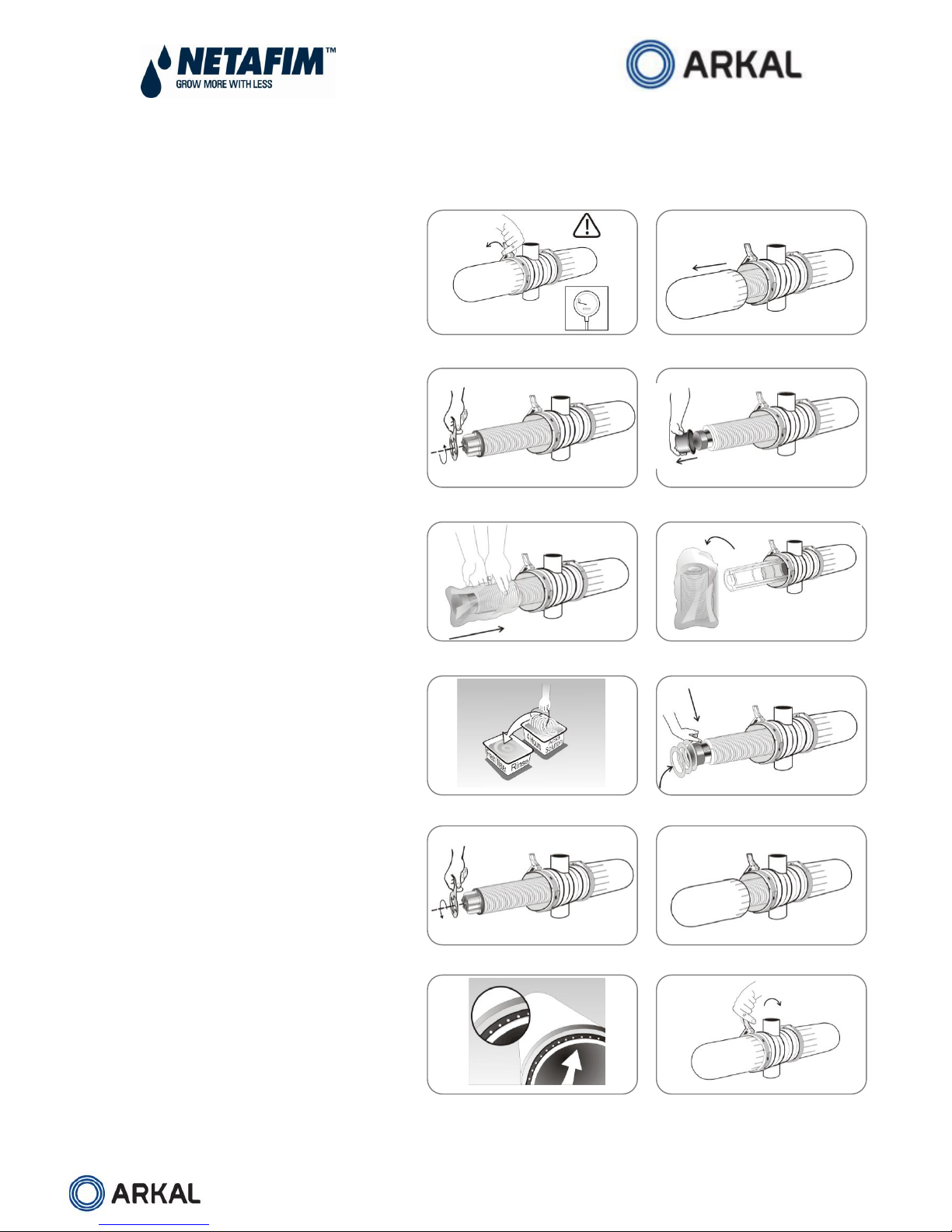
To guarantee thorough cleaning the following steps should be taken:
Close the water inlet after backwashing
the systems. Make sure that there is no
pressure in the system, pull out the safety
pin, open the clamp and remove the
cover. (Figure 1, 2)
Unscrew the butterfly nuts on the
filtration elements.
Removethetighteningcylinders.(Figure3,4)
Remove the disc sets (for convenience
we recommend using a plastic bag).
(Figure 5, 6)
Tie each set on a string and place them
in a cleaning solutions (HCL, Chlorine,
or other) refer to “Cleaning
Recommendations Clogged Filtration
Discs”. (Figure 7)
Ensure that the correct quantities of
discs are assembled on the spines:
when the discs are pressed with two
hands, the top disc should be level with
the imprinted circle on the outside of
the spine. (Figure 8)
Tighten the butterfly nut until the
stopping point. (Figure 9)
Place the filter cover on the filter body
and secure it with a slight clockwise
rotation. Reposition clamp onto the
cover and close using the lever.
(Figure 10)
Tighten the clamp. Insert the safety
pin. (Figure 11)
Figure 1
Figure 2
Figure 3
Figure 4
Figure 5
Figure 6
Figure 7
Figure 8
Figure 9
Figure 10
Figure 11
Figure 12
4” Twin Apollo 08/2013 Page 10 of 14
Attention:
When carrying out any of the following seasonal maintenance, service, or cleaning the discs –After
backwashing the system and after closing the water inlet, make sure that there is no pressure in
the system!
Please Note:
Before removing the cover you may experience the vacuum phenomenon –
which will make the removing of the cover very difficult or almost impossible.
Do Not - insert any sharp tools (objects) in between the cover and the
body! You may damage the hydraulic seal and the cover!
In order to remove the cover easily –you should drain the water from
the filter!
You may drain the filter through the drain valve located on the filter body,
once the filter is empty the cover can then be removed safely and easily.
Cleaning Recommendations for Clogged Filtration Discs
Water-formed deposits may cause clogging of the filter discs. The formation of these deposits
depends on the quality of the filtered water and environmental conditions like temperature, pH, light,
duration of filtration and more.
Common water-formed deposits are:
Biological or organic deposits (mostly mucous or oily to the touch, beige, brown or green in color)
Iron oxide (rust) or other metal oxides
Carbonates (white or gray deposit)
Combinations of the above