EnglishDeutsch
 logo
Brands
  1. Home
  2. •
  3. Brands
  4. •
  5. ATEN
  6. •
  7. Media Converter
  8. •
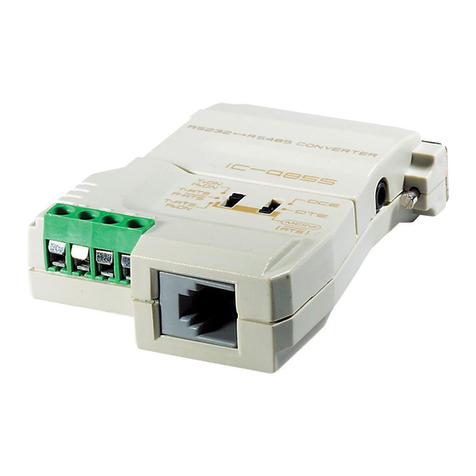
  9. ATEN Interface Converter IC-485S User manual

ATEN Interface Converter IC-485S User manual

Other manuals for Interface Converter IC-485S

3

Other ATEN Media Converter manuals

ATEN VS192 User manual

ATEN

ATEN VS192 User manual

ATEN VS132A User manual

ATEN

ATEN VS132A User manual

ATEN RS-232 User manual

ATEN

ATEN RS-232 User manual

ATEN IC485SN User manual

ATEN

ATEN IC485SN User manual

ATEN VanCryst VS1804T User manual

ATEN

ATEN VanCryst VS1804T User manual

ATEN CV-130A User manual

ATEN

ATEN CV-130A User manual

ATEN IEEE-488/Parallel Converter IC-488P User manual

ATEN

ATEN IEEE-488/Parallel Converter IC-488P User manual

ATEN VC180 User manual

ATEN

ATEN VC180 User manual

ATEN VS-108 User manual

ATEN

ATEN VS-108 User manual

ATEN RS-232 User manual

ATEN

ATEN RS-232 User manual

ATEN VC180 User manual

ATEN

ATEN VC180 User manual

ATEN Interface Converter IC-485S User manual

ATEN

ATEN Interface Converter IC-485S User manual

ATEN VC881 User manual

ATEN

ATEN VC881 User manual

ATEN VC1280 User manual

ATEN

ATEN VC1280 User manual

ATEN SXP-500 User manual

ATEN

ATEN SXP-500 User manual

ATEN Centronics SXP-320A User manual

ATEN

ATEN Centronics SXP-320A User manual

ATEN VS92A User manual

ATEN

ATEN VS92A User manual

ATEN CV-130 User manual

ATEN

ATEN CV-130 User manual

ATEN CV-131 User manual

ATEN

ATEN CV-131 User manual

ATEN VS92A User manual

ATEN

ATEN VS92A User manual

ATEN IC-485AI User manual

ATEN

ATEN IC-485AI User manual

ATEN VC486 User manual

ATEN

ATEN VC486 User manual

ATEN VS-108 User manual

ATEN

ATEN VS-108 User manual

ATEN VC812 User manual

ATEN

ATEN VC812 User manual

Popular Media Converter manuals by other brands

SoundTraxx Blunami BLU-2200 user guide

SoundTraxx

SoundTraxx Blunami BLU-2200 user guide

SPROLINK VA1 user manual

SPROLINK

SPROLINK VA1 user manual

Acclaim Lighting DDC-1-AC user guide

Acclaim Lighting

Acclaim Lighting DDC-1-AC user guide

Nikon AF-S TC-20E III user manual

Nikon

Nikon AF-S TC-20E III user manual

Axis AXIS Q7406 user manual

Axis

Axis AXIS Q7406 user manual

Omega TAC80B-J instruction sheet

Omega

Omega TAC80B-J instruction sheet

Zoom Thunderbolt TAC-2R Operation manual

Zoom

Zoom Thunderbolt TAC-2R Operation manual

OST iConverter 10/100M quick start guide

OST

OST iConverter 10/100M quick start guide

Vertiv Netsure user manual

Vertiv

Vertiv Netsure user manual

birddog MINI user guide

birddog

birddog MINI user guide

Roland GI-10 owner's manual

Roland

Roland GI-10 owner's manual

Wallenstein WX310 Operator's manual

Wallenstein

Wallenstein WX310 Operator's manual

Pace MSS 200-1 Service manual

Pace

Pace MSS 200-1 Service manual

Solar Converters EQ 12/24-50 manual

Solar Converters

Solar Converters EQ 12/24-50 manual

CYP EL-7400V Operation manual

CYP

CYP EL-7400V Operation manual

TIE MIDI 1i1o user manual

TIE

TIE MIDI 1i1o user manual

DCS Vivaldi Upsampler user manual

DCS

DCS Vivaldi Upsampler user manual

Westermo MCW-211 SERIES user guide

Westermo

Westermo MCW-211 SERIES user guide

https://manuals.online logo
https://manuals.online logoBrands
  • About & Mission
  • Contact us
  • Privacy Policy
  • Terms and Conditions

Copyright 2026 Manuals.Online. All Rights Reserved.

FCC Information
FEDERAL COMMUNICATIONS COMMISSION INTERFERENCE
STATEMENT: This equipment has been tested and found to comply
with the limits for a Class B digital service, pursuant to Part 15 of the
FCC rules These limits are designed to provide reasonable
protection against harmful interference in a residential installation
Any changes or modifications made to this equipment may void the
user’s authority to operate this equipment This equipment generates,
uses, and can radiate radio frequency energy If not installed and
used in accordance with the instructions, may cause harmful
interference to radio communications However, there is no
guarantee that interference will not occur in a particular installation
If this equipment does cause harmful interference to radio or
television reception, which can be determined by turning the
equipment off and on, the user is encouraged to try to correct the
interference by one or more of the following measures:

Reorient or relocate the receiving antenna

Increase the separation between the equipment and receiver

Connect the equipment into an outlet on a circuit different from
that to which the receiver is connected

Consult the dealer or an experienced radio/TV technician for help
FCC Caution: Any changes or modifications not expressly approved
by the party responsible for compliance could void the user's authority
to operate this equipment
This device complies with Part 15 of the FCC Rules Operation is
subject to the following two conditions:
(1) this device may not cause harmful interference, and
(2) this device must accept any interference received, including
interference that may cause undesired operation
KCC Statement
RoHS
This product is RoHS compliant

- 3 -
IC485S /IC485SI User Manual
Online Registration
You can register your product at our online support center:
Online Su ort
International
North America
International http://support aten com
Email Support support@aten com
Online
Support
Technical Support http://support aten com
Troubleshooting
Documentation
Software Updates
http://www aten com
Email Support support@aten-usa com
Online
Technical
Support
Troubleshooting
Documentation
Software
Updates
http://www aten-usa com/support
Telephone Support 1-888-999-ATEN ext 4988
1-949-428-1111
- 4 -
Tele hone Su ort
For telephone support, call this number:
International 886-2-8692-6959
China 86-400-810-0-810
Japan 81-3-5615-5811
Korea 82-2-467-6789
North America 1-888-999-ATEN ext 4988
1-949-428-1111
- 5 -
Package Contents
The RS232 / RS485 Interface Converter package contains the
following items:

IC-485S or IC-485SI Interface Converter

1 Power Adapter (DC 9V; 300mA)

1 User Manual*
Check to make sure that all the components are present and that


nothing got damaged in shipping If you encounter a problem,
contact your dealer
Read this manual thoroughly and follow the installation and
operation procedures carefully to prevent any damage to the unit,
and/or any of the devices connected to it
*Features may have been added to the IC485S /IC485SI since
this manual was printed Please visit our website to download
the most up-to-date version of the manual
Copyright © 2015-2023 ATEN
®
International Co , Ltd
Released: 2023-05-30
ATEN and the ATEN logo are trademarks of ATEN International Co , Ltd All rights
reserved All other trademarks are the property of their respective owners
- 6 -
Overview
Although RS-232 serial ports are found on almost every
computer, because of their slow transmission speeds, limited
range, and limited networking capabilities, they are not an
effective solution for industrial strength long distance
communications systems
Systems based on the RS-485 standard, however, utilize
different voltage lines for the data and control signals, so they are
not subject to the RS-232 limitations
The IC-485S / IC-485SI is a bidirectional converter that
transparently converts RS-232 signals to RS-485 signals (and
vice versa) The IC-485S / IC-485SI provides Point-to-Point;
Multidrop; and Simplex operations over distances of up to 1200
m (4000 ft ), thus permitting the creation of reliable long distance
data communications systems using standard computer
hardware
- 7 -
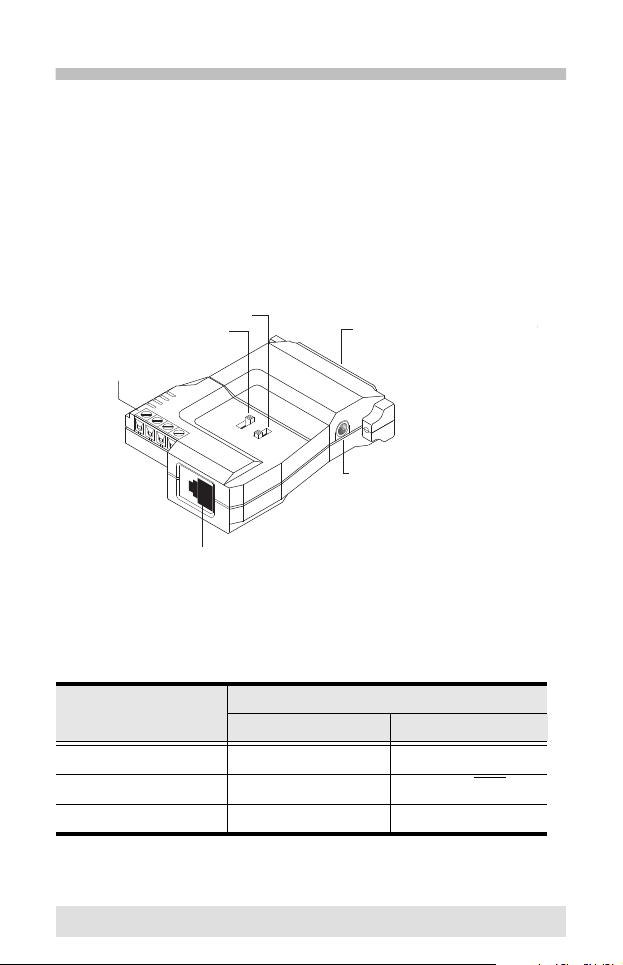
Switch Configuration
The IC-485S / IC-485SI’s operating mode parameters are set
with two slide switches:

SW1 sets the Device Mode

SW2 sets the Transmitting and Receiving Mode
IC 485S Switch Settings
Position
Setting
SW1 SW2
1 DCE TxO, RxON
2 DTE TxRTS, RxRTS
3 Monitor TxRTS, RxON
Spare
Power Jack
RJ-11
Terminal Block
SW 1
SW 2 RS-232 DB-25 Female Connec
- 8 -
IC 485SI Switch Setting
Position
Setting
SW1 SW2
1 DCE TxO, RxON
2 DTE TxRTS, RxRTS
3 X TxRTS, RxON
Power Jack
Grnd. Tab
Te r minal Block
SW 1
SW 2 RS-232 DB-25 Female Connecter
- 9 -
Terminology
Explanations of the SW! and SW2 terms are given in the table
below:
Term Ex lanation
DCE Data Communications Equipment; if the IC-485S /
IC-485SI is going to be plugged into a DTE
device, the IC-485S / IC-485SI must be set to
DCE
DTE Data Terminating Equipment; if the IC-485S / IC-
485SI is going to be plugged into a DCE device,,
the IC-485S / IC-485SI must be set to DTE
TxON,, RxON This setting is used in Point-to-Point operations,,
in which the unit is always in Transmitting and
Receiving Mode
TxRTS, RxRTS This setting is used in Multidrop operations, in
which the unit is in Transmitting Mode when the
RTS signal is high, and is in Receiving Mode
when the RTS signal is low
TxRTS, RxON This setting is used in Multidrop Full Duplex
operations to monitor the RS-485 line signals
Receiving Mode is always ON Transmitting mode
only occurs when the RTS signal is high
- 10 -
Operating Modes
The IC-485S / IC-485SI supports four operating modes: Point-to-
Point; Multidrop; Simplex; and Monitor (IC-485S only) Point-to-
Point and Multidrop can be configured for Full or Half Duplex
Each of the operating modes is explained in the sections that
follow
Point to Point
A Point-to-Point configuration is one in which two devices,
located at two different places are linked for communication by a
pair of IC-485S or IC-485SI units There are two configurations:
Point-to-Point Full Duplex, and Point-to-Point Half Duplex
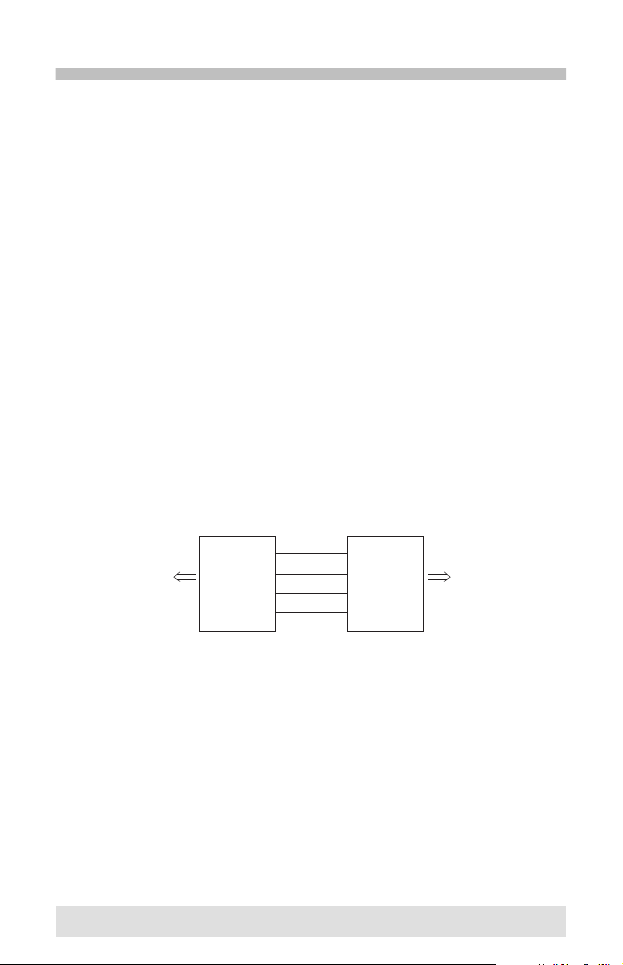
1. Point-to-Point Full Du lex

Point-to-Point Full Duplex uses reverse four wire cabling
as shown in the diagram below:

For both IC-485S / IC-485SI units, set SW1 to DCE or DTE
depending on what type of device the IC-485S / IC-485SI
will plug into (if it will plug into a DCE device, configure it
for DTE, and vice versa)

For both IC-485S / IC-485SI units, set SW2 to TxON,
RxON
T+
T-
R-
R+
R+
R-
T-
T+
Connect
to PC#1's
COM port
Connect
to PC#2's
COM port
DB-25 DB-25