manuals.online logo
Brands
  1. Home
  2. •
  3. Brands
  4. •
  5. ATV
  6. •
  7. Security Camera
  8. •
  9. ATV FD540DNIR User manual

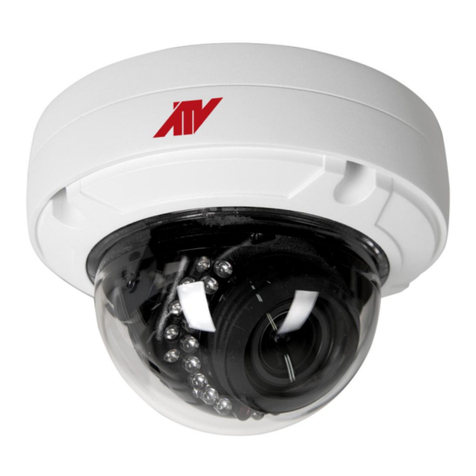
ATV FD540DNIR User manual

Other ATV Security Camera manuals

ATV LD72BI User manual

ATV

ATV LD72BI User manual

ATV VD600TDNWI User manual

ATV

ATV VD600TDNWI User manual

ATV IPVD2TI User manual

ATV

ATV IPVD2TI User manual

ATV VDM700DN/6 User manual

ATV

ATV VDM700DN/6 User manual

ATV IPSD202MT User manual

ATV

ATV IPSD202MT User manual

ATV VLBTIR User manual

ATV

ATV VLBTIR User manual

ATV 22X MINITRAX III User manual

ATV

ATV 22X MINITRAX III User manual

ATV IPVD1MT User manual

ATV

ATV IPVD1MT User manual

ATV NLPW237 User manual

ATV

ATV NLPW237 User manual

ATV VD650WDR User manual

ATV

ATV VD650WDR User manual

ATV IPB2TWI User manual

ATV

ATV IPB2TWI User manual

ATV BHR212MR User manual

ATV

ATV BHR212MR User manual

ATV CZ7T2812UWCI User manual

ATV

ATV CZ7T2812UWCI User manual

ATV NBW4212M User manual

ATV

ATV NBW4212M User manual

ATV NVW4212M User manual

ATV

ATV NVW4212M User manual

ATV NBW436 User manual

ATV

ATV NBW436 User manual

ATV IPB2TI User manual

ATV

ATV IPB2TI User manual

ATV FD540VA User manual

ATV

ATV FD540VA User manual

ATV NVW2212M User manual

ATV

ATV NVW2212M User manual

ATV BSS7212 User manual

ATV

ATV BSS7212 User manual

ATV NBW4K311M User manual

ATV

ATV NBW4K311M User manual

ATV BHR7212MR User manual

ATV

ATV BHR7212MR User manual

ATV NV237 User manual

ATV

ATV NV237 User manual

ATV IPC560TDN User manual

ATV

ATV IPC560TDN User manual

Popular Security Camera manuals by other brands

ADEMCO RapidDome Owners Operating & Installation Guide

ADEMCO

ADEMCO RapidDome Owners Operating & Installation Guide

EverFocus EBA2880 user manual

EverFocus

EverFocus EBA2880 user manual

Honeywell OptiCAM-IR Installation and setup guide

Honeywell

Honeywell OptiCAM-IR Installation and setup guide

Uniq UC-600 user manual

Uniq

Uniq UC-600 user manual

OPTICOM NVD-120-S datasheet

OPTICOM

OPTICOM NVD-120-S datasheet

Steren CCTV-221 instruction manual

Steren

Steren CCTV-221 instruction manual

Arm Electronics C420BCDNVFIR Features

Arm Electronics

Arm Electronics C420BCDNVFIR Features

Eneo PLD-2036PTZ installation guide

Eneo

Eneo PLD-2036PTZ installation guide

Axis AXIS M20 Series installation guide

Axis

Axis AXIS M20 Series installation guide

Panasonic KX-HCM230 operating instructions

Panasonic

Panasonic KX-HCM230 operating instructions

COP-USA CC15NV-SL Specifications

COP-USA

COP-USA CC15NV-SL Specifications

Active Silicon HARRIER H.264 quick start guide

Active Silicon

Active Silicon HARRIER H.264 quick start guide

Motorola Avigilon 1.3C-H5SL-BO1-IR installation guide

Motorola

Motorola Avigilon 1.3C-H5SL-BO1-IR installation guide

INSTEON 2864-232 user manual

INSTEON

INSTEON 2864-232 user manual

Wisenet XNB-6002 quick start guide

Wisenet

Wisenet XNB-6002 quick start guide

Axis M5525-E user manual

Axis

Axis M5525-E user manual

Vitek VTC-IR62NZ922 user guide

Vitek

Vitek VTC-IR62NZ922 user guide

Panasonic WV-SF342 Specifications

Panasonic

Panasonic WV-SF342 Specifications

manuals.online logo
manuals.online logoBrands
  • About & Mission
  • Contact us
  • Privacy Policy
  • Terms and Conditions

Copyright 2025 Manuals.Online. All Rights Reserved.

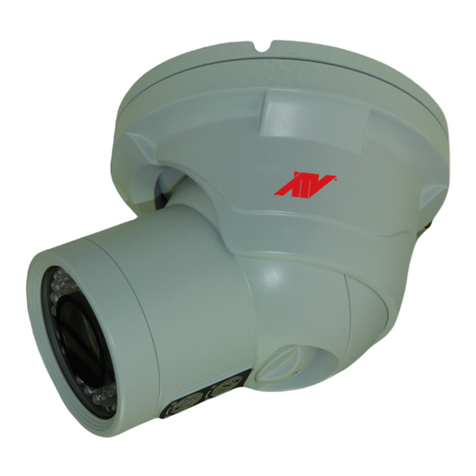
3-AXIS INFRARED - LED
PLASTIC DOME CAMERA
540TV Lines
uper High Resolution
S
Infrared - LED Dome Camera
LIMITATION OF LIABILITY
THE INFORMATION IN THIS PUBLICATION IS BELIEVED TO BE ACCURATE IN
ALL RESPECTS, HOWEVER, WE CANNOT ASSUME RESPONSIBILITY FOR ANY
CONSEQUENCES RESULTING FROM THE USE THEREOF. THE INFORMATION
CONTAINED HEREIN IS SUBJECT TO CHANGE WITHOUT NOTICE. REVISIONS
OR NEW EDITIONS TO THIS PUBLICATION MAY BE ISSUED TO INCORPORATE
SUCH CHANGES.
ii
WARNINGS AND CAUTIONS:
CAUTION:
CAUTIONCAUTION
CAUTION: TO REDUCE THE RISK OF ELECTRIC SHOCK,
DO NOT REMOVE COVER(OR BACK).
NO USER-SERVICEABLE PARTS INSIDE.
REFER SERVICING TO QUALIFIED SERVICE PERSONNEL.
EXPLANATION OF GRAPHICAL SYMBOLS
The lightning flash with arrowhead symbol, within an equilateral triangle, is
intended to alert the user to the presence of uninsulated "dangerous voltage"
within the product's enclosure that may be of sufficient magnitude to constitute a
risk of electric shock to persons.
The exclamation point within an equilateral triangle is intended to alert the user to
the presence of important operating and maintenance (servicing) instructions in the
literature accompanying the product.
Should any liquid or solid object fall into the cabinet,
unplug the unit and have it checked by the qualified
personnel before operating it any further.
Unplug the unit from the wall oulet if it is not going to
be used for several days or more. To disconnect the
cord, pull it out by the plug. Never pull the cord itself.
Allow adequate air circulation to prevent internal heat
build-up. Do not place the unit on surfaces (rugs,
blankets, etc.) or near materials(curtains, draperies)
that may block the ventilation holes.
Height and vertical linearity controls located at the
rear panel are for special adjustments by qualified
personnel only.
Do not install the unit in an extremely hot or
humid place or in a place subject to excessive
dust, mechanical vibration.
The unit is not designed to be waterproof.
Exposure to rain or water may damage the unit.
Clean the unit with a slightly damp soft cloth.
Use a mild household detergent. Never use
strong solvents such as thinner or benzine as
they might damage the finish of the unit.
Retain the original carton and packing
materials for safe transport of this unit in the
future.
Safety ----------------------------------------- Installation -----------------------------------
Cleaning --------------------------------------
PRECAUTIONS
TO REDUCE THE RISK OF FIRE OR ELECTRIC SHOCK, DO NOT EXPOSE THIS PRODUCT TO RAIN OR
MOISTURE. DO NOT INSERT ANY METALLIC OBJECTS THROUGH THE VENTILATION GRILLS OR
OTHER OPENINGS ON THE EQUIPMENT.
iii

FCC INFORMATION : THIS EQUIPMENT HAS BEEN TESTED
AND FOUND TO COMPLY WITH THE LIMITS FOR A CLASS A DIGITAL
DEVICE, PURSUANT TO PART 15 OF THE FCC RULES. THESE
LIMITS ARE DESIGNED TO PROVIDE REASONABLE PROTECTION
AGAINST HARMFUL INTERFERENCE WHEN THE EQUIPMENT IS
OPERATED IN A COMMERCIAL ENVIRONMENT. THIS EQUIPMENT
GENERATES, USES, AND CAN RADIATE RADIO FREQUENCY
ENERGY AND IF NOT INSTALLED AND USED IN ACCORDANCE WITH
THE INSTRUCTION MANUAL, MAY CAUSE HARMFUL INTERFERENCE
TO RADIO COMMUNICATIONS. OPERATION OF THIS EQUIPMENT IN
A RESIDENTIAL AREA IS LIKELY TO CAUSE HARMFUL
INTERFERENCE IN WHICH CASE THE USER WILL BE REQUIRED TO
CORRECT THE INTERFERENCE AT HIS OWN EXPENSE.
CAUTION : CHANGES OR MODIFICATIONS NOT EXPRESSLY
APPROVED BY THE PARTY RESPONSIBLE FOR COMPLIANCE
COULD VOID THE USER'S AUTHORITY TO OPERATE THE EQUIPMENT.
THIS CLASS A DIGITAL APPARATUS COMPLIES WITH CANADIAN
ICES-003.
NORME NMB-003 DU CANADA.
WARNING
This is a Class A product. In a domestic environment this product
may cause radio interference in which case the user may be required
to take adequate measures.
CE COMPLIANCE STATEMENT
FCC COMPLIANCE STATEMENT
iv
v
IMPORTANT SAFEGUARDS
1 -1 Class 2 power source only.
7
-2 Do NOT use power source other than that specified.
17
17. CAUTION-these servicing instructions are
for use by qualified service personnel only.
to reduce the risk of electric shock do not
perform any servicing other than that contained
in the operating instructions unless you are
qualified to do so.
5. ACCESSORIES
vi

INTRODUCTION
CAMERA CONNECTION
INSTALLING & ADJUSTING CAMERA MODULE
BASE INSTALLATION
STRUCTURE OF THE SETUP MENU
OPERATING CAMERA
LENS ADJUSTMENT
DC AUTO IRIS LENS
TROUBLESHOOTING AND MAINTENANCE
SPECIFICATIONS
EXTERNAL DIMENSION
BASIC CAMERA INSTALLATION
TABLE OF CONTENTS
1
2
3
4
5
7
8
18
18
19
20
21
1
The camera provides high-quality images using SONY CCD technology especially
designed for closed-circuit television (CCTV) and security surveillance
applications.
Features:
High resolution and high performance 1/3" SONY Super HAD CCD
Technology
Excellent picture quality
540 lines(Color) of resolution
0.5 lux(Color), 0 lux(IR LED ON) @ F.1.2 Sensitivity
Auto electronic shutter [1/60(1/50) ~ 1/120,000] and manual electronic
shutter modes
OSD (On Screen Display)
(Digital Noise Reduction) Auto Function
DNR
Auto and manual white balance modes
BLC (Back Light Compensation)
Day&Night (Auto / DAY / NIGHT / EXT)
Privacy Zone 4point
AGC (Auto Gain Control)
Sense-up (x2 ~ x32)
MIRROR (NORMAL /MIRROR/VERTICAL /ROTATE)
VIDEO OUT(BNC)
Motion Detection
Internal / AC line lock
Operates in 12 VDC or 24 VAC
Use Certified / Listed Class 2 power supply only.
Camera Mount : camera mount directily to the wall or ceiling
4-9mm Day/Night A/I Varifocal Lens F1.6~2.4
INTRODUCTION
Test Monitor Output
CAMERA CONNECTIONS
2
23
1
REMINDER:
Never aim the camera directly into the sun.
1. Lens : 4-9mm D&N A/I Vari-focal lens for wide area monitoring.
2. Power : 24V AC input / 12V DC input
power source from a DC 12V or AC 24V ac +/-10% 60/50Hz +/-1Hz
Use Certified/Listed Class 2 power supply transformer only.
*If using DC 12V power adaptor,
use a power supply capable of supplying 8 Watts.
3. Video : BNC connector used to connect the camera to a monitor, switcher, etc.
3
BASIC CAMERA INSTALLATION
TOP
Unpack and identify the following parts from the product carton:
Note : Arrow ma rk indicates the top of the camera image.
D. Anchor
Note : Make sure the power is turned off when connecting the power
adaptor cable.
4
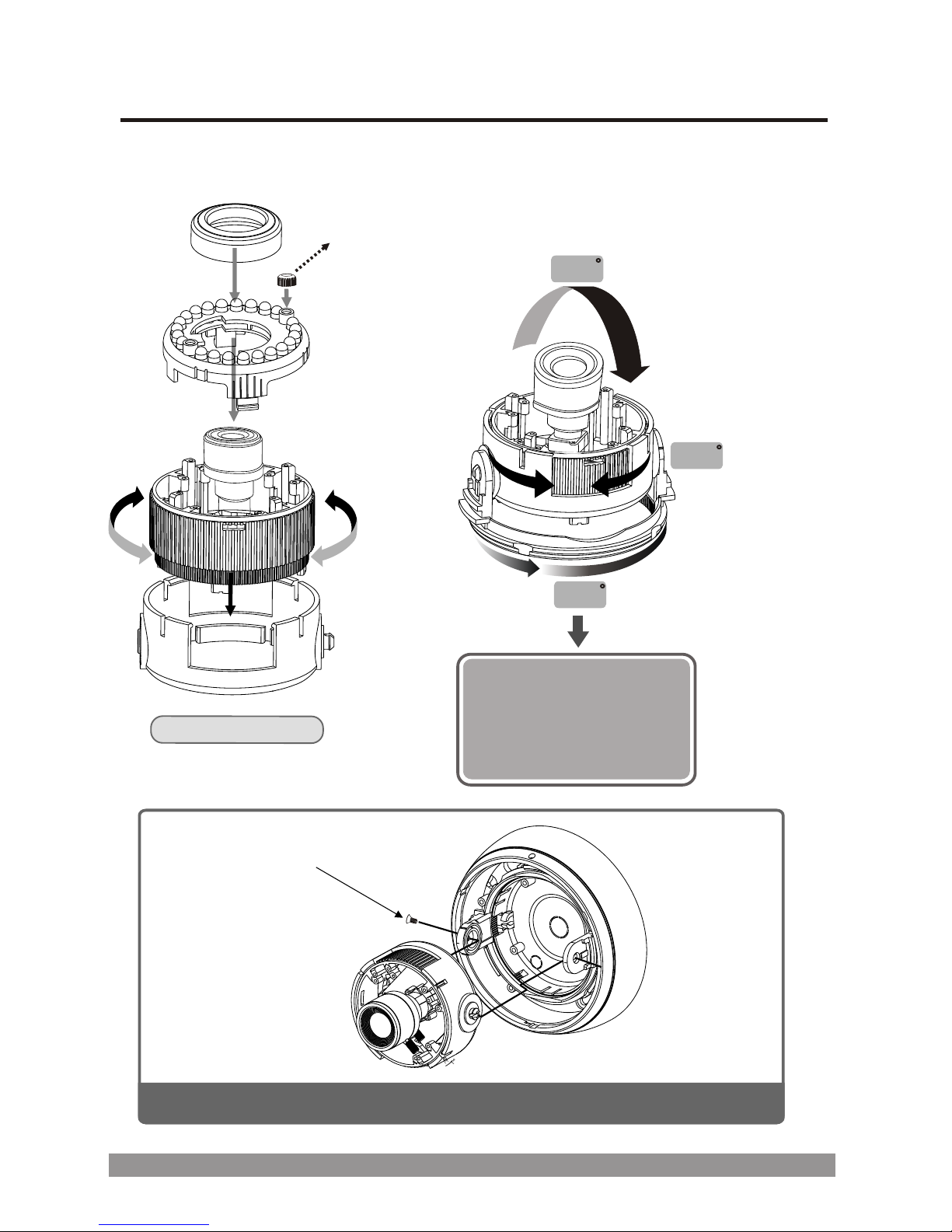
INSTALLING & ADJUSTING CAMERA MODULE
Use the following drawings to install the camera module to the housing.
360
360
180
IR ame only
c ra
Sensor Cap
At extreme tilt angles:
Use this to cover a sensor if it points inside the housing.
Screw Taptite(FC)
M3x6
Camera lens can be moved
horizontally or vertically and
freely swiveled to any angle.
3-Axis Camera Construction
Note: The distance between the camera and the target must exceed 0.5M