manuals.online logo
Brands
  1. Home
  2. •
  3. Brands
  4. •
  5. Avago
  6. •
  7. Media Converter
  8. •
  9. Avago HEDR-5 High Resolution Series Installation and operating instructions

Avago HEDR-5 High Resolution Series Installation and operating instructions

Other Avago Media Converter manuals

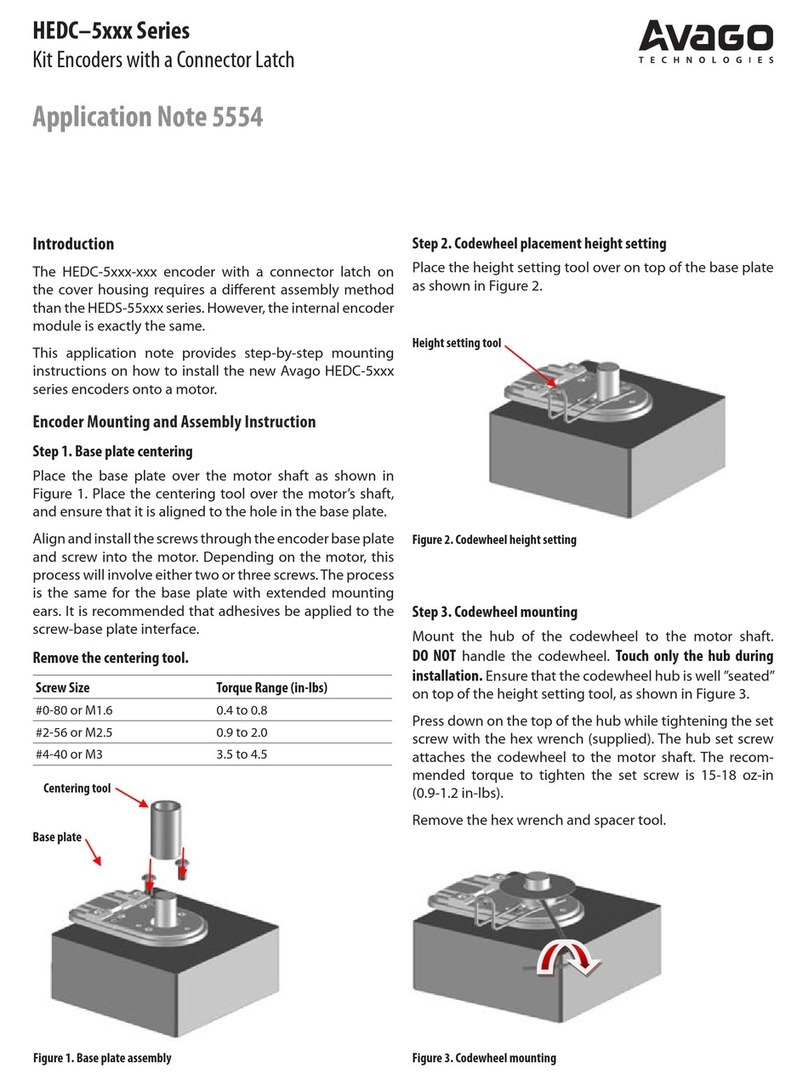
Avago HEDC-5 Series Installation and operating instructions

Avago

Avago HEDC-5 Series Installation and operating instructions

Avago AED -8 Series Instruction Manual

Avago

Avago AED -8 Series Instruction Manual

Avago HEDS-8949 User manual

Avago

Avago HEDS-8949 User manual

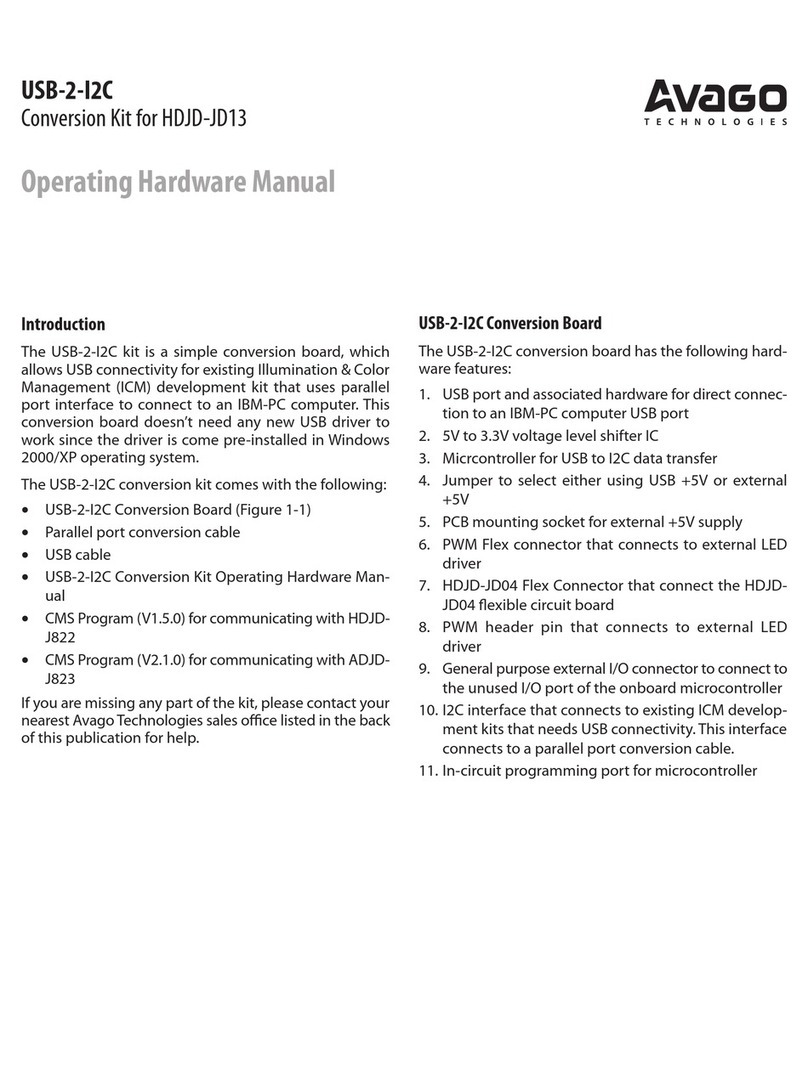
Avago USB-2-I2C User manual

Avago

Avago USB-2-I2C User manual

Popular Media Converter manuals by other brands

TR-Electronic CMS582M-4096/4096 IOL DMS 14H7 KRF Assembly instructions

TR-Electronic

TR-Electronic CMS582M-4096/4096 IOL DMS 14H7 KRF Assembly instructions

Korenix JetCon 2301S user manual

Korenix

Korenix JetCon 2301S user manual

StarTech.com ET91000LCOAM manual

StarTech.com

StarTech.com ET91000LCOAM manual

Alesis AI-3 Reference manual

Alesis

Alesis AI-3 Reference manual

Caton Vpro 5100 user guide

Caton

Caton Vpro 5100 user guide

Cypress CSC-5500 Operation manual

Cypress

Cypress CSC-5500 Operation manual

H&B TX-100 Installation and instruction manual

H&B

H&B TX-100 Installation and instruction manual

Bolin Technology D Series user manual

Bolin Technology

Bolin Technology D Series user manual

IFM Electronic Efector 400 RN30 Series Device manual

IFM Electronic

IFM Electronic Efector 400 RN30 Series Device manual

GRASS VALLEY KUDOSPRO ULC2000 user manual

GRASS VALLEY

GRASS VALLEY KUDOSPRO ULC2000 user manual

Linear Technology DC1523A Demo Manual

Linear Technology

Linear Technology DC1523A Demo Manual

Lika ROTAPULS I28 Series quick start guide

Lika

Lika ROTAPULS I28 Series quick start guide

Weidmuller IE-MC-VL Series Hardware installation guide

Weidmuller

Weidmuller IE-MC-VL Series Hardware installation guide

Optical Systems Design OSD2139 Series Operator's manual

Optical Systems Design

Optical Systems Design OSD2139 Series Operator's manual

Tema Telecomunicazioni AD615/S product manual

Tema Telecomunicazioni

Tema Telecomunicazioni AD615/S product manual

KTI Networks KGC-352 Series installation guide

KTI Networks

KTI Networks KGC-352 Series installation guide

Gira 0588 Series operating instructions

Gira

Gira 0588 Series operating instructions

Lika SFA-5000-FD user guide

Lika

Lika SFA-5000-FD user guide

manuals.online logo
manuals.online logoBrands
  • About & Mission
  • Contact us
  • Privacy Policy
  • Terms and Conditions

Copyright 2025 Manuals.Online. All Rights Reserved.

HEDR-5xxx High Resolution Series
Three Channel Quick Assembly Encoders
Application Note 5560
Introduction
This application note provides step by step instructions
for mounting the new Avago HEDR-5xxx series encoders
onto a motor.
The Avago HEDR-5xxx series encoders are designed to
cater for existing HEDS-5xxx series users who wish to up-
grade due to higher CPR requirements. Therefore the base
plate and outer diameter of these encoders are compat-
ible with the legacy HEDS-5xxx series.
The Avago HEDR-5xxx series have been specially designed
for easy installation while ensuring that the chance of n-
ger contact with the internal code wheel is eliminated.
Encoder Mounting and Assembly Instruction
The HEDR-5xxx comes in the form of 3 parts; namely
the base plate, centering tool and encoder body unit.
See gure 1.
Figure 3. Recommended motor mounting dimension
Align and install the screws* through the encoder base
plate and into the motor. See gure 3. Refer to Table 1 for
recommended torque.
* Depending on the motor type, two or three screws will be required.
Figure 2. Base plate to motor shaft assembly
Step 1. Centering the base plate
Place the base plate over the motor shaft as shown in g-
ure 2. Slide the centering tool over the motor shaft, and
ensure that it is aligned to the hole in the center of the
base plate.
Figure 1. HEDR-5xxx exploded assembly view
Centering tool
Base plate
Screws
Encoder
body unit
Table 1. Recommended screw torque settings
Screw Size Torque Range (in-lbs)
#0-80 or M1.6 0.4 to 0.8
#2-56 or M2.5 0.9 to 2.0
NOTE: It is recommended that adhesives be applied to the screw-base
plate interface to prevent the screws loosening during operation.
Note: Screws are not included
For product information and a complete list of distributors, please go to our web site: www.avagotech.com
Avago, Avago Technologies, and the A logo are trademarks of Avago Technologies in the United States and other countries.
Data subject to change. Copyright © 2005-2014 AvagoTechnologies. All rights reserved.
AV02-3824EN - October 28, 2014
Figure 4. Base plate after screw tightening and centering tool removed
Step 2. Remove the centering tool
Step 3. Encoder body unit assembly
With the base plate centered to the shaft as seen in Figure
4, mount the encoder body unit to the motor’s shaft. See
gure 5.
Figure 5. Mounting encoder body unit to the base plate
Step 4. Lock codewheel onto the motor shaft
Insert the hex wrench into the set-screw opening of the
encoder body unit and apply a downward force (as indi-
cated by arrow), then tighten the set screw. See Figure 6.
The recommended torque is 15-18 oz-in (0.9-1.2 in-lbs).
Figure 7. Closing up the set screw outlet
Figure 8. Completed assembly
Figure 6. Tightening encoder body unit set-screw to the motor’s shaft
Perform the same action on the opposite side of the en-
coder. Note that you will need to pull the“L-shape”mecha-
nism down and to the right instead.
The closure is considered complete when the “hinge” is
clearly visible through the set-screw openings on both
sides of the encoder body unit. See gure 7 (AFTER)
The completed encoder assembly is now ready for opera-
tion. See gure 8.
Screw head,
max height
= 2.1mm
Shown here
are two snap
points
Press body
unit down
Set screw
outlet
opening
Tightened
clockwise
Hex Wrench
(1.5mm)

Set screw
“Hinge”
Hex wrench to pull the cover leftwards “L-shape”
BEFORE AFTER
Press t the encoder body unit to the base plate, ensuring
that all four snap points are well locked.
The set screw tightening process will:
1. Lock the code wheel's hub to the motor shaft
2. Physically align the code wheel's index position to that
of the detector IC (index channel may not necessarily
be triggered electrically).
Step 5. Release codewheel and close set-screw outlet
Using the hex wrench, pull the“L-shape”protrusion down
and to the left. See gure 7 (BEFORE). This action releas-
es the internal codewheel holding mechanism and also
serves to close the set-screw opening.
* 1.5mm Hex wrench should be used to fasten M3 set screw in Figure 6