VOXVOX
OK
Connect with us:
Axvue stands behind all of its products.
If you are not completely sasfied or have any quesons,
please contact us at hps://www.axvue.com
AXVUE INC.
Revised at 08/2020
*Any updated or revised version please refer to axvue official website.
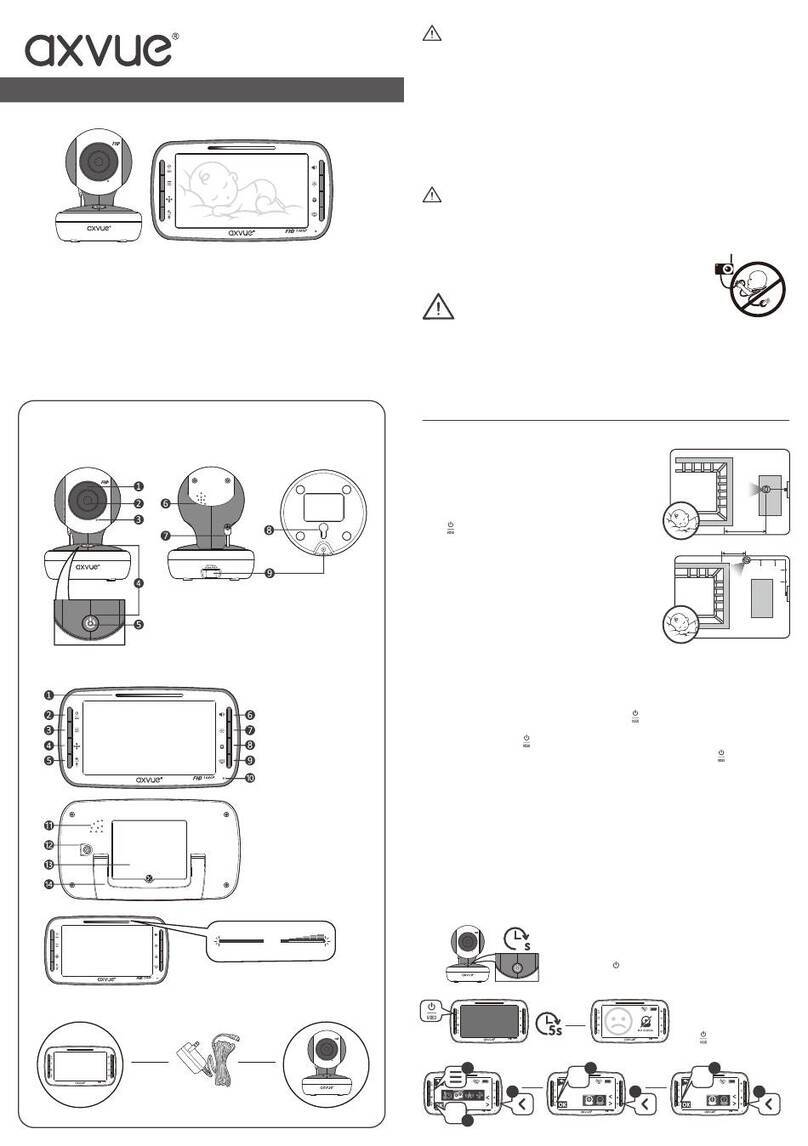
Setup & use
(continued)
Favorite Features
(continued)
CAUTION
1. To comply with the FCC RF exposure compliance requirement, a separaon distance of 20 cm must be maintained
between the antenna of this device and all persons.
2. This transmier most not be co-located or operang in conjuncon with any other antenna or transmier.
NOTE
This equipment has been tested and found to comply with the limits for a Class B digital device,
Pursuant to Part 15 of the FCC Rules. These limits are designed to provide reasonable protecon against harmful
interference in a residenal installaon. This equipment generates, uses and can radiate radio frequency energy and, if
not installed and used in accordance with the instrucons, may cause harmful interference to radio communicaons.
However, there is no guarantee that interference will not occur in a parcular installaon. If this equipment does cause
harmful interference to radio or television recepon, which can be determined by turning the equipment off and on,
the user is encouraged to try to correct the interference by one or more of the following measures:
- Reorient or relocate the receiving antenna.
- Increase the separaon between the equipment and receiver.
- Connect the equipment into an outlet on a circuit different from that to which the receiver is connected.
FCC Information
CAUTION
Changes and modificaons not expressly approved by AXVUE may void the users authority to operate this equipment.
This device complies with part 15 of FCC Rules. Operation is subject to the following
two conditions: (1) The device may not cause harmful interference, and (2) This
device must accept any interference received, including interference that may cause
undesired operation.
DO NOT EXPOSE TO RAIN OR MOISTURE
CAUTION
RISK OF ELECTRIC SHOCK
DO NOT OPEN
- Make sure you read this instrucon carefully before using the product.
- Store this instrucon safely for your future reference.
- Ensure that you read the “Warning” secon of the product package and this instrucon carefully.
- Use the product properly by following this instrucon.
- Wipe the product by wet towel aer you take it down from the wall.
- Avoid possible danger by following manufacturer’s instrucon.
- Do not using the product in humid place or contact with liquid, like bathtub, hand washing sink, kitchen sink, laundry
tub, humid basement, swimming pool, etc.
- Ensure the product is installed in a flat place. Otherwise, it will cause serious personal injury and product damage
when dropped.
- Only follow this instrucon and use installaon tools provided by the manufacturer to set up the product.
- The slots and holes on the product are used for venlaon, please ensure that it is not covered or blocked by other
objects.
- Do not place the product on bed, sofa, rug or other similar places, it will block or cover the slots and holes on the
product. Do not place the product in a closed bookcase or shelf unless it has parcular part for venlaon.
- This product should be connected with certain power supply unit, if you are not sure about the power supply system
in your home, please contact with your product dealer and local power supply company. Please refer to the operang
instrucon if you want to operate the product in portable/baery mode or by connecng with other power supply
sources.
- Power supply cords should be routed so that they are not likely to be walked on or pinched by items placed upon or
against them, paying parcular aenon to cords at plugs, convenience receptacles, and the point where they exit
from the product.
- An outside antenna system should not be located in the vicinity of overhead power lines or other electrical lines or
power circuits, it will cause interference for the signal transmission. When installing an outside antenna system,
extremely aenon should be paid to avoid touching such power lines or circuits, otherwise, you will have possible
danger of electrical shock.
- Do not overload wall outlet, extension cords or convenience receptacles, this can be cause a risk of fire or electrical
shock.
- Do not insert any ny objects into the product’s inside, it may touch dangerous voltage point or cause short-circuit,
this can be cause a risk of fire or electrical shock. Any kind of liquid spillage happens on the product should be avoid.
- Do not maintain the product by yourself as opening and removing the covering, this may expose you to dangerous
voltage or other hazards. Please contact with qualified service personnel for maintaining.
- Unplug the product from wall outlet and contact with qualified service personnel if you have problems as below:
* When the power-supply cord or plug has been damaged.
* If liquid has been spilled, or objects have fallen into the product.
* If the product has been exposed to rain or water.
* If the product didn’t operate normally by following the operang instrucons, please only adjust those controls
which are covered by the operang instrucons. An improper adjustment of other controls may result in product
damage, it will also require extensive work from qualified service personnel to restore the product to its normal
operaon mode.
* If the products has been dropped or damaged in any way, or when the product shows a disnct change in
performance—this indicated that the product need to be maintained.
- Replacement parts—When replacement parts are required, be sure the service technician has used replacement
parts specified by the manufacturer or its have the same characteriscs as the original part. Unauthorized
substuons may result in fire, electrical shock or other hazards.
IMPORTANT SAFETY INSTRUCTIONS
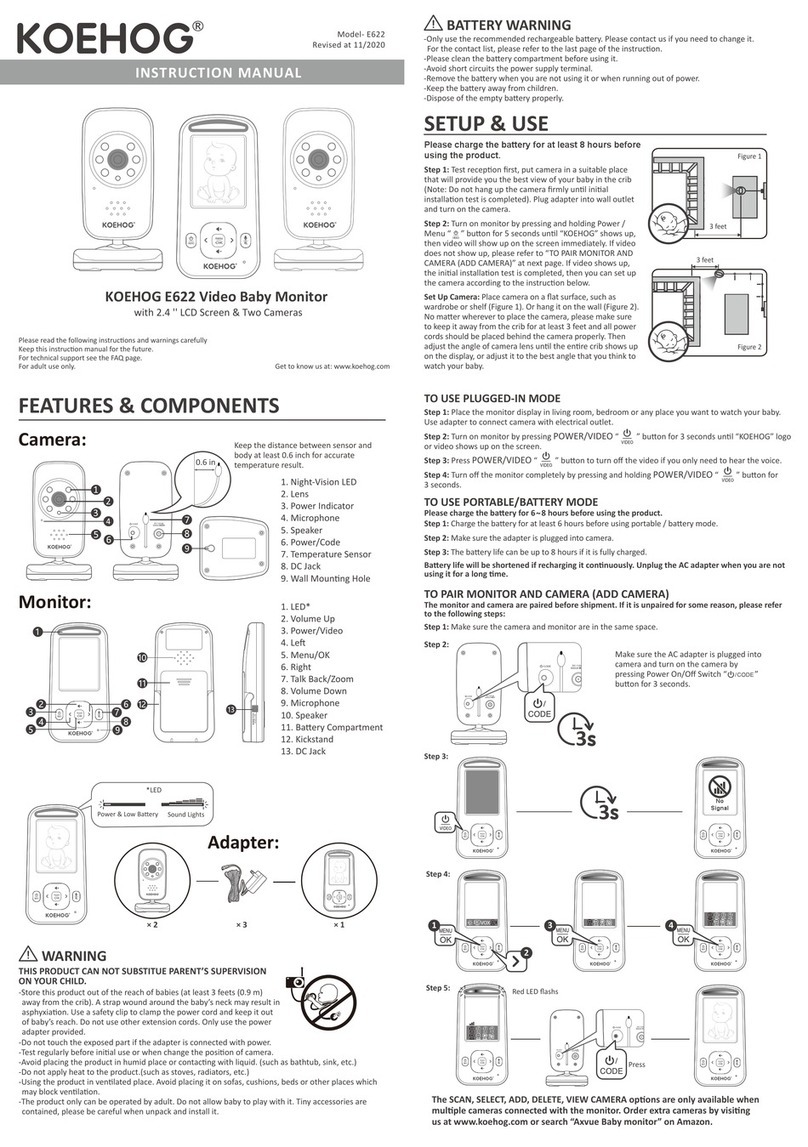
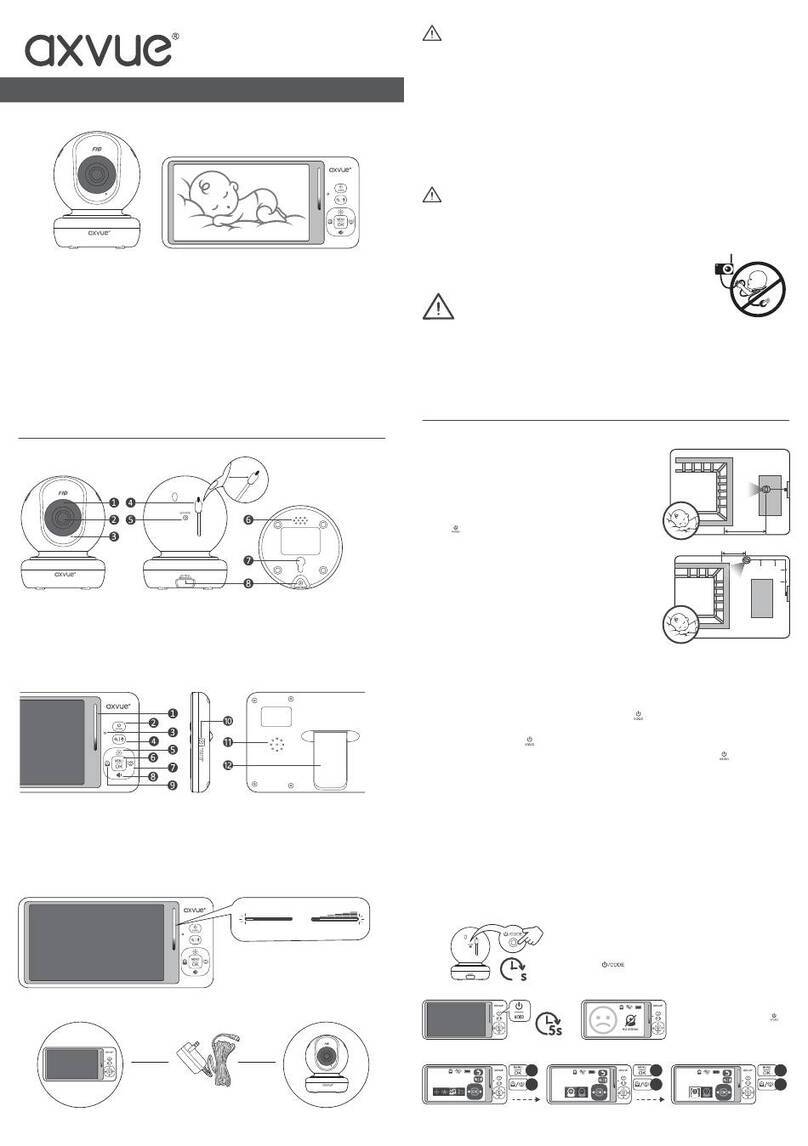
The SCAN, SELECT, ADD, DELETE, VIEW CAMERA options are only available when multiple
cameras connected with the monitor. Order extra cameras by visiting us at www.axvue.com
or search “Axvue Baby monitor” on Amazon.
Favorite Features
TO ADJUST SCREEN COLOR TEMPERATURE
Step 5:
Press and hold the TALK BACK buon on the monitor to acvate two-way communicaon mode.
85°F
8s
13 24
Red LED flashs
VOX
OK
VOX
OK
VOX
OK
13
2
OK
4
vox
OK
5
OK
7
6
12
TO DELETE A CAMERA
VOX
No
Signal
VOX
OK
CAM SIGNAL WILL BE LOST!
CANCEL YES
TO SELECT A CAMERA
TO SCAN ALL CAMERAS (AUTO-SCAN)
TO SET UP VOX—Video on Crying
VOX
VOX
VOX
cam 1 85°F
VOX
scan 2 85°F
VOX
OK
12
OK
2
3
OFF 123
OK
OK
2
3
8s
VOX
1
cam 1 85°F
VOX
cam 2 85°F
VOX
cam 1 85°F
VOX
cam 1 85°F
VOX
cam 1 vox1 85°F
VOX
VOX
cam 1 vox1 85°F
VOX
cam 1 vox3 85°F
1
VOX
VOX
VOXVOX
3
2
OK
4
vox
OK OK
7
5
6
OK OK
VOX
cam 1 85°F
VOX VOX
VOX VOX
VOX
cam 1 85°F
1
VOX
2
DIGITAL ZOOM IN & OUT
VOX
cam 1 85°F
VOX
cam 1 85°F
VOX
cam 1 85°F
TWO-WAY COMMUNICATION
VOLUME CONTROL
BRIGHTNESS ADJUSTMENT
Long
Press
1