“INPUT LEVEL” Settings: “+4”, “-30 dBu”, “-50 dBu”
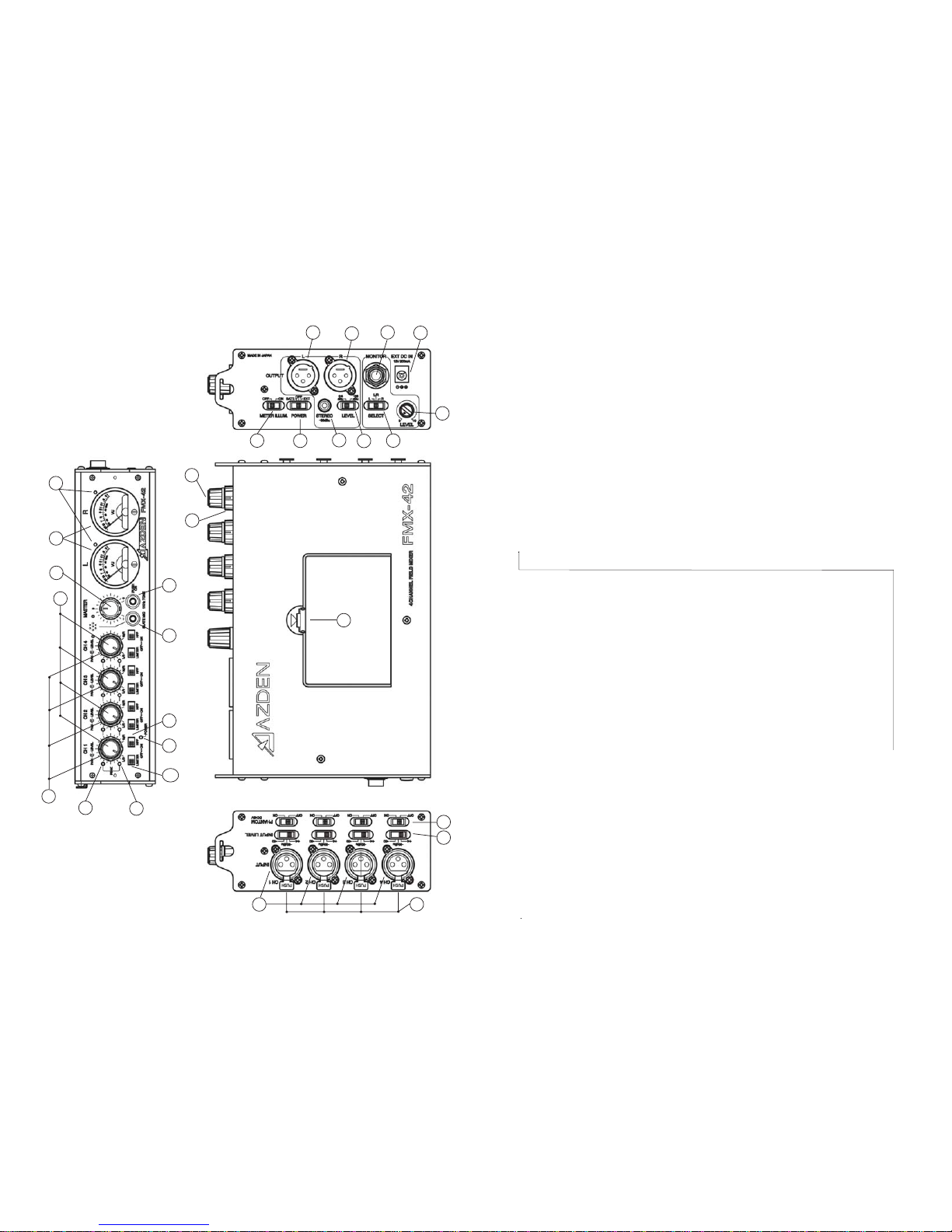
EachinputchanneloftheFMX-42hasitsownlevelsetting(7).Selecttheinputlevel
thatisbestsuitedforthemicrophone,wirelessreceiverorline-levelaudiocompo-
nentthatyouareconnectingtoeachinput.The“+4”settingisforline-levelaudio,“-
30dBu”and“-50dBu”arebothmicrophone-levelsettings.Forthemicrophone-
levelsettings,startwiththe“-30dBu”position.Ifyourmicrophoneseemstohavetoo
muchgain(volume)trythe“-50dBu”setting.
“PHANTOM DC48V” Switch:
EachchanneloftheFMX-42has itsown “PHANTOMDC48V”powersetting(8).
Whenusingadynamicmicrophonebesuretoturnthecorresponding“PHANTOM
DC48V”switchtothe “OFF” position.Whenusingacondenser microphone that
requires 48VDC external power, turn the corresponding “PHANTOM DC48V”
switch to the “ON” position. The “PHANTOM DC48V” only opterates in the “-30
dBu”and“-50”“INPUTLEVEL”position
WARNING: With the “PHANTOM DC48V” power turned “ON” the FMX-42 supplies
48VDC to the microphone. Please make sure that your microphone is designed to
handle48VDCoryou may damage it. Checkthe microphone’suser manual orwith
themanufacturer of yourmicrophone.
FRONT PANEL CONTROLS and SETTINGS
Input “LEVEL” Controls:
Each“INPUT”channeloftheFMX-42hasanadjustableinput“LEVEL”control(9)
(thisistheinner-smallercontrol).Thiscontrolstheinputvolumeofthemicrophone
connected to each corresponding “INPUT”. Zero is the lowest (quietest) setting
while10isthehighest(loudest).Forthebest soundwiththelowestnoise,increase
theinputlevelcontroluntilthecorrespondingVUMeter(10)peaksat0dB.
Input “PEAK” Level LEDs:
Each“INPUT”channeloftheFMX-42has2“PEAK”levelLEDs.TheseLEDsare
providedtohelpsetpreciseinput“LEVEL”adjustments.TheLEDsarelocatedtothe
leftofeachinput“LEVEL”control.ThelowerLED(11)indicatestheleveloftheinput
electronicallypriortothe“LEVEL”control.TheupperLED(12)indicatesthelevel
electronicallyafterthe“LEVEL”control.ThelowerLED(11)lightingREDindicates
thattheitemattachedtothemixer’s“INPUT”hasasignalthatistoohighandshould
bereducedeitherbychangingthe“INPUTLEVEL”switch(7)oratthedeviceitself.
Theupper“PEAK”level LED(12) shouldonlylightREDoccasionally.IfthisLED
stays lit continuously lower the input “LEVEL” (9) and/or change your “INPUT
LEVEL”(7)settings.TheseLEDshelpreducesignaloverloadanddistortion.
“PAN” Controls:
EachchanneloftheFMX-42hasanadjustable“PAN”control(13)(thisistheouter-
largercontrol).Whenthe“PAN”controlisinthecenterposition,anequalamountof
soundwillcomefrom“OUTPUT”“L” (14) and “OUTPUT” “R” (15) foranymicro-
phoneorline-levelinputconnectedtothecorresponding“INPUT”.Movingthe
23
“PAN”controlleftwilldecreasethesoundoutputinthe“R”ightchannel.Movingthe
“PAN”controlrightwilldecreasethesoundoutputinthe“L”eftchannel.
“LIMITER” Switch:
Each “INPUT” channel of the FMX-42 has a switchable “LIMITER” (16). After
settingtheinput“LEVEL”,turnthisswitchto“ON”.The“LIMITER”circuitactsasa
safety and reduces the possibility of overload distortion from very loud sounds
withoutaffectingnormalsoundvolume.Ifyouprefertheoverallsoundqualityofthe
mixerwithoutthe“LIMITER”circuitengagedleavetheswitch“OFF”.
“HPF” - High Pass Filter:
Each“INPUT”channeloftheFMX-42hasaswitchablehighpass(lowcut)filter-
“HPF”(17).Thisfilter is useful for removing unwanted low frequencies, suchas
windandair-conditioningnoise.Formostapplicationsengagingthehighpassfilter
willimproveoverallsoundquality.
“MASTER” Level Control:
The “MASTER” knob (18) controls the overall volume of all connected sources
(microphonesand/orline-leveldevices).Forthebestpossiblesoundandlowest
noise,trytokeepthiscontrolsetatitsmidpointwhilemaintainingtheVUmetersat
their0dBrangewiththe“input“LEVEL’controls.
VU Meters - “L” and “R”
Forthebestsound,whilekeepingthe“MASTER”controlatitsmidpoint,increaseor
decreaseeachchannels“LEVEL”control(9)untilthe“L”and/or“R”VUmeter(10)
peaks at 0 dB. If the ”LEVEL” is set too low, sound may be accompanied by
backgroundhiss.Ifthe“LEVEL”issettoohighthesoundmaybedistorted.Monitor
thesoundwithheadphonesandadjustthe“LEVEL”forthebestsound.Apeaklevel
LED(19) willlightREDifyouroveralllevelsaresettoohigh.
“SLATE MIC”:
Press and hold this button (20) to engage the “SLATE MIC” (microphone).The
“SLATEMIC”isusedtopickupaudioatthemixer’slocationandisnotintendedfor
seriousaudiorecording.Itishowever,veryusefulfornotatingscenesorotheron-
locationdocumentation.
“1 kHz TONE”:
Pressandholdthisbutton(21)togeneratethe1kHztone.Thisoutputtoneisused
tosettherecordinglevelsofyourvideocameraoraudiorecordertotheiroptimum
level.Whilegeneratingthe1kHztone,settherecordinglevelsofyourvideocamera
oraudiorecordertothespecifiedlevelasrecommendintheowner’smanual.The
signalisgeneratedat+4dBu.