Table of Contents
Page i Manual Documentation Number MESR9xx-4210m
www.bb-elec.com/
www.bb-europe.com/
T
Ta
ab
bl
le
e
o
of
f
C
Co
on
nt
te
en
nt
ts
s
1.Introduction.......................................................................................................................................................1
About MESR9xx Modbus Gateways..........................................................................................................................................1
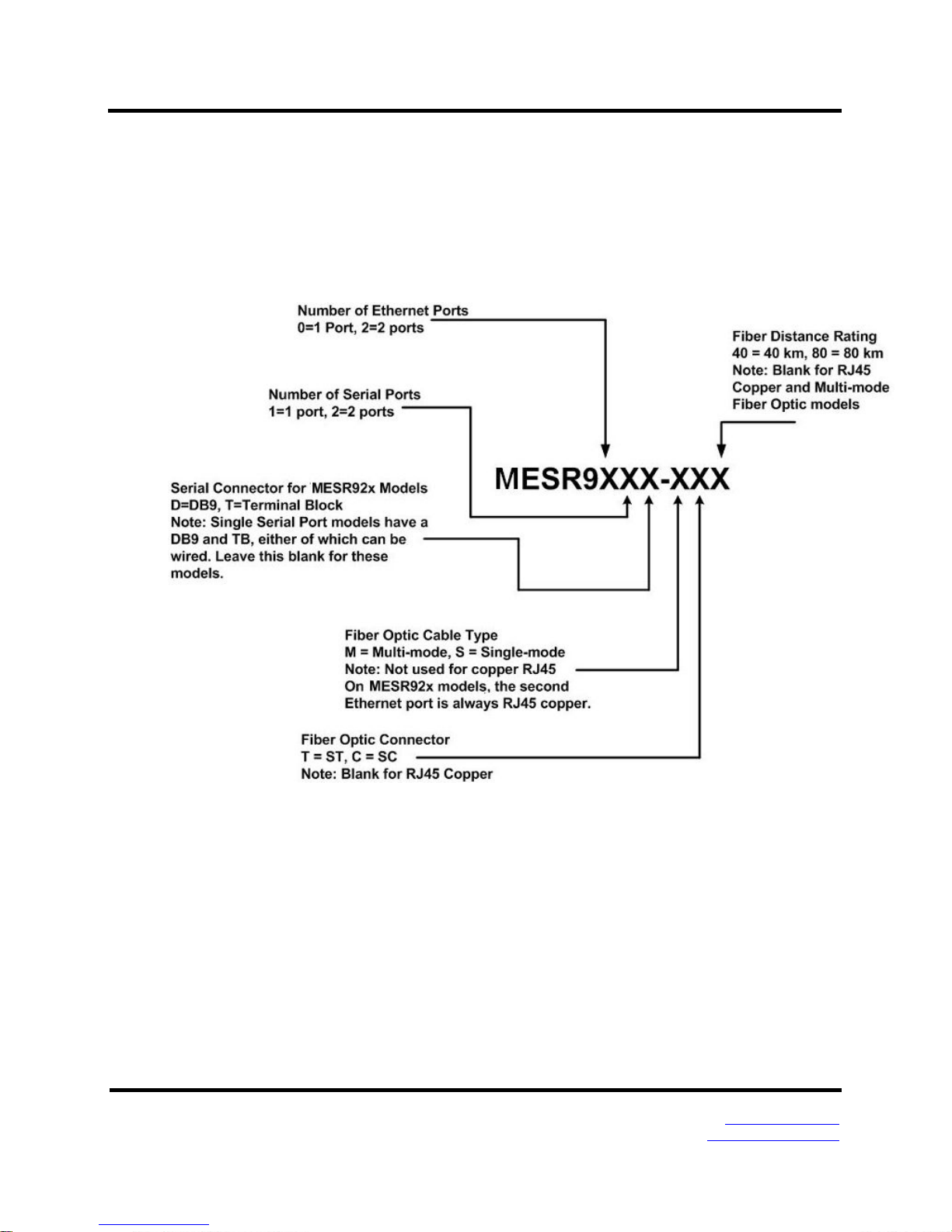
MESR9xx Modbus Gateway Model Numbering.........................................................................................................................2
List of MESR9xx Modbus Gateway Models...............................................................................................................................3
MESR9xx Modbus Gateway Features.......................................................................................................................................4
Vlinx Manager Configuration Software.......................................................................................................................................5
2.MESR9xx Modbus Gateway Hardware............................................................................................................6
Package Checklist......................................................................................................................................................................6
MESR9xx Modbus Gateway Enclosures and Mounting.............................................................................................................6
LED Indicators............................................................................................................................................................................7
E1/E2 Ethernet Link LED .............................................................................................................................................. 7
Ready LED..................................................................................................................................................................... 7
Serial Port LEDs............................................................................................................................................................ 7
Mode Switch...............................................................................................................................................................................8
Ethernet Connector....................................................................................................................................................................8
Fiber Optic Connectors ..............................................................................................................................................................9
Serial Port Connectors...............................................................................................................................................................9
Power Connector .....................................................................................................................................................................10
Mounting Hardware..................................................................................................................................................................10
3.Modbus Gateway Setup and Connections ...................................................................................................11
Connecting the Power Supply..................................................................................................................................................11
Connecting MESR9xx Modbus Gateways to Modbus networks..............................................................................................11
Connecting the MESR9x1-x ......................................................................................................................................... 12
Connecting the MESR9x2T-x....................................................................................................................................... 13
Connecting the MESR9x2D-x....................................................................................................................................... 13
Connecting MESR9xx Modbus Gateways to a Network..........................................................................................................14
Network Connection (10BaseT/100BaseTX)................................................................................................................ 14
Fiber optic Connection ................................................................................................................................................ 14
MESR9xx Modbus Gateway Configuration Connections.........................................................................................................14
Installing Modbus Configuration Manager Software................................................................................................... 14
Configuring the MESR9xx Modbus Gateway via the Network Connection.................................................................. 19
Configuring the MESR9xx Modbus Gateway on Networks without a DHCP Server ................................................... 34
Configuring the MESR9xx Modbus Gateway via the Serial Port (Console Mode) ...................................................... 37
MESR9xx Modbus Gateway Operational Connections............................................................................................................39
Using MESR9xx Modbus Gateways in Direct IP Mode............................................................................................... 39
Initiating a Hardware Reset on the Modbus Gateway..............................................................................................................40
Reloading Factory Defaults......................................................................................................................................................40
4. Upgrading the Modbus Gateway Firmware..........................................................................................................41
Downloading Firmware Files....................................................................................................................................................42
Uploading the Firmware to the Modbus Gateway....................................................................................................................42
5.Diagnostics .....................................................................................................................................................43
Testing a Modbus Gateway Connection..................................................................................................................................43
6.Application Examples.....................................................................................................................................45
Ethernet Master and Serial Slaves...........................................................................................................................................45
Serial & Ethernet Masters, Serial & Ethernet Slaves...............................................................................................................51
Serial Masters, IP Slaves.........................................................................................................................................................53
Identical Hard Coded Slaves....................................................................................................................................................59
Identical Production Lines........................................................................................................................................................60
7.Modbus Help ...................................................................................................................................................61
Modbus ASCII/RTU Basics......................................................................................................................................................61