ENGLISH
7
While charging, the charger may become
warm. This is normal and does not
indicate a problem. The appliance can be
left connected to the charger indefinitely.
The charging indicator (4) will be lit as
long as the appliance is connected to the
plugged-in charger.
Warning! Do not charge the battery at
ambient temperatures below 4 °C or
above 40 °C.
Switching on and off (fig. D)
XTo switch the appliance on, slide the
on/off switch (3) forward.
XTo switch the appliance off, slide the
on/off switch (3) back.
Wet pick-up (fig. A)
Use the wet pick-up accessory (7) on
non-absorbent surfaces.
XFor best results when using this
accessory, hold the appliance at an
angle of 45° and pull it slowly
towards you.
XOn absorbent surfaces, such as
carpet, your appliance will pick up
wet spills better without the
accessory.
Cleaning and maintenance
Warning! Regularly clean the filter and
deflector (8 & 9).
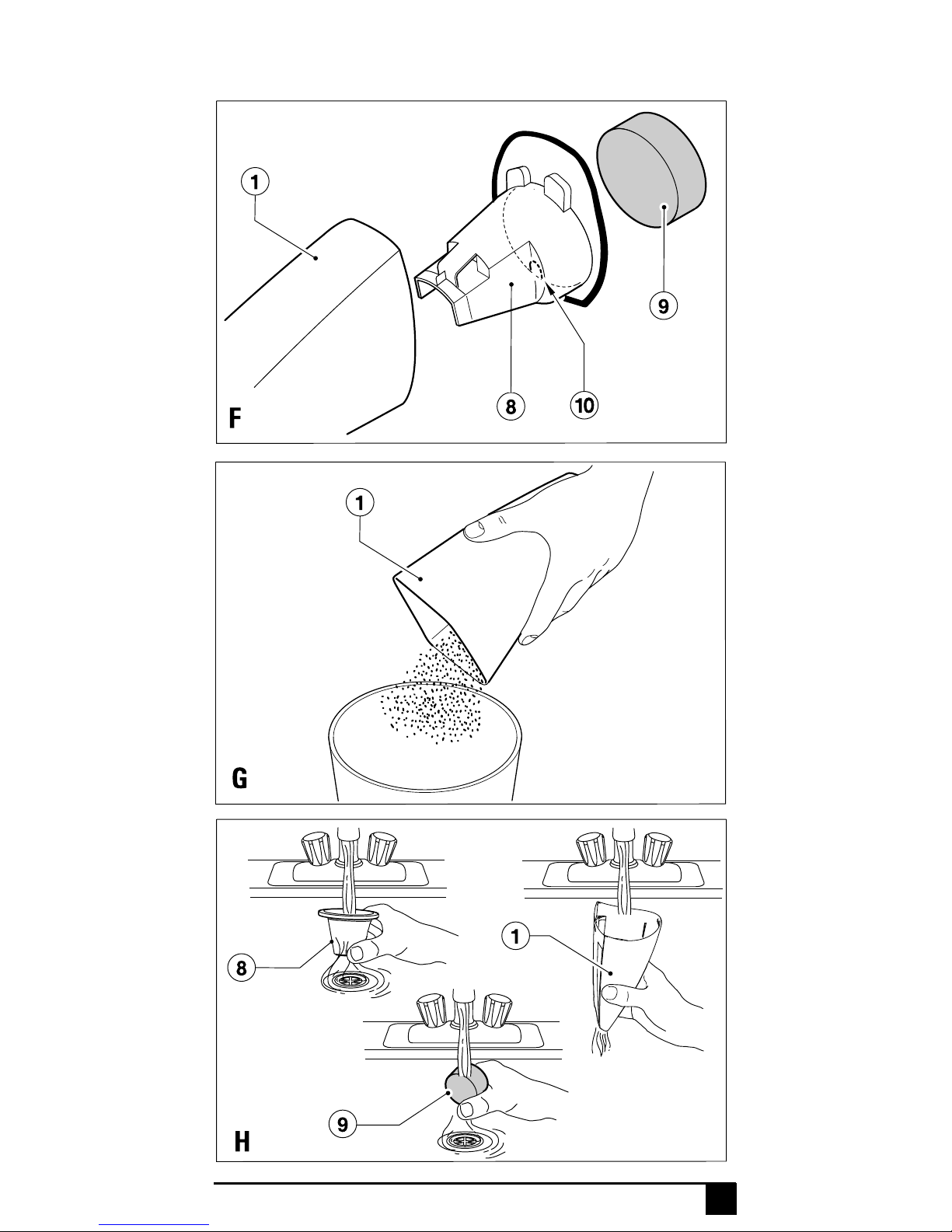
Cleaning the dust collector and filters
(fig. E - H)
In order to keep the suction force
optimised, the filter must be cleared
regularly during use.
The filter is re-usable and should be
cleaned regularly.
XPress the release button (2) and
remove the dust collector (1).
XRemove the filter and deflector
(8 & 9) from the dust collector (1) (fig.
F). There is a small lip (10) at the
bottom of the deflector (8) to help you
remove it from the dust collector (1).
XBrush any loose dust from the filter
and deflector (8 & 9).
XEmpty the dust collector (1) (fig. G).
XWash the filter and deflector (8 & 9)
in warm, soapy water (fig. H). The
dust collector (1) can also bewashed
if necessary.
Warning! Do not immerse the appliance
in water.
XMake sure that the dust collector (1)
and the filter and deflector (8 & 9) are
dry.
XRefit the filter and deflector (8 & 9) in
to the dust collector (1). Make sure
that it clicks into place.
XRefit the dust collector (1) onto the
appliance. Make sure that the dust
collector clicks into place.
Warning! Never use the appliance
without the filter. Optimum dust collection
will only be achieved with clean filters.
Replacing the filters
The filter should be replaced every 6 to 9
months and whenever worn or damaged.
A replacement filter (8) is available from
your Black & Decker dealer (cat. no.
WVF70):
XRemove the old filter as described
above.
XFit the new filter as described above.
Storing the accessories (fig. I & J)
XPress the accessories into the
corresponding holders until they click
into place.
Protecting the environment
Separatecollection.Thisproduct
must not be disposed of with
normal household waste.
Should you find one day that your Black &
Decker product needs replacement, or if it
is of no further use to you, do not dispose
of it with household waste. Make this
product available for separate collection.
Separate collection of used
products and packaging allows
materials to be recycled and
used again. Re-use of recycled
materials helps prevent
environmental pollution and
reduces the demand for raw
materials.
Local regulations may provide for
separate collection of electrical products