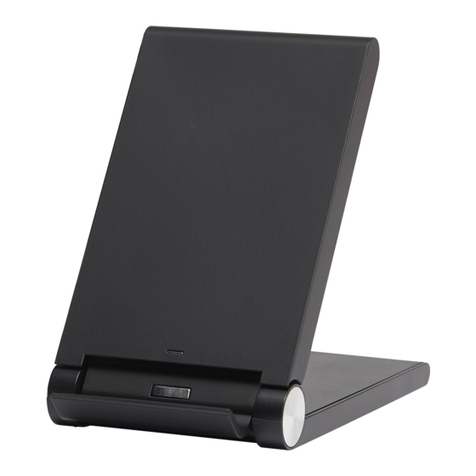
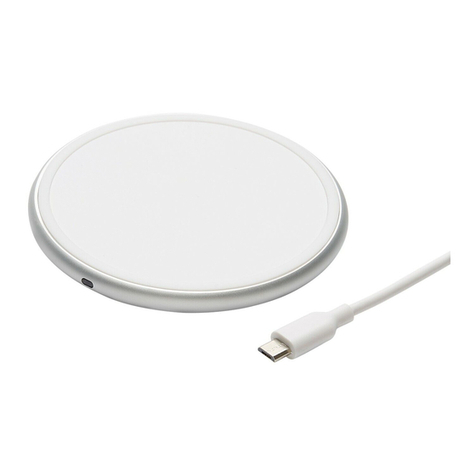
Specication
Input: DC5.0V,2.0A/DC9.0V,1.8A
Output: DC5.0V,1.0A/DC9.0V,1.1A
Frenquency: 110-205KHz Conversion: ≥72%
Size: 118x70x87.5mm NW: 150g
Trouble shooting
1.Wireless charging terminal bad
2.Power cable current less than 1.5A
3.Adapter current less than 1A
4.Adapter, power cable, product poor contact
5.Mobile location shift
Notes:
1. Do not squeeze or collisions.
2. Do not disassemble or throw into re or water, to avoid
causing a shot circuit leakage.
3. Do not use wireless charger in severely hot, humid or corrosive
environments to avoid circuit damage and occursleakage
phenomenon.
4. Do not place too close with magnetic stripe or chip card(ID
card, bank cards etc.)to avoid magnetic failure.
5. Please keep the distance at least 20cm betweem implantable
medical devices(pacemakers, implantable cochlear, etc.)and
the wireless charger, to avoid potential interference with the
medical device
6. To take care of the children, to ensure that they won’t play the
wireless charger as a toy, to avoid unnecessary accidents.
7. When work radios and products close contact, will produce
interference, when product interference, please increase the
distance between the product and radio.
8. When don’t use the product, pease turn o the power supply
and unplug the power plug.
9. Before clean this product. please cut o the power supply.
please only used dry rag to clean the product.
10.If the damage caused by improper use of the body, the odd
smell, smoke andother phenomena, please stop using
immediately.
Changes or modications not expressly approved by the party
responsible for compliance could void the user’s authority to
operate the equopment.
The involved images are sketch maps, the nal product as per
the material subjects.
Includes:
Wireless Charger x1pc
Micro USB cable x1pc
User’s Manual x1pc
No power adapter, if you need, please purchase separately.
Compatible devices:
SAMSUNG® Note5/S6/S6 Edge/S6 Edge+/S7/S7 Edge/S7 Edge+/S6 NOTE/S6 DUOS
LG® D1/LG LTE2/OPtimus F5/G2(USA)/G3(four contacts after the shell)/G PRO
OPtimus Vu3/LTE2
NOKIA® Lumia 820/Lumia 1020/Lumia 1520/Lumia 920/Lumia 822/Lumia 930
Lumia 929/Lumia 928
HTC® 8x/HTC Buttery(USA)/lncredible4G LTE/Droid DNA/Rzound/One mini2
One M8 Eye(M8Et/TD-LTE 4G)/One E9(E9t/TD-LTE 4G)/HTC Buttery3(TD-LTE 4G)
ASUS® Z97-DELUXE/PADPHONES-X
Google® Nexus2/Nexus3/Nexus4/Nexus5/Nexus6/Nexus7
MOTO® Motorola 260/Droid Turbo 2 (XT1585)/XPRO/MAXX(XT1254)
Nexus 6(XT1100/XT1103)/Droid Turbo (XT1254)/Droid MAXX2 (XT1080)
SONY® Z3V/Z4V
BLACKBERRY® PRIV(STV100-1)/PRIV(STV100-2)/Z30
SHARP® SH-07D/SH-04D/SH-02D/SH-13C
Federal Communication Commission
Interference Statement
- “This device complies with Part 15 of the FCC Rules.
Operation is subject to the following two conditions: (1) this
device may not cause harmful interference, and (2) this
device must accept any interference received, including
interference that may cause undesired operation.”
- “Warning: Changes or modications to this unit not
expressly approved by the party responsible for compliance
could void the user’s authority to operate the equipment.”
- “NOTE: This equipment has been tested and found to
comply with the limits for a Class B digital device, pursuant
to Part 15 of the FCC Rules. These limits are designed to
provide reasonable protection against harmful interference
in a residential installation. This equipment generates, uses
and can radiate radio frequency energy and, if not installed
and used in accordance with the instructions, may cause
harmful interference to radio communications.
However, there is no guarantee that interference will not
occur in a particular installation. If this equipment does
cause harmful interference to radio or television reception,
which can be determined by turning the equipment o and
on, the user is encouraged to try to correct the interference
by one or more of the following measures:
■Reorient or relocate the receiving antenna.
■Increase the separation between the equipment and receiver.
■Connect the equipment into an outlet on a circuit dierent
from that to which the receiver is connected.
Consult the dealer or an experienced radio/TV technician for help.”
Wal-Mart Stores,Inc.,
Bentonville, AR 72716
Hotline: 1-800-925-6278
CAUTION:
To reduce the likelihood of excessive heat and possible damage,
use only the USB cable packaged with this product.