Blueant BLUESONIC User manual

1
BlueSonic
Bluetooth Portable Speakers
www.blueantwireless.com
USER MANUAL
BLUEANT
BLUESONIC PORTABLE SPEAKERS
Thank you for purchasing your new BlueAnt device.
CK811.indd 1 2006/3/10 、U、ネ 12:48:41

2
BlueSonic
Bluetooth Portable Speakers
Features
• Stream music over A2DP & answer VOIP calls from your
Windows PC/Laptop
• Stream music over A2DP & answer calls from your mobile
phone or PDA
• Plug in your iPod or MP3 music player (cable included)
• Totally wireless or wired, portable and re-chargeable
• 2 Year Warranty
• In-built DSP cancellation to reduce echo and background
noise.
• In-built microphone to amplify conversation via Skype,
MSN & Yahoo Messenger.
• Rear Microphone-in jack to connect an external
microphone to collect better voice output
• Crystal clear stereo sound and powerful bass reflection.
• Answer a mobile phone call automatically while
playing music. Music will be returned automatically as
soon as conversation is over.
• Ideal for Conference-Calls, Amplified Speakers etc.
Portability from office to home, even to a car.
• In-built rear magnets suitable for most metal surface, E.g.
Filing cabinet, Fridge
• Compact design, easy to carry and store.
• Pairs with up to 8 Bluetooth devices.
CK811.indd 2 2006/3/10 、U、ネ 12:48:41

3
www.blueantwireless.com
Introduction
When first using the BlueSonic please make sure that
you:
• Fully charge the device for at least 3 hours before using
for the first time. Afterwards it takes approximately 2 hours
to fully recharge. (Refer below for charging details.)
• DO NOT insert the USB Bluetooth Dongle until after you
have loaded the software form the CD.
• Pair the BlueSonic with a Bluetooth mobile phone,
computer or other Bluetooth device before making calls
or listening to music. The Bluetooth audio connection
between the wireless speakers and other devices
are established by setting up PAIRED links which are
stored in each device ready for quick connection when
requested. (Refer below for Pairing details.)
The BlueSonic speakers support:
• Voice calls over Bluetooth using the Headset/Handsfree
profile.
• Wireless stereo music over Bluetooth using the A2DP/
High Quality Audio profile.
• A wired 3.5mm stereo input at the rear of the device.
• An External Microphone input at the rear of the device
(microphone not supplied)
CK811.indd 3 2006/3/10 、U、ネ 12:48:42

4
BlueSonic
Bluetooth Portable Speakers
Contents
1. Product Overview..............................................................6
1.1 Description of Buttons and Inputs…….................…..6
1.2 Product Specifications……………..............…...….….8
2. Bluetooth
2.1 What are Headset and Handsfree?............................9
2.2 What is A2DP?..........................................................9
3.Charging the BlueSonic......................................................9
4. Button and Symbol Definitions……………...............…...10
4.1 Button Operation
4.2 Button Functions Matrix
4.3 LED Indicators
5. Using with Bluetooth Mobile Phones and PDA’s...........12
5.1 Pairing to a Mobile Phone or PDA……..............…...13
5.2 Voice Connection……………………..............….......14
5.3 A2DP / Stereo Connection………….............…........14
6. Using with Computers for Music and VOIP....................17
6.1 Loading the Software from the included CD.........…..17
6.2 Pairing to a Windows PC............................................18
6.3 Voice Connection with a PC………………...............19
6.4 A2DP / Stereo connection with a PC…....................21
7. Connecting an Audio Source directly by 3.5mm audio
cable.......................................................................................22
8. 2.5 mm External Microphone……………............………..22
9. Streaming Audio via the BlueAnt A2DP Streamer
(optional accessory).............................................................23

CK811.indd 4 2006/3/10 、U、ネ 12:48:42

5
www.blueantwireless.com
10. FAQ - Frequently Asked Questions
10.1 General…………...................................................23

10.2 Bluetooth………………………...............................27
10.3 Troubleshooting…………………….............…........30
11. Contact Us……………………..........................................36
12. Warranty……………………………...................................37
12.1 Process…………………………..............……….....37
12.2 Terms and Conditions………….............…......……38
13. Certification and Safety Approvals/General
Information…….....................................................................38
14. Cautions……………………………...................................40
CK811.indd 5 2006/3/10 、U、ネ 12:48:42

6
BlueSonic
Bluetooth Portable Speakers
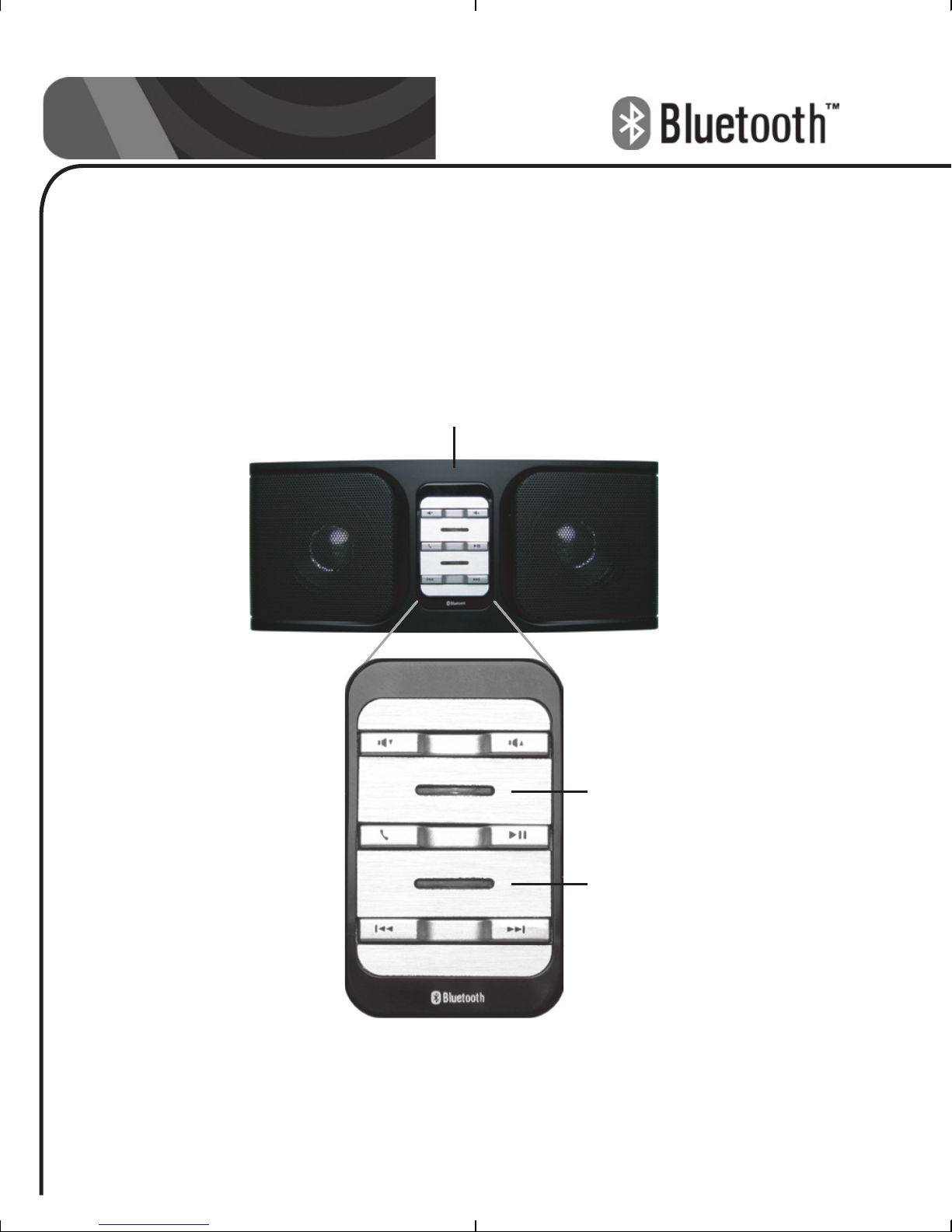
1. Product Overview
1.1 Description of Buttons and Inputs
BACKWARD FORWARD
VOL(+)
VOL(-)
PICK UP / HANG UP
PLAY / PAUSE
MIC
INDICATORS
INDICATORS
Front Panel
CK811.indd 6 2006/3/10 、U、ネ 12:48:42

7
www.blueantwireless.com
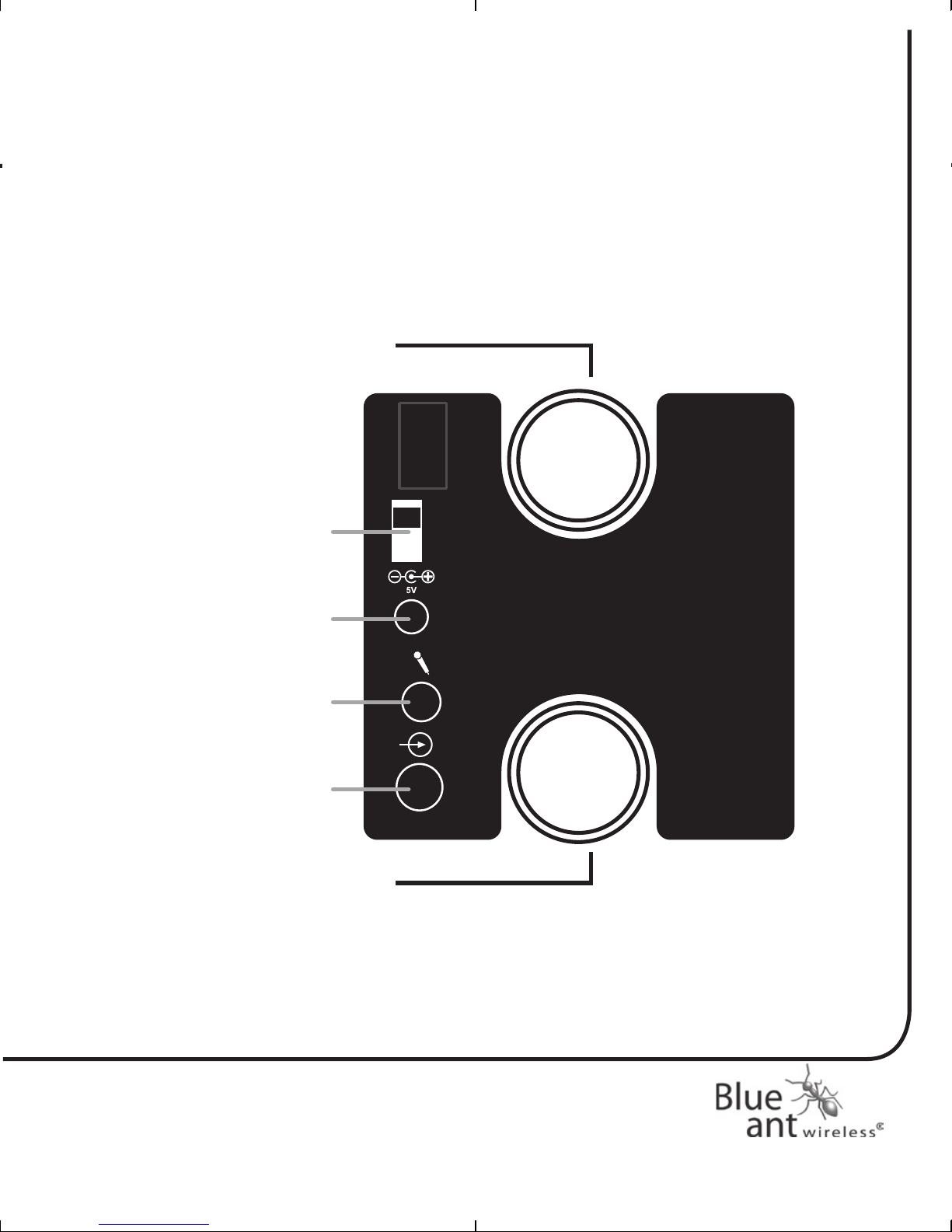
DC JACK
MAGNETS
MAGNETS
POWER
ON/OFF
MIC IN
LINE IN
Off
On
Back Panel
CK811.indd 7 2006/3/10 、U、ネ 12:48:42

8
BlueSonic
Bluetooth Portable Speakers
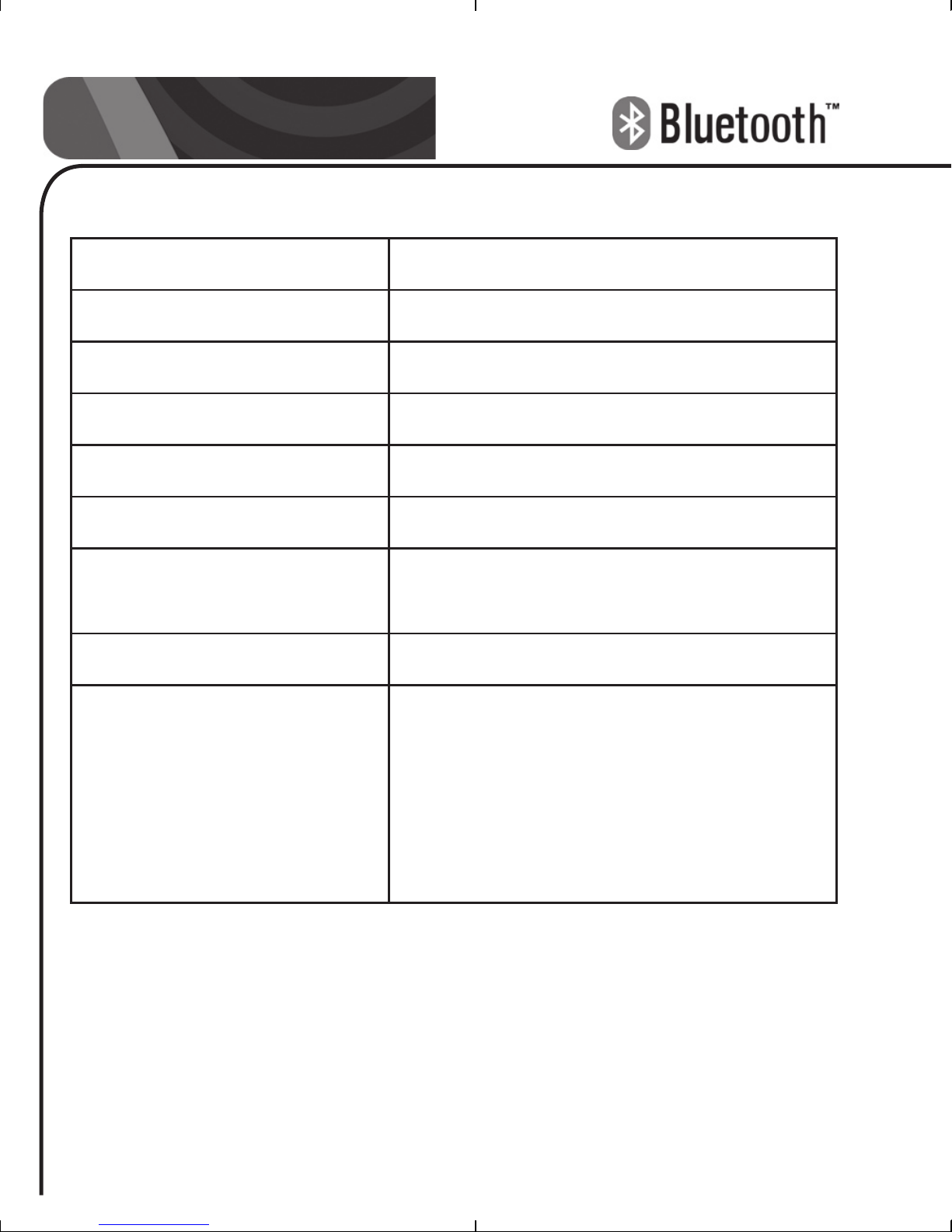
1.2 Product Specification
Bluetooth Specification Bluetooth v1.2 Class2
Bluetooth Profiles HSP/HFP/A2DP/AVRCP
Frequency Band 2.4GHz~2.4835GHz ISM Band
Working Distance 10 meters
Standby Time 48 hours
Playing Time 10 hours@60db 5 hours@95dB
Battery 3.7V Li-Polymer rechargeable
battery
Weight 360g
Box Contents 1. One BlueSonic Bluetooth
Portable Speaker
2. One 100-240V AC adapter.
3. One 3.5mm audio lead
4. User manual
5. Quick Start Guide
CK811.indd 8 2006/3/10 、U、ネ 12:48:42

9
www.blueantwireless.com
2. Bluetooth
2.1 What are Headset and Handsfree?
Handsfree and Headset are both Bluetooth Service Profiles
that allow for Voice connections between Bluetooth devices.
Most Bluetooth enabled phones and PC’s include one or both
of these profiles.
2.2 What is A2DP?
Advanced Audio Distribution Profile - A2DP technology is a
new music revolution allowing you to send CD quality stereo
music from one device to another without using wires. A2DP
is crystal clear music without the hassle of plugging cables.
Bluetooth Wireless Technology with the A2DP technology
makes mobile phones, pda’s and computers capable of
streaming music.
For a list of A2DP compatible phones got to www.blueant.com.
au
3. Charging the BlueSonic
a. Plug the AC5V charger into an electrical outlet. Plug
the adapters’ connector into the DC Jack charging
port on the back of the BlueSonic.
b. The Amber indicator will turn ON while charging and
change to Green when charging is complete.
c. It takes 3 hours to fully charge the in-built battery the
first time only. It takes 2 hours to re-charge thereafter.
d. The BlueSonic can be charged while it is “ON” or
CK811.indd 9 2006/3/10 、U、ネ 12:48:42

10
BlueSonic
Bluetooth Portable Speakers
“OFF”
e. The unit must be charged with the supplied AC5V
charger only.
4. Button and Symbol Definitions
4.1 Button Operation
• Short Press = Press and release less than 1 second
• Long Press = Press and release after 2 seconds
• Double Click = Click twice within 0.5 seconds
• Press/Hold = Press and Hold for more than 6 seconds
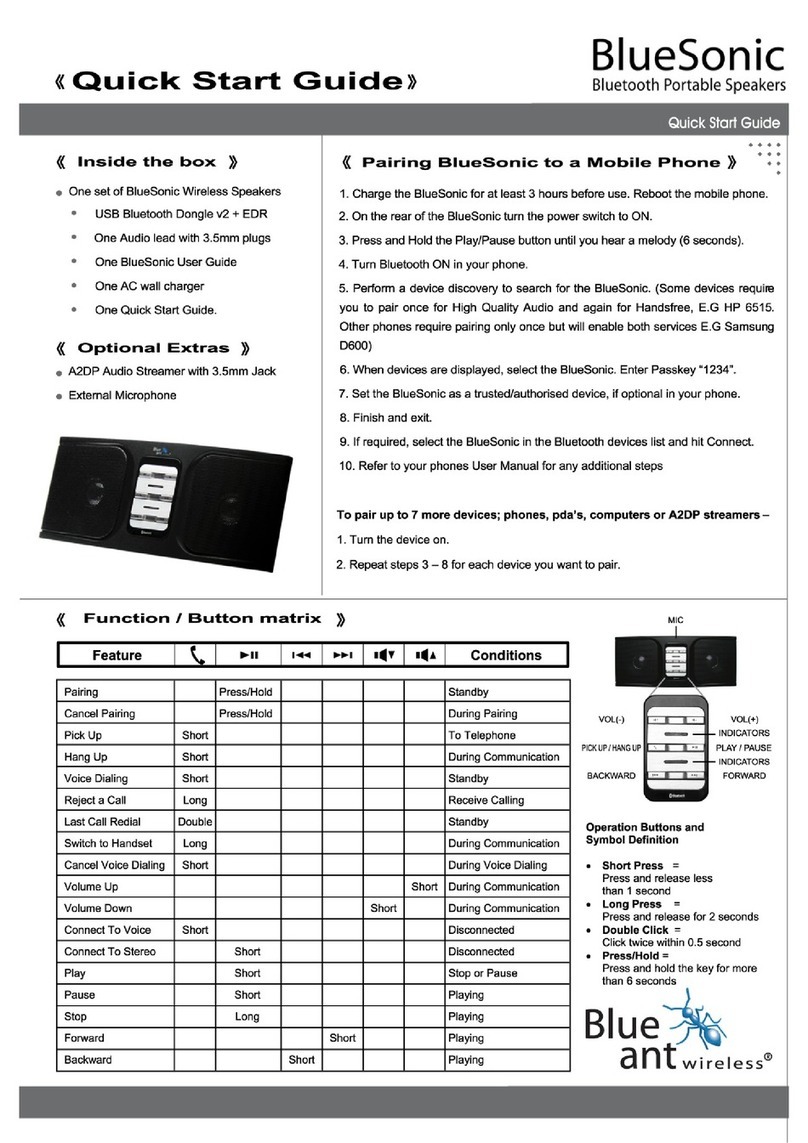
4.2 Button Functions Matrix
Feature Button Operation Status
Pairing Press/Hold Standby
Cancel Pairing Press/Hold During Pairing
Pick Up Short To Telephone
Hang Up Short During
Communication
Voice Dialing Short Standby
Refuse Answering Long Receive Calling
CK811.indd 10 2006/3/10 、U、ネ 12:48:43
Other manuals for BLUESONIC
2
Table of contents
Other Blueant Portable Speakers manuals