manuals.online logo
Brands
  1. Home
  2. •
  3. Brands
  4. •
  5. BPC
  6. •
  7. UPS
  8. •
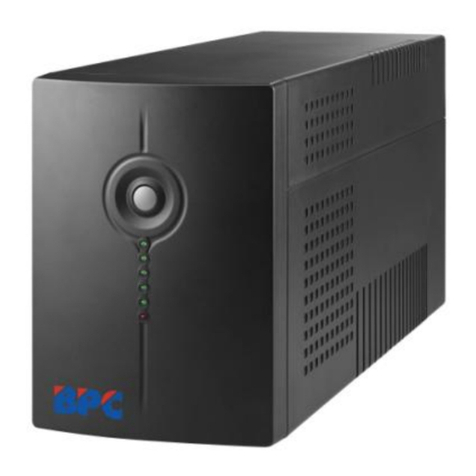
  9. BPC PowerStar Extreme User manual

BPC PowerStar Extreme User manual

This manual suits for next models

3

Other BPC UPS manuals

BPC PowerPro HP310 User manual

BPC

BPC PowerPro HP310 User manual

BPC 1.5K SMART User manual

BPC

BPC 1.5K SMART User manual

BPC T300P Series User manual

BPC

BPC T300P Series User manual

BPC 5000VA User manual

BPC

BPC 5000VA User manual

BPC HP-115 User manual

BPC

BPC HP-115 User manual

BPC HP-206P User manual

BPC

BPC HP-206P User manual

BPC PowerStar series 1200 User manual

BPC

BPC PowerStar series 1200 User manual

Popular UPS manuals by other brands

Pylontech Victron & Pylontech US5000 manual

Pylontech

Pylontech Victron & Pylontech US5000 manual

Tecnoware EVO DSP PLUS MM 6.8 user manual

Tecnoware

Tecnoware EVO DSP PLUS MM 6.8 user manual

Mustek PowerMust 530(B) Plus Startup manual

Mustek

Mustek PowerMust 530(B) Plus Startup manual

Emerson Liebert NXL series Operation and maintenance manual

Emerson

Emerson Liebert NXL series Operation and maintenance manual

MAKELSAN BOXER SERIES user manual

MAKELSAN

MAKELSAN BOXER SERIES user manual

Block PC-0524-400-0 manual

Block

Block PC-0524-400-0 manual

CyberPower CP585LCD user manual

CyberPower

CyberPower CP585LCD user manual

Eaton 3S Advanced user's guide

Eaton

Eaton 3S Advanced user's guide

CyberPower Office Tower Series UPS 1000 user manual

CyberPower

CyberPower Office Tower Series UPS 1000 user manual

CyberPower BM100 quick start guide

CyberPower

CyberPower BM100 quick start guide

Best Power 610 quick start guide

Best Power

Best Power 610 quick start guide

Best Power Unity/I UT3K user manual

Best Power

Best Power Unity/I UT3K user manual

Mustek PowerMust 400 Offline user manual

Mustek

Mustek PowerMust 400 Offline user manual

Xantrex Trace 512 UR-UPS owner's manual

Xantrex

Xantrex Trace 512 UR-UPS owner's manual

Forza SL-1501UL user manual

Forza

Forza SL-1501UL user manual

LEGRAND keor 310081 quick start guide

LEGRAND

LEGRAND keor 310081 quick start guide

ABB Conceptpower DPA 500 operating manual

ABB

ABB Conceptpower DPA 500 operating manual

ZincFive BC Series installation instructions

ZincFive

ZincFive BC Series installation instructions

manuals.online logo
manuals.online logoBrands
  • About & Mission
  • Contact us
  • Privacy Policy
  • Terms and Conditions

Copyright 2025 Manuals.Online. All Rights Reserved.

Important Safety Warnings
This manual contains instructions and warnings that should be followed during the
installation, operating and storage of the UPS system. Please keep this manual for
further reference.
CAUTION! To prevent the risk of fire or electric shock, install in a temperature and humidity
controlled indoor area free of conductive contaminants. (See the specifications for the
acceptable temperature and humidity range.)
CAUTION! To reduce the risk of overheating the UPS, do not cover the UPS' cooling vents and
avoid exposing the unit to direct sunlight or installing the unit near heat emitting appliances
such as space heaters or furnaces.
CAUTION! Do not attach non-computer-related items, such as medical equipment,
life-support equipment, microwave ovens, or vacuum cleaners to UPS.
CAUTION! Do not plug the UPS input into its own output.
CAUTION! Do not allow liquids or any foreign object to enter the UPS. Do not place beverages
or any other liquid-containing vessels on or near the unit.
CAUTION! In the event of an emergency, press the OFF button and disconnect the power
cord from the AC power supply to properly disable the UPS.
CAUTION! Do not attach a power strip or surge suppressor to the UPS.
CAUTION! If the UPS is with metal chassis, for safety purpose, grounding is a must during
UPS installation in order to reduce leakage current below 3.5mA.
Attention hazardous through electric shock. Also with disconnection of this unit from the
mains, hazardous voltage still may be accessible through supply from battery. The battery
supply should be therefore disconnected in the plus and minus pole at the quick connectors of
the battery when maintenance or service work inside the UPS is necessary.
CAUTION! Servicing of batteries should be performed or supervised by personnel
knowledgeable of batteries and the required safety precautions. Keep unauthorized
personnel away from batteries.
CAUTION! When replacing the batteries, use the same number and type of batteries.
CAUTION! Internal battery voltage is 12VDC. Sealed, lead-acid, 6-cell battery.
CAUTION! Do not dispose of batteries in a fire. The battery may explode. Do not open or
mutilate the battery or batteries. Released electrolyte is harmful to the skin and eyes.
CAUTION! Unplug the UPS prior to cleaning and do not use liquid or spray detergent.
CAUTION! A battery can present a risk of electric shock and high short circuit current. The
following precaution should be observed before replacing batteries:
1) Remove watches, rings, or other metal objects.
2) Use tools with insulated handles.
3) Wear rubber gloves and boots.
4) Do not lay tools or metal parts on top of batteries.
5) Disconnect charging source prior to connecting or disconnecting batteries terminal.
Specifications
MODEL
650
650 Smart
1K Smart
CAPACITY
650 VA / 360 W
650 VA / 360 W
1000 VA /500 W
INPUT
Input Voltage
220/230/240 VAC
Voltage Range
140-300 VAC
OUTPUT
Voltage Regulation
+/-10%
Transfer Time
Typical 4-8 ms, 13 ms max.
Waveform
Simulated Sine Wave
BATTERY
Type & Number
12 V/7 AH x 1
12 V/7 AH x 2
Charging Time
4-6 hours recover to 90% capacity
PHYSICAL
Dimension (DxWxH) mm
287 x 100 x 142
350 x 146 x 160
Net Weight (kgs)
4.25
8.9
MANAGEMENT
USB/RS-232 Port (option)
-
USB Port
USB Port
Supports Windows® 98/2000/2003/XP/Vista/2008/7, Linux,
Unix, and MAC
PowerStar Extreme User Manual
Uninterruptible Power Supply

Installation & Operation
Initial Set-up
After unpacking the unit, please avoid placing the unit in direct sun light, excessive heat,
excessive humidity or in contact with fluids of any type. Place the unit away from other
equipment at least 20 cm to avoid interference.
Place the unit to avoid:
- Direct sunlight
- Excessive heat
- Excessive humidity or contact with fluids

Connect Utility
Plug the UPS into an electrical outlet that does not share a circuit with a heavy electrical load.
Please allow the UPS to charge at least 6 hours prior to use.

Connect Equipment
Connect critical equipment to “Battery Backup Sockets”. These battery backup sockets provide
battery back-up and surge protection. In case of power outage, battery power is automatically
provided to these outlets. Connect minor less critical devices to “Surge Protected Socket”.
Power is not supplied to this socket when the utility fails.
NOTE: Please DO NOT connect scanner or printer into “Battery Backup Sockets”.

Connect Com. Port and Install Software (Only available for the SMART
models with USB/RS-232 ports)
Connect the communication port cable end to the communication port located on the rear
panel of the UPS. Connect the other end of communication port cable to the port on the rear
panel of the computer.
Download the software from http://www.power-software-download.com/viewpower.html.
Follow on-screen instruction to install the monitoring software.

Connect Modem/Phone/Network for Surge Protection (Only for the
models with RJ-45)
Connect a single modem/phone line into surge-protected “IN” outlet on the back panel of the
UPS unit. Connect from “OUT” outlet to the computer with another phone line cable.
Power On/Off UPS
Press power switch on the front panel of the UPS to turn on UPS. Press switch again to turn
off the UPS.
Connection Chart

Status Indicator
Troubleshooting
Problem
Possible Cause
Solutions
No LED display on the
front panel.
Low battery.
Charge the UPS at least 6 hours.
Battery fault.
Replace the battery with the same
type of battery.
The UPS is not turned on.
Press the power switch again to turn
on the UPS.
Alarm continuously
sounds when the
mains is normal.
The UPS is overload.
Remove some loads first. Before
reconnecting equipment, please
verify that the load matches the UPS
capability specified in the specs.
When power fails,
back-up time is shorten.
The UPS is overload.
Remove some critical load.
Battery voltage is too low.
Charge the UPS at least 6 hours.
Battery defect. It might be due
to high temperature operation
environment, or improper
operation to battery.
Replace the battery with the same
type of battery.
The mains is normal but
green LED is flashing.
Power cord is loose.
Reconnect the power cord properly.
Battery Backup
Sockets
Battery Backup
Sockets
Surge Protected
Socket
Surge Protected
Socket
1K
650/650 Smart
Option
UPS status LED
AC Mode: green
lighting
Battery Mode: green
flashing
Battery mode LED:
yellow lighting
AC mode LED: green
lighting
Fault LED: red lighting