manuals.online logo
Brands
  1. Home
  2. •
  3. Brands
  4. •
  5. Casio
  6. •
  7. Watch
  8. •
  9. Casio ID-14S User manual

Casio ID-14S User manual

Other Casio Watch manuals

Casio 5480 User manual

Casio

Casio 5480 User manual

Casio 5153 User manual

Casio

Casio 5153 User manual

Casio 2165 Configuration guide

Casio

Casio 2165 Configuration guide

Casio MO0701-EB User manual

Casio

Casio MO0701-EB User manual

Casio DB36-1AV User manual

Casio

Casio DB36-1AV User manual

Casio 2471 User manual

Casio

Casio 2471 User manual

Casio 2753 User manual

Casio

Casio 2753 User manual

Casio QW-389 User manual

Casio

Casio QW-389 User manual

Casio 5117 User manual

Casio

Casio 5117 User manual

Casio 3417 User manual

Casio

Casio 3417 User manual

Casio QW-782 Configuration guide

Casio

Casio QW-782 Configuration guide

Casio 5516 User manual

Casio

Casio 5516 User manual

Casio QW-770 Configuration guide

Casio

Casio QW-770 Configuration guide

Casio 4333 User manual

Casio

Casio 4333 User manual

Casio 4389 User manual

Casio

Casio 4389 User manual

Casio 3298 User manual

Casio

Casio 3298 User manual

Casio 5054 User manual

Casio

Casio 5054 User manual

Casio 3482 Service manual

Casio

Casio 3482 Service manual

Casio 2621 User manual

Casio

Casio 2621 User manual

Casio 1353 Configuration guide

Casio

Casio 1353 Configuration guide

Casio 5378 User manual

Casio

Casio 5378 User manual

Casio QW-1170 User manual

Casio

Casio QW-1170 User manual

Casio F105W-1A User manual

Casio

Casio F105W-1A User manual

Casio 5174 User manual

Casio

Casio 5174 User manual

Popular Watch manuals by other brands

Piaget 560P Instructions for use

Piaget

Piaget 560P Instructions for use

Armitron pro sport MD0346 instruction manual

Armitron

Armitron pro sport MD0346 instruction manual

West Marine BlackTip 13411293 Instruction Booklet and Care Guide

West Marine

West Marine BlackTip 13411293 Instruction Booklet and Care Guide

Jaeger-leCoultre HYBRIS MECHANICA CALIBRE 184 manual

Jaeger-leCoultre

Jaeger-leCoultre HYBRIS MECHANICA CALIBRE 184 manual

FOREVER iGO PRO JW-200 user manual

FOREVER

FOREVER iGO PRO JW-200 user manual

Relic OS10 quick start guide

Relic

Relic OS10 quick start guide

MyKronoz ZeClock manual

MyKronoz

MyKronoz ZeClock manual

Strikes and Spares SASM80 E-manual

Strikes and Spares

Strikes and Spares SASM80 E-manual

Christopher Ward C1000 Owner's handbook

Christopher Ward

Christopher Ward C1000 Owner's handbook

Lotus ILMFS01 instruction manual

Lotus

Lotus ILMFS01 instruction manual

Chronos Manufactures Chrono Diamond Thyrso 10400 instruction manual

Chronos Manufactures

Chronos Manufactures Chrono Diamond Thyrso 10400 instruction manual

Pandora WATCH2 quick guide

Pandora

Pandora WATCH2 quick guide

Suunto X6 user guide

Suunto

Suunto X6 user guide

Seiko N830 instruction manual

Seiko

Seiko N830 instruction manual

MotionX 365 user guide

MotionX

MotionX 365 user guide

Aplus GV18 user guide

Aplus

Aplus GV18 user guide

Garmin VENU SQ 2 owner's manual

Garmin

Garmin VENU SQ 2 owner's manual

QCY Watch GTC manual

QCY

QCY Watch GTC manual

manuals.online logo
manuals.online logoBrands
  • About & Mission
  • Contact us
  • Privacy Policy
  • Terms and Conditions

Copyright 2025 Manuals.Online. All Rights Reserved.

Operation Guide ID-14S
1
MA1205-EA
ILLUSTRATION
©
2012 CASIO COMPUTER CO., LTD.
1cm
•A sticker is affixed to the glass of this clock when you purchase it. Be sure to remove the sticker before using the
clock.
•Depending on the clock model, the configuration of your clock may differ somewhat from that shown in the
illustration.
DATE (month - date) Day of the week
PM indicator
Current time (Hour, minutes, seconds)
Current Temperature
Operation Guide ID-14S
2
SETTING THE TIME
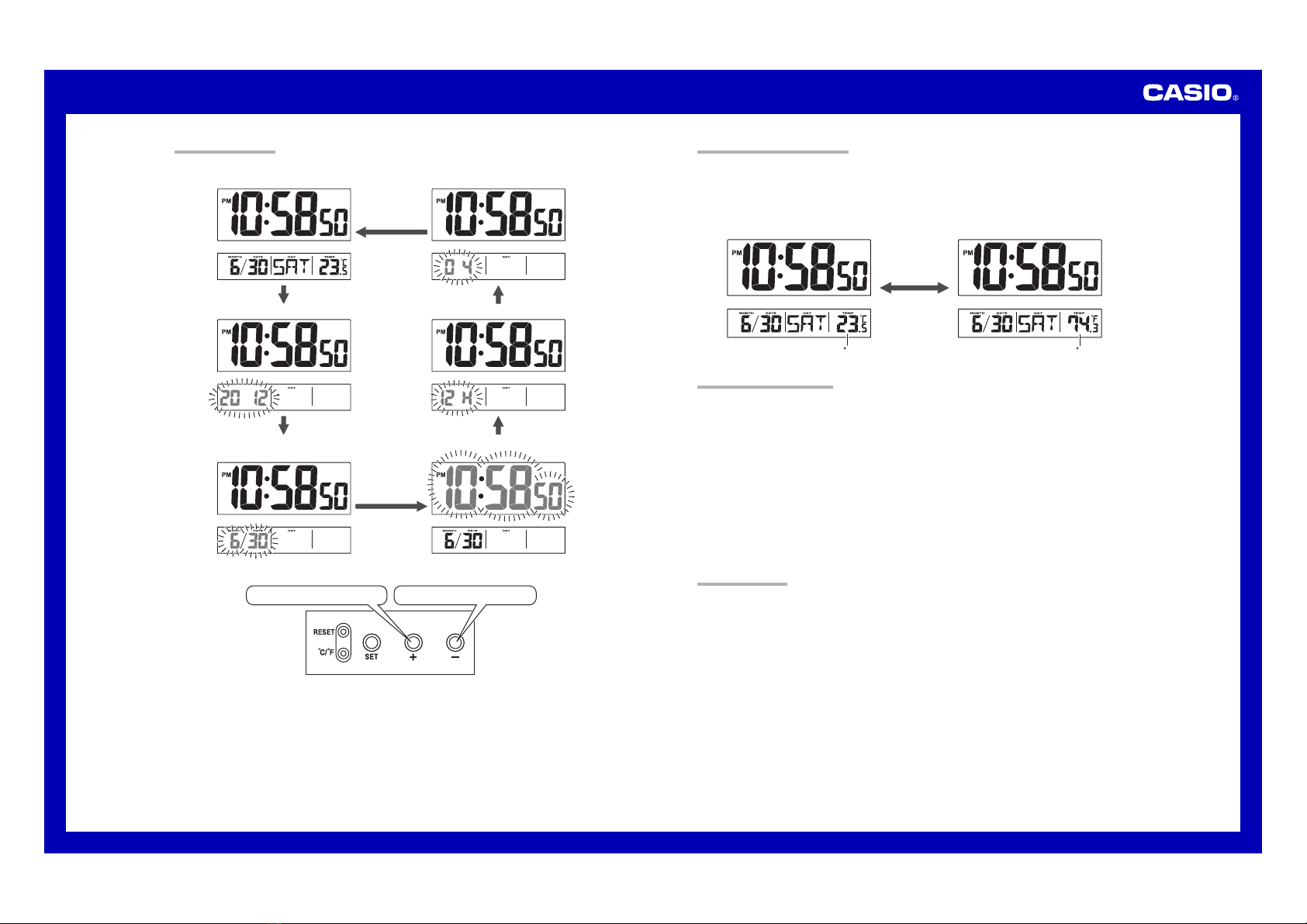
1. Press the SET button (22
22
2) to cycle through the setting screens as shown below.
Current Time Screen Contrast Setting Screen
Year Setting Screen
Month and Day Setting Screen
12-hour/24-hour Setting Screen
Time Setting Screen
2.
While the screen you want is on the display, use the
+ and –
buttons (33
33
3) to change the digits that are flashing.
Press
+
to increase the flashing digits. Press
–
to decrease the flashing digits.
•Holding down +or –changes the flashing digits at high speed.
•You can set the year in the range of 2000 to 2099. The day of the week is set automatically in accordance
with the date setting.
•Pressing +or –while the Time Setting Screen is on the display causes the seconds count to be reset to 00.
•Each press of +or –while the 12-hour/24-hour Setting Screen is on the display toggles between 12-hour and
24-hour timekeeping.
•You can set the contrast level in the range of 1 to 10.
3. After making the settings you want, use the SET button (22
22
2) to display the Current Time Screen.
•The clock automatically returns to the Current Time Screen if you leave a setting screen on the display for
about three minutes without performing any operation.
THERMOMETER FUNCTIONS
•A built-in sensor measures temperature and shows the measured value on the display.
•The temperature display shows “LO” for temperatures below –19.9°C (–3.8°F) and “HI” for temperatures above
49.9°C (121.8°F).
•Though temperature readings are displayed up to 0°C (32°F) and greater than 41°C (105°F), note that such
readings are actually outside the guaranteed temperature range of this clock.
Switching between Celsius and Fahrenheit
•Push the °C/ °F button (44
44
4) to select either Celsius (°C) or Fahrenheit (°F).
C F
°C/ °F button (44
44
4)
BATTERY REPLACEMENT
•Replace batteries whenever the display of the clock becomes dim and difficult to read.
1. Open the battery compartment cover as shown in the illustration.
2. Remove both of the old batteries.
3. Load two new batteries. Make sure that their positive (+) and negative (–) ends face in the correct directions. If
you load batteries incorrectly, they can burst and damage the clock.
4. Replace the battery compartment cover.
5. Press the RESET button (11
11
1). Be sure to press the RESET button (11
11
1) after replacing batteries.
Battery precautions
•Keep batteries out of the reach of small children. If a battery is accidentally swallowed, contact a physician
immediately.
•Be sure to load the batteries with their positive (+) and negative (–) ends facing correctly.
•Never mix old and new batteries, or batteries of different brands.
•Never charge the batteries that come with the product.
•Should batteries ever leak while in the product, wipe out the fluid with a cloth, taking care not to let any get onto
your skin.
•Replace the batteries at least once a year, even if the current batteries are working properly.
•The batteries that come with the product lose some of their power during transport and storage.
SPECIFICATIONS
Accuracy at Normal Temperature: ±60 seconds a month
Calendar System: Auto-calendar pre-programmed from the year 2000 to 2099
Thermometer Functions: Measuring range: –19.9°C to 49.9°C (–3.8°F to 121.8°F)
Though temperature readings are displayed up to 0°C (32°F) and greater than 41°C (105°F), note that such
readings are actually outside the guaranteed temperature range of this clock.
Temperature Sensor Precision: ±2°C (±4°F) in range of 0°C to 40°C (32°F to 104°F)
Battery Life: Approximately 1 year
Battery: Two AA size batteries (Type: R6P)

Ambient Temperature Range: 0°C to 40°C (32°F to 104°F)