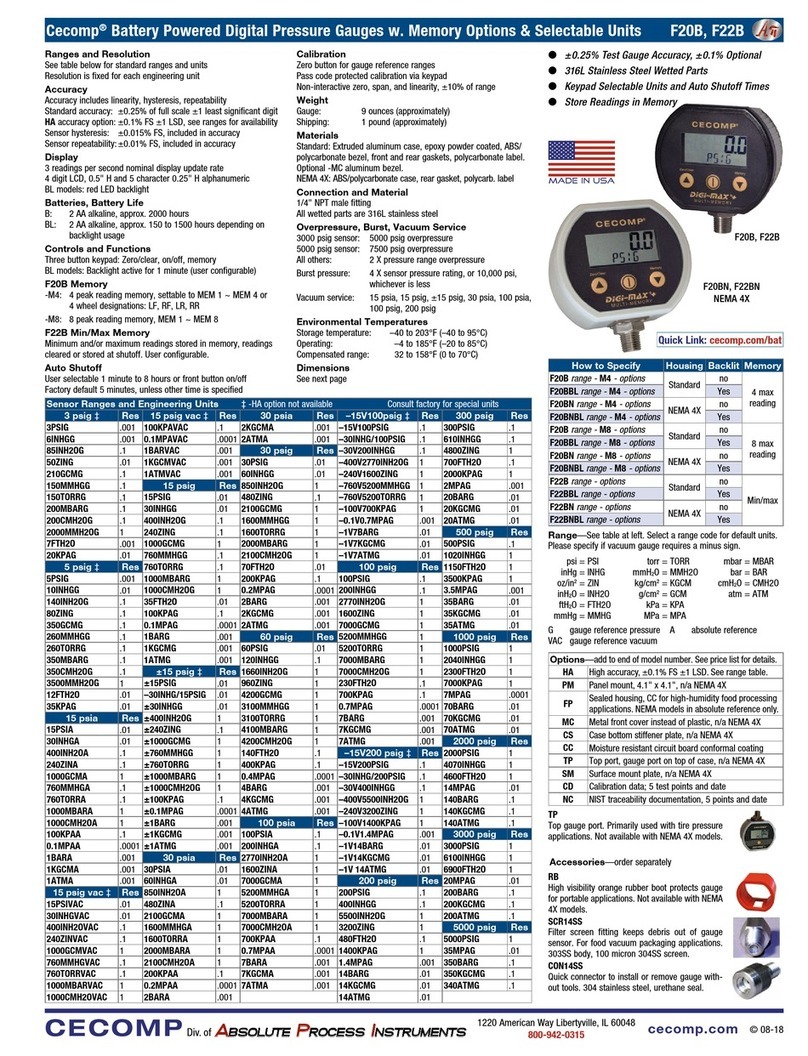
Instructions DPG2000B D4, M0, M1 Series
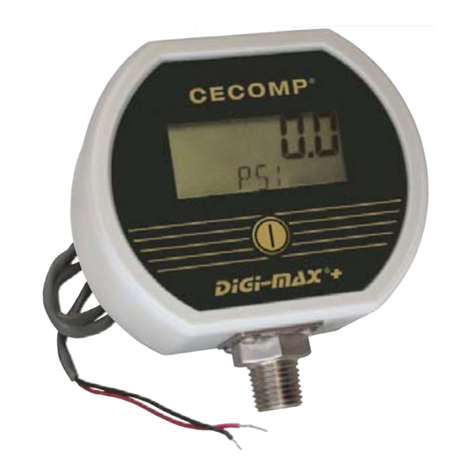
¼" NPT
2.88"
3.38"
0.75"
1.65"
Types of Gauges
Gauge reference reads zero with the gauge port open.
Bipolar ranges read positive pressure and vacuum in the same
units, and zero with the gauge port open.
Compound ranges read positive pressure in psig and vacuum
in inHg, and zero with the gauge port open.
Sealed reference reads zero with the gauge port open and is
referenced to 14.7 psi. Used for 1000 psi and up.
Absolute reference reads atmospheric pressure with gauge
port open and zero at full vacuum. With the gauge port open
to atmosphere, it is normal for readings to fluctuate due to
continuously changing barometric pressure.
Power Up
Press and hold the front button for approximately 1 second.
The display is tested, the full-scale range is indicated, the
display test is briefly shown again, then the actual pressure and
units are displayed. The gauge is ready for use.
Power Up with Zero
This applies to gauge reference models only. Absolute refer-
ence gauges do not use the zero feature since they read
atmospheric pressure under normal conditions.
Be sure the gauge port is exposed to normal atmospheric pres-
sure. The zeroing function is only stored at power-up and the
zero correction is erased when the gauge is shut off.
Press and hold the front button until oooo is displayed.
Release the button. The gauge in now zeroed. The full-scale
range is indicated and the display test is briefly shown again,
then the actual pressure and units are displayed. The gauge
is ready for use.
Attempting to zero the gauge with pressure greater than about
3% of full-scale pressure or vacuum applied will result in an
error condition, and the display will alternately indicate Err 0
and the actual pressure. The gauge must be powered down to
reset the error condition.
Normal Operation
Following the start-up initialization, the display indicates the
pressure reading updated approximately 3 times per second.
The auto shutoff timer starts when the gauge is powered up or
whenever the button is pushed, unless the gauge shutoff time
was set to zero for on/off operation.
If excessive vacuum is applied to a pressure-only gauge, the
display will indicate -Err until the vacuum is released.
Applying vacuum to a gauge designed for pressure may
damage the pressure sensor. If excessive pressure is applied
(112.5% over range), an out-of-range indication of I – – – or
I.–.–.– will be displayed depending on model.
Shut-Down
To shut off the gauge manually at any time, press and hold
the button until the display indicates OFF (about 5 seconds)
and then release.
When an auto shutoff timer is used, the display indicates OFF
five seconds prior to auto shutoff. Press the button to keep the
gauge on. The auto shutoff and backlight (if equipped) timers
are reset whenever the button is pressed.
If the gauge is set up without auto shutoff (on/off operation) it will
stay on until manually shut off or until the batteries are depleted.
Turn gauge off when not in use to conserve battery life.
Display Backlighting (BL Option Only)
Display backlighting will operate for one minute when the
button is pressed provided the front light sensor detects low
ambient light levels.
Backlighting may not be apparent under some lighting condi-
tions. Backlighting may also be configured to be on at all times
(which will shorten battery life), or be turned off at all times.
M0 Versions
M0 models are configured with minimum and maximum func-
tions disabled. One or both can be enabled or disabled in the
User Configuration mode.
Minimum/Maximum Memory
If enabled, minimum and maximum readings are stored con-
tinuously whenever the gauge is on. The stored readings can
be manually cleared if desired. The MIN and MAX memory
can be configured to save or clear the reading whenever the
gauge is off.
Press and hold the button for about 1 second until MAX is
displayed alternating with the units. The maximum reading will
be continuously updated. The gauge may be left in this mode.
After MAX is displayed, press and hold the button for about 1
second until MIN is displayed alternating with the units. The
minimum reading will be continuously updated. The gauge
may be left in this mode. If excessive vacuum is applied to a
pressure-only gauge while in this mode, the display will indi-
cate -Err until the MAX/MIN readings are cleared.
After MIN is displayed, press and hold the button again for
about 1 second until * * * * * is displayed. The MAX and MIN
memory is not erased and the gauge returns to normal opera-
tion with the display indicating the current reading.
Press and continue to hold the button until the display indicates
clr MX/MN (about 3 seconds total) and then release the but-
ton. Both maximum and minimum values are cleared and the
gauge returns to the normal operating mode.
M1 Versions: Peak Reading
M1 models are peak reading gauges that only display and
capture maximum readings. The maximum reading will be
continuously updated. The MAX memory can be configured to
save or clear the reading whenever the gauge is off.
Battery ReplacementPrecautions
A low battery indication (either LOBAT or a symbol depend-
ing on the model) will be shown in the upper left-hand corner
of the display when the battery voltage falls sufficiently. The
batteries should be replaced when the indicator comes on or
unreliable readings may result.
WARNING: Replace batteries with approved type in non-
hazardous locations only. Replace batteries with two Panasonic
LR03 1.5 V AAA alkaline cells.
Replace both batteries with new ones at the same time. Do
not mix different types of batteries. Substitution of components
may impair intrinsic safety.
1. Remove the 6 Phillips
screws on the back of
the unit.
2. Remove batteries by lift-
ing up the positive end of
the battery (opposite the
spring) taking care not to
bend the spring.
3. Discard old batteries
properly, do not discard
into fire, sources of
extreme heat, or in any
hazardous manner.
4. Install batteries with correct orientation. The negative (flat)
end of each battery should be inserted first facing the bat-
tery holder spring.
5. Replace the back cover, including the rubber gasket.
Approved Locations
The DPG2000B series is approved for use in the following
Hazardous Locations.
IS Class I Div 1 Gp ABCD
T3C Ta = –40ºC to 82ºC; T4 Ta = –40ºC to 66ºC.
CL I Zone 0 AEx/Ex ia IIC
T3 Ta = –40ºC to 82ºC; T4 Ta = –40ºC to 66ºC
Installation
4Read these instructions before installing the gauge.
Configuration may be easier before the gauge is installed.
Contact the factory for assistance.
4Installation instructions must be strictly followed in compli-
ance with Intrinsic Safety National Standard NEC 504 or
ANSI/ISA RP 12.6 and the National Electrical Code.
4Outdoor or wash down applications require a NEMA 4X
gauge or installation in a NEMA 4X housing.
4Use fittings appropriate for the pressure range of the gauge.
4Due to the hardness of stainless steel, it is recommended
that a thread sealant be used to ensure leak-free operation.
4For contaminated media use an appropriate screen or filter
to keep debris out of gauge port.
4Avoid permanent sensor damage! NEVER insert objects into
gauge port or blow out with compressed air.
4Remove system pressures before removing or installing
gauge.
4Install or remove gauge using a wrench on the hex fitting
only. Do not attempt to turn by forcing the housing.
Operation
4Use within the pressure range indicated on gauge label.
4Avoid permanent sensor damage! Do not apply vacuum to
gauges not designated for vacuum operation.
4Use only with media compatible with 316L stainless steel.
Gauges are not for oxygen service. Accidental rupture of
sensor diaphragm may cause silicone oil inside sensor to
react with oxygen.
4The DPG2000B series gauges must only be operated in
specified ambient temperature ranges.
Maintenance
4The non-metallic cover of the pressure gauge is considered
to constitute an electrostatic discharge hazard. Clean only
with a damp cloth.
4Batteries must be replaced when the low battery indication
comes on to prevent unreliable readings.
4WARNING: Replace batteries with approved type in non-
hazardous locations only.
4Approved batteries are two Panasonic LR03 1.5 V AAA alka-
line cells. Replace both batteries at the same time.
p WARNING: Substitution of batteries may impair intrinsic
safety. Improper voltages will damage the gauge.
4WARNING: Substitution of components may impair intrinsic
safety. Do not modify the gauge.
4These products do not contain user-serviceable parts
except for batteries. Contact factory for repairs, service, or
refurbishment.
DS-DPG2000B rev. 12-12
Two
AAA
batteries
cecomp.com
1220 American Way Libertyville, IL 60048
800-942-0315
CECOMPDiv. of
AABSOLUTEBSOLUTE PPROCESSROCESS IINSTRUMENTSNSTRUMENTS
Cecomp maintains a constant effort to upgrade and improve its products.
Specifications are subject to change without notice. See cecomp.com for
latest product information. Consult factory for your specific requirements.
WARNING: This product can expose you to chemicals including
nickel and chromium, which are known to the State of Califor-
nia to cause cancer or birth defects or other reproductive harm.
For more information go to www.P65Warnings.ca.gov
Disposal of Electrical & Electronic Equipment Applicable
in the European Union and other European countries.
This product should not be treated as household waste
when you wish to dispose of it. Please contact your local
waste disposal authority for information and collection
location for recycling electrical and electronic equipment.
You may also return this product via pre-paid shipping
to Absolute Process Instruments or your supplier for proper disposal.