manuals.online logo
Brands
  1. Home
  2. •
  3. Brands
  4. •
  5. Chevrolet
  6. •
  7. Car Video System
  8. •
  9. Chevrolet MyLink User manual

Chevrolet MyLink User manual

Other manuals for MyLink

3

Other Chevrolet Car Video System manuals

Chevrolet Corvette 2015 Installation guide

Chevrolet

Chevrolet Corvette 2015 Installation guide

Chevrolet Corvette 2016 User manual

Chevrolet

Chevrolet Corvette 2016 User manual

Chevrolet Corvette2015 User manual

Chevrolet

Chevrolet Corvette2015 User manual

Chevrolet 2015 Captiva Sport User manual

Chevrolet

Chevrolet 2015 Captiva Sport User manual

Chevrolet Captiva Sport 2014 User manual

Chevrolet

Chevrolet Captiva Sport 2014 User manual

Chevrolet MyLink2018 User manual

Chevrolet

Chevrolet MyLink2018 User manual

Chevrolet 2015 City Express User manual

Chevrolet

Chevrolet 2015 City Express User manual

Chevrolet Camaro MyLink Infotainment System 2017 User manual

Chevrolet

Chevrolet Camaro MyLink Infotainment System 2017 User manual

Chevrolet MyLink User manual

Chevrolet

Chevrolet MyLink User manual

Chevrolet 2013 VOLT User manual

Chevrolet

Chevrolet 2013 VOLT User manual

Chevrolet Camaro 2018 User manual

Chevrolet

Chevrolet Camaro 2018 User manual

Chevrolet Acadia 2013 User manual

Chevrolet

Chevrolet Acadia 2013 User manual

Chevrolet Camaro User manual

Chevrolet

Chevrolet Camaro User manual

Chevrolet CORVETTE 2020 User manual

Chevrolet

Chevrolet CORVETTE 2020 User manual

Chevrolet CORVETTE User manual

Chevrolet

Chevrolet CORVETTE User manual
Chevrolet 2013 Malibu User manual

Chevrolet

Chevrolet 2013 Malibu User manual

Chevrolet MyLink User manual

Chevrolet

Chevrolet MyLink User manual

Popular Car Video System manuals by other brands

Farenheit MD-1510CM instruction manual

Farenheit

Farenheit MD-1510CM instruction manual

Mazda Connect manual

Mazda

Mazda Connect manual

RCA DRC97983 Manual de usuario

RCA

RCA DRC97983 Manual de usuario

Panasonic CY-VHD9401U Service manual

Panasonic

Panasonic CY-VHD9401U Service manual

Stinger HEIGH10 RB10RAM13B installation manual

Stinger

Stinger HEIGH10 RB10RAM13B installation manual

Alpine IVA-W203 - 6.5" Touch Screen 2-DIN DVD In-Dash... owner's manual

Alpine

Alpine IVA-W203 - 6.5" Touch Screen 2-DIN DVD In-Dash... owner's manual

Eonon E1057 instructions

Eonon

Eonon E1057 instructions

Milion D2223 user manual

Milion

Milion D2223 user manual

Metra Electronics 99-8153 installation instructions

Metra Electronics

Metra Electronics 99-8153 installation instructions

Voxx Electronics HR8MA1 owner's manual

Voxx Electronics

Voxx Electronics HR8MA1 owner's manual

Axxera AV604Bi quick start guide

Axxera

Axxera AV604Bi quick start guide

Clarion NX706E owner's manual

Clarion

Clarion NX706E owner's manual

Pyle view PLDN74BTi owner's manual

Pyle view

Pyle view PLDN74BTi owner's manual

Clarion NX602 quick start guide

Clarion

Clarion NX602 quick start guide

RCA DRC6296 - Twin 9" Mobile DVD System Manual Del Usuario

RCA

RCA DRC6296 - Twin 9" Mobile DVD System Manual Del Usuario

Fiat Uconnect 5.0 manual

Fiat

Fiat Uconnect 5.0 manual

Lanzar SVDVD5 owner's manual

Lanzar

Lanzar SVDVD5 owner's manual

Eonon E1060 instructions

Eonon

Eonon E1060 instructions

manuals.online logo
manuals.online logoBrands
  • About & Mission
  • Contact us
  • Privacy Policy
  • Terms and Conditions

Copyright 2025 Manuals.Online. All Rights Reserved.

GEN5DIY.com MyLink Installation Instructions
Written by GearHeadPeter for GEN5DIY.com
May 15, 2014
Disclaimer: Safety First. Ensure the parking brake is set before working on the vehicle as the vehicle will
sometimes be in neutral, and could roll causing damage or injury to others.
Ensure you can open both doors fully to gain access to the panels, electronics, etc...
If you feel you cannot do this install yourself, STOP, and take your vehicle to a professional
to complete the install for you. You are responsible for any installation costs.
This Radio does not meet DOT specifications, and it is for off road
use only.
GEN5DIY.COM and its affiliates will not be held responsible or liable for any damages to
your vehicle, others, or any of your vehicles components or equipment in the process of this
install.
You are acknowledging this Disclaimer and accept full responsibility if you install the radio.
If you need assistance please call 928-854-4884, M-F only from 9 - 5 PM, PST.
Tools needed for MyLink Install:
Plastic trim removal tools (Various sizes if needed)
¼” drive, 6” extension, ¼” flexible extension, and ¼” Swivel Flex socket
7 mm Socket, 6mm socket
T20 Torx bit and driver
T15 Torx bit and driver
Phillips screwdriver & Small flat blade screwdriver
Dremel Tool with cutoff wheel & grinding /sanding disk
Large pliers to seat the T-tap and medium pliers to help push the pins into the connectors or use a pick tool
X acto knife
Pick tool or small jeweler’s flat blade screw driver for unlocking connector locks
Page 1 of 28
STEPS 1 & 2 – Panels, Glove Box & Center Console removal
Tools required for this step:
Plastic trim removal tools (Various sizes if needed)
¼” drive with 7 mm Socket
T20 Torx bit
Phillips screwdriver
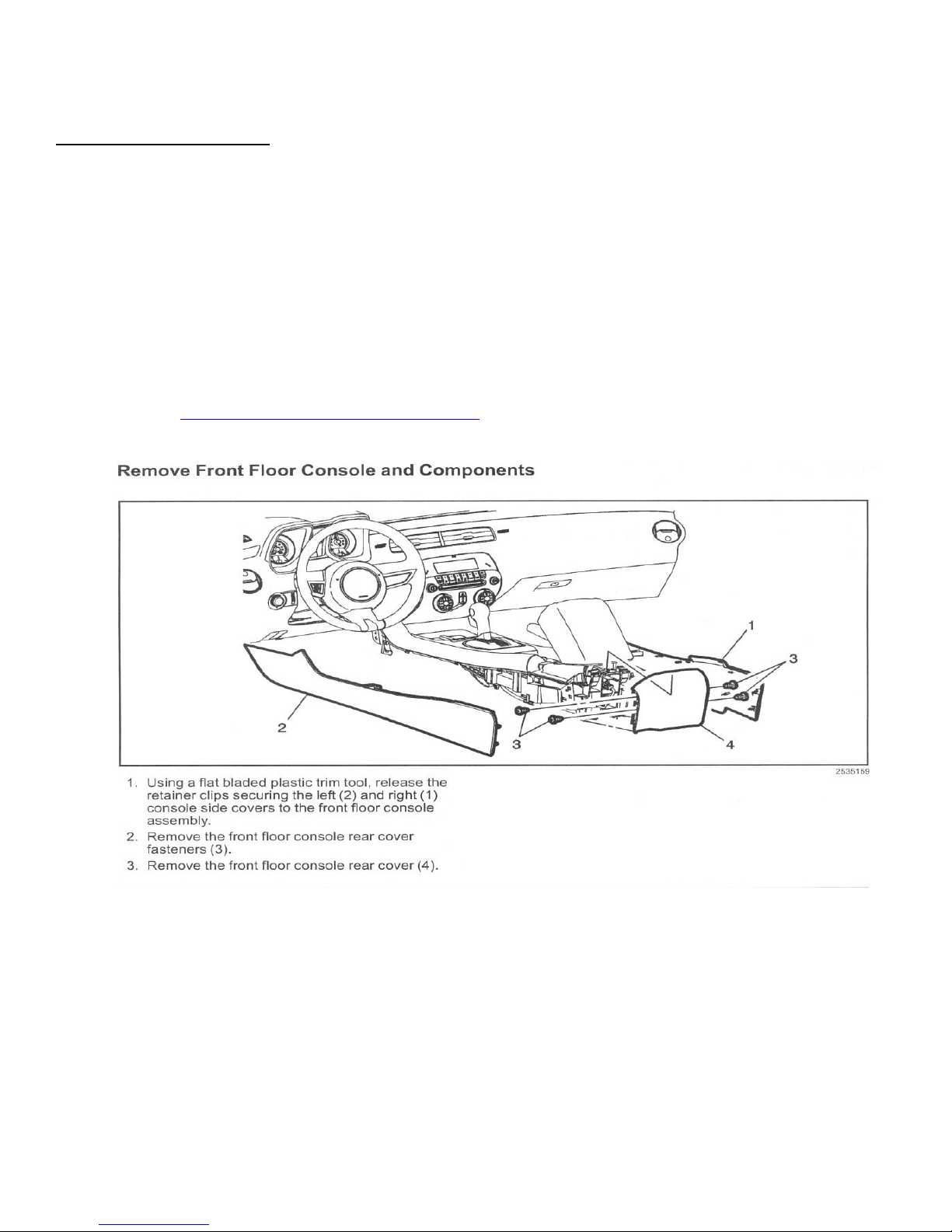
1) Follow the video instructions for removing the passenger kick and side panels or the driver kick and side
panels depending on which side, center console side panels (both sides), passenger door threshold panel, and
glove box.
a) Click on Step 1 - Panels & Glove Box Removal video for in-depth instructions.
b) Side and rear center console panel removal.
2) Automatic Shifter disassembly (If Manual skip to step 3)
a) Tools required for this step:
a.i) Small flat blade screwdriver
a.ii) T-20 Torx drive
a.iii) 7 mm socket & drive
a.iv) Plastic trim removal tool
a.v) Blue painters tape
Page 2 of 28
b) Click on Step 2 - Center Console Removal video for in-depth instructions.
c) If an automatic depress the brake pedal and put the shifter into “M”. Ensure parking brake is set.
c.i) Using a Small flat blade screwdriver pry out the plastic access panel on the front of the shifter.
c.ii) Using the T-20 Torx driver unscrew the locking screw that holds the knob on the shifter shaft.
d) Pull the automatic shifter control knob off the shaft and set it, the screw and small cover aside.
e) Put a few strips of blue painters tape on either side of the automatic shifter assembly, and across
the front to protect it from being scratched when removing the front Center console trim cover
next.
e.i) The bottom of 12 vdc accessory plug and the Traction/Stability connector get real close to the shifter
cover. If possible try to push the 12 vdc plug and the Traction/Stability connector up about .5” to
clear the shifter cover. There are tabs on each.
e.ii) Make sure the shifter is in “M”, and the automatic shifter control knob is off before trying to take
out the front floor console cover.
f) Using a slim plastic trim removal tool, start by removing the front floor console cover from the back
first moving towards the front, and lift off. Be careful not to scratch the shifter cover as a new one will
cost $125.
Page 3 of 28
g) If you have the 4-gauge pack disconnect the cable and place the front floor console cover aside. If you
do not have the 4-gauge pack set the front floor console cover aside.
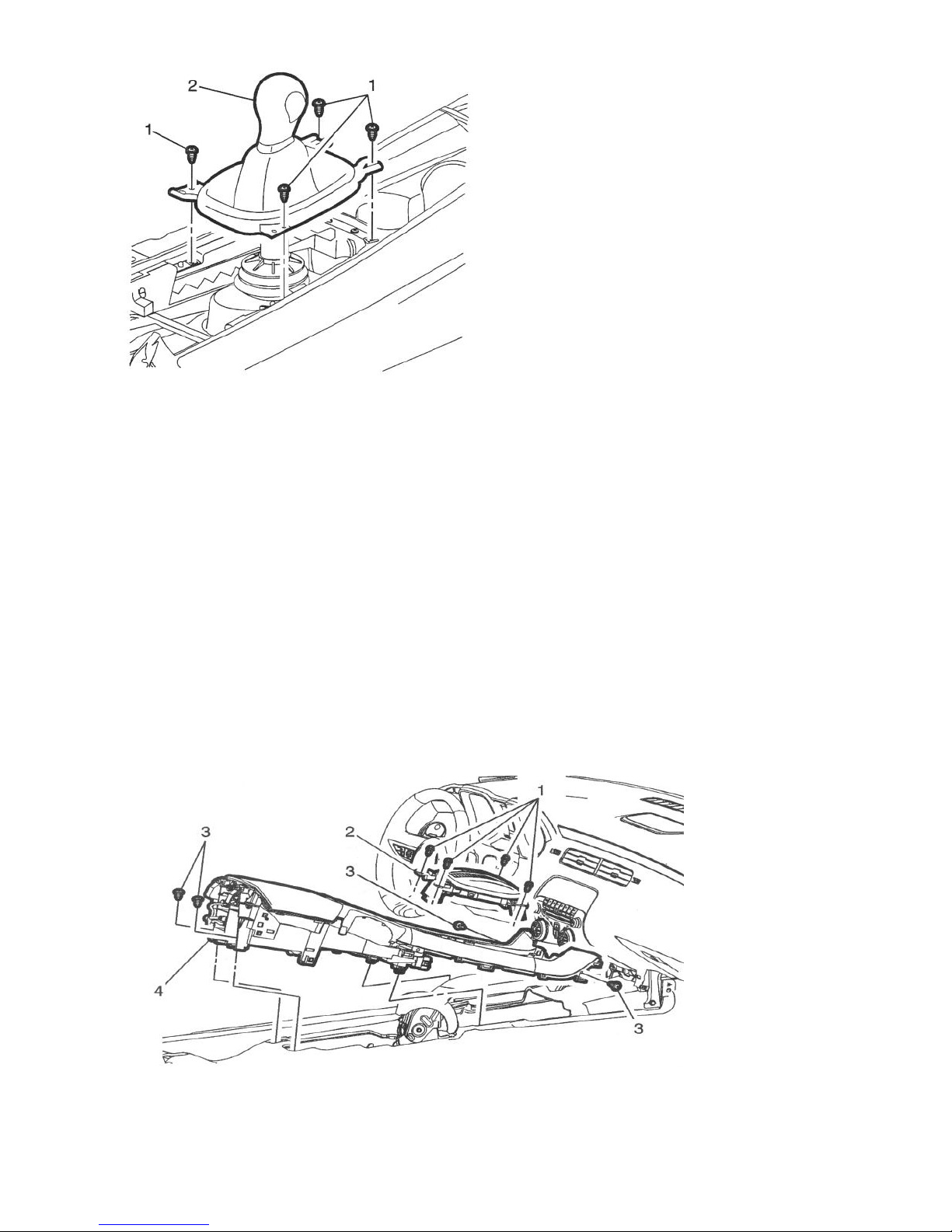
h) Unscrew the four (4) bolts using the 7mm socket & drive holding the white plastic shifter cover to the
center console.
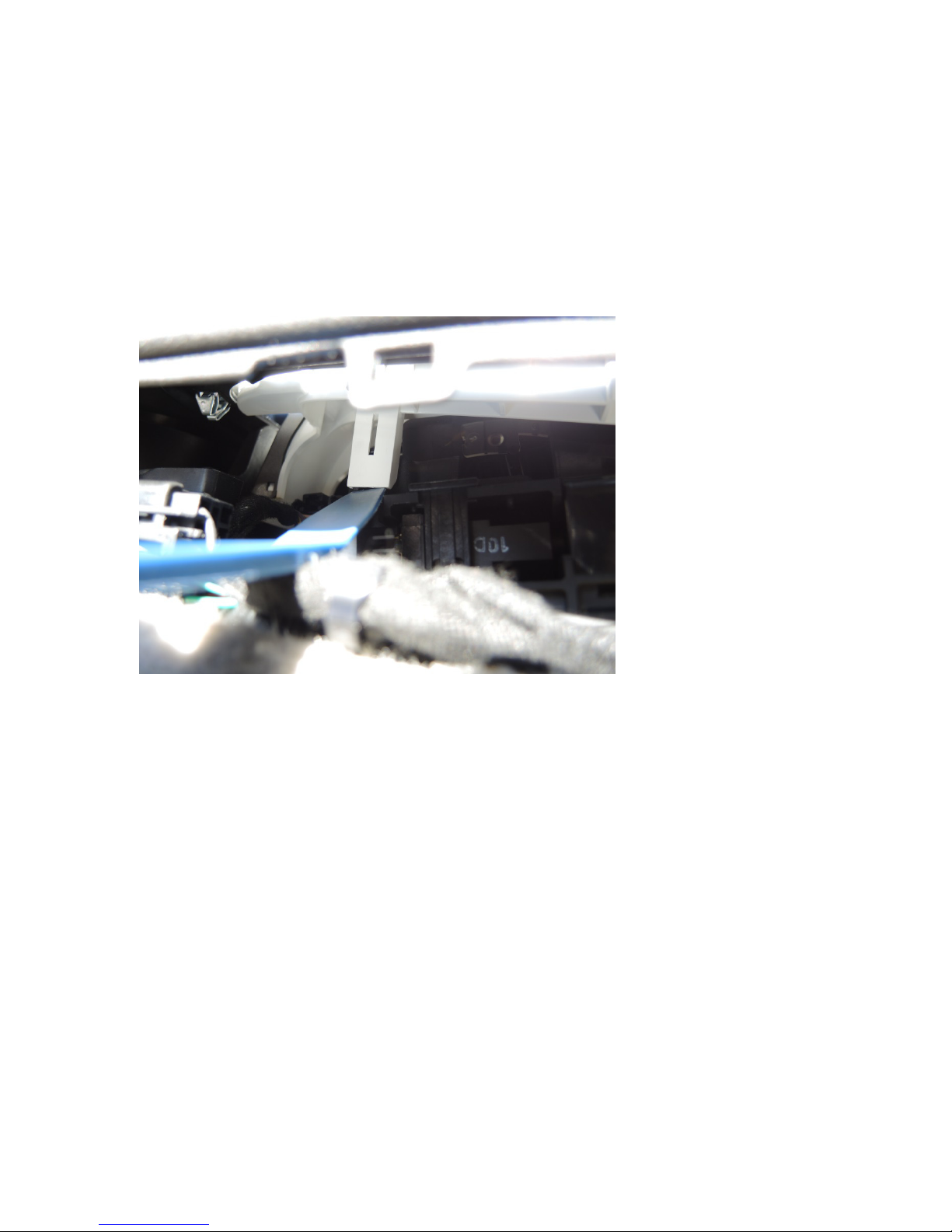
h.i) To release the shifter assembly there are two (2) release points on the shifter towards the back where
it attaches to the center console. See the image of the release points. You might need to use a small
blade screw driver with a long shaft to push in the release points. Start with either the two (2) in the
front or the back. This will take a bit of time so be patient.
h.ii) Lift the shifter frame out of the center console. Disconnect the LED bulb by twisting the bulb
housing to remove it from the shifter assembly.
3) Manual Shifter
a) Remove the manual transmission control lever screws (1)
Page 4 of 28
b) Firmly pull upward on the knob (2) until it is released from the control assembly.
4) Removing the Center Console
a) For automatics depress the brake and push down on the black stem that the shifter knob came off of, and
push the gear selector into Park.
b) Remove the four (4) Phillips screws (3) that hold the center console to the floor.
c) Disconnect console I/P harness in line connector. This connects the console USB port and 12 vdc
connector to the vehicle. Also see the image below.
Page 5 of 28
d) With the four screws removed and the harness disconnected you can now take out the center console, but
be careful not to scratch anything. Set the center console upside down on a blanket as you will be
replacing the center console harness with Gen5DIY’s new harness later in the steps.
Step 3 – Radio Removal
Tools required for this step:
Slim Plastic trim removal tool.
6mm socket & driver
1) Click on Step 3 - Radio Removal and Connectors Disconnected video for in-depth instructions.
2) Remove 2 – 6mm bolts that hold the faceplate on where the gauge pack was.
Page 6 of 28
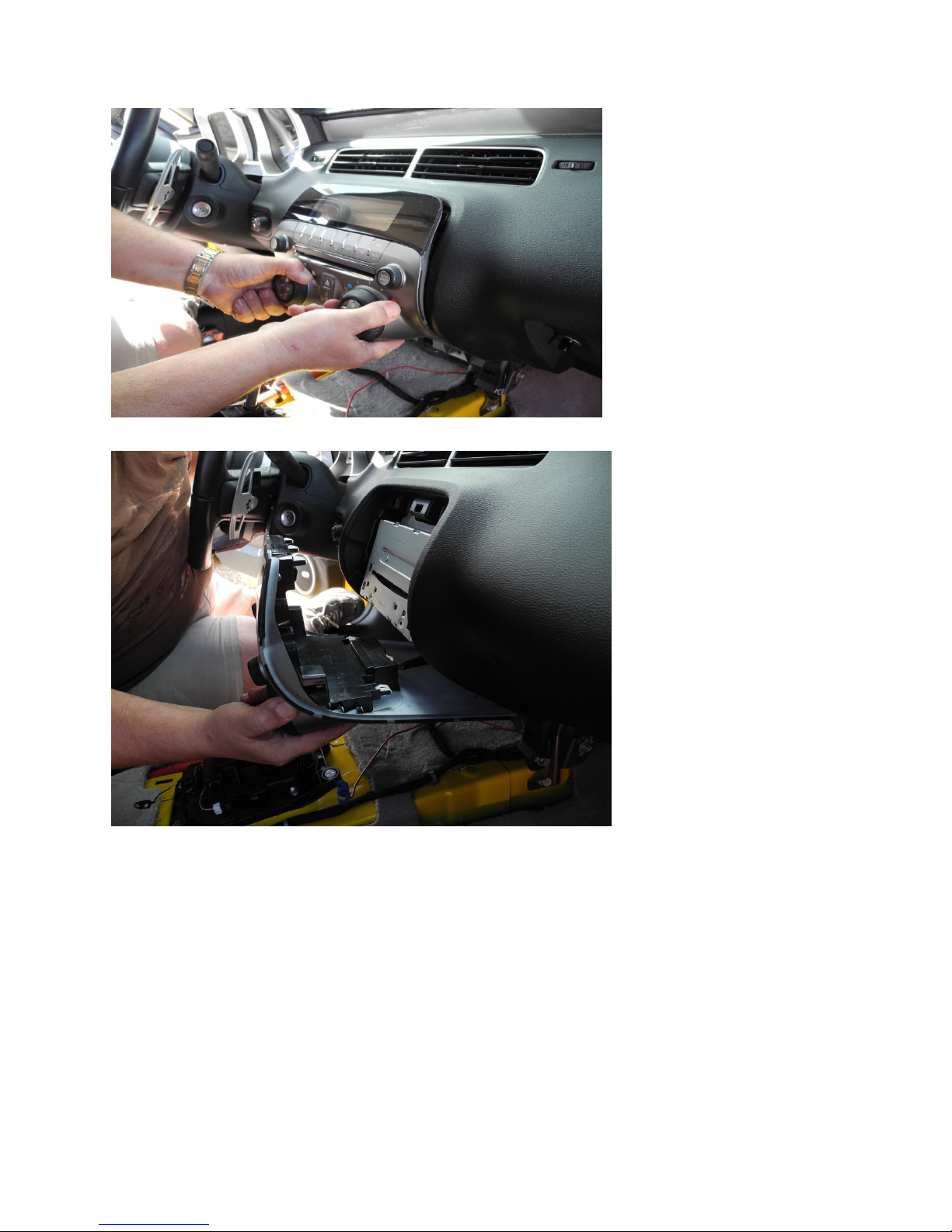
a) Using a slim trim panel removal tool pry from the top and sides until lose. First, pull face plate out from
the top, and then down to disengage the guidance pins. Pull face plate a few inches away from dash.
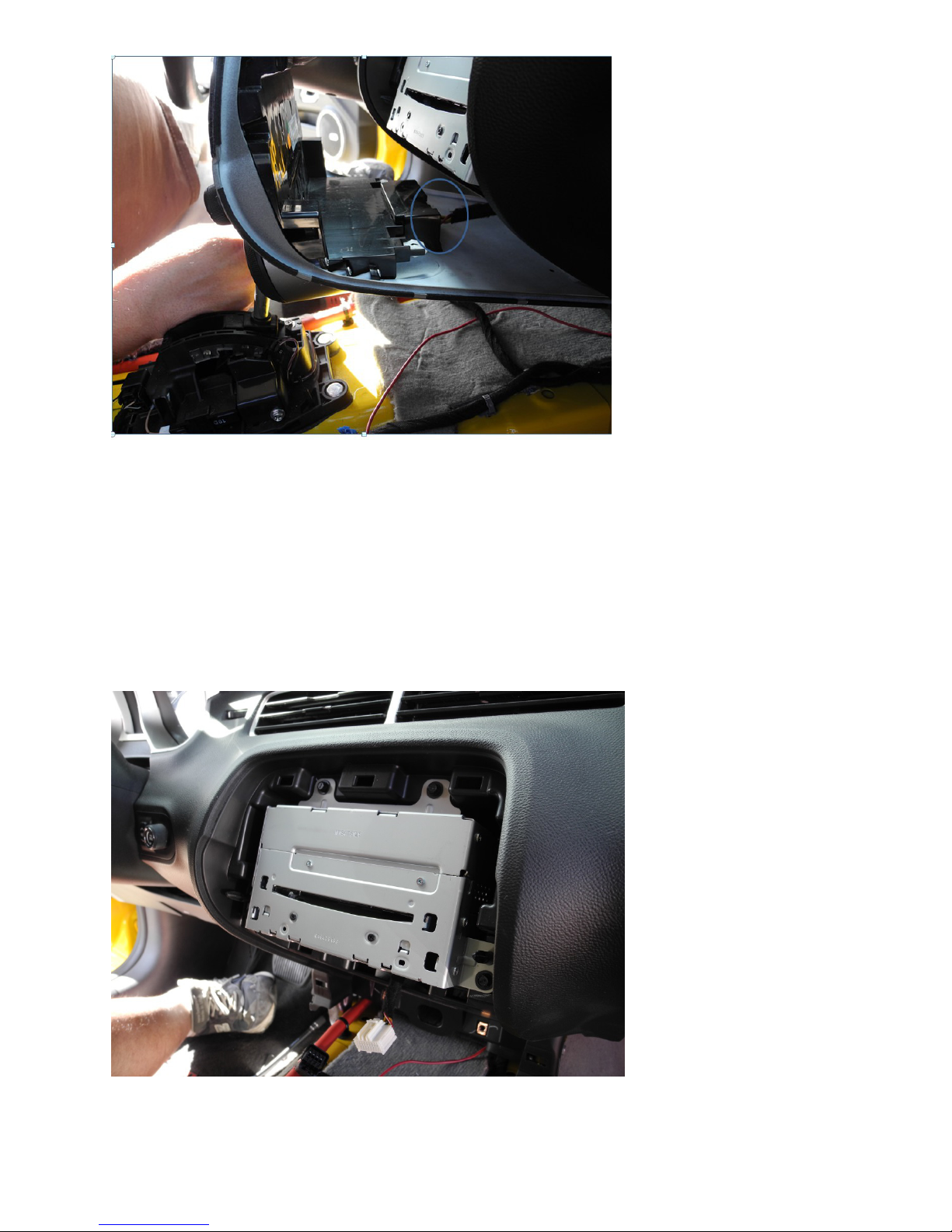
b) It is now time to disconnect the face plate Radio/HVAC - A20 connector that is circled in Blue in the
next frame. It is a small white connector. Push the tab down and pull the connector out. The face plate
is now free. Set it aside.
Page 7 of 28
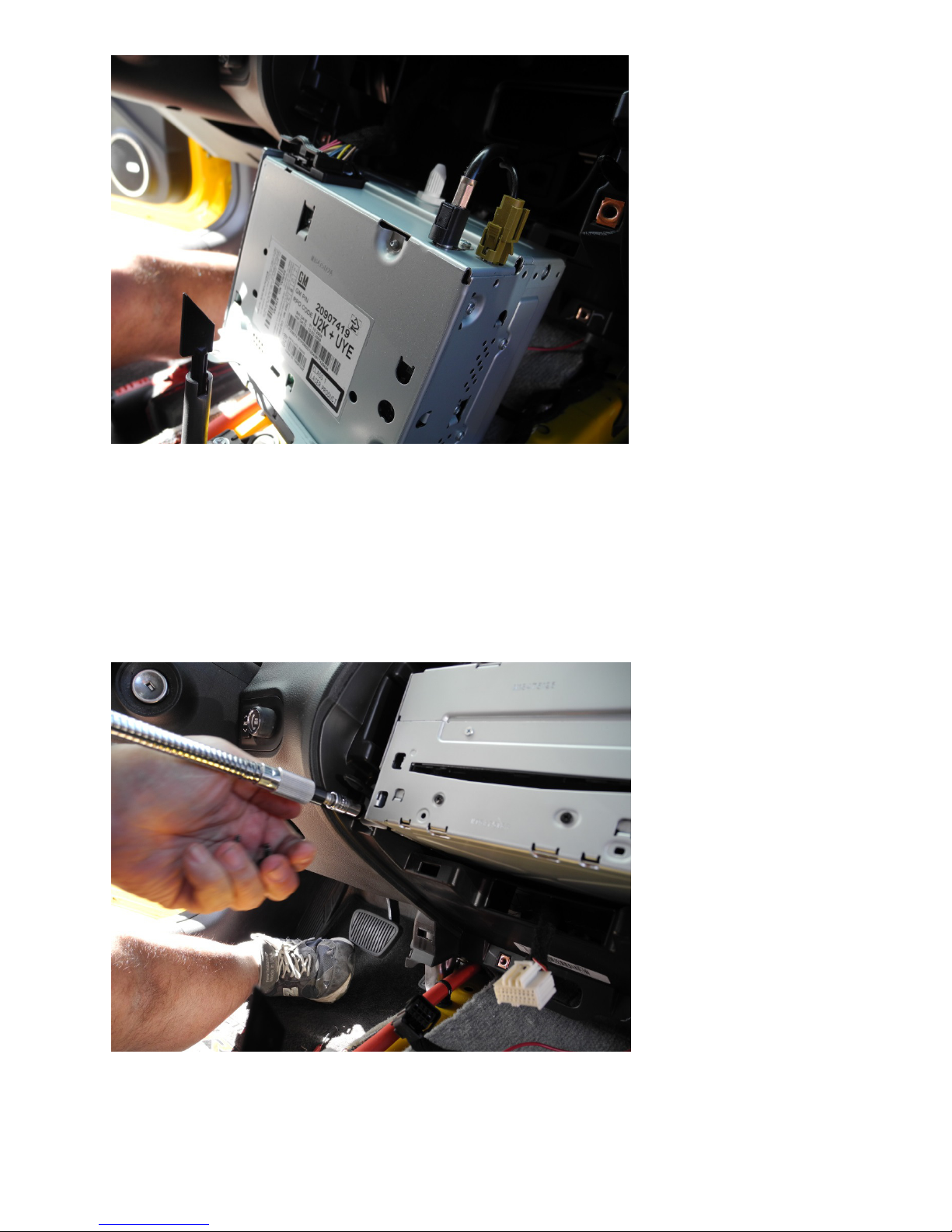
c) Remove 4 - 6mm bolts that hold the head unit in place. Pull out the head unit, and then tilt it down to
disconnect the head unit harness and its cables.
Page 8 of 28
Page 9 of 28
d) With the head unit out of the way if you want the door lock/unlock switch to work now would be a good
time to install a T-Tap on Pin 12 Pink/Black (Lock signal), and one on pin 13 Orange/Black (Unlock
signal) of HVAC/Radio connector A20. Run the new wires to your new switch. Don’t forget the new
switch needs a ground to work besides the two signal wires. See the pin out of A20 on next page.
d.i) If you have a 2012 and newer Camaro that already has the door locks in the door panels you can skip
this step.
HVAC/Radio connector A20 pin out
Page 10 of 28