manuals.online logo
Brands
  1. Home
  2. •
  3. Brands
  4. •
  5. Crown
  6. •
  7. Control Unit
  8. •
  9. Crown OC-150 User manual

Crown OC-150 User manual

Other manuals for OC-150

2

Other Crown Control Unit manuals

Crown OC-150A User manual

Crown

Crown OC-150A User manual

Crown OC-150 User manual

Crown

Crown OC-150 User manual

Crown OC-150 Quick start guide

Crown

Crown OC-150 Quick start guide

Crown IReC-1 User manual

Crown

Crown IReC-1 User manual

Popular Control Unit manuals by other brands

Seitz 14A80 user manual

Seitz

Seitz 14A80 user manual

Wilo RS485 Installation and operating instructions

Wilo

Wilo RS485 Installation and operating instructions

Becker CentralControl CC41 Commissioning Instruction

Becker

Becker CentralControl CC41 Commissioning Instruction

SICK CDB650 operating instructions

SICK

SICK CDB650 operating instructions

Panduit NetKey NKP5E88M Series installation instructions

Panduit

Panduit NetKey NKP5E88M Series installation instructions

MX Options Concentric Petite Fitting instructions

MX

MX Options Concentric Petite Fitting instructions

Clean Water Systems Fleck 2510 Installation & start?up guide

Clean Water Systems

Clean Water Systems Fleck 2510 Installation & start?up guide

Fairchild FSB44104A user guide

Fairchild

Fairchild FSB44104A user guide

LEGRAND Wattstopper LMIN-104 installation instructions

LEGRAND

LEGRAND Wattstopper LMIN-104 installation instructions

PMK ATT10BNCS instruction manual

PMK

PMK ATT10BNCS instruction manual

Tektronix TDS3FFT user manual

Tektronix

Tektronix TDS3FFT user manual

Woodward easYgen Technical manual

Woodward

Woodward easYgen Technical manual

Balluff BNI EIP-502-105-R015 user guide

Balluff

Balluff BNI EIP-502-105-R015 user guide

NXP Semiconductors TWR-LS1021A Getting started

NXP Semiconductors

NXP Semiconductors TWR-LS1021A Getting started

Advantech PCM-3117 Startup manual

Advantech

Advantech PCM-3117 Startup manual

Danfoss MCO 101 manual

Danfoss

Danfoss MCO 101 manual

Moons' Lin Engineering R701P user manual

Moons'

Moons' Lin Engineering R701P user manual

Aventics RV1 operating instructions

Aventics

Aventics RV1 operating instructions

manuals.online logo
manuals.online logoBrands
  • About & Mission
  • Contact us
  • Privacy Policy
  • Terms and Conditions

Copyright 2025 Manuals.Online. All Rights Reserved.

Div,
of
lNTERNATlQNAL
RADlO
&
ELECTRONlCS
CORP.
BOX
1WO
ELKHART,
INDIANA
46514
TABLE
OF
CONTENTS
SECTION
I
GENERAL
OPERATIQN
PAGE
lntroductian
.................................................................................................................
1
Warranty
&
Unpacking
...............................................................................................
1
..........................................................................................................
Quick
Summary
2
Front
Pane[
Contrsi
Functions
...................................................................................
2
Rear
Panel
Connectars
...................
,.....
....................*.........................................
3
Complete
Ca;lnnectisn
of
inputs
................................................................................
4
..............................................................................
Campiete
Connection
of
Outputs
5
....................................................................................
Camman
Usage
Procedures
6
Mounting
Instructions
................................................................................................
8
..............................................................................................................
Specifications
9
SECTlON
I!
TECHNlGAL
DESCRIPTION
AND
USE
Introduction
...............................................................................................................
15
.................................................................................................
inputdOutput
Sg~cs
42
........................................................................
Meter
Response
and
interpretalion
14
....................................................................................................
Circuit
&scription
48
.............................................................................
Headphone
Attenuator
Switches
18
Crsrsstal
k
&
Sparation
.......
..
....................................................................................
18
Care
of
the
06-150
...................................................................................................
18
.................................................................................................
220
Volt
Conversion
18
.......................................................................................................
Warranty
srvice
19

LIST
OF
ILLUSTRATIONS
...........................................................................................................................
06-350
Pictorial
1
Front
Panel
Control
Functions
...................................................................................................
2
Rear
Panel
Connectors
...............................................................................................................
3
.......................................................................
Campjete
Connections
of
the
inputs
(fotdsut) 4
...................................................................
Csmpfete
Connections
aaf
the
Outputs
(Foldout)
5
................................................................................................................
Mounting
Dimensions
8
..............................................................................................
...................
06-150
Pictorial
..
II
Voltag~
and
Curreat
with
Reactance
.....................................................................................
14
.....................................................................................................................
V-1
Output
Graph
$5
.....................................................................................................
Spaker
impedance
Curve
15
Ifmpedance
-
Power
G~aph
......................................................................................................
17
QG-150
Flow
Diagram
.............................................................................................................
17
2-7
220
Volt
Canversion
......................................................................
...
14
With
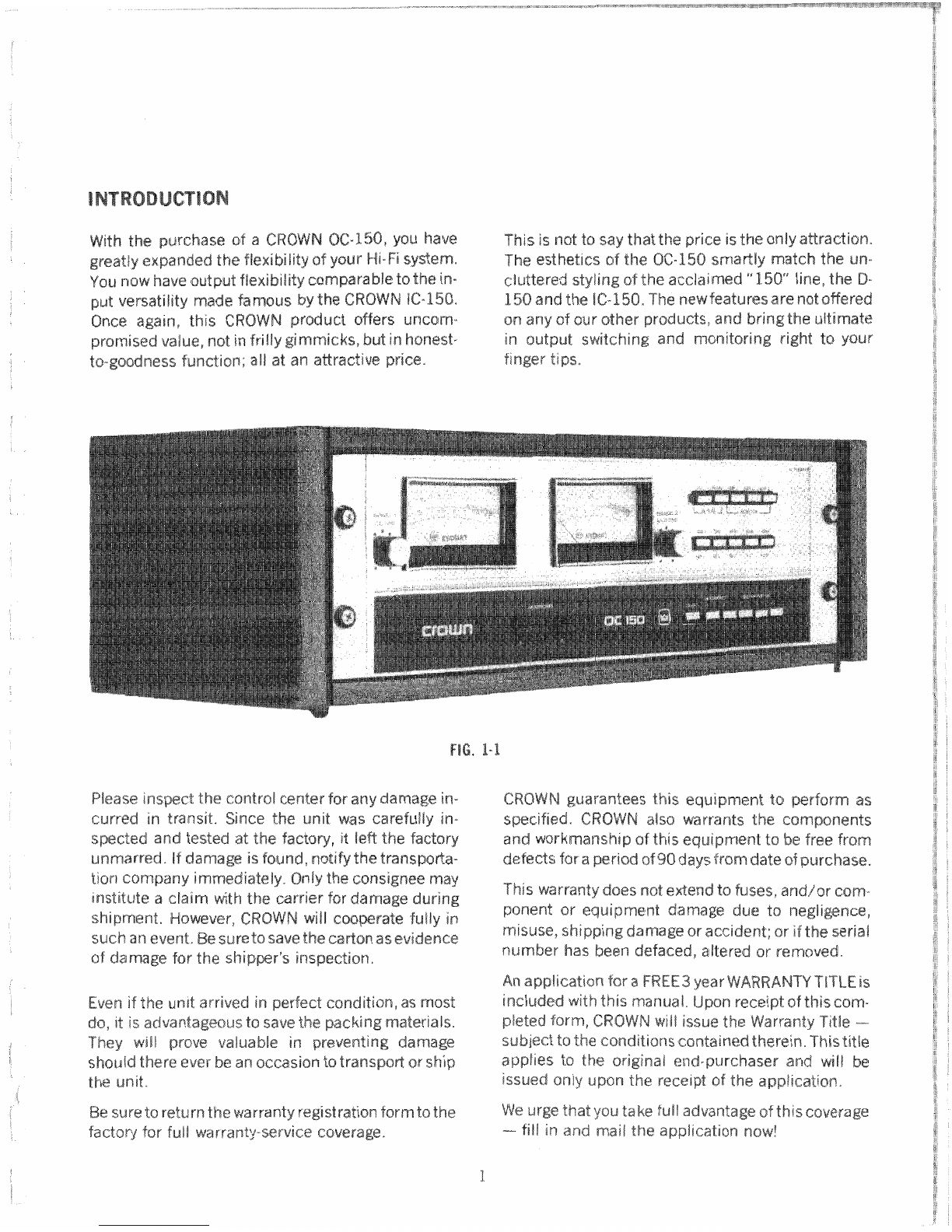
the purchase
of
a
CROWN
OCOC-%SO,
you
have
This
is
not
to
say
that
the
price
is
the
only
attraction,
greatly
expanded
the
flexibility
of
your
Hi-Fi
system.
The
esthetics
sf
the
QC-158
sma~ly
match
the
un-
YOU
now
have
output flexibility
comparable
ts
the
in-
clutkred
styling
of
the
acclaimed
"150"
line,
the
D-
put
uet-satility
made
famous
by
the
CROWN
1C-150.
158
and
the
IC-%5Qx
The
new
Features
arenoto%ered
Once
again,
this
CROWN
pvoduct
offers
uncom-
an
any
of
our
other products,
and
bsingthe
ultimate
promised
value,
not
in
frilty
gimmicks,
but
in
hanest-
in
output
switching
and
monitoring
right
to
your
ts-goodness
Functian;
a!/
at
an
a@raetiv~
price,
finger
tips,
Please
inspect
"che
control
center
for
any
damage
in-
curred
in
transit.
Since
&he
unit
was
carefully
in-
spected
and
tested
at
the
factory,
it
left
the
factory
unmarred..
If
damage
is
found,
notify
the
transpada-
tion
company
immediate3y.
6nly
the
consignee
may
institute
a
claim
with
the
carrier
far
damage
during
shipment. However,
CROWN
will
c~~perateSuity in
such
an
event,
Be
sure
to
save
the
cafisn
as
evidence
of
dan2age
Bar
the
shipper"
inspection,
CROWN
gr.lat.an"cee
this
equipment
to
perform
as
specified.
CROWN
also
warrants
the
components
and
workmanship
of
titis
equipment
ta
be
free
from
defects
for
a
period
of
90
d~y~
from
date
af
purchase.
This
warranty
does
nat
extend
to
fuses+
and/or
cam-
psnent
or
equipment
damage
due
to
negligerace,
misuse,
shipping
damage
or
accident;
or
if
the
serial
number
has
beew
defaced,
altered
o~
removed.
An
appficatioa
for
a
FREE3
year
VdAWRANTY
TlTLE
is
Even
if
the
unit
arrived
in
perfeet
candi"fisn,
as
most
included
with
this
manual.
Upon
receipt
of
this
com-
do,
it
is
advantageous
to
save
the
packing
materials.
pieted
form,
GROWN
will
issue
the
Warranty Title
-
They
wilt
prove
valuable
in
preventing
dan2age
subject
to
the
conditions
~sntained
therein.
This
title
shouid
there
ever
be
an
occasian
to
transpofl
or
ship
applies
to
the
original
end-purchaser
and
will
be
the
unit.
issued
mly
upm
the
receipt
of
the
application.
Be
sure
ta
return
the
war~anb
yegistration
form
to
the
We
urge
that
you
take
full
advantage
af
this
coverage
factory
for
fuil
warranty-service
coverage.
-
fill
in
and
mail
the
application
now!
QUICK
SUMMARY
The
OC-150
is
an
OUTPUT
CONTROL
CENTER.
It
is
connected
in
a
hi-fi
system
between
thepoweramplifier(s)
and
the
speaker
system&s),
1.
The
meters
read either
VU
in
db,
or
rms equivalents
of
true
peaks,
in
volts.
2.
Output
from
1,
2,
or
3
amplifier(%)
can
be
monitored
on
the meters,
one
at
a
time,
switch
selected.
3.
Up
to
three
speaker systems,
in
any
combination
are
switch
selected
from
Amp
it1
input.
4.
From
input
#2,
three
headphoneoutputs
are
available.
The
rear
panel
electrostaticstrip
is
direct.
Front
panel
jacks
1
and
2
are
switch
selected
and
fed
through
the
attenuator
switch,
on
rear
panel.
A.
WQLB
TIME
CONTROLS
D,
METER/MONITBR
SWlf
CW
1,
2
-
determine
how
long
the
meters
will
hold
a
1
--VU
-
when
depressed,
meters
act
as
VU
voltage
reading,
when
in
the
peak
mode.
Variable
meters.
Meters
calibrated
in
db.
from
zero
ta
infinity.
2
-PEAK
---
when
depressed, meters
read
rms
equivalents,
of
true
signal
peaks,
in
vaits.
B,
METERS
3
--Amp
$41
-
when
depressed
signad
from
in-
1,2
--
can
be
used
to
monitor
output
signal levels,
put
#1
is
fed
to
meterso
either
VU
ar
PEAK,
Meter
scales
arecalibrated
in
dh
and
volts,
4
---Amp
$82
---
when
depressed
signal
from
ixs-
put
#2
is
fed
to
meters.
e,
HEADPHONE
JACKS
5
-Amp
#3
---
when
depressed,
signal
tram
in-
1,
2
--
connected
through
headphone
selector
put
#3
is
Fed
to
meters,
switch
and
the
attenualor
switch
to
Amp
#2
input.
If
intended
for
use
with
Amp
#3.
input,
an
external
V@
PEAK
AMP
1
AMP
2
AMP
3
jumper must
be
used
beheen
Amp
#1
and
Amp
#2
inputs.
(See
caution, page
4.)
E,
RANGE
SWITCH
F,
SPEAKER
SELECTOR
SWITCH
1,
2,
3,
4,
5
-
determine
the
sensitivity
of
the
1
---
BN/OFF
-
AC
power
ta
meter circuits.
meters,
both
in
VU
and
in
PEAK
modes.
Full
scale
2,3
-
HEADPHONES
-
select
headphone
jack
1
ranges
are
expressed
in
db
and
volts.
(See
and/or
2,
Impedance
vs,
Voltage,
Power
graph,
page
17.)
4,5,6
-
SPEAKER
SYSTEMS
-
select
any
or
all
(in
para1
tel)
of
speaker
systems
1,2
and
3.
Wsutes
signal
from
input
#I
to
selected
output$s).
HEAWWNES
SPEAKERS
FIG.
1-3
A.
AMPLIFIER
INPUTS
6%
HEADPHONE
BnENUATQR
SWITCH
1
-
Amp
-
Signal
fed
to
meters
(when
AMP
(Fed
from
input
W2)
#1
is
depressed)
and
ta
speaker
selector
switch,
1,
2
-
selects
the
amsurrrt
of
attenuatian
desired
then
ta
selected
speaker
system.
(see
page
6)
far
either
headphane
jack
(1
and2)
2
-
Amp
#2
--.
Sigl-rai
fed
ta
meters,
(when
AMP
on
front
panel.
%2
is
depressed)
to
e9ectrastatic
headphane
barrier strip
(D),
and
through
the
attenuatar
B.
ELECTROSTATIC
HEADPHONE
OUTPUT
switch
(Cf
to
headphone
selector
switch,
then
to
Barrier
strip
type
compatible
with
self-powered
headphone
jacks
on
front
panel.
boxes
common
ts
many
types
of
efectrostatitc
3
---
Amp
#3
-
Barrier strip
type
--
signal fed
to
headphones.
Connected
directly
ts
Amp
$42
input
meters
only
(when
AMP
#3
is
depressed).
with
no attenuatian,
B,
SPEAKER
OUTPUTS
E,
AC
OUTLETS
(Fed
frsm
t
nput
#1
through
speaker
selector
Unswitched,
availabie
for
pawering
accessow
switch.)
equipment
(1258
watts
maximum),
1,
2
--
Dual
binding
post
type
3
-
Barrier
strip
type
F.
A6
FUSEHOLDER
Use
only
type
MDL
188
Amp
fuse,
-.
Amp
inputs
#I,
#2
and
ft3
all
have
isolated
grounds,
both
channel-to.
channal,
and
from
the
chassis,
Amplifiers
with
balanced
outputs
may
b
used
without
prob!tl.ms.
--
Amp
tt2
input
is
connected
to
the
front
panel
headphone
jacks
via
the
headphone
selector
switch.
Mechanically,
these
stereo
jacks have
eommon
grounds.
To
keep
input
#2
balanced,
the
ground
return
for
channel
1
has
kn
deliberately
eliminated.
(Strap
"X",
see
schematic,
MI-
260.)
Thus
input
#2
can
be
used
asa
balanced
input
for
metering
only;
no
signal
will
be
present
on
channel
1
at
the
headphone
jacks.
The
electro-
static barrier
strip
may
be
used
as
a
balanced
output.
--
Most
presentmday
amplifiers
have
a
common ground
between
channels.
Thus
strap
""Xyis
not
needed
for
normal
operation.
if
single
channel
operation
is
desired,
then
strap
""X'
must
be
installed.
Additionally,
a
similar
strap
could
be
added
to
all
inputs,
and
the
speaker
cables
could
be
reduced
to
3mconduetor
ca
biss.
CAUTIONS
--
Any
load
connected
to
a
balanced
output
must
have,
isolated
grounds!
Just
kcause
electrostatic
headphone
hxes
have
four
wires
does
not
mean
the
set
has
isolatad
grounds!
Nsver
parallel
the
OC-150
input
terminals,
except
in
the
case
of
using
one
amplifier
for
speakers
and
headphones.
Any
time
an
unbalanced
input
is
paralleled
to
another
input(s),
all
inputs
involved
become
unbalaneed?
41
PF
--
With
strap
X
connected,
you
cannot
use
a
balanced
amplifier
(such
as
any
CROWN
amp
operating
in
mono)
into
input
#2.
Far
special
hookwup
diagram
for
CROWN
mono
amps,
see
lNPUI
CONNECTIONS
FOLDOUT.
This
hook-up
provides
full
power
to
the
speakers
and
half
power
to
the
headphone
jacks.
CROWN
MONO
AMIF"
HOOKaUF"
MOTES:
---
The
gvound
return for channel
1
is
through
the
common ground of the Input lines
to
the
two
amplifi-
ers.
--
This hook-up
applies
to
CROWM
amplifiersonly! You
must
be
certainof hawthegrounds
are
connt?eted
be-
foreyou connctct anyotherampsinthis configuration.
__---
/___.---
____------
MAIN
AMP
NORMAL HOOK-UP
NOTES:
--.
Add two-conductorjumpers from Input
#1
to input
#2
for hctadphonaand
speaker output from
one
amplif
iftr.
-0bserue
proper
phasing
of
speaksrs.
If
you
are
using
a
power
amplifier
other
than
a
GROWN,
be
very
carefui
that
you
don't
exceed
the
amplifieJs
power
capabilities
by
decreasing
the
load
impedance
too
far,
For
example,
by
dt?press-
ing
two
speaker
selectar
switches
and
a
headphone
set
at
the
same
time,
the
resultant
impedance
would
be
27
ohms,
if
all
thraa
?ewere
8
ohm
sysm
terns8
--Be
certain
to
fuse
speakers
according
to
the
manu-
facturer's
recommendations.
Use
headphone
jacks
cautiously
to
avoid
overpower-
ing
headphones
or
damaging
hearing.