manuals.online logo
Brands
  1. Home
  2. •
  3. Brands
  4. •
  5. DFI
  6. •
  7. Motherboard
  8. •
  9. DFI PB64-V3 User manual

DFI PB64-V3 User manual

Other DFI Motherboard manuals

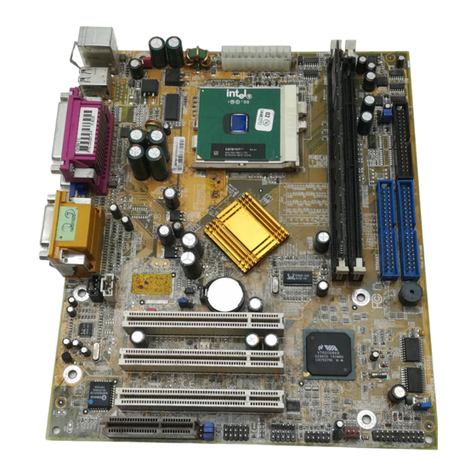
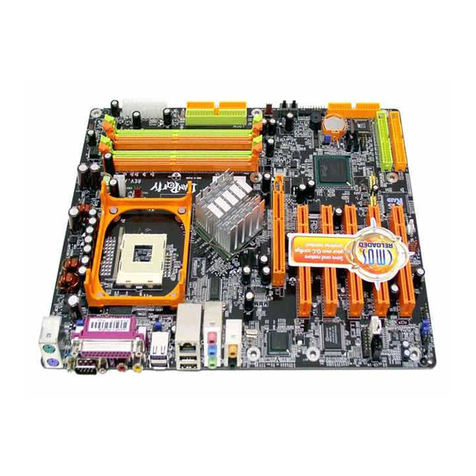
DFI LanParty 865PE User manual

DFI

DFI LanParty 865PE User manual

DFI BW051 User manual

DFI

DFI BW051 User manual

DFI LR102 SERIES User manual

DFI

DFI LR102 SERIES User manual

DFI 848P-AL User manual

DFI

DFI 848P-AL User manual

DFI CS631-C246 User manual

DFI

DFI CS631-C246 User manual

DFI COM331-B User manual

DFI

DFI COM331-B User manual

DFI KD600-H110/Q170 User manual

DFI

DFI KD600-H110/Q170 User manual

DFI KD630-H110C User manual

DFI

DFI KD630-H110C User manual

DFI PW65 Series User manual

DFI

DFI PW65 Series User manual

DFI CD70-SC User manual

DFI

DFI CD70-SC User manual

DFI BL330-BR User manual

DFI

DFI BL330-BR User manual

DFI PE21-EC User manual

DFI

DFI PE21-EC User manual

DFI COM330-B User manual

DFI

DFI COM330-B User manual

DFI PE11-TC User manual

DFI

DFI PE11-TC User manual

DFI PT332-DRM User manual

DFI

DFI PT332-DRM User manual

DFI AK74-TC User manual

DFI

DFI AK74-TC User manual

DFI PT880-ALF User manual

DFI

DFI PT880-ALF User manual

DFI PM12-TC User manual

DFI

DFI PM12-TC User manual

DFI M8MP553 User manual

DFI

DFI M8MP553 User manual

DFI CP900-B User manual

DFI

DFI CP900-B User manual

DFI SO630 User manual

DFI

DFI SO630 User manual

DFI SB330-CRM User manual

DFI

DFI SB330-CRM User manual

DFI 845PE-ML User manual

DFI

DFI 845PE-ML User manual

DFI WL551 User manual

DFI

DFI WL551 User manual

Popular Motherboard manuals by other brands

Gigabyte MNJ190I-FH user manual

Gigabyte

Gigabyte MNJ190I-FH user manual

Biostar HI-FI-Z87X-3D Setup manual

Biostar

Biostar HI-FI-Z87X-3D Setup manual

Atmel SAM9753PIA-DK user guide

Atmel

Atmel SAM9753PIA-DK user guide

Coapt GEN2 Handbook

Coapt

Coapt GEN2 Handbook

Supero SUPER P4DL6 user manual

Supero

Supero SUPER P4DL6 user manual

Cypress CY3210-PSoCEVAL1 quick start guide

Cypress

Cypress CY3210-PSoCEVAL1 quick start guide

ASROCK B660M-HDV manual

ASROCK

ASROCK B660M-HDV manual

Fujitsu D2831 Short description

Fujitsu

Fujitsu D2831 Short description

Industrial Computers ADE-6050 user manual

Industrial Computers

Industrial Computers ADE-6050 user manual

Asus TUF Z270 MARK 2 manual

Asus

Asus TUF Z270 MARK 2 manual

ASROCK H61 Pro BTC user manual

ASROCK

ASROCK H61 Pro BTC user manual

Norco POS-7893 user manual

Norco

Norco POS-7893 user manual

Intel DG965MS specification

Intel

Intel DG965MS specification

Asus B85M-VIEW PAKER user manual

Asus

Asus B85M-VIEW PAKER user manual

Asus P5G41T-M LX V2 user manual

Asus

Asus P5G41T-M LX V2 user manual

Gigabyte GA-K8VT800-RH user manual

Gigabyte

Gigabyte GA-K8VT800-RH user manual

Gigabyte Z790M AORUS ELITE user manual

Gigabyte

Gigabyte Z790M AORUS ELITE user manual

Semtech SC120 user guide

Semtech

Semtech SC120 user guide

manuals.online logo
manuals.online logoBrands
  • About & Mission
  • Contact us
  • Privacy Policy
  • Terms and Conditions

Copyright 2025 Manuals.Online. All Rights Reserved.

PB64-V3
Rev. A+
System Board
Users Manual
39500911
Copyright
This publication contains information that is protected by copyright. No
part of it may be reproduced in any form or by any means or used to
make any transformation/adaptation without the prior written permission
from the copyright holders.
This publication is provided for informational purposes only. The
manufacturer makes no representations or warranties with respect to
the contents or use of this manual and specifically disclaims any express
or implied warranties of merchantability or fitness for any particular purpose.
The user will assume the entire risk of the use or the results of the use of
this document.Further,the manufacturer reserves the right to revise this
publication and make changes to its contents at any time, without obligation
to notify any person or entity of such revisions or changes.
All Rights Reserved. © 1999
Trademarks
Microsoft®MS-DOS®,WindowsTM,Windows®95 andWindows®98 are
registered trademarks of Microsoft Corporation. Intel®, Pentium®II,
Pentium®III and CeleronTM are registered trademarks of Intel Corporation.
Award is a registered trademark ofAward Software,Inc.Other trademarks
and registered trademarks of products appearing in this manual are the
properties of their respective holders.
Caution:
Danger of explosion if battery incorrectly replaced.
Replace only with the same or equivalent type recommended by the
manufacturer.
Dispose of used batteries according to the battery manufacturers
instructions.
FCC and DOC Statement on Class B
This equipment has been tested and found to comply with the limits
for a Class B digital device, pursuant to Part 15 of the FCC rules.
These limits are designed to provide reasonable protection against
harmful interference when the equipment is operated in a residential
installation. This equipment generates, uses and can radiate radio
frequency energy and, if not installed and used in accordance with
the instruction manual, may cause harmful interference to radio
communications. However, there is no guarantee that interference
will not occur in a particular installation. If this equipment does cause
harmful interference to radio or television reception, which can be
determined by turning the equipment off and on, the user is
encouraged to try to correct the interference by one or more of the
following measures:
 Reorient or relocate the receiving antenna.
 Increase the separation between the equipment and the receiver.
 Connect the equipment into an outlet on a circuit different from
that to which the receiver is connected.
 Consult the dealer or an experienced radio TV technician for
help.
Notice:
1. The changes or modifications not expressly approved by the
party responsible for compliance could void the user's authority
to operate the equipment.
2. Shielded interface cables must be used in order to comply with
the emission limits.
Table of Contents
Chapter 1 - Introduction
1.1 Features and Specifications..................................................................................
1.2 Package Checklist.........................................................................................................
Chapter 2 - Hardware Installation
2.1 System Board Layout .............................................................................................
2.2 System Memory.............................................................................................................
2.3 DIP Switch Settings for Processors............................................................
2.4 Jumper Settings for the CPUs Front Side Bus................................
2.5 Jumper Settings for Clearing CMOS Data..........................................
2.6 Jumper Settings for Wake-On-Keyboard/Wake-On-Mouse......
2.7 Connecting the Ribbon Cables and Wires of the Ports
and Connectors.............................................................................................................
Chapter 3 - Award BIOS Setup Utility
3.1 The Basic Input/Output System.....................................................................
3.1.1 Standard CMOS Setup....................................................................
3.1.2 BIOS Features Setup..........................................................................
3.1.3 Chipset Features Setup....................................................................
3.1.4 Power Management Setup............................................................
3.1.5 PNP/PCI Configuration....................................................................
3.1.6 Load Fail-Safe Settings......................................................................
3.1.7 Load Optimal Settings......................................................................
3.1.8 Integrated Peripherals.........................................................................
3.1.9 Supervisor Password..........................................................................
3.1.10 User Password.........................................................................................
3.1.11 IDE HDD Auto Detection...........................................................
3.1.12 Save & Exit Setup.................................................................................
3.1.13 Exit Without Saving..............................................................................
Chapter 4 - Supported Softwares
4.1 Desktop Management Interface.....................................................................
4.2 Hardware Doctor Utility........................................................................................
4.3 Patch Utility and drivers........................................................................................
6
11
32
32
35
39
41
46
47
48
48
52
53
54
54
55
12
13
14
15
16
17
18
56
59
61

62
62
64
Appendix A - System Error Messages
A.1 POST Beep.......................................................................................................................

A.2 Error Messages..............................................................................................................
Appendix B - Troubleshooting
B.1 Troubleshooting Checklist....................................................................................
6
1.1 Features and Specifications
1.1.1 Features
Chipset
 VIA693/596A AGPset
 ESS Solo-1 PCI AudioDrive
Processor
The system board is equipped with a 242-pin Slot 1 processor slot
for installing an Intel PentiumII/PentiumIII processor that is
packaged in an SECC/SECC 2 or an Intel CeleronTM processor
(SEPP). It is also equipped with a switching voltage regulator that
automatically detects 1.30V to 3.5V.
 450/100MHz or 500/100MHz PentiumIII processor
 233/66MHz, 266/66MHz, 300/66MHz, 333/66MHz,
350/100MHz, 400/100MHz or 450/100MHz PentiumII
processor
 266/300/300A/333/366/400/433MHz CeleronTM processor
(SEPP for Slot 1)
System Memory
16MB to 384MB memory using unbuffered DIMMs
 Three 168-pin DIMM sockets
 Uses x64 or x72 PC SDRAM, 3.3V
- PC-66 SDRAM DIMM for 66MHz FSB processors
- PC-100 SDRAM DIMM for 100MHz FSB processors
 ECC supported (uses x72 PC SDRAM DIMM)
Chapter 1 - Introduction
DIMMs
2MBx64/x72
4MBx64/x72
8MBx64/x72
16MBx64/x72
Memory Size
16MB
32MB
64MB
128MB
1
Introduction
7
Expansion Slots
The system board is equipped with 1 dedicated AGP slot. AGP is an
interface designed to support high performance 3D graphics cards. It
utilizes a dedicated pipeline to access system memory for texturing,
z-buffering and alpha blending; delivering up to 533MB/sec.
bandwidth for 3D graphics applications. AGP in this system board
will deliver faster and better graphics with your PC.
The system board is also equipped with 4 dedicated PCI slots, 2
dedicated 16-bit ISA slots. All PCI and ISA slots are bus masters.
Onboard Audio Features
 Sound Blaster, Sound Blaster Pro and WSS compatible
 Supports PC games and applications
 Sample rates from 4KHz up to 48KHz
 Full duplex operation for simultaneous record and playback
 ESS proprietary AudioRack application
Desktop Management Interface (DMI)
The system board comes with a DMI 2.0 built into the BIOS. The
DMI utility in the BIOS automatically records various information
about your system configuration and stores these information in the
DMI pool, which is a part of the system board's Plug and Play
BIOS. DMI, along with the appropriately networked software, is
designed to make inventory, maintenance and troubleshooting of
computer systems easier. Refer to Chapter 4 for instructions on
using the DMI utility.
ATX double deck ports
 2 USB ports
 2 DB-9 serial ports
 1 DB-25 parallel port
 1 mini-DIN-6 PS/2 keyboard port
 1 mini-DIN-6 PS/2 mouse port
 1 game/MIDI port
 3 audio jacks: line-out, line-in and mic-in
Introduction
1
8
Connectors
 1 connector for IrDA interface
 2 IDE connectors
 1 floppy connector
 1 20-pin ATX power supply connector
 1 3-pin WOL (Wake-On-LAN) connector
 3 CD audio-in connectors
 3 fan connectors for CPU, chassis and AGP fans
PCI Bus Master IDE Controller
 Two PCI IDE interfaces support up to four IDE devices
 Ultra DMA/33 supported (Synchronous Ultra DMA mode -
data transfer rate up to a maximum of 33MB/sec.)
 PIO Mode 3 and Mode 4 Enhanced IDE (data transfer rate up
to 16.6MB/sec.)
 Bus mastering reduces CPU utilization during disk transfer
 Supports ATAPI CD-ROM, LS-120 and ZIP and SCSI sequential
boot-up
IrDA Interface
The system board is equipped with an IrDA connector for wireless
connectivity between your computer and peripheral devices. It
supports peripheral devices that meet the IrDA or ASKIR standard.
USB Ports
The system board is equipped with two USB ports. USB allows
data exchange between your computer and a wide range of
simultaneously accessible external Plug and Play peripherals.
BIOS
 Award BIOS, Windows95/98 Plug and Play compatible
 Flash EPROM for easy BIOS upgrades
 Includes NCR 810 SCSI BIOS
 2MB flash memory
1
Introduction
9
1.1.2 System Health Monitor Functions
The system board is capable of monitoring the following system
health conditions.
 Monitors processor/system temperature and processor overheat
alarm
 Monitors 1.5V/3.3V/±5V/±12V/VCORE voltages and failure
alarm
 Monitors processor/chassis fan speed and failure alarm
 Automatic processor/chassis fan control
 Read back capability that displays accurate temperature, voltage
and fan speed
1.1.3 Intelligence
Automatic CPU/Chassis Fan Off
The CPU and chassis fans will automatically turn off once the system
enters the Suspend mode.
Dual Function Power Button
Depending on the setting in the BIOS setup, this switch will allow
the system to enter the Soft-Off or Suspend mode.
External Modem Ring-on
The Modem Ring-on feature allows the system that is in the
Suspend mode or Soft Power Off mode to wake-up/power-on to
respond to incoming calls.
Note:
This feature supports external modem only.
RTC Timer to Power-on the System
The RTC installed on the system board allows your system to
automatically power-on on the set date and time.
Introduction
1
10
Wake-On-LAN Ready
The Wake-On-LAN function allows the network to remotely wake
up a Soft Power Down (Soft-Off) PC.Your LAN card must support
the remote wakeup function.
Important:
The 5VSB power source of your power supply must support
≥
720mA (minimum).
Wake-On-Keyboard/Wake-On-Mouse
This function allows you to use the keyboard or mouse to power-on
the system. Refer to Jumper Settings for Wake-On-Keyboard/Wake-
On-Mouse in Chapter 2 and Keyboard/Mouse Power On in the
Integrated Peripherals setup of the Award BIOS in Chapter 3 for
more information.
Important:
 The power button will not function once a keyboard
password has been set in the KB Power On Password
field of the Integrated Peripherals setup. You must type the
correct password to power-on the system.
 The 5VSB power source of your power supply must
support
≥
720mA (minimum).
ACPI
The system board is designed to meet the ACPI (Advanced
Configuration and Power Interface) specification. ACPI has energy
saving features that enables PCs to implement Power Management
and Plug-and-Play with operating systems that support OS Direct
Power Management.
Virus Protection
Most viruses today destroy data stored in hard drives. The system
board is designed to protect the boot sector and partition table of
your hard disk drive.