DynaGen BCM-12 User manual

BCM-12
Battery Charge Monitor
Installation and User Manual for the BCM – 12 Battery Charge
Monitor.
Full Version
File: BCMrev3.0man.doc
March 3, 2005

2
Thank You For Purchasing This DynaGen Product
Please Read Manual Before Installing Unit
Receipt of Shipment and Warranty Return Information
Upon receipt of shipment, carefully remove the unit from the shipping container and thoroughly
examine the unit for shipping damage. In case of damage, immediately contact the carrier and
request that an inspection report be filed prior to contacting DynaGen.
All returned items are to be shipped prepaid and include a Return Material Authorization (RMA)
number issued by DynaGen. RMA forms are available by contacting DynaGen Technical
Support through the contact methods listed below.
Limited Warranty
DynaGen will repair or replace any BCM, which proves to be defective under normal and proper
use within Two Years from the date of shipment. This constitutes the only warranty and no other
warranty shall be implied.
We welcome your comments and suggestions. Please contact us at:
DynaGen Technologies Inc.
Phone: 1-888-396-2436
(902) 562 0133
Fax: (902) 567 0633
WEB SITE: www.dynagen.ca
Operating & Installation Manual for Battery Charge Monitor (BCM)

3
Table of Contents
SPECIFICATIONS 1
WIRING INSTALLATION GUIDELINES 5
Wiring instructions, types and sizes 5
Wiring guidelines 6
Terminal description 7
WIRING DIAGRAMS 8
BCM general wiring 8
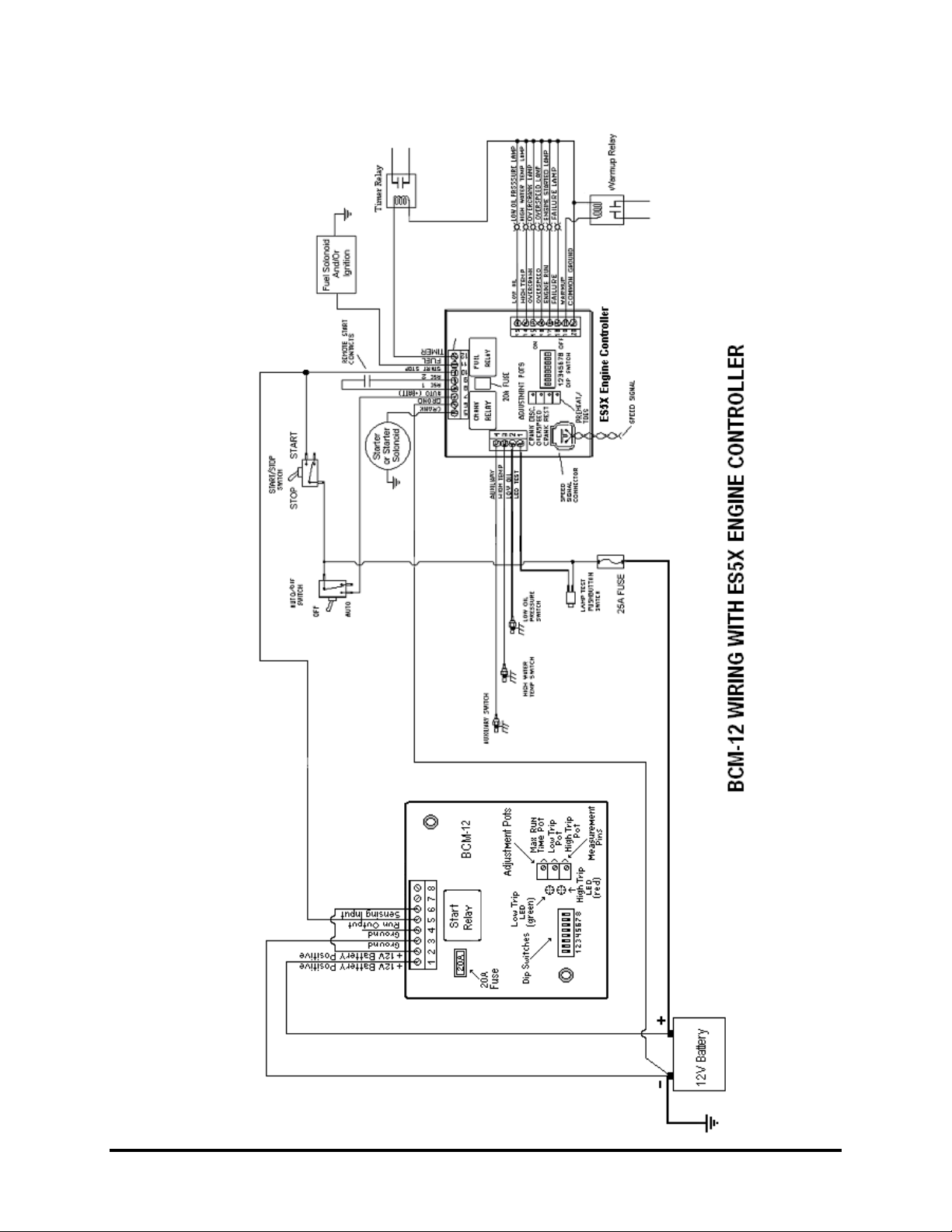
BCM wiring with ES5x engine controller 9
BCM wiring with GSC300 engine controller 10
ADJUSTMENTS AND SETUP PROCEDURES 11
LOW trip setting 11
HIGH trip set point 12
Maximum run time calibration 12
Delay on calibration 13
SYSTEM OPERATING STATES 14
IDLEState 14
DelayonState 14
ChargingState 14
Operating & Installation Manual for Battery Charge Monitor (BCM)

4
SPECIFICATIONS
Operating VDC limits: (4.75 VDC min.- 18VDC max.)
Standby current draw: 12 mA
Operating current draw: 160 mA
Operating temperature range: -20 O C ⇒+85 OC
Operating humidity range: 0 ⇒95% non-condensing
Run output: 5 Amps max. continuous
sourcing(+bat) output
High/Low pot adjustment 10 – 15 VDC
Range
Actual unit weight: 0.45 lb.
Shipping weight: 1 lb. (0.45kg)
Unit dimensions: 3.25” x 3.25” x 0.5”
Shipping dimensions: 4” (10.16cm) x 4” (10.16cm) x 3” (7.62cm)
Operating & Installation Manual for Battery Charge Monitor (BCM)

5
WIRING INSTALLATION GUIDELEINES
Danger: Never work on the engine while its power is on. This
Battery Charge Monitor does not generate a warning signal prior to
automatic engine start. Warning signs should be placed on engine
equipment indicating this important safety measure.
Following these instructions will help avoid common installation problems during wiring and
setup.
• Battery (Terminal 1 & 2) must be disconnected before any wiring connections are made.
Battery disconnection can easily be accomplished by removing terminal block from BCM
unit.
• Wire length from the BCM unit to operating equipment, should not exceed 30 feet. Longer
runs may require the use of heavier gauge wiring.
• Do not connect high voltage AC circuits to the BCM unit.
Wiring size should be minimum 18AWG. Use stranded wire, since solid wire has a tendency to
crack, break and loosen over time.
NOTE:
• When making connections to BCM’s removable terminal block, ensure that there are no wire
strands that are exposed. Exposed strands may cause shorting to adjacent wiring terminals.
• Ensure that wire connections to removable terminal block are securely fastened, since
vibrations have a tendency to loosen wiring connections over time.
Terminal Wire Size Current Max. Function
1 14 – 18 10A Battery positive (+)
2 14 – 18 10A Battery positive (+)
3 14 – 18 10A Battery negative (-)
4 14 – 18 10A Battery negative (-)
5 14 – 18 10A Start/Run Relay output
6 18 0.1A Sensing Input
7 N/C N/C N/C
8 N/C N/C N/C
Operating & Installation Manual for Battery Charge Monitor (BCM)

6
WIRING GUIDELINES
1. DO NOT use wire smaller than 18 AWG.
2. DO NOT short Run output to ground, as this will cause 20A fuse to blow, and may cause
damage to on board relay contacts.
3. Replace on board 20A fuse with similar type and rating (Replacement fuse to be Blade type
MINI FUSE rated 20 Amps maximum). Never bypass fuse with jumper, as this will not
protect unit in the event of a short circuit or overload condition.
4. DO NOT exceed the maximum rated current and voltage on the BCM output. Do not exceed
10 amps for Run output.
5. Do not reverse power supply connections to the BCM unit as this will result in permanent
damage to unit.
6. Installation of a diode is not required across Run output. An internal fast switching diode is
provided to protect the BCM output from inductive kick-back. However, diodes should be
placed across external slave relay contacts when used to actuate any inductive loads, such as
solenoids, to protect the contacts from damage caused by arcing. In addition to prolonging
the useful life of the relays, placing such diodes will enormously reduce generated electrical
noise.
7. DO NOT short potentiometer jumpers to ground, as this may result in damage to BCM unit.
These jumpers are located adjacent to the potentiometers on rear of unit, they provide a
method for simple and easy calibration of LOW, HIGH and RUN TIME set points.
8. There is a potentiometer, which is just below the potting, adjacent to the Run relay. DO NOT
attempt to adjust this pot. This pot has been calibrated at the factory and does not require
field adjustment. Adjusting this pot will greatly affect the sensing accuracy of the BCM unit.
9. Replace On board relay with similar type and rating. Some replacement types are as follows:
• Bosch Part # 0 332 207 307
• American Zettler Part # AZ977-1A-12D
• Aromat Part # CM1–R –12V
Operating & Installation Manual for Battery Charge Monitor (BCM)

7
TERMINAL DESCRIPTION
Term # Description
1 & 2
+ Battery connection to BCM unit. This connection is fused through the on board
20 Amp replaceable fuse. This provides main power to operate BCM unit.
3 & 4 Battery ground connection for the controller module. A good ground connection,
directly from the battery, is required for proper operation.
5 Run Output. This output closes to + Battery when actuated. This output energizes
only after a delay on period, when a low battery condition is present.
6 Sense input. This input is used to monitor battery status. If the same battery that
powers up the unit is the battery that is required to be monitored, simply connect
the sense input (T#6) to one of the battery terminals (T#1 or T#2).
7 Not Used
8 Not Used
Operating & Installation Manual for Battery Charge Monitor (BCM)

8
WIRING DIAGRAMS
Operating & Installation Manual for Battery Charge Monitor (BCM)

9
Operating & Installation Manual for Battery Charge Monitor (BCM)

10
Operating & Installation Manual for Battery Charge Monitor (BCM)
Table of contents