manuals.online logo
Brands
  1. Home
  2. •
  3. Brands
  4. •
  5. Dynex
  6. •
  7. Camera Accessories
  8. •
  9. Dynex DX-TRPFLX User manual

Dynex DX-TRPFLX User manual

Other Dynex Camera Accessories manuals

Dynex DX-MNP70BL User manual

Dynex

Dynex DX-MNP70BL User manual

Dynex DX-TRPFLX Installation and operation manual

Dynex

Dynex DX-TRPFLX Installation and operation manual

Dynex DX-NW080 User manual

Dynex

Dynex DX-NW080 User manual

Dynex DX-DA101381 User manual

Dynex

Dynex DX-DA101381 User manual

Dynex DX-TRPMN57 User manual

Dynex

Dynex DX-TRPMN57 User manual

Dynex DX-TRPMN665 User manual

Dynex

Dynex DX-TRPMN665 User manual

Dynex DX-DGPK03 User manual

Dynex

Dynex DX-DGPK03 User manual

Dynex DX-TRPFLX Installation and operation manual

Dynex

Dynex DX-TRPFLX Installation and operation manual

Dynex DX-TRP60 User manual

Dynex

Dynex DX-TRP60 User manual

Dynex DX-TRP61BL User manual

Dynex

Dynex DX-TRP61BL User manual

Dynex DX-SW040 User manual

Dynex

Dynex DX-SW040 User manual

Dynex DX-TRP60 Owner's manual

Dynex

Dynex DX-TRP60 Owner's manual

Dynex DX-TRP58BL User manual

Dynex

Dynex DX-TRP58BL User manual

Dynex DX-SFLX6B User manual

Dynex

Dynex DX-SFLX6B User manual

Dynex DX-MW010 User manual

Dynex

Dynex DX-MW010 User manual

Popular Camera Accessories manuals by other brands

CamRanger CamRanger user manual

CamRanger

CamRanger CamRanger user manual

Custom Brackets HDV CAGE KIT Instructions for use

Custom Brackets

Custom Brackets HDV CAGE KIT Instructions for use

Aegis ABL052010P user manual

Aegis

Aegis ABL052010P user manual

Saft SRA Series Installation and operating instructions

Saft

Saft SRA Series Installation and operating instructions

Kodak TIB5200 technical information

Kodak

Kodak TIB5200 technical information

Videotec HEG instruction manual

Videotec

Videotec HEG instruction manual

Ikelite 6171.11 manual

Ikelite

Ikelite 6171.11 manual

Pentax Auto Bellows Slide Copier K user manual

Pentax

Pentax Auto Bellows Slide Copier K user manual

Nikon UT-1 user manual

Nikon

Nikon UT-1 user manual

dji RONIN 4D quick start guide

dji

dji RONIN 4D quick start guide

SLIK ABLE 300DX user manual

SLIK

SLIK ABLE 300DX user manual

Rebelcell 36V70 user manual

Rebelcell

Rebelcell 36V70 user manual

Trojan GC2 48V quick start guide

Trojan

Trojan GC2 48V quick start guide

Calumet 7100 Series CK7114 operating instructions

Calumet

Calumet 7100 Series CK7114 operating instructions

Ropox 4Single Series User manual and installation instructions

Ropox

Ropox 4Single Series User manual and installation instructions

Cambo Wide DS Digital Series Main operating instructions

Cambo

Cambo Wide DS Digital Series Main operating instructions

Samsung SHG-120 Specification sheet

Samsung

Samsung SHG-120 Specification sheet

Ryobi BPL-1820 Owner's operating manual

Ryobi

Ryobi BPL-1820 Owner's operating manual

manuals.online logo
manuals.online logoBrands
  • About & Mission
  • Contact us
  • Privacy Policy
  • Terms and Conditions

Copyright 2025 Manuals.Online. All Rights Reserved.

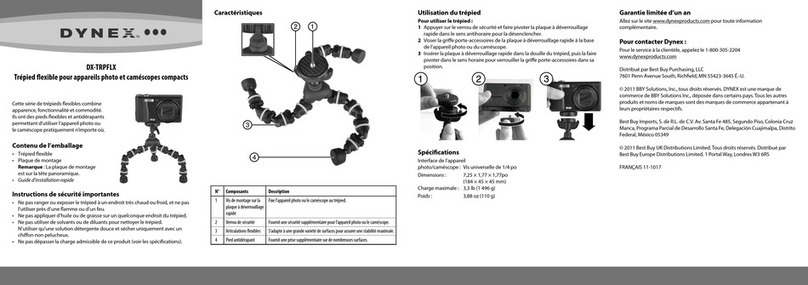
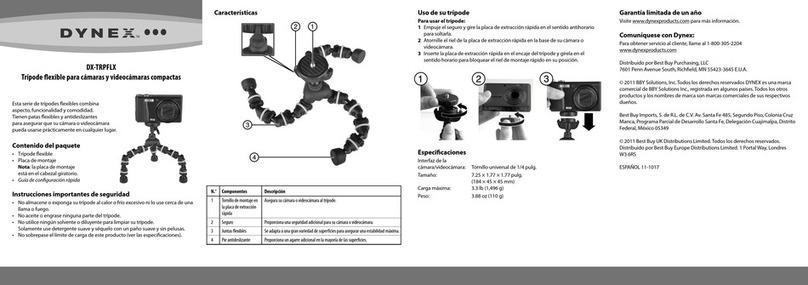
DX-TRPFLX
Flexible Tripod for Compact Cameras and Camcorders
# Component Description
1 Mounting screw in Secures your camera or camcorder to the tripod.
the quick-release plate
2 Safety lock Provides an extra measure of security for your camera or camcorder.
3 Flexible joints Conform to a wide variety of surfaces to ensure maximum stability.
4 Non-slip foot Provides extra grip on many surfaces.
This series of exible tripods combines
appearance, function, and convenience.
They feature exible, gripping legs to
ensure that your camera or camcorder
can be used virtually anywhere.
Package contents
• Flexible tripod
• Mounting plate
Note: mounting plate is on the pan head.
• Quick Setup Guide
Important safety instructions
• Do not store or expose your tripod to excessive heat or cold, or use near any
ame or re.
• Do not oil or grease any part of the tripod.
• Do not use any solvents or thinners to clean your tripod.
Use only a mild detergent and wipe dry with only a soft, lint-free cloth.
• Do not exceed the load limit of this product. (See Specications)
Features Using your tripod
To set up your tripod:
1Push the safety lock in and rotate the quick-release plate counter-clockwise to
release it.
2Screw the quick-release plate shoe into the base of your camera or camcorder.
3Insert the quick-release plate into the tripod’s socket, then rotate it clockwise
to lock the quick-mount shoe in position.
Specications
Camera/camcorder
interface: Universal 1/4 in. screw
Size: 6.89 × 1. 77 × 1. 77 in
(175 × 45 × 45 mm)
Maximum load: 3.3 lb. (1496 g)
Weight: 3.25 oz. (100 g)
One-year limited warranty
Visit www.dynexproducts.com for details.
Contact Dynex:
For customer service call 1-800-305-2204
www.dynexproducts.com
Distributed by Best Buy Purchasing, LLC
7601 Penn Avenue South, Richeld, MN 55423-3645 USA
© 2010 BBY Solutions, Inc. All Rights Reserved. DYNEX is a trademark of BBY
Solutions, Inc. Registered in some countries. All other products and brand
names are trademarks of their respective owners.
Best Buy Imports, S. de R.L. de C.V. Av. Santa Fe 485, Segundo Piso, Colonia Cruz
Manca, Programa Parcial de Desarrollo Santa Fe, Delegación Cuajimalpa, Distrito
Federal, México 05349
© 2010 Best Buy UK Distributions Limited. All rights reserved. Distributed by
Best Buy Europe Distributions Limited. 1 Portal Way, London W3 6RS
ENGLISH 10-0542
QUICK SETUP GUIDE
C
M
Y
CM
MY
CY
CMY
K
DX-TRPFLX_10-0542_QSG_V1_EN.eps 1 6/9/2010 6:43:29 PMDX-TRPFLX_10-0542_QSG_V1_EN.eps 1 6/9/2010 6:43:29 PM