Eagle T20CF User manual

-1 -
Operations Manual
Eagle T20CF Carton Erector
READ ALL INSTRUCTIONS CONTAINED IN THIS
MANUAL PRIOR TO MACHINE INSTALLATION!

- 2 -
Contents
page
1. Safety & Warnings 3
2. Specifications 4
3. Setup and Installation 5
3.1 Transportation 5
3.2 Tape Head Installation 5
3.3 Power Supply 5
4. Operation 6
4.1 Standard Operation 6
4.2 Case Erector 6
4.3 Carton Size Adjustment 7
4.4 Feeding Adhesive Tape 8
4.5 Control Panel Operation 8
4.6 LCD Display Operation 9
5. Maintenance & Troubleshooting 10
5.1 Maintenance 10
5.2 Troubleshooting 10
6. Illustrations & Parts List 12
6.1 Replacement Parts 12
6.2 Carton Storage Shelf 13
6.3 Carton Storage Table 14
6.4 Carton Pre-Storage Table Lifting Body 16
6.5 Back Cover Carton Push & Fold 18
6.6 Machine Frame 20
6.7 Front Cover Folder 22
6.8 Conveyer Belt 23
6.9 Vacuum-Assisted Carton Placer 25
6.10 Blocking Pin & Press Plate 27
6.11 Left & Right Cover Folder 29
6.12 Carton Sealer –Front Roller 31
6.13 Carton Sealer –Rear Roller 33
6.14 Carton Sealer –Roller 34
6.15 Guide Pulley 35
6.16 Tape Knife 36
6.17 Tape Dispenser 37
6.18 Tape Wheel 38
6.19 Tape Press 39
6.20 Tape Guide 40
6.21 Electrical Diagrams 41

- 3 -
1. Safety and Warnings
WHILE OPERATING THE MACHINE, OPERATORS MUST REFRAIN FROM
WEARING CLOTHING OR ACCESSORIES THAT MAY GET CAUGHT IN THE
MOVING PARTS OF THE MACHINE
(WATCHES, RINGS, BRACELETS, TIES, LOOSE CLOTHING, ETC…)
This manual covers safety precautions, parameters, machine operation, maintenance, and troubleshooting
information.
Prior to setting up the machine
1. Verify the model number matches the model number addressed in this manual.
2. Verify that no parts of the machine have been removed or are missing.
3. Remove all packaging or shipping materials used during transport or storage of the machine.
4. Check for any damage that may have occurred during shipping or transport.
Prior to operating the Eagle T20CF, verify
•Verify power supply voltage matches the requirements of the machine.
•Protective shielding and covers are properly installed
•Machine is on stable ground and casters are in the locked position.
The Eagle T20CF is designed to automatically shut down if the control panel is opened while the machine is in
operation.

- 4 -
2. Specifications
Power Requirement
220VAC, 50/60Hz (Single Phase)
Air Supply
85psi (6Kgf/cm2)
Tape Width
2-3in (48-72mm)
Working Speed
0-12 cases per minute
Carton Length
11-20.5in
Carton Width
7-11in
Carton Height
11-24in
Machine Length
80.7in
Machine Width
86.6in
Machine Height
53in
Weight
882lbs
Operational Environment
32-104ºF (0-40ºC) @ ≤ 98% Humidity
Machine Noise Levels
≤ 75db

- 5 -
3. Machine Setup and Installation
TAKE CARE TO AVOID DAMAGE TO THE MOTOR AND ASSEMBLY WHILE LIFTING
OR TRANSPORTING THE MACHINE!
3.1 Transportation
Use a fork lift or tow motor to remove the machine from its shipping container or pallet.
3.2 Tape Head Installation
Remove the front supporting shaft. Rest the rear of the tape head on the rear supporting shaft. Place the front
supporting shaft on the angled notches in the front of the tape head and lower the tape head down guiding
the pin into the notches in the frame.
Check tape cutter position and adjust as needed.
3.3 Connect Power Supply
Connect the machine to the power supply.
Note: Prior to connecting the machine to the power supply, verify that the power switch is set to the ‘OFF’
position and that the work area is clean and clear of any items.

- 6 -
4. Operation
4.1 Standard Operation
Prior to operating the machine, please confirm that
1. The proper voltage is being supplied to the motor
2. All fasteners and protective covers are securely in place
3. All electronic components are dry
Machine Operation
1. Plug the machine into the power source
a. DO NOT hard wire the machine to the power source
2. Turn on air supply.
3. Feed cartons to be erected into storage tray
4.2 Case Erection
1. Adjust the machine for the size of the cartons to be erected.
2. Place the cartons on the carton storage shelf.
3. Machine will place carton, fold front and rear lower flaps, fold left and right lower flaps, and seal
bottom of the carton.

- 7 -
4. Operation
4.3 Carton Size Adjustment
Width/2 Adjustment
Width Adjustment
Press Plate Height
Adjustment
Length + Width Adjustment
Length Adjustment
Width Adjustment
- 8 -
4. Operation
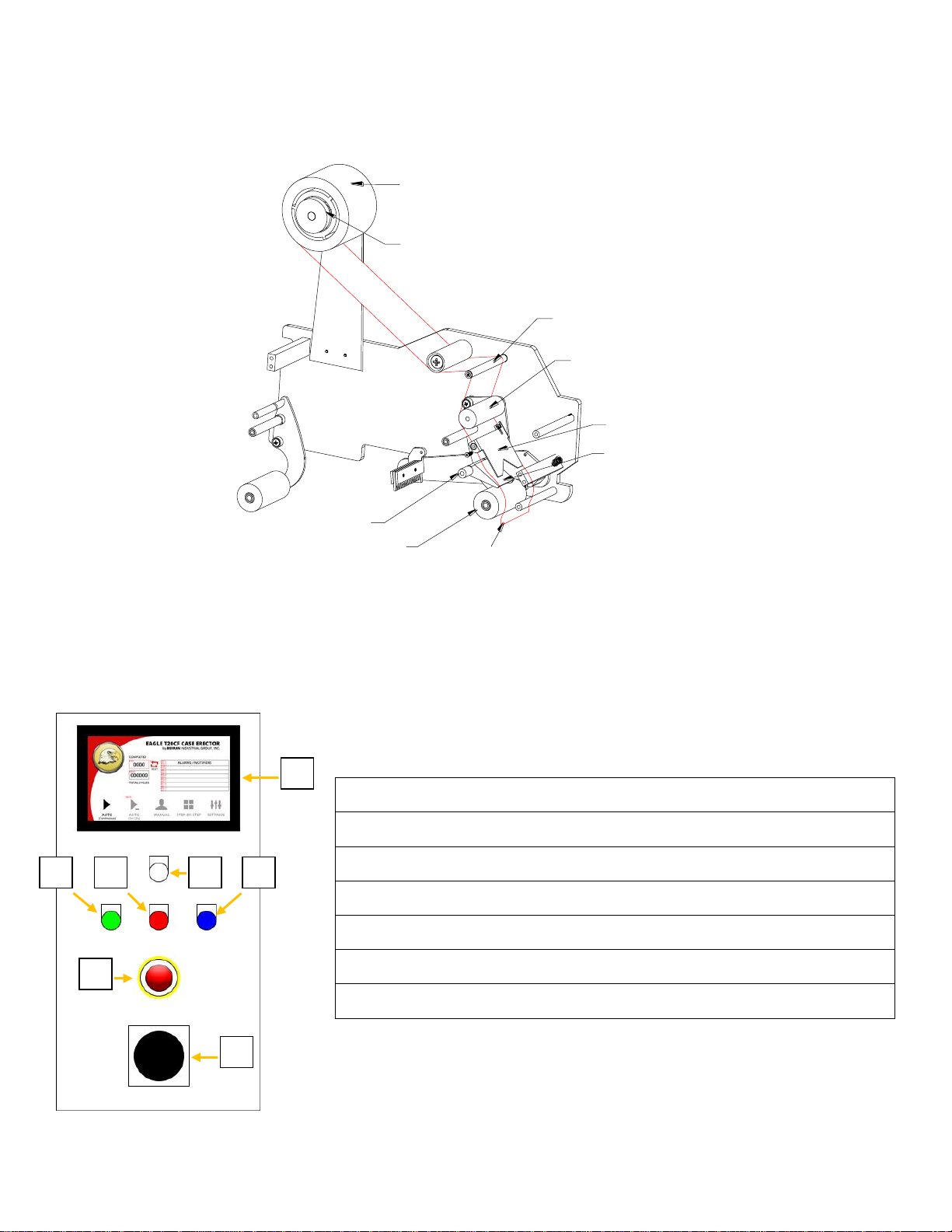
4.4 Feeding the Adhesive Tape
Guide tape roller
Rubber roller
Adhesive tape core adjustment button
Adhesive tape
Adhesive tape
Press tape board
Guide tape board
Unidirectional
lozenge pattern roller
Guide tape roller
4.5 Control Panel Operation
Before operating the machine, the operator should review the features and functions of every switch to
ensure the correct and safe operation of the machine.
1. Power Indicator
2. Power Switch
3. LCD Display Screen
4. Emergency Stop Button
5. Start Button
6. Stop Button
7. Reset Button
5
3
7
1
6
4
2

- 9 -
4.6 LCD Display Operation
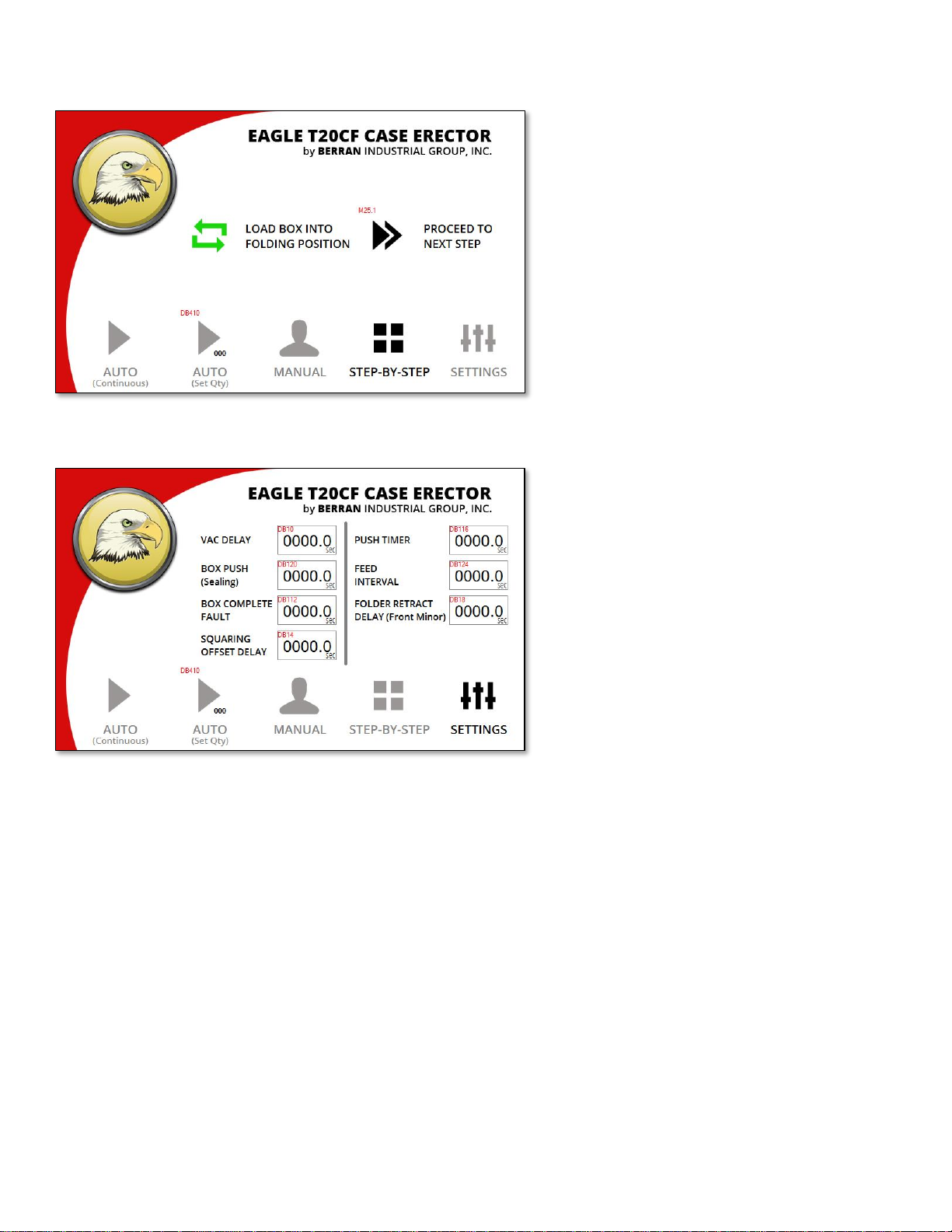
Start Screen
Once the machine has fully powered up, this
screen will be displayed. Continue by
pressing the button labeled “CONTINUE”.
Automatic Mode
There are two automatic operation modes.
In the first mode, the machine will run
continuously until carton stock has been
exhausted. The second mode, called “Set
Qty”, will erect a preset number of cartons
and will stop the machine once the preset
number of cartons have been completed.
Manual Mode
While in manual mode, the machine will
allow for operation in which it will pause
after each step and wait for input from the
operator before continuing.
- 10 -
4.6 LCD Display Operation
Step-by-Step
This screen permits the user to run the
machine one step at a time. The first step is
to load the carton into the folding position.
This is accomplished by pressing the green
icon labeled “LOAD BOX INTO FOLDING
POSITION”. Then press “PROCEED TO NEXT
STEP” to move through each step until the
completed carton is driven out of the
machine.
Settings
This is the screen where fault timers and
action timers can be modified.
Table of contents
Other Eagle Industrial Equipment manuals