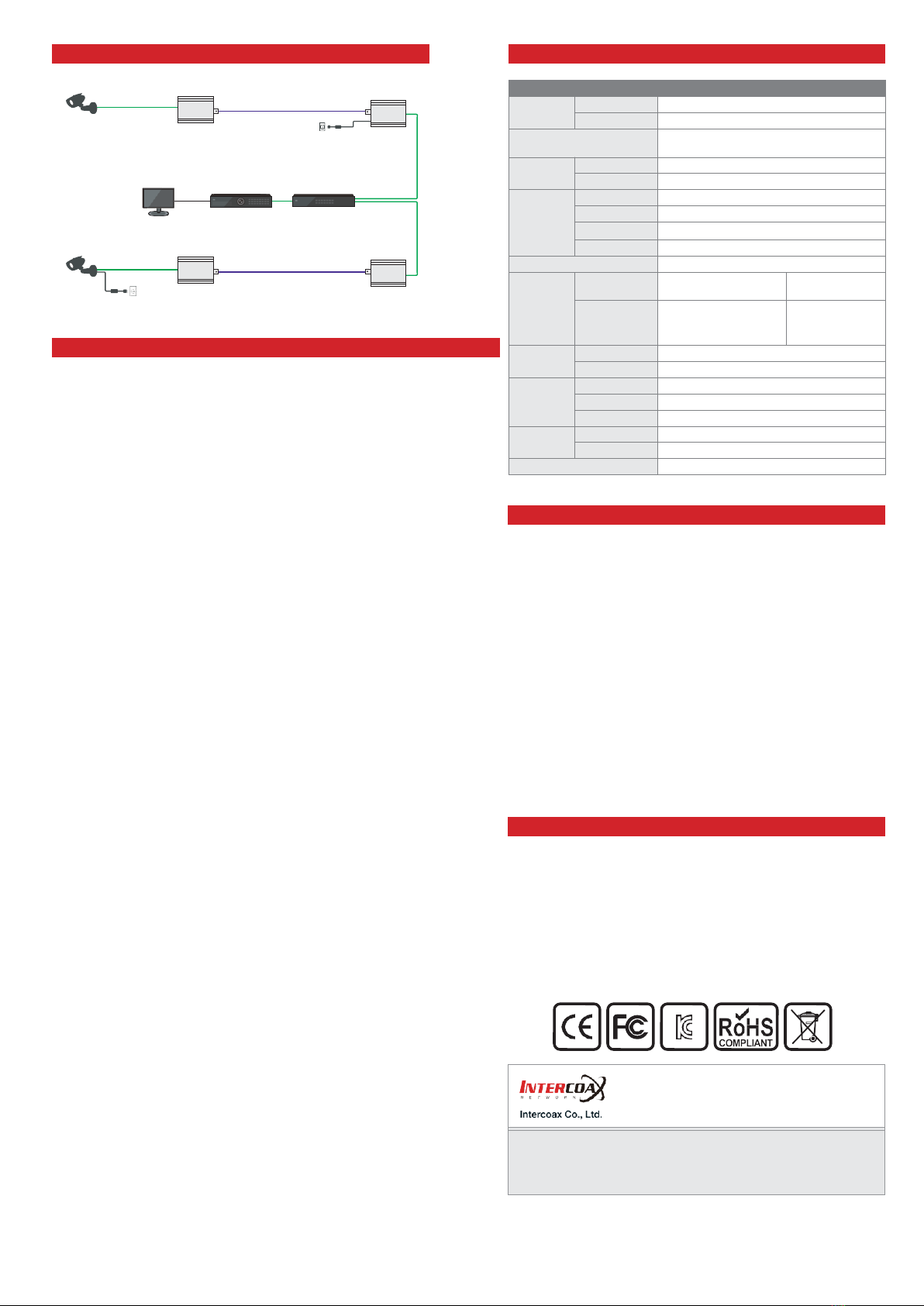
AC/DC
Adapter(12V)
How to change the communication password (Coax/UTP/2-Wire)
All Intercoax EoC converters have the same password as factory
defaults setting value and can be used immediately when connecting
to the product (Plug & Play mode).
However, if a number of products are mixed in the same area or
the signal transmission line is in poor condition, the communication
passwords for each equipment (or group) can be set differently to
prevent cross-talk between thelines.
1.
Needed items for Joining
EoCConverters/Powersupply/ShortCable(Coax,UTP,2-Wire)/
Paper clip
2.
Product configuration
a.
ConnectEoCConverterswithCoaxcable(orUTP,2-Wire)and
power to the one of the converters up with power supply.
b.
Check if the Power LED on both devices is ON.
3.
Remove the existing password (Unjoining)
This process removes passwords that are entered as factory
defaults.
a.
Press the Join button on one of the connected products using a
paper clip until the Power LED turns off and on (Approximately
15 seconds)
b.
Remove the existing password bypressing the Join button on the
opposite product in the same way as above.
c.
Join LED will be turned off if the password on the devices is
removed correctly.
4.
Create New Password(Joining)
New password for communication between connected devices is
created and this will block the communication with other devices (or
group) which have a different password.
a.
Press the Join button for 2 seconds on one of the connected
product using a paper clip and the Join LED of the device will
flicker at a constant speed. (Stand-by mode)
b.
Press the Join button for 2 seconds on the opposite device in the
sameway asabove. Andthen, theJoin LEDofthe deviceflickers
at a constant speed and both devices restart at the same time.
c.
Then the Join-Link lights up and communications are resumed
between the products
5.
When adding new products in 1:N configuration to a group that
has already been joined. (Group Joining)
a.
Connect new device to the group which isalready joined. (using
T-BNC or Y-UTP coupler,Terminal block)
b.
Remove the password ofthe new device in thesame way asstep
‘3-a’.
c.
PressJoinbuttonontheoneofthedeviceoftheexistinggroup
for2secondsand JoinLEDflickersataconstantspeed.
d.
Press Join button on the newdevice for 2 seconds and new
device restarts
e.
Join-Linklightsup and communications are resumed between
the products.
Caution
Please install the device following the installation guide.
Do nottouch the device and cable with wet hands.
Keep away from moisture and shock.
Donotinstallnearanyheatsourcessuchasradiators,heatregisters,
stoves orother apparatus that produce heat.
Indoor useonly.
Do notuse for other purposes.
Do not disassemble or modify this device.
Do notputany sticker or paint on it.
Ifthisdeviceisdefectiveormalfunctioning,pleaseunplugthepower
adapterimmediately andcontact dealerorservice center.
Please use the rated power supply for the product.
Connect DC power to this device first and then to AC outlet.
Warranty
This device has passed the quality control and product inspection.
Please install and use according to the installation guide.
Thewarranty periodfor thisproductis24monthsfromthe date of
purchase.
Ifthis device isdefective ormalfunctioning, please unplug the power
adapter immediately and contact dealer or service center.
Any damages or breakage from user’s abuse, accident, modification
or natural disasters will not be covered manufacturer’s warranty.