Introduction
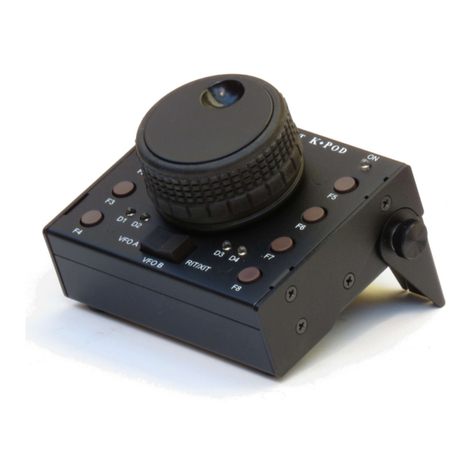
The K-Pod control panel is an ideal companion to your Elecraft K3 or K3Stransceiver, maximizing convenience
and operating efficiency. It’s small enough to be placed anywhere the action is, typically next to a computer
keyboard. It’s versatile enough to integrate multiple transceiver and station control functions.
Features include:
A heavy, free-spinning knob that can be assigned to VFO A, VFO B, or RIT/XIT offset.
Control of 16 functions using tap and hold operation of 8 programmable switches.
Switch functions can be easily set up using K3 Utility to perform diverse functions such as selecting
bands, modes, frequencies, or power levels; sending messages; clearing RIT; changing tuning rates, etc.
Many examples are provided in this manual.
Additional capabilities will be provided with future firmware releases, such as direct control of the unit’s three
general-purpose relay drive outputs.
In the Box
K-Pod module.
DC Power Cable, 2.1 mm Barrel Connector to RCA Connector, 24” (61 cm), E850427
K3S/K3 Data Cable, 6P6C Connectors, 30” (76 cm), E980326
Cable, USB A to B Connector, 36” (91 cm), E850629
Allen Wrench (for Knob Set Screw), 5/64” (2 mm), E980004
K3 Modification Kit (for some older K3 Transceivers, see page 16), E850755
Installation
Placing the K-Pod
The K-Pod module may be operated in any position. A built-in tilt stand may be deployed by loosening the two
thumb screws to hold it at a convenient angle (see image on page 1). In addition two threaded holes for 8-32
screws are provided for mounting it on a user-supplied bracket or support.
Adjusting the Knob Drag
Friction to limit the ease with which the knob turns is provided by two felt washers between the knob and the
K-Pod panel, just as is done on the K3Sor K3 VFO A knob.
To adjust the friction, remove the finger grip to access the set screw holding the knob on the encoder shaft. Place
your thumbs on the center of the knob and pull forward on the edge of the grip to slide it off of the knob. Avoid
using tools since they can scratch the knob finish.
Use the supplied Allen wrench to loosen the set screw and position the knob for the desired friction. A popular
technique is to loosen the knob, lay the K-Pod flat on the desk, and then tighten the set screw. This allows the
amount of friction to be determined by the weight of the knob. Then, if further adjustment is desired, loosen the
set screw again and either press the knob toward the panel to increase the friction of move it slightly away to
reduce the friction.