manuals.online logo
Brands
  1. Home
  2. •
  3. Brands
  4. •
  5. FANATEC
  6. •
  7. Video Game Controllers
  8. •
  9. FANATEC PODIUM Wheel Rim NASCAR User manual

FANATEC PODIUM Wheel Rim NASCAR User manual

Other FANATEC Video Game Controllers manuals

FANATEC Forza Motorsport CSR Wheel User manual

FANATEC

FANATEC Forza Motorsport CSR Wheel User manual

FANATEC ClubSport Wheel Base V2 User manual

FANATEC

FANATEC ClubSport Wheel Base V2 User manual

FANATEC CSL Elite F1 Set User manual

FANATEC

FANATEC CSL Elite F1 Set User manual

FANATEC McLaren GT3 User manual

FANATEC

FANATEC McLaren GT3 User manual

FANATEC CSL Elite Racing Wheel User manual

FANATEC

FANATEC CSL Elite Racing Wheel User manual

FANATEC DD PRO User manual

FANATEC

FANATEC DD PRO User manual

FANATEC G Wireless Controller User manual

FANATEC

FANATEC G Wireless Controller User manual

FANATEC CSL Elite Pedals User manual

FANATEC

FANATEC CSL Elite Pedals User manual

FANATEC Porsche 911 Turbo S Wheel User manual

FANATEC

FANATEC Porsche 911 Turbo S Wheel User manual

FANATEC SPEEDTER PURE User manual

FANATEC

FANATEC SPEEDTER PURE User manual

FANATEC ClubSport Porche 918 RSR User manual

FANATEC

FANATEC ClubSport Porche 918 RSR User manual

FANATEC PODIUM F1 User manual

FANATEC

FANATEC PODIUM F1 User manual

FANATEC CSL Elite Racing Wheel User manual

FANATEC

FANATEC CSL Elite Racing Wheel User manual

Popular Video Game Controllers manuals by other brands

Seastar Solutions Optimus 360 Configuration and Commissioning

Seastar Solutions

Seastar Solutions Optimus 360 Configuration and Commissioning

Wasp SL-6610 manual

Wasp

Wasp SL-6610 manual

JKG JKG2022A user manual

JKG

JKG JKG2022A user manual

Marvo MG08 user manual

Marvo

Marvo MG08 user manual

Belkin F8GBPC001 quick start guide

Belkin

Belkin F8GBPC001 quick start guide

GameSir Z2 user manual

GameSir

GameSir Z2 user manual

Laser PCO-AGAMEC-BK user manual

Laser

Laser PCO-AGAMEC-BK user manual

Cortex VEXnet user guide

Cortex

Cortex VEXnet user guide

Nacon DAIJA ARCADE STICK user guide

Nacon

Nacon DAIJA ARCADE STICK user guide

Gioteck HF-1 manual

Gioteck

Gioteck HF-1 manual

Thrustmaster dual trigger user manual

Thrustmaster

Thrustmaster dual trigger user manual

SHAKS S1+ user manual

SHAKS

SHAKS S1+ user manual

YCCTEAM Joy Con instruction manual

YCCTEAM

YCCTEAM Joy Con instruction manual

Hyperkin Smartboy instruction manual

Hyperkin

Hyperkin Smartboy instruction manual

MoveMaster MoveMaster User instructions

MoveMaster

MoveMaster MoveMaster User instructions

VENOM VS2858 user guide

VENOM

VENOM VS2858 user guide

Gamester Vortex RC71097 instruction manual

Gamester

Gamester Vortex RC71097 instruction manual

MARS GAMING MGP1 user manual

MARS GAMING

MARS GAMING MGP1 user manual

manuals.online logo
manuals.online logoBrands
  • About & Mission
  • Contact us
  • Privacy Policy
  • Terms and Conditions

Copyright 2025 Manuals.Online. All Rights Reserved.

PACKAGE CONTENTS
Quick Guide
EN
Page 1 Page 2
Fanatec®is a registered trademark of Endor AG
Designed and developed by Endor AG in Germany
Made in China www.fanatec.com
Wheel Rim NASCAR®
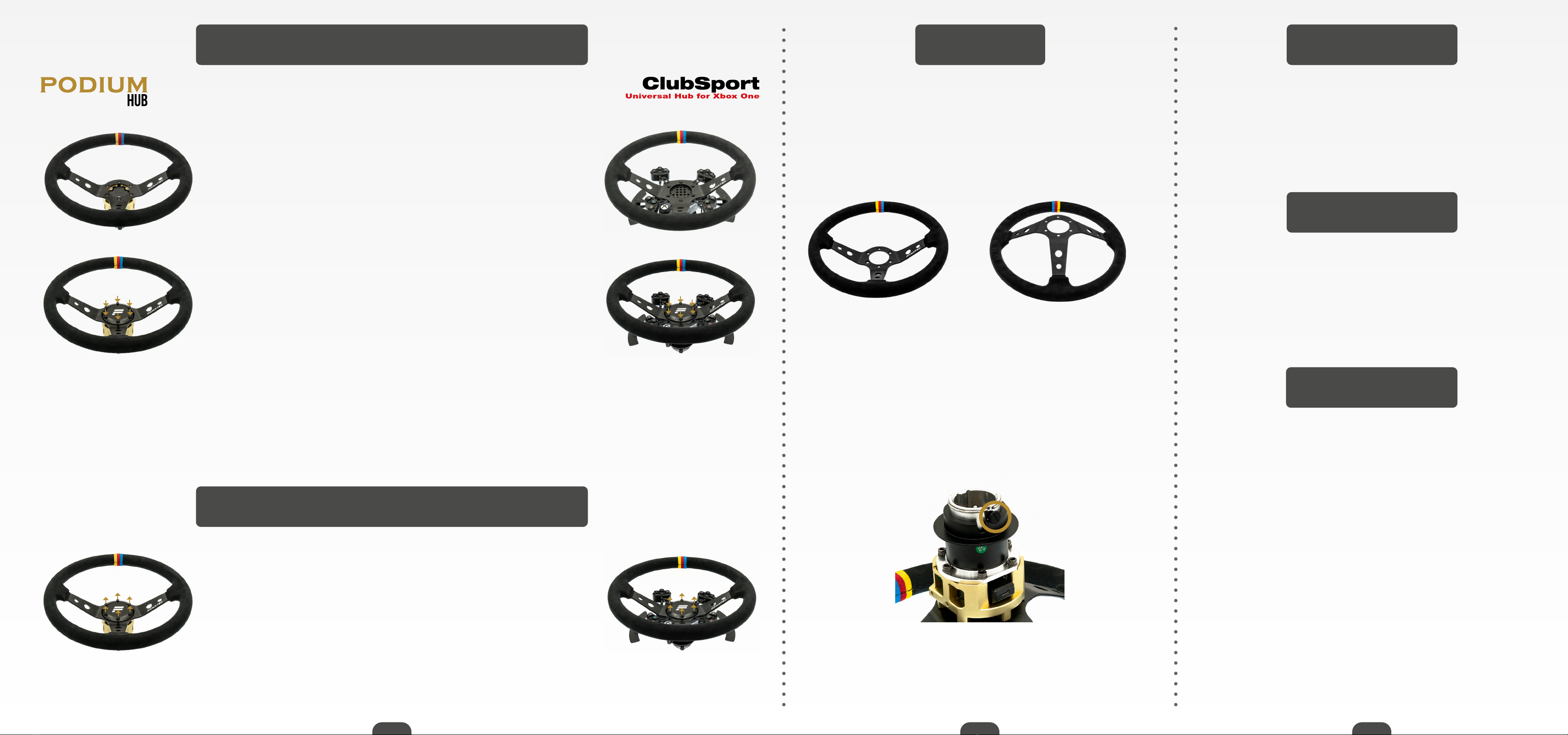
●NASCAR®Wheel Rim (A)
●NASCAR®Soft Hub Cover with preinstalled Velcro (B)
●Adapter plate with preinstalled Velcro (C)
●Metal Hub Cover (D)
●6x M5x16mm hexagon button head cap bolt (E)
●6x M5x16mm hexagon countersunk bolt (F)
A
C
BD
EF
ATTACHING THE WHEEL RIM
WITH SOFT HUB COVER
● Align the Velcro adapter Plate (C) on the FANATEC®
Hub.
● Place the Wheel Rim (A) on top and insert the 6
countersunk bolts (F) into the mounting holes and tighten
them equally.
● Align the Soft Hub Cover (B) with the Velcro on the
adapter plate (C) and press rmly to connect the two
parts.
NOTE: Use the bolts included with a max. torque of
2 Nm on your Wheel Rim.
NOTE: The position and mounting of the Button Clusters on your Fanatec Hub
depends on your personal preference. Please read the Manual of your Universal
Hub for Xbox One or Podium Hub for more information.
1.
2.
3.
DETACHING THE WHEEL RIM
WITH SOFT HUB COVER
●To detach the Soft Hub Cover (B), twist the Soft Hub
Cover slightly whilst pulling it away from the adapter
plate (C).
●Loosen the bolts (F) and remove the Wheel Rim and
the adapter plate(C) from your Fanatec Hub.
1.
2.
TheNASCARidenticationsandlogosaretrademarks,copyrighteddesigns,andother
forms of intellectual property of the National Association for Stock Car Auto Racing, Inc.
Page 3 Page 5Page 4
ATTACHING THE WHEEL RIM
WITH METAL HUB COVER
●Align the Wheel Rim (A) to the Fanatec Hub.
●Place the metal hub cover (D) on top and insert the 6
button head cap bolts (E) into the mounting holes and
tighten them equally.
NOTE: Use the bolts included with a max. torque of
2 Nm on your Wheel Rim.
1.
2.
NOTE: The position and mounting of the Button Clusters on your Fanatec Hub
depends on your personal preference. Please read the Manual of your Universal
Hub for Xbox One or Podium Hub for more information.
DETACHING THE WHEEL RIM
WITH METAL HUB COVER
●Loosen the bolts and remove the Wheel Rim and
the Metal Hub Cover (D) from your Fanatec Hub.
1.
STORAGE
To prevent damage or pressure marks on your Wheel Rim,
we recommend resting it on the hub and not on the rim
grip.
If it is still installed on your Fanatec Hub, use the Quick
Release storage pin to prevent wear on the mechanism
during long term storage.
✔✖Clean only with a dry or slightly damp cloth. Using cleaning
solutions may damage your NASCAR®Wheel Rim.
Because of the possibility of increased wear-and-tear,
Fanatec cannot give a general recommendation to use
gloves.
CLEANING
USAGE
TRADEMARKS
“NASCAR®” is a registered trademark of the National
Association for Stock Car Auto Racing, Inc. All rights
reserved.
“Fanatec” and “Endor” are registered trademarks of Endor
AG/Germany. All rights reserved.
All other trademarks are the properties of their respective
owners.