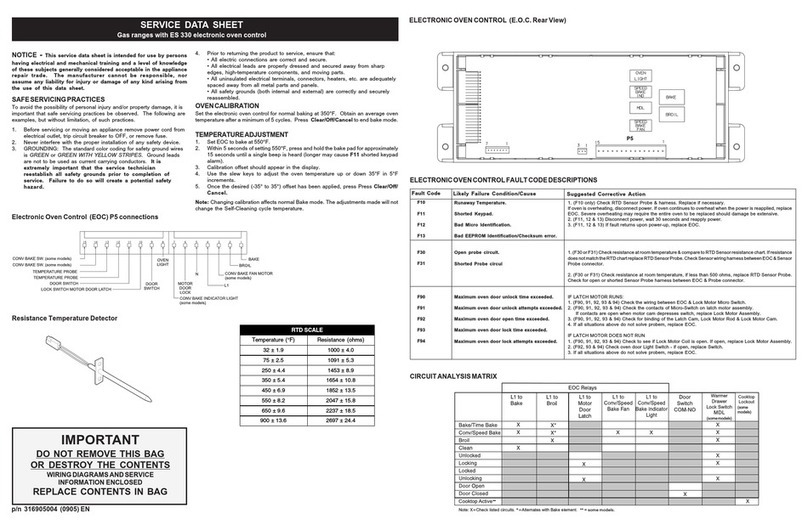
NOTICE - This service data sheet is intended for use by persons
having electrical and mechanical training and a level of knowledge of
these subjects generally considered acceptable in the appliance
repair trade. The manufacturer cannot be responsible, nor assume
any liability for injury or damage of any kind arising from the use of this
data sheet.
SAFESERVICINGPRACTICES
To avoid the possibility of personal injury and/or property damage, it is important
that safe servicing practices be observed. The following are examples, but
without limitation, of such practices.
1. Before servicing or moving an appliance remove power cord from electrical
outlet, trip circuit breaker to OFF, or remove fuse.
2. Never interfere with the proper installation of any safety device.
3. GROUNDING: The standard color coding for safety ground wires is GREEN
or GREEN WITH YELLOW STRIPES. Ground leads are not to be used as
current carrying conductors. It is extremely important that the
service technician reestablish all safety grounds prior to
completion of service. Failure to do so will create a potential
safety hazard.
4. Prior to returning the product to service, ensure that:
• All electric connections are correct and secure.
• All electrical leads are properly dressed and secured away from sharp
p/n 316441736 (0612)
RESISTANCERESISTANCE
RESISTANCERESISTANCE
RESISTANCE
TEMPERATURETEMPERATURE
TEMPERATURETEMPERATURE
TEMPERATURE
DETECTORDETECTOR
DETECTORDETECTOR
DETECTOR
ELECTRONICOVENCONTROL(REARVIEW)
IMPORTANT
DO NOT REMOVE THIS BAG
OR DESTROY THE CONTENTS
WIRINGDIAGRAMS AND SERVICE
INFORMATION ENCLOSED
REPLACE CONTENTS IN BAG
ELECTRONICOVENCONTROLFAULTCODEDESCRIPTIONS
Runaway Temperature.
Shorted Keypad.
Bad Micro Identification.
Bad EEPROM Identification/Checksum error.
Open probe connection.
Shorted Probe connection.
Maximum oven door unlock time exceeded.
Maximum oven door unlock attempts exceeded.
Maximum oven door open time exceeded.
Maximum oven door lock time exceeded.
Maximum oven door lock attempts exceeded.
Likely Failure Condition/Cause Suggested Corrective Action
Fault Code
1. (F10 only) Check RTD Sensor Probe & replace if necessary. If oven is overheating, disconnect
power. If oven continues to overheat when the power is reapplied, replace EOC. Severe
overheating may require the entire oven to be replaced should damage be extensive.
2. (F11, 12 & 13) Disconnect power, wait 30 seconds & reapply power.
3. (F11, 12 & 13) If fault returns upon power-up, replace EOC.
1. (F30 or F31) Check resistance at room temperature & compare to RTD Sensor resistance chart.
If resistance does not match the RTD chart replace RTD Sensor Probe. Check Sensor wiring
harness between EOC & Sensor Probe connector.
2. (F30 or F31) Check resistance at room temperature, if less than 500 ohms, replace RTD Sensor
Probe. Check for shorted Sensor Probe harness between EOC & Probe connector.
1. (F90, 91, 92, 93 & 94) Check the wiring between EOC & Lock Motor Micro Switch.
2. (F90, 91, 92, 93 & 94) Replace the Motor Door Latch assembly if necessary.
3. (F90, 91, 92, 93 & 94) Check for binding of the Latch Cam, Lock Motor Rod & Lock Motor Cam.
4. (F90, 91, 92, 93 & 94) Check to see if Lock Motor Coil is open. If open, replace Lock Motor
Assembly.
5. (F90, 91, 92, 93 & 94) Lock Motor continuosly runs - if Micro Switch is open, replace Lock Motor
Assembly.
6. (F92, 93 & 94) Check oven door Light Switch - if open, replace Switch.
7. If all situations above do not solve problem, replace EOC.
F10
F11
F12
F13
F30
F31
F90
F91
F92
F93
F94
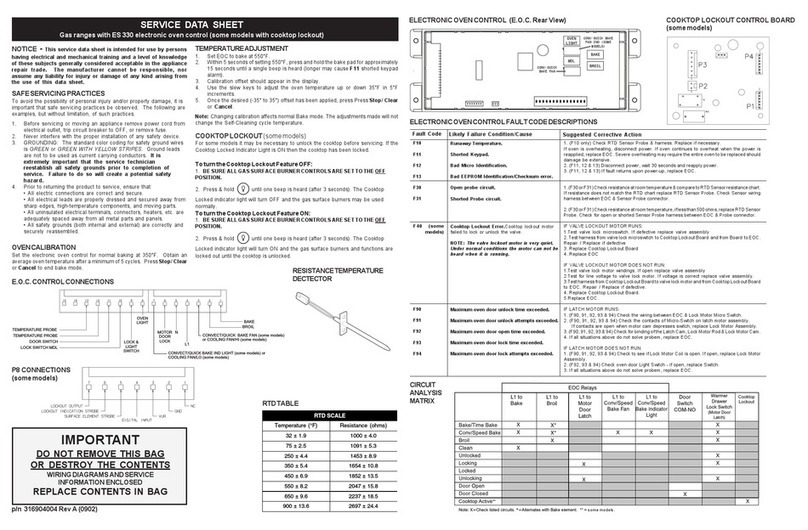
SERVICE DATA SHEET
Gas Ranges with ES 200/205/300 & 305 Electronic Oven Controls
CIRCUIT ANALYSIS
MATRIX
edges, high-temperature components, and moving parts.
•Alluninsulatedelectricalterminals,connectors, heaters, etc. areadequately
spaced away from all metal parts and panels.
• All safety grounds (both internal and external) are correctly and securely
reassembled.
OVENCALIBRATION
Set the electronic oven control for normal baking at 350°F. Obtain an average
oven temperature after a minimum of 5 cycles. Press CANCEL or CLEAR to
end bake mode.
TEMPERATUREADJUSTMENT
1. Set EOC to bake at 550°F.
2. Within 5 seconds of setting 550°F, press and hold the bake pad for
approximately 15 seconds until a single beep is heard (longer may cause
F11 shorted keypad alarm).
3. Calibration offset should appear in the display.
4. Use the slew keys to adjust the oven temperature up or down 35°F in 5°F
increments.
5. Once the desired (-35° to 35°) offset has been applied, press CANCEL or
CLEAR.
Note: Changing calibration affects both Speed Bake and normal bake modes.
The adjustments made will not change the self-cleaning temperature.
RTD SCALE
Temperature (°F) Resistance (ohms)
32 ± 1.9 1000 ± 4.0
75 ± 2.5 1091 ± 5.3
250 ± 4.4 1453 ± 8.9
350 ± 5.4 1654 ± 10.8
450 ± 6.9 1852 ± 13.5
550 ± 8.2 2047 ± 15.8
650 ± 9.6 2237 ± 18.5
900 ± 13.6 2697 ± 24.4
E.O.C.CONTROLCONNECTIONS(P5)