Page 4
If you have need assistance or have questions, email techsupport@gill-electronics.com
SAFETY CONSIDERATIONS for INSTALLERS
S
The Installer is solely responsible for taking all steps necessary and appropriate for safe and proper installation of TeslinkTM products.
Safety is dependent on a proper installation of a TeslinkTM transmitter. The Installer should be properly trained and qualified for
installation. The Installer should read and fully understand this document prior to installation. The installer must have a good
understanding of electrical procedures and systems, along with proficiency in the installation and service of commercial and residential
work surfaces. There are no adjustments required at any time of the electrical components within the transmitter.
Installers should not open the transmitter housings or make modifications to the TeslinkTM transmitter or components unless
expressly approved in writing by an authorized representative of
Gill Electronics, Incorporated. Any changes or modifications will void the product warranty.
During Installation
•DO NOT connect this charger to an electrical outlet until:
1. ALL other electrical connections are made
2. Mounting of ALL components is complete
3. VERIFICATION that no short circuit exists in the entire system
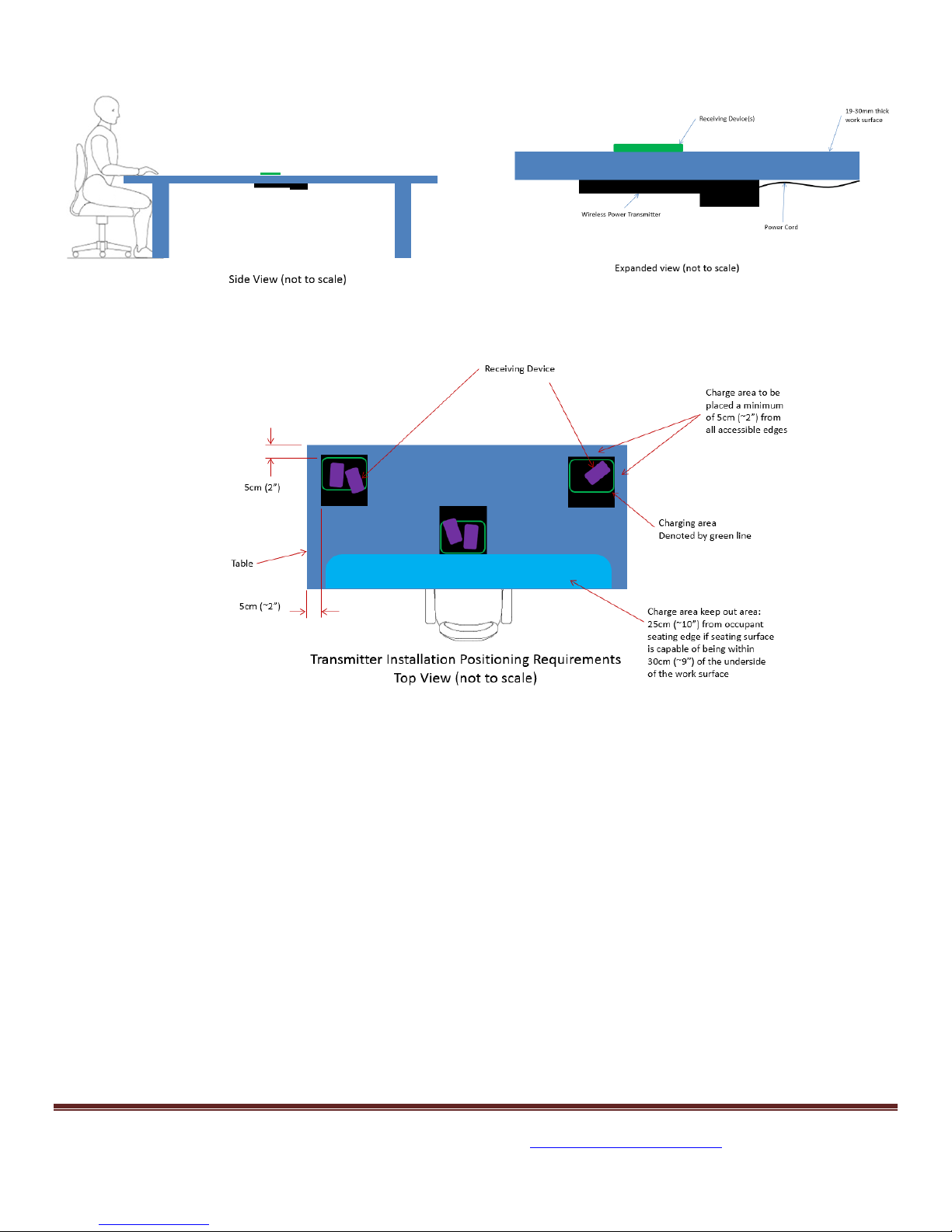
4. VERIFICATION that transmitter is mounted in such a location and manner that no animate object, can in a normal manner
of contact, come within 44mm of the bottom of a transmitter. (i.e. a transmitter mounted in a desk would be far enough
away from the edge that if a person was sitting in a chair their thighs/knees would not be positioned with 44mm of the
bottom of the transmitter). See ensuing illustrations for more details.
5. Ensure installation in a horizontal surface only.
•DO NOT install equipment or route wiring cords in the path of any walkways or moving components
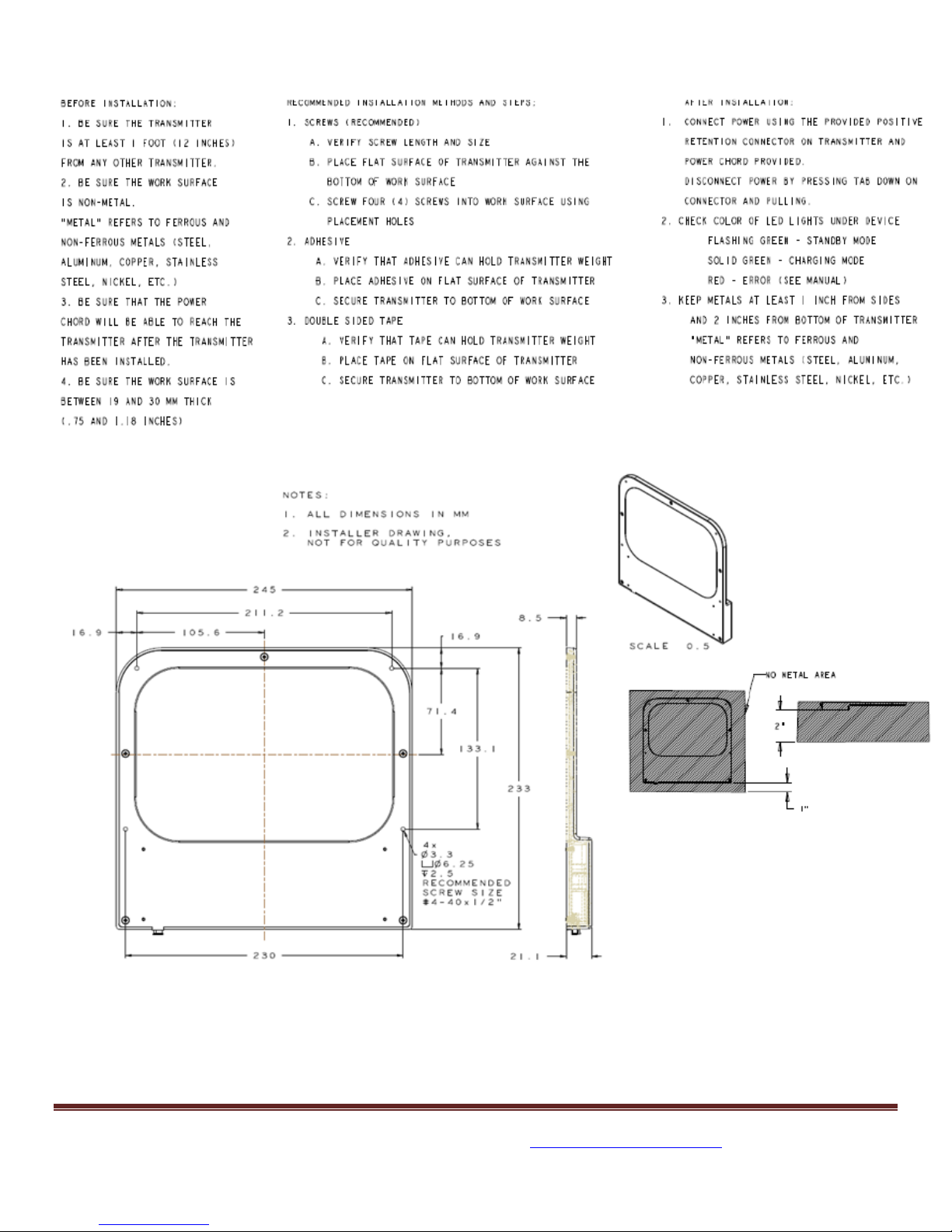
•BEFORE drilling into the work surface, make sure that the equipment has no metal objects or structures within 1” around (XY)
and within 2” below (Z).
•When drilling into the work surface, DO make sure that both sides of the surface are clear of anything that could be damaged
•The charging area on top of the work surface/furniture must be indicated in some manner
After Installation
• Test the transmitter to ensure that it is working properly (see LED Indicator Light)
• File these instructions in a safe place and refer to them when performing maintenance or re-installing
WARNING: Failure to follow all safety precautions and instructions may result in death, serious injury, or property damage.
The installer assumes sole responsibility for such precautions and instructions and for any failure to follow them.
I
Disclaimer
By proceeding with installation of Teslink™ components in products, the installer agrees that: (i) Gill is not liable under any theory of
contract, tort law, or otherwise for any loss, damage, death, personal injury, special, incidental, or consequential damages, or any other
damage of any nature arising directly or indirectly from or relating to the improper installation or use of Gill products or components in
residential or office furniture or any other application; and (ii) the installer will defend, indemnify, protect, and hold harmless Gill and
each of its affiliates, officers, directors, agents, and employees from and against any such liability, claims, injuries, losses, and
damages. In order to safely install and use Gill products and components, full consideration of the work environment
(e.g., location of electrical wiring, support members, surface thicknesses, and other electrical and structural components) is required.
Gill disclaims responsibility for improper use or installation of products or components and use or installation not consistent with the
original manufacturer specifications and recommendations (if any) for such products or components.
Warranty Information
Neither this document nor the statements in this document create any warranties, express or implied, regarding Teslink™products. All
information regarding any warranties made by Gill to the purchaser of components is located in separate documentation provided by