1.1 Environmental Requirement
Please make sure that AC power, PLC output modules,starters,relays and other types of electrical
interface device are far away from the back ofthis product.
1.3 Power Requirement
Input voltage: 12~28VDC; Starting current:180mA;Working current:130mA.
Particularly note that there must be enough distance between this product and converters or switch
mode power supply. Make sure that the input and output cables of that kind equipment are shield
cable and the shielding network is connected with the ground.
Make sure that the DC power andACpower is isolated.
Do not use common power with perceptual load or input circuit ofthe controller.
An Internal fuse will prevent damage for over voltage condition, however it isn’t
guaranteed the internal electronic components are not damaged.。
Chassis ground must be used.
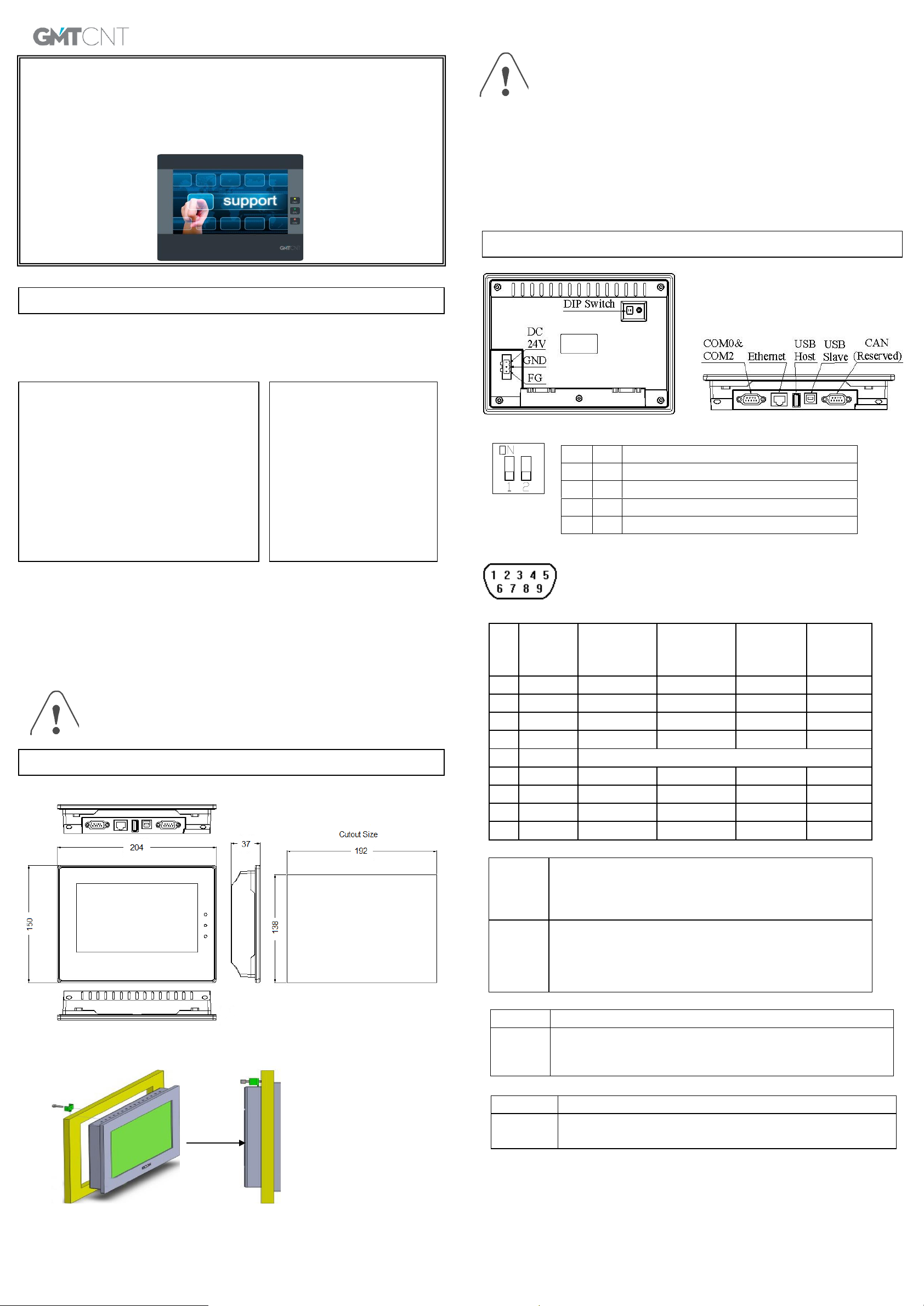
2.1 Dimensional Drawing (mm)
2.2 Fixed Screw Installation Instructions
Put the unit through the panel cut out. Slide the clamps into the 4 holes provided around the case.
Tighten the clamping screws in an even pattern until the unit is secured in the panel.
To seal to NEMA-4 specifications, all supplied mounting clamps must be used and
panel cannot flexmore than 0.010"
Do not over-tighten mounting clamps!
2.3 Power Connections
Before connecting the power, please make sure all local and national electrical standards are met. For
power cables, please select cables with their dielectric strength values and current values in compliance
with the safety specifications.
First find the power terminal at the back of the product and loosen the screw according to
counterclockwise, then insert the power cables and tighten the screwup.
Connect positive DC line to the ‘+24V’ terminal and the DC ground to the ‘0V’ terminal.
3.1 DIPSwitch
3.2 COM0&COM2 Pin assignment of the 9-pin male,D-SUB,COM0.This port is used toconnect the
GOP41-070ET(E) to controller with RS-232/485/422 port. Note: RS232/485/422
communication functions are supported by COM0.COM2 supports RS232
communication function.
3.3 Ethernet (GOP41-070ETE Support)
This port is connected with the HUB or Switch through a standard Ethernet
cable (RJ-45 straight-through cable) and then connected to a LAN. It can
also be directly connected with the Ethernet port of a PC through a dual
system interconnection cable (RJ-45 crossover cable).
The port can be used for upload/download of HMI configuration, setting of
system parameters and online simulations of configurations. It can connect
multiple HMIs via the Ethernet to form an HMI network. Furthermore, it can
implement communications between HMI and PLC via the Ethernet, as well
ascommunications with a PCvia the Ethernet port.
3.4 USB HOST (GOP41-070ETE Support)
Connect with USB interface devices or U disks
Thisinterfacecan be connectedwith USBkeyboard, mouse and printers, and the U
disk can be used for user’s configuration uploading/ downloading as well as data
storage.
3.5 USB SLAVE
Touch Screen Calibrate Mode
Firmware Update and Basic Parameter Setting Mode
Application (Online Operation) Mode
USB Slave port can be connected with a PC
The portisonly used todownload userconfiguration program to the HMI and to
set HMI system parameters.
GMTCNT GOP41-070ET(E)
Human Machine Interface
Installation Instruction
2. Installation Description
Please take shielding
measures in the following
places:
Places that exist electrostatic or
otherkinds of noise
Places of strong
electromagnetic
Places that may be exposed to
rays
Places near the power
Please do not use in the following places:
Places direct in sunlight
Surrounding temperature and humidity beyond
the specifications
Places of temperature change sharply and easily
cause condensation
Places that exist corrosive gas and combustible
gas
Places of much dust, dirt, salt and iron powder
Places that will be splashed water, oil and drugs
Places that bring direct vibration and shock to
host