Hot Diggity Pro Series
One Touch Control Model Series: 8550, 8551, 8552 (010 and 011)
Page 8
gmpopcorn.com
OPERATING INSTRUCTIONS
There are two separate heating zones on the Roller Grill (front zone and rear zone). Temperature
for each zone is controlled independently. After startup, one zone can be used to hold product at
serving temperature, while the other zone is used to bring additional product up to serving
temperature.
Helpful Tip: Use front zone to hold product at serving temperature, to avoid having to
reach over the higher heat zone for product which is ready to serve.
Controls and Their Functions
The unit controls were programmed at the factory. To adjust the preset programmable inputs for
any of the following controls, reference Programming the Digital Temperature Control section of
this manual.
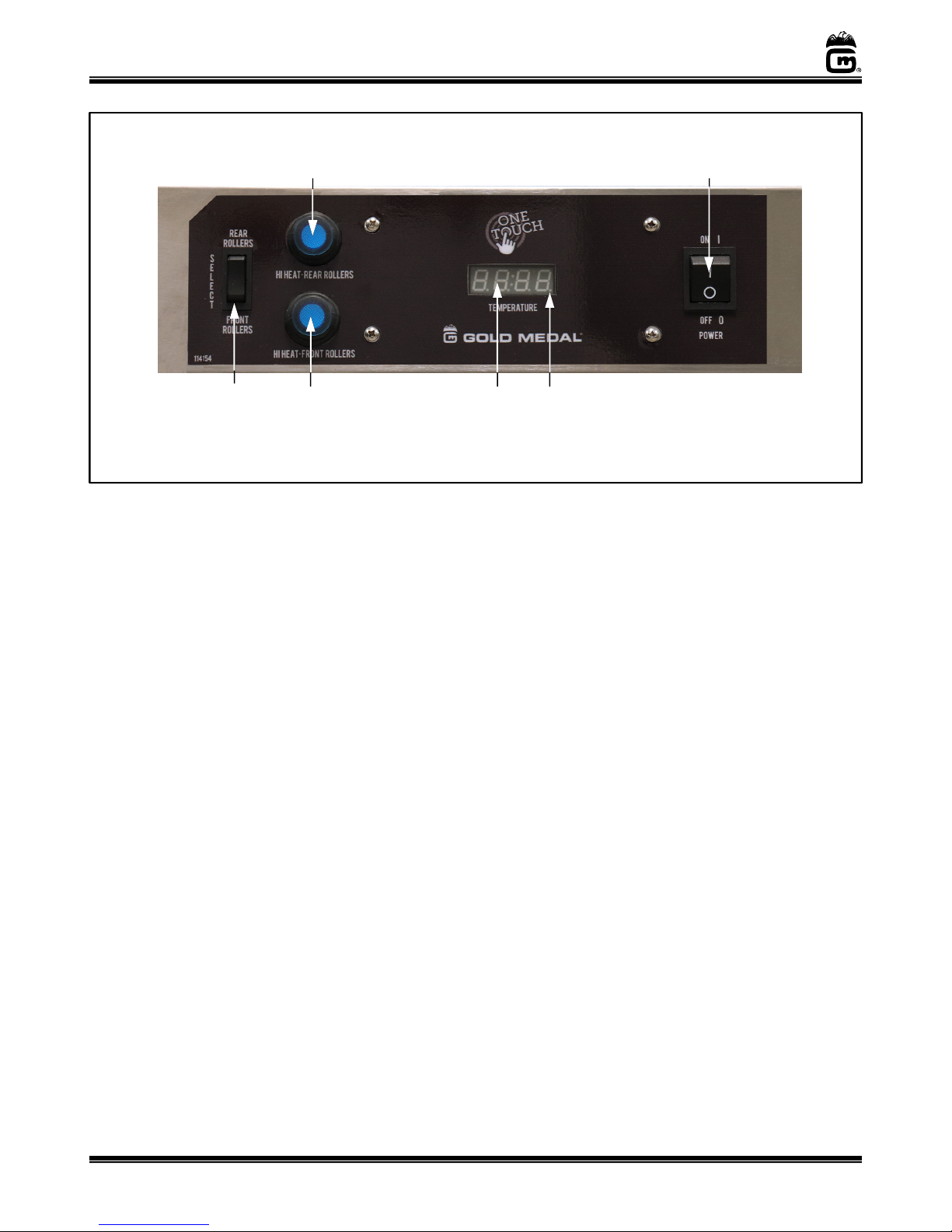
POWER SWITCH
Two position, ON/OFF rocker switch - supplies power to the motor and heating elements
for all rollers. Rollers will heat product up to the set point temperature.
FRONT/REAR SELECT SWITCH
Two position rocker switch – In normal operating mode, this switch toggles the Digital
Display to show the temperature of the front zone rollers or the rear zone rollers.
In program mode, this switch is used to toggle through the parameters inputs.
DIGITAL DISPLAY
In normal operating mode, the Digital Display shows the temperature of the front zone
rollers or the rear zone rollers depending on which zone is selected.
In program mode, the Digital Display is used to show the parameter settings.
HEAT INDICATOR LIGHT – Indicator light located on the digital display - turns ON when
the unit is heating. The Heat Indicator Light will cycle OFF/ON during operation.
HI HEAT FRONT ROLLERS nd HI HEAT REAR ROLLERS (Push Button Switches)
Lighted push button switch.
In norm l oper ting mode, press button to activate the HI Heat Cycle for the front or
rear roller zone (when activated, the push button light will turn ON). The HI Heat Cycle
will heat to a preset temperature (maximum of 220°F), and it will run for a preset amount
of time (5-30 minutes). Once cycle is complete, the HI Heat Cycle will turn OFF, and the
rollers will return to the preset zone temperature.
Note: To stop the HI Heat Cycle before it completes, hold the push button in for 5 seconds.
The push button light will turn OFF and the HI Heat Cycle will no longer be active.
In progr m mode, the HI Heat Rear Rollers button is used to raise the programmable
input, and the HI Heat Front Rollers button is used to lower the programmable input.