GreenTech pureWater ALKALINE XT User manual

Owner’s Manual
ALKALINE XT

2
TABLE OF CONTENTS
WELCOME
Thank you for your purchase of the Alkaline XT Water Ionizer.
The Alkaline XT Water Ionizer is simple to install, easy to use, and the automatic
cleaning feature makes the machine virtually maintenance free. This manual
will guide you through the Installations, Controls, Uses and other features of
your Alkaline XT Water Ionizer. Read through it carefully to ensure you achieve
optimum results.
We hope you enjoy the endless benets of alkaline water provided by your
Alkaline XT Water Ionizer for many years to come.
Glossary .............................................................3
Warnings.............................................................4
Parts & Accessories ....................................................5
Installation ........................................................6 - 7
Controls .............................................................8
Modes & Uses ........................................................9
Operations ..........................................................10
Customizing Settings ..................................................11
Cleaning & Replacements ............................................12
Troubleshooting ......................................................13
Specications .......................................................14
Warranty Information .................................................15
RECORDS
Please record the name and phone number of your Dealer.
Name: ________________________________________________________________________________
Phone #:______________________________________________________________________________
Please record the serial number of your pureWater Alkaline XT.
Serial #: _______________________________________________________________________________

3
GLOSSARY
The great and many benets of alkaline water are simple to understand, but the
technology and chemistry involved in producing alkaline water can be more
difcult to comprehend. Below is a glossary of some frequently used technical
terms associated with water ionization.
pH: The pH scale measures the level of acidity or alkalinity of a substance.
The pH scale ranges from 0 to 14.
Alkaline: Having a pH value above 7.
Acidic: Having a pH value below 7.
Neutral: Having a pH value of 7.
Electrolysis: A process in which an electric current is used to ionize water.
pureWater Water Ionizers use electrolysis to oxidize or reduce the water
molecules from your tap with several titanium plates that act as cathodes and
anodes. This process separates the alkaline water from its byproduct (acid
water) and vice versa.
ORP (Oxidation Reduction Potential): The measure of the tendency of a
substance to either gain or lose electrons. If the ORP is above zero, the water
output is acidic. If the ORP is below zero, the water output is alkaline.

4
WARNINGS
Consult a doctor before use, especially if you have a weak liver, kidneys
or are under treatment for any ailments.
Never use aluminum or copper containers to store your ionized water.
A chemical reaction may occur.
Acidic water is for external purposes only. Do not ingest.
Never take medicine with alkaline water. Always use the neutral setting.
Never use hot water (over 40°C/104°F) with your Alkaline Water Ionizer.
It will damage your machine.
Ensure the waste water hose drains properly at all times.
Avoid direct sunlight and high temperatures around your Alkaline
Water Ionizer.
Always use the automatic cleaning feature to clean your Alkaline Water
Ionizer. Never use volatile solvents such as alcohol to clean your machine.
Never run water through your Alkaline Water Ionizer when it is not
powered as this may damage your machine.
Note your water quality. Use additional lters if necessary. Replace your
lters regularly.
Unplug unit during extended times of idle.
Do not disassemble machine beyond what is shown in this manual.
5
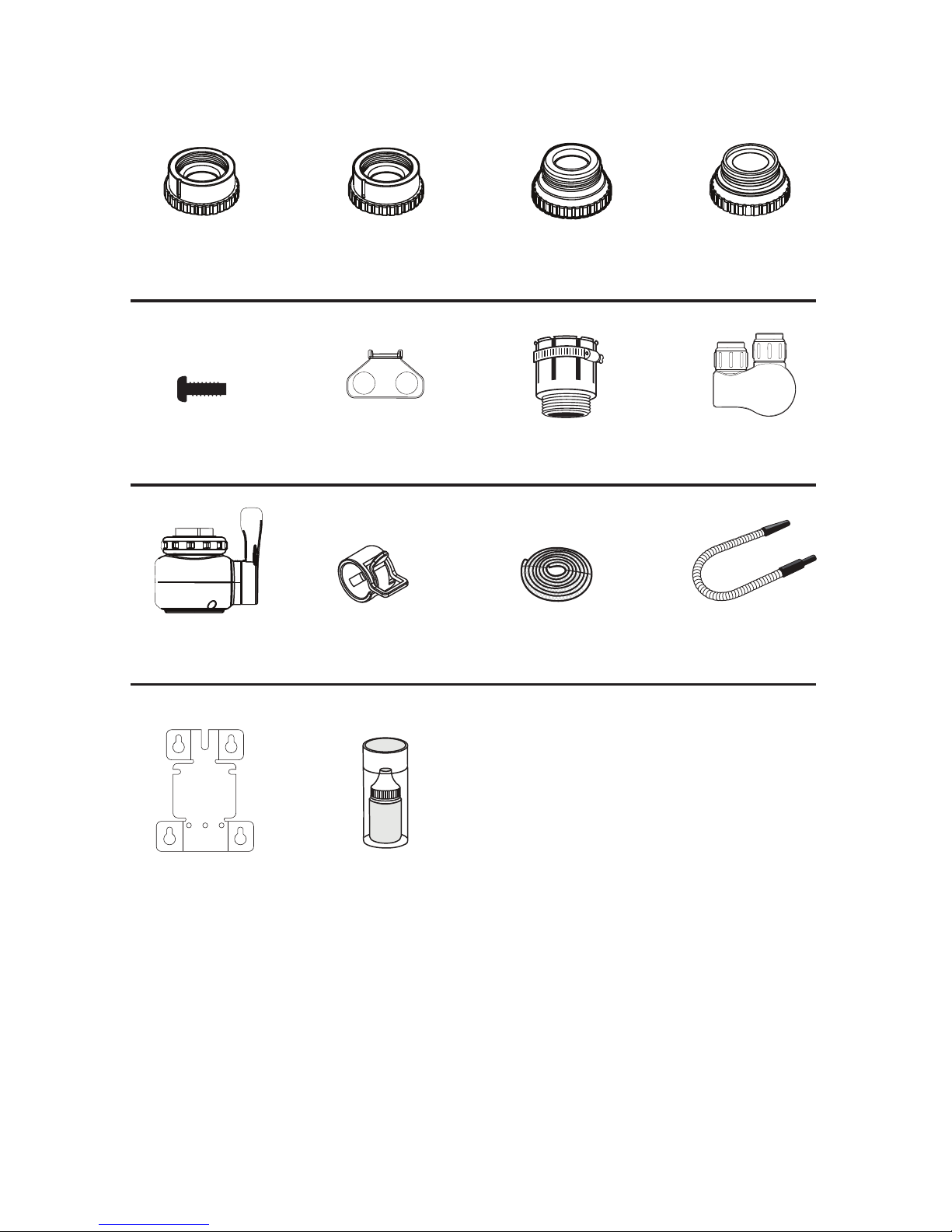
PARTS & ACCESSORIES
Diverter x 1
Adapter A x 1 Adapter B x 1 Adapter C x 1 Adapter D x 1
Wall Mount x 1
Adapter Key x 1 Connector x 1
Clamps x 2
Screws x 3 Rubber
Tightener x 1
pH Test Kit x 1
Outlet Hose x 1
Inlet/Drain Hose x 2

6
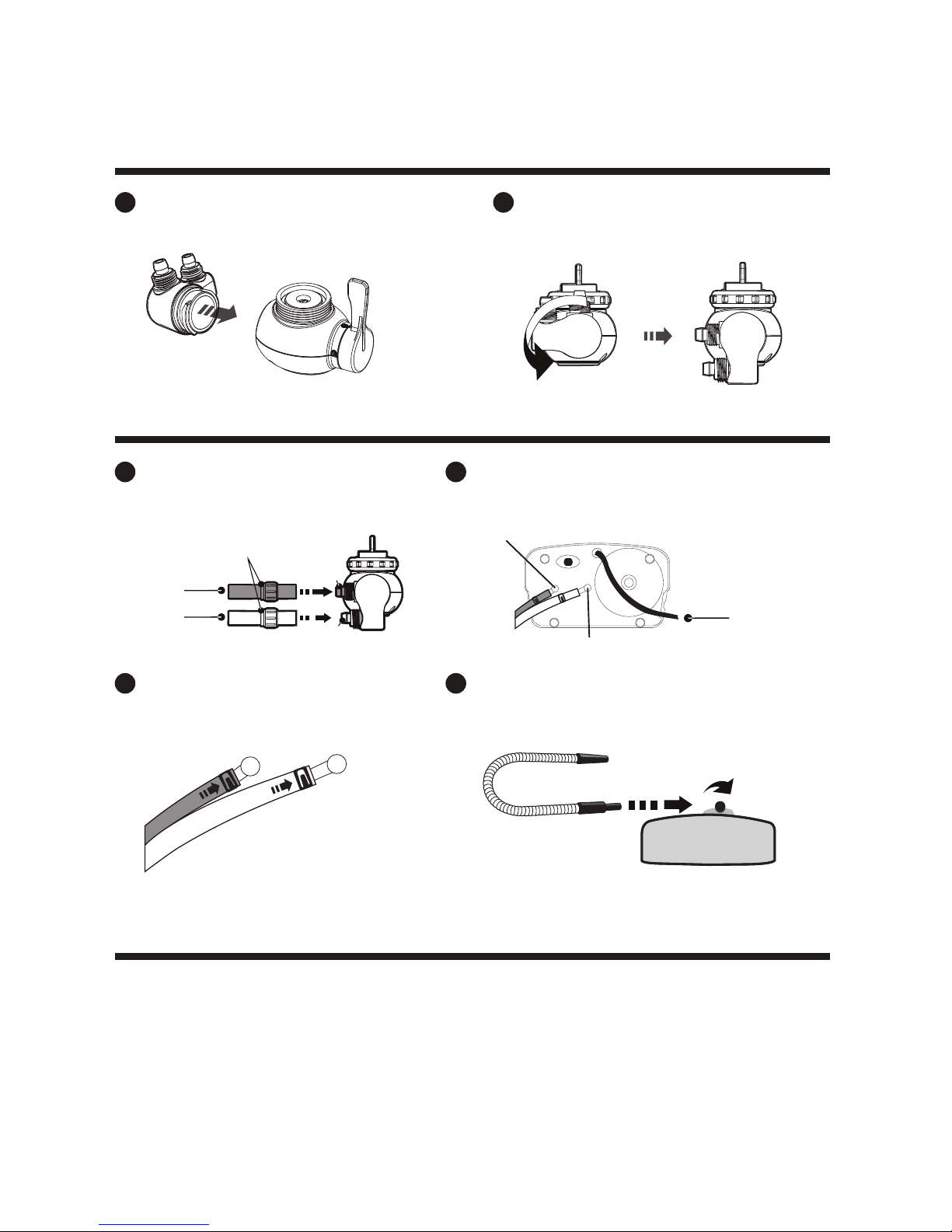
INSTALLATION
1. Determine the faucet’s threading, choose appropriate adapter and install as shown.
External Thread
Threadless (13-24mm)
1
1Tighten the adapter into place using
the locking key with the gasket and
nut above it.
Push the diverter and tightener over
the faucet and secure the clamp.
Twist the nut in clockwise direction.
Nut
Rubber Tightener Clamp
Tighten the nut and reserve 3-4mm
space between nut and thread of
the diverter. Place the clamp
around the tightener.
Nut
Clamp
3~4mm
2
2
Attach diverter to the adapter and
fasten the nut around it.
Nut
Waterproof Gasket
Adapter
Diverter
Internal Thread or
Adapter
(C)
Adapter
(D)
Nut
Waterproof Gasket
Adapter
Adapter
(A)
Adapter
(B)
or
Note: These directions apply to both External and Internal Threads.
Nut
Nut
7
Push the connector into the diverter.
Cut the supplied hose in half. Connect and
secure them over the inlet and outlet with
the hose fasteners.
Place clamps over the hose ends leaving open space to fit
over the water supplies. Connect Hose A to Tap Water In (A)
and Hose B to Drain Water Out (B) on the base of your unit.
Twist into position in a counter-clockwise direction.
Tap Water In (A)
Power Cord
Drain Water Out (B)
Hose fasteners
Hose A
Hose B
Outlet (A)
Inlet (B)
1
1
Screw the Outlet Hose into position at the top of the unit.
Slide and secure the hoses over the Tap Water In
and Drain Water Out with the clamps.
3 4
2
2
INSTALLATION CONT.
2. Install the Connector.
Once installation is complete, plug your unit in and refer to OPERATIONS (Page 10) of this
manual to learn how to run your newly installed Alkaline XT.
3. Install Hoses.
4. Power

8
CONTROLS
Reset
(Used with Filter
Replacement and
calibrating pH levels.
Filter Replacement
Notication LED
Lights Up when your Filter’s
lifespan has been reached.
Alkaline Water LED
Lights up when your unit is
creating Alkaline Water.
Acidic Water LED
Lights up when your unit is
creating Acidic Water.
Electrolysis Cleaning
Notication LED
Turns on while the
electrolysis cleaning
is in progress.
Water Quality Settings
Choose your water quality
setting using one of these 7
button selections.
Current Mode
Noties you of which
Water Quality Level is
currently active with
a backlit LED
Electrolysis Cleaning
Press this button to clean
the electrolysis plates.

9
MODES & USES
Each level of Acidic, Neutral, and Alkaline water has a general use based on its
pH level. Use our guide below to know what water mode you should use for a
certain situation.
NOTE: Each level’s pH can be adjusted to t your needs. Refer to Customizing Settings (Page 11)
Alkaline Mode
Neutral Mode
Acidic Mode
Level 4: pH 9.0 - 11.0
Level 3: pH 8.5 - 10.5
Level 2: pH 8.0 - 10.0
Level 1: pH 7.5 - 9.5
Standard: pH 7.0
Level 1: pH 4.5 - 6.5
Level 2: pH 4.0 - 6.0
Suggested Uses
Use Alkaline 4 water for cooking meals that require
boiling water. Alkaline water boils faster and does
not leach the avor from foods as they cook.
Use Alkaline 3 for daily drinking of alkaline water.
Use Alkaline 2 for making hot beverages such
as teas or coffee to remove bitterness and
enhance flavor.
Use Alkaline 1 for beginner useage of daily
alkaline drinking water.
Use Neutral when taking medicine or when
alkaline/acidic water is not desired.
Use Acidic 2 for disinfecting utensils and surfaces.
Use Acidic 1 on your skin as an astringent. Acidic 1
can also be used as a disinfectant on skin.
Water Quality Modes
Consult a doctor before use, especially if you have a weak liver, kidneys or are under treatment
for any ailments.
4
3
2
1
0
1
2

10
OPERATIONS
How it works
The water rst travels from your tap through a USA Made NSF-Certied Carbon lter where
impurities like chlorine are removed from your tap water.
After the impurities are ltered out, the water then travels through platinum coated
Japanese made titanium plates where the water molecules are separated by an electric
charge. This is a process called electrolysis.
Upon selecting the desired level of alkalinity on the front of the unit, the alkaline water is
then dispersed from the outlet and the byproduct ows out of the drain tube.
How to Use
Once you have completed installation of your Alkaline XT Water Ionizer and it is plugged
into a power outlet you can begin to use your machine.
First, press the button of your desired (e.g. “Alkaline 1”). [When just beginning an alkaline
drinking water regimen, it is recommended to use Alkaline 1 for the rst week and then
gradually progress to Alkaline 3].
After choosing your desired level of pH, turn the tap on to about ¾ maximum water ow.
The display will light up. Let the water run on the selected level for about 10 seconds
before lling your glass or container.
When nished, simply turn the tap off. The unit will revert back to the default Alkaline 3 setting.
This manual suits for next models
1
Table of contents
Popular Water Filtration System manuals by other brands
Wisy
Wisy LineAir 100 Installation and operating instructions

Schaffner
Schaffner Ecosine FN3446 Series User and installation manual
Pentair
Pentair FLECK 4600 SXT Installer manual

H2O International
H2O International H20-500 product manual

Renkforce
Renkforce 2306241 operating instructions
Neo-Pure
Neo-Pure TL3-A502 manual