9
Note –Automatic standby
•Please note that the speaker system switches to
standby mode after 15 minutes of no activity (no
audio playback /noother activity).
•Press any button on the remote control or the
subwoofer to re-activate the speaker system.
•The system is shipped from the factory with an
auto standby function. To deactivate this mode,
press button 5onthe front of the subwoofer
system or on the remote control for about 3
seconds. ‘E off’ or ‘E on’ appears in the display.
6. Audio source selection
6.1 AUX playback
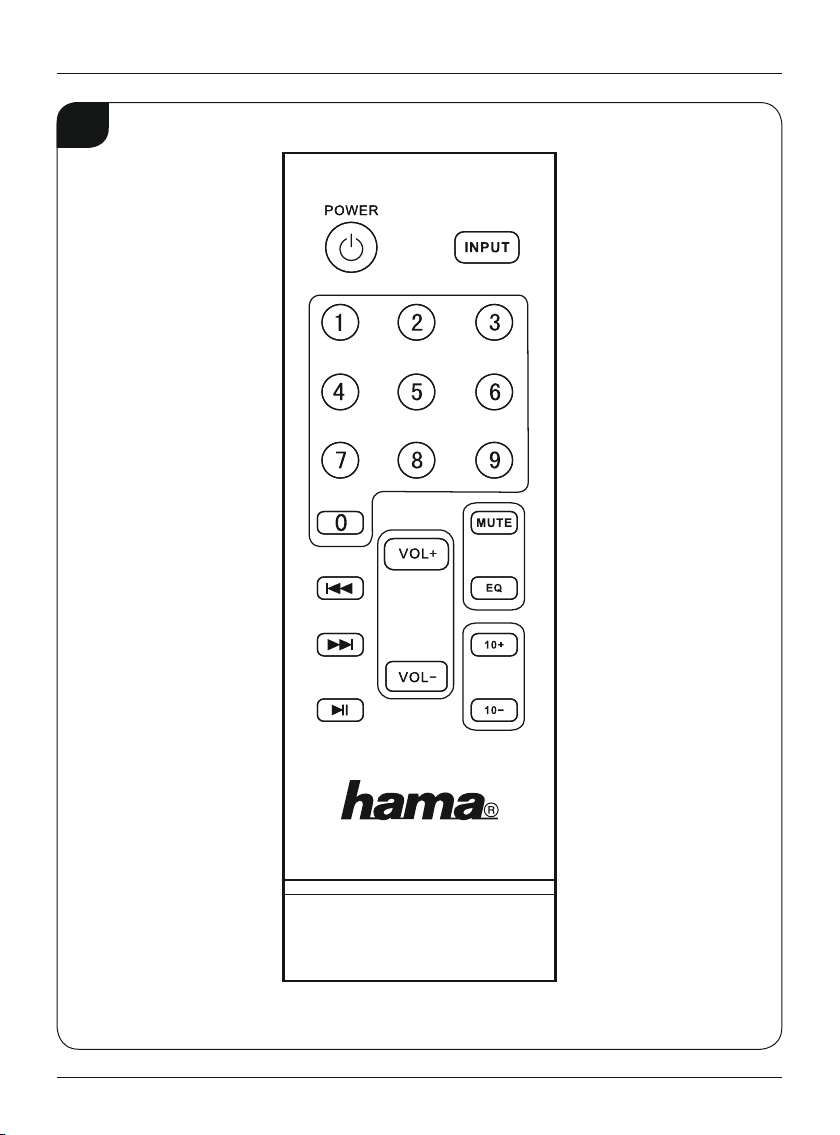
•Press the INPUT button on the remote control or
the MODE button on the subwoofer several times to
select the AUX connection as the audio source. The
AUX selection is shown on the subwoofer’sdisplay
and signalled by an “AUX” speech message.
6.2 Playback using
Bluetooth®
•Press the INPUT button on the remote control or
the MODE button on the subwoofer several times
to select
Bluetooth®
as the audio source. The BLUE
selection is shown on the subwoofer’sdisplay and
signalled by a“Bluetooth” speech message.
6.3 USB/SD playback
•Insert aUSB memory stick or SD/SDHC cardinto the
device.
•Press the MODE button on the remote control or
press the MODE button on the subwoofer several
times to select USB/SD as the audio source. The USB/
SD selection is shown on the subwoofer’sdisplay and
signalled by an “USB” speech message.
7. Advanced features
7.1 General and individual volume control
•Press VOL+ or VOL- to increase or decrease the
volume of the system.
7.2
Bluetooth®
first connection (pairing)
•Make surethat your
Bluetooth®
-capable terminal
device is on and
Bluetooth®
is activated.
•Make surethat the speaker is located within the
Bluetooth®
range of max. 10 metres.
•Open the
Bluetooth®
settings on your terminal device
and wait until "Hama PR-2180" appears in the list of
Bluetooth®
devices found.
•Select "Hama PR-2180" and wait until the speaker is
listed as connected in the
Bluetooth®
settings on your
terminal device.
•If the
Bluetooth®
has connected successfully BLUE will
be shown on the display.
Note
•Check whether your mobile device (MP3 player,
mobile phone, etc.) is
Bluetooth®
capable.
•If not, you can only use the speaker for playback
using the included audio cable.
•Note that the maximum range for
Bluetooth®
is
10 metres without obstacles such as walls, people,
etc.
7.3 Numeric keypad 0-9
•Select an audio le on aUSB or SD storage medium.
The selection is only possible on the audio source
active at that time.
8. Care and Maintenance
•Only clean this product with aslightly damp, lint-free
cloth and do not use aggressive cleaning agents.
9. Warranty Disclaimer
Hama GmbH &CoKGassumes no liability and provides
no warranty for damage resulting from improper
installation/mounting, improper use of the product or
from failuretoobserve the operating instructions and/
or safety notes.
10. Service and Support
Please contact Hama Product Consulting if you have
any questions about this product.
Hotline: +49 9091 502-115 (German/English)
Further support information can be found here:
www.hama.com